

Translating captions
A video made for one market reaches the next one with subtitles: the viewer hears the original voices and reads their words in their own language. This is the lightest form of localization, and in Madoo it keeps the one thing that makes subtitles work — the timing. Each line appears when it is said and disappears when it ends, in every language, because the translation changes only the words: the timing, the order of the lines and who says them come from the original, untouched. This page explains how, shows the two ways to get there — one for clips and reels, one for long recordings — and ends with two labs. Replacing the voices themselves is dubbing, covered in the pages that follow.
How a translation keeps the timing
Section titled “How a translation keeps the timing”Translating a caption file as text — pasting an SRT into a language model and asking for it in Italian — seems
simpler and goes wrong in ways that are hard to see: two lines merged into one, a line split in two, a timestamp
rewritten, a number changed, a line left in English. Madoo never lets a model touch the timing. It works on a
caption track (madoo.caption-track/v1): the list of the lines of a transcript — the cues — each with a
stable ID, a start and an end time, its text and, when known, who says it. A translation goes through three nodes:
- Caption Blocks (
enumerate/caption_blocks) groups the cues into blocks of up to 24 lines or 4,000 characters, never splitting a line, and adds the line before and after each block as context — they help the model understand the sentence and are never translated twice. Each block is translated on its own, side by side. - Caption Translation (
ai/caption_translation) sends a block to a language model and accepts only a translation for every cue ID of the block, once, in order. Numbers are replaced by placeholders before the model sees them and put back afterwards, so “Artemis II”, “2024” or “4.5%” cannot change; links must come back identical, and every term of the glossary must be used as given. The model is the node’s default — a model that answers in the structured form this needs — and Target Language (target_language) is a BCP 47 tag:it,es,fr,de,pt-BR,zh-Hans. - Aggregate Caption Track (
aggregate/caption_track) puts the translated blocks back together on the original track — the one connected to Source Track (source_track) — and takes from it every start, end, ID and speaker. It also writes the translation as an SRT file onsrtand a WebVTT file onvtt.
The result is a caption track in the target language with exactly the lines and times of the original. A translation cannot shift a line, lose one or invent one: if the model tries, the block is refused.
Two paths: clips and long recordings
Section titled “Two paths: clips and long recordings”Everything starts from a transcript with timing, made by Speech to Text as explained in Transcription and captions. What changes with the length of the media is how the transcript is made.
A clip or a reel is transcribed in one pass. With Timing Detail set to segment or word, Speech to Text
also returns its transcript as a caption track, on caption_track — the same lines as its SRT and WebVTT files,
cut into readable phrases that close at the end of a sentence — ready to translate:
Extract Audio → Speech to Text ─ caption_track ─→ Caption Blocks → Caption Translation → Aggregate Caption Track └───────────────────────── Source Track ──────────────┘A long recording is transcribed in segments. An interview, a lecture or a webinar is cut by Audio
Segments (enumerate/audio_segments) into clips that are transcribed side by side; Aggregate Transcript
(aggregate/transcript) joins them back into one caption track on the timeline of the whole recording, removing
the words repeated where two clips overlap. From there the translation is the same:
Extract Audio → Audio Segments → Speech to Text (per segment) → Aggregate Transcript ─ caption_track ─→ Caption Blocks → …Audio Segments cuts at pauses where it can, so no word is cut in half, and repeats a few seconds of audio around each cut so that no word is lost; Long media explains its settings, and when one pass is better. The second lab below takes this path on an interview of three and a half minutes, so short that one pass would do: it shows the path at a size that is easy to follow, and the same workflow runs unchanged on an hour-long recording.
Several languages from one transcript
Section titled “Several languages from one transcript”One transcript serves every language. Connect the blocks of one Caption Blocks node to one Caption Translation
per language, each followed by its own Aggregate Caption Track, and the original track to the Source Track of
each: the speech is transcribed once and paid once, and the languages are translated side by side. For a workflow
that others run with their own language, expose the language as a text input (input/text) and connect it to the
Target Language input of the translation — a connected value wins over the saved one — and to the language of
the delivery steps.
Glossary and faithful text
Section titled “Glossary and faithful text”A Glossary (glossary) fixes the translation of the words that must not vary: product names, brand terms, a
programme’s vocabulary. Write one mapping per line, source => translation — or a JSON object — and a term that
must stay as it is maps to itself:
Artemis => ArtemisGateway => Gatewaycustomer success => customer successA translation that ignores a glossary term is refused like a changed number. The glossary can also arrive on the Glossary input from another step, so one list serves every workflow of a brand.
The translation is faithful to the transcript, and the transcript to the speech. ElevenLabs Scribe V2, the default transcription model, writes what is said as it is said — hesitations, repetitions, a speaker correcting themselves — and the translation renders that too, as the second lab shows. For captions that read more like written text, transcribe with Whisper, which leaves hesitations out; for a faithful record of what was said, keep Scribe.
When a line cannot be translated: deliver first
Section titled “When a line cannot be translated: deliver first”Sometimes a model answers a block in the wrong language, misses a line or changes a number. Failure Policy
(failure_policy) decides what happens then:
strict(the default) refuses the whole block and the step fails: nothing is delivered with a line in the wrong language.best_effortkeeps every line that passed the checks and puts the original text back only on the lines that did not, recording each one, with its time, as a warning. The track is always delivered.
With best_effort, Aggregate Caption Track also reports what is left: Pending Captions (pending_captions),
a caption track of only the lines still in the original language, Pending Count (pending_count) and
Complete (complete). A repair round gives those lines a second chance: connect Pending Captions to a
second Caption Blocks — with small blocks, four lines — and a second Caption Translation, and aggregate again with
the first result on Baseline Track (baseline_track), so that only the repaired lines change:
… → Aggregate Caption Track (first pass) ─ pending_captions ─→ Caption Blocks (4 lines) → Caption Translation └──────────── baseline_track ──────────→ Aggregate Caption Track (final) ←┘When the first pass translated everything, Pending Captions is absent: the repair round is
skipped and costs nothing, and the final track is the first one. A line still untranslated
after the repair stays in the original language, listed in the warnings, and Complete says false — a
quality gate can hold such a delivery back, or let it through and flag it.
Delivering: three ways
Section titled “Delivering: three ways”Selectable tracks. Selectable Caption Tracks (video/caption_tracks) puts up to eight languages beside the
video, for the viewer to choose from or to turn off. The video is not re-encoded or copied — it stays exactly as it
was — and each language becomes a WebVTT file of its own, named in Tracks (tracksConfig) with its language,
the label the viewer sees and whether it is captions (the same language, for viewers who cannot hear) or
subtitles (a translation); exactly one track is the default. The node returns the files and a manifest, the
bundle (madoo.caption-bundle/v1), that Madoo’s player reads: in the results of a run and in the gallery the
viewer finds a caption button with a choice per language. Outside Madoo, a web player or a video
platform takes the WebVTT files directly — a web page does it with one <track> per language, as the first lab
below does on this page.
Subtitles burned in. Video Subtitles (video/subtitles) draws a translated track into the picture: connect
the translated caption track to its Timed Segments input and choose the look, as for any captions. The text is
then part of the video — it shows everywhere, including on social networks that do not read caption files — and
each language is a video of its own.
Caption files. Aggregate Caption Track writes the translation as SRT and WebVTT, on the original timing, for a platform where the caption file is uploaded next to the video: YouTube, Vimeo, a learning platform, a TV distributor. Transcription and captions explains the two formats.
Every language travels as a BCP 47 tag. Speech to Text reports the detected language that way (en), each WebVTT
file names its language on its first line, and Selectable Caption Tracks checks that the track connected to each
row is in the language the row declares: en and en-US differ, and a mismatch stops the step.
What it costs
Section titled “What it costs”Only two steps are paid; everything else runs on Madoo’s workers at no credit cost.
- Speech to Text costs 0.5 credits per minute of audio with ElevenLabs Scribe V2, counted by the started minute — and each segment is counted on its own, overlap included. A segment of 62 seconds counts as two minutes. On the interview of the second lab, segments of about a minute cost 3.5 credits, because each ran just past its minute; segments of about 100 seconds cost 2, the same as one pass. So keep segments just under a whole number of minutes; with the default of ten minutes the rounding is negligible.
- Caption Translation is billed on the text actually translated. In the labs of this page it cost about 0.07 credits per minute of speech per language.
Before a run, Estimate (estimate_execution) gives the expected credits; after it, each step reports what it
consumed.
Lab 1: a reel in three languages
Section titled “Lab 1: a reel in three languages”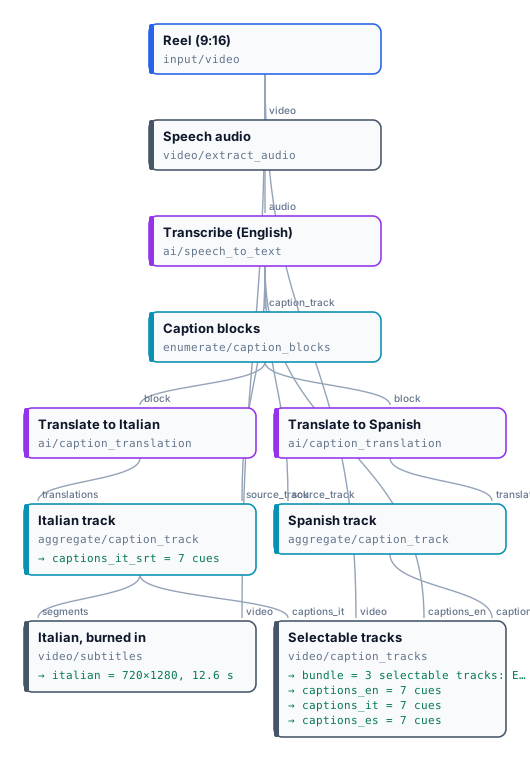
The vertical reel of the editing lab — twelve seconds of an interview — takes the short path. Speech to Text transcribes the English with word timing, and its caption track goes straight to Caption Blocks; two Caption Translation nodes turn the same blocks into Italian and Spanish; each Aggregate Caption Track rebuilds its language on the original timing. Selectable Caption Tracks offers the three languages beside the untouched reel, and Video Subtitles burns the Italian into a version for social networks.
The reel below plays the original video with the three WebVTT files the workflow wrote, as a web page would: the player’s caption button chooses English, Italiano or Español.
Above, the original reel with three selectable tracks; below, the Italian version with the subtitles burned in. Seven lines in each language, each on the same times as the English; 0.56 credits in all — 0.5 for the transcription, 0.06 for both translations.
The files are the English, Italian and Spanish WebVTT, and the Italian SRT.
node madoo-install-example.mjs lab-caption-translation --api <your Madoo API URL> --key <key.json> --run --save translatedTo translate your own clip, replace the reel; to add a language, add a Caption Translation and an Aggregate Caption Track, and a row to the tracks.
Lab 2: a longer interview, in segments
Section titled “Lab 2: a longer interview, in segments”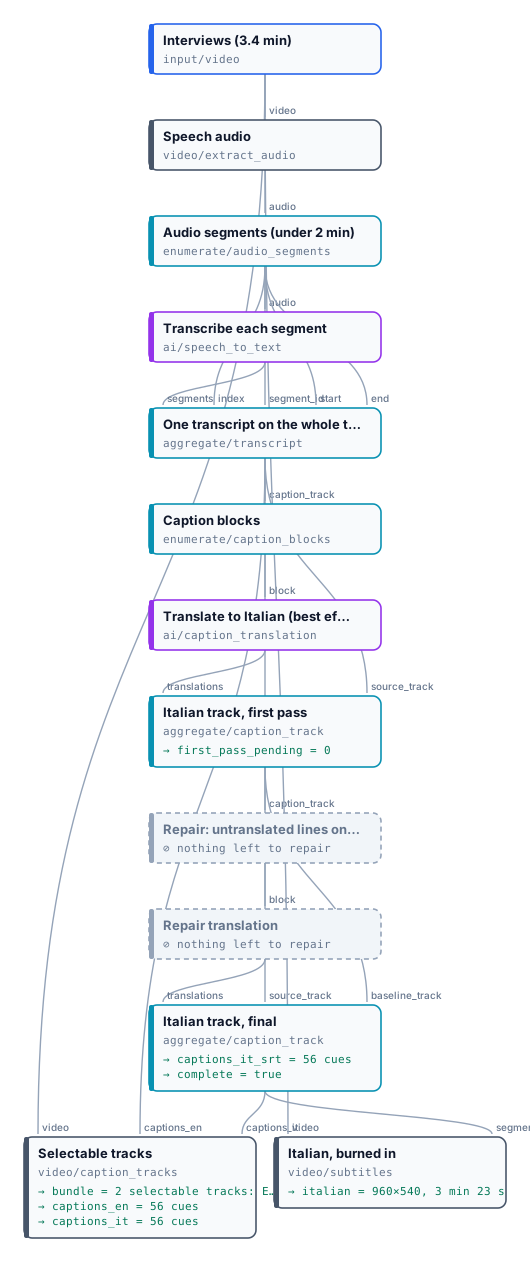
Three NASA astronauts — Reid Wiseman, Jeanette Epps and Doug Wheelock — speak about the Artemis programme for three
minutes and twenty-three seconds. The workflow takes the segmented path: Audio Segments cuts the speech into two
clips of under two minutes, transcribed side by side, and Aggregate Transcript joins them into one English track of
56 lines. Caption Translation translates it into Italian with a glossary that keeps Artemis, Gateway, Orion
and Space Launch System as they are, with the best_effort policy; a repair round is ready for the lines the
first pass could not translate. In this run there were none: Pending Count was 0, the repair round was skipped at
no cost, and the final track reports Complete true. The result is an English and an Italian track to choose
from, the Italian burned into a version of the interview, and the Italian SRT. The translation follows the speech
closely: at 0:23 Wiseman corrects himself — “these aren’t, uh, you know, these are, are kids just out of college,
these are senior managers” — and the Italian keeps the hesitation and the correction, as a faithful transcript does.

The interview is 960×540 and 3 min 23 s. 2.23 credits: 2 for transcribing two segments of under two minutes, 0.23 for translating 56 lines into Italian in three blocks. The one-second black frames between answers are in NASA’s original: it is press material, a series of short answers meant to be cut apart.
The Italian version with the subtitles burned in is result-italian.mp4; the files are the English and Italian WebVTT and the Italian SRT.
node madoo-install-example.mjs lab-caption-translation-long --api <your Madoo API URL> --key <key.json> --run --save interviewsFor an hour-long recording, keep the workflow and raise the segment length back towards the default of ten minutes: nothing else changes.
Media: “Artemis Media Resource — Interview Soundbites”, NASA (public domain; NASA does not endorse this documentation). The reel also carries “Local Forecast – Elevator” Kevin MacLeod (incompetech.com), licensed under Creative Commons: By Attribution 4.0 License, http://creativecommons.org/licenses/by/4.0/.
When a step fails
Section titled “When a step fails”| Code | Meaning | Fix |
|---|---|---|
CAPTION_TRACK_INVALID |
what arrived is not a complete caption track | connect caption_track of Speech to Text or of Aggregate Transcript, not text or an SRT |
CAPTION_TRACK_UNAVAILABLE (Speech to Text leaves caption_track absent) |
the transcript had timing the track could not be built from | use the segments output, or transcribe again |
TRANSLATION_COVERAGE_INVALID, TRANSLATION_ID_ORDER_INVALID |
the model missed, repeated or reordered lines (strict) |
run again, or use best_effort with a repair round |
TRANSLATION_NUMBER_CHANGED, TRANSLATION_URL_CHANGED, TRANSLATION_GLOSSARY_MISMATCH |
a number, a link or a glossary term did not come back as given (strict) |
check the glossary, or use best_effort: the line keeps its original text and is reported |
TRANSLATION_LANGUAGE_MISSING |
no target language | set Target Language, or connect it |
GLOSSARY_INVALID |
a glossary line is not source => translation |
one mapping per line, or a JSON object |
CAPTION_TRANSLATION_JSON_MODE_REQUIRED |
the model chosen cannot answer in the structured form translation needs | keep the node’s default model |
CAPTION_TRACK_LANGUAGE_MISMATCH |
a track connected to Selectable Caption Tracks is in a different language from its row | align the row’s language with the track (en is not en-US) |
MEDIA_TOO_LARGE, MEDIA_WORK_CAPACITY |
the video is over 2 GiB, or the worker is busy with other media | cut long videos into segments; a busy worker is retried automatically |