

Writing with a model
A model is the right tool for text that has to be written: a product description from a supplier’s notes, a
recommendation in a newsletter, a polite reply to a review, a summary of a long document, the prompt for an image
step. Text Generation (ai/text_generation) is the general node for it: it sends a prompt to a language model
and returns the answer on result. It is a paid step, priced by the tokens it reads and writes, and its answer is a
proposal — good writing, but not guaranteed to respect every rule you give it.
Everything that can be assembled stays outside the model: the data are read with Extract, the prompt is built by a Text Template, amounts and dates are written by Format as Text. The model receives a short, complete brief and writes only the part that needs a writer.
Prompt and system prompt
Section titled “Prompt and system prompt”| What it carries | Example | |
|---|---|---|
system_prompt |
who writes and the rules that hold for every run: the voice, the language, what is forbidden, the length, the form | You write the newsletter of an independent bookshop. Warm, precise, no superlatives. Use only the facts in the notes; never reveal the ending; at most 60 words. |
prompt |
this task and its data | Recommend this book. Title: … Author: … Bookseller’s notes: … |
Both are settings on the node and both are also input ports: a connected input wins over the setting. The usual shape is a fixed system prompt written on the node and a prompt that arrives from a Text Template filled with the fields of the current item — one book, one product, one customer.
What makes the difference in practice:
- Give the facts, and say they are the only facts. A model fills gaps with plausible inventions — a prize, a material, an opening hour. “Use only the facts in the notes” in the system prompt, and the notes in the prompt.
- Say what to avoid. Superlatives, prices, dates, the ending of a story, promises a shop cannot keep: a list of what not to write works better than an adjective describing the tone.
- Give the form. One paragraph, three bullet points, a subject line and a body. For an answer that a later step must read field by field, ask for JSON: see Structured answers.
- One task per step. A step that writes the description and the tags and the translation does each a little worse; three steps, or one JSON answer with three fields, are easier to check.
Max Tokens and reasoning
Section titled “Max Tokens and reasoning”Max Tokens is the most a step may generate — and it counts everything the model produces, including the
reasoning that some models do before answering. A model that reaches the limit stops: the answer is cut short, or
never written. The step then fails with AI_RESPONSE_INCOMPLETE and a message that says so — “stopped at the
token limit (1200 tokens). The answer is cut short. Raise Max Tokens on the node” — instead of passing half a text
on. The tokens already used were billed by the provider and the failed step is charged them.
- A token is about three quarters of an English word. The 60 words of the lab’s recommendation are about 80–120 tokens of answer.
- Leave room for reasoning. In the lab, Gemini 3.8 Flash reasoned for 2,583 tokens to write 81; on a first run with Max Tokens at 1,200 it stopped before writing anything. Set Max Tokens to a few times the length you expect, or leave the default; you pay for what is generated, not for the limit.
- Left empty, Max Tokens is the node’s own default or the model’s, whichever is larger — the value the editor shows. For Text Generation that is 1024 with Luna and the other GPT models, 4096 with Claude and Gemini — 8192 with Claude Opus 5.5, Sonnet 5.5 and Haiku 5.5, which think more per answer; a node whose task needs more keeps its own (2048 for Document Analysis, 4096 for Video Analysis).
Reasoning effort sets how much a reasoning model thinks before it writes. More reasoning helps with a complicated brief — many rules, a document to weigh, a calculation — and costs more and takes longer; for a short text from clear notes it adds little. Each model has its own scale:
| Models | Setting | Default |
|---|---|---|
| GPT-6 Luna (the default) | Reasoning Effort: none, low, medium, high, xhigh, max |
medium |
| GPT-6.1 Sol | Reasoning Effort: low, medium, high, xhigh, max; it always reasons |
medium |
| GPT-5.6 Luna, Terra, Sol | Reasoning Effort: none, low, medium, high, xhigh, max |
medium |
| GPT-5.5 | Reasoning Effort: low, medium, high, xhigh |
medium |
| GPT-5, 5.1, 5.2, 5.4, 5 Mini, 5 Nano; o3, o3-mini, o4-mini | Reasoning Effort: low, medium, high |
medium |
| GPT-5.4 Mini and Nano | none on the node | — |
| Claude Haiku 4.5, Sonnet 4.5 and 4.6, Opus 4.6 | Thinking Effort: off, low, medium, high |
off |
| Claude Opus 4.8 | Reasoning Effort: off to max |
the provider’s |
| Claude Opus 5 | Reasoning Effort: low to max; it always reasons |
the provider’s |
| Claude Opus 5.5 | Reasoning Effort: low to max; it always reasons |
the provider’s: medium |
| Claude Sonnet 5.5 | Reasoning Effort: off, low to max |
medium |
| Claude Haiku 5.5 | Reasoning Effort: off, low to max |
medium |
| Gemini 3.8 Flash, Gemini 3.1 Pro | Reasoning Effort: low, medium, high; they always reason |
3.8 Flash medium, 3.1 Pro high |
| Gemini 3.6 Flash, 3.5 Flash, 3 Flash | Reasoning Effort: minimal, low, medium, high |
the model’s (medium; 3 Flash high) |
| Gemini 3.5 Flash-Lite, 3.1 Flash-Lite | Reasoning Effort: minimal, low, medium, high |
minimal: almost no reasoning |
| Gemini 2.5 models | none on the node: the model decides how much to reason | — |
The model settings are on the node’s model panel in the editor, and in model.params over the API:
"model": { "model": "gpt-6-luna", "params": { "reasoning_effort": "none" } }.
Temperature controls how freely a model chooses its words. The GPT-6 and GPT-5.6 models — GPT-6 Luna, the default, among them — GPT-5.5, the o-series and Claude Opus 4.8, Opus 5, Opus 5.5, Sonnet 5.5 and Haiku 5.5 do not use it: on those models the value has no effect. Gemini 3 models use it, but Google recommends leaving it at 1.0, their default: lower values can make them loop or write worse. To get a steadier text, say so in the system prompt and give the form; to get variety, ask for it (“three different openings”).
Which model
Section titled “Which model”Text Generation can use 35 models from OpenAI, Anthropic and Google; the default is GPT-6 Luna. The list, with
each model’s settings, is on the node’s model picker and in GET /api/v1/node-types/ai/text_generation/models. The
lab wrote the same 60-word recommendation with four of them:
| Step | Words | Tokens written (+ reasoning) | Credits |
|---|---|---|---|
| Luna, the default | 52 | 265 (incl. 193 reasoning) | 0.010 |
Luna, reasoning none |
61 | 81 | 0.010 |
| Claude Haiku 4.5 | 59 | 92 | 0.043 |
| Gemini 3.8 Flash | 57 | 81 (+ 2,583 reasoning) | 0.634 |
What the run shows:
- The default is a good start. Luna kept to the facts and to the length, at the lowest cost — 0.010 credits is
the smallest charge a step can have — though on this run it left out the book’s title. With reasoning
noneit was faster and as good for a text this simple, and went one word over the limit, at 61. - Models differ in how freely they read the notes. Claude Haiku wrote the most fluent text and also added what the notes do not say (“a written dialogue across time”, “character-driven stories”). Gemini 3.8 Flash stayed closest to the notes — almost a paraphrase, page count included. On an earlier run Haiku went to 68 words against a limit of 60: a word limit in the prompt is a request, not a guarantee.
- Price follows tokens, and reasoning is tokens. Gemini 3.8 Flash is not an expensive model per token, but at its
default Reasoning Effort it reasoned thirty times longer than it wrote and cost sixty times Luna. For a short text,
set it to
low.
A larger model — Terra or Sol, Claude Sonnet or Opus, Gemini Pro — is worth trying when the brief is long or subtle: a sensitive reply, a document to summarise faithfully, a text where tone matters as much as content. Try it on a few real items and compare before switching a whole workflow; the costs page explains how a step’s price is worked out.
What a model does not guarantee
Section titled “What a model does not guarantee”- Length. A limit in the prompt is a request: in the lab one model wrote 68 words of 60. When the length matters
— a field on a marketplace, a text on a design — ask for JSON and check it with a schema that has a
maxLength(Structured answers); Max Tokens is not a way to shorten a text, it cuts it. - Facts. A model can add a detail that sounds right. Keep the facts in the prompt, forbid the rest in the system prompt, and for texts that go out unread — product sheets, legal notes — have a person or a check look at them.
- The same words twice. Two runs on the same brief give two different texts. For a text that must be identical every time — a confirmation, a legal line, a price — use a template, not a model.
Try it: a bookshop recommendation
Section titled “Try it: a bookshop recommendation”The lab writes one recommendation for a bookshop’s newsletter from the bookseller’s notes on a new novel:
{ "title": "The Lighthouse Ledger", "author": "Marta Ilves", "bookseller_notes": "Novel, 312 pages. 1950s, an island off the Estonian coast. A young keeper finds the logbook of the woman who kept the light before her and starts answering it. Short chapters, quiet prose, a lot of weather. Translated from Estonian. Our pick for readers of slow, atmospheric novels."}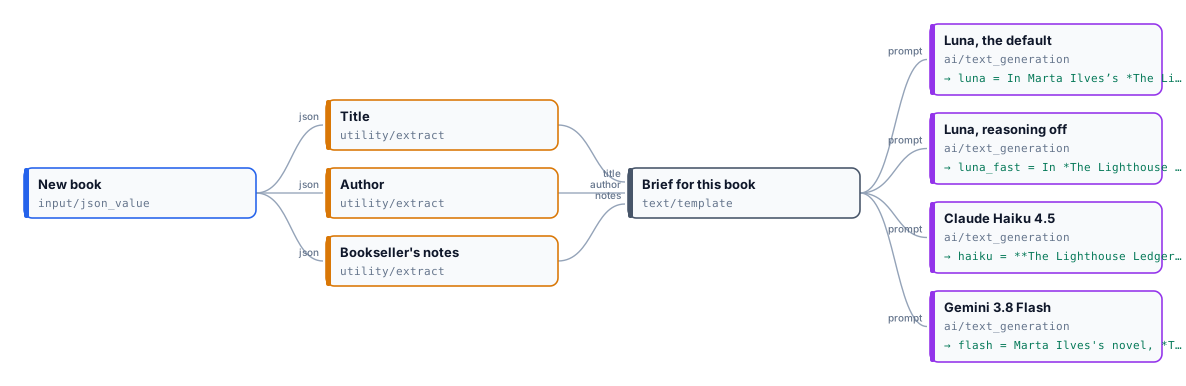
The system prompt, the same for the four steps:
You write the weekly newsletter of Libreria Sottovento, an independent bookshop. Voice: warm, precise, abookseller talking to a regular customer; no hype, no superlatives such as 'masterpiece' or 'must-read'.Rules: use only the facts in the bookseller's notes; never invent prizes, sales figures or quotes; never revealhow the story ends; at most 60 words; one paragraph; end with who will enjoy the book. Write in English.What Luna wrote on the reference run:
Set on an island off the Estonian coast in the 1950s, Marta Ilves’s novel follows a young lighthouse keeper who finds the previous keeper’s logbook and begins answering it. Short chapters, quiet prose and plenty of weather shape its measured atmosphere. Readers who enjoy slow, atmospheric novels will feel at home here.
The four texts are in result.json next to the lab. The run costs about 0.7 credits, almost all of it Gemini.
node madoo-install-example.mjs lab-writing-with-a-model --api <your Madoo API URL> --key <key.json> --runWhen something goes wrong
Section titled “When something goes wrong”| Code | What happened | What to do |
|---|---|---|
AI_RESPONSE_INCOMPLETE |
the model reached Max Tokens: the answer was cut, or none was written | raise Max Tokens; with a reasoning model, or lower its reasoning effort |
MISSING_PROMPT |
no prompt on the node and nothing on the prompt input |
write the prompt, or connect the template that builds it |
EMPTY_RESULT |
the model answered with nothing | check the prompt; try again, or another model |
| a provider’s refusal or error | the model declined the request or the provider failed | read the message on the step; rephrase a prompt that was refused |