

Text without a model
Much of the text a workflow produces is not written, it is assembled: a booking confirmation is a fixed sentence with a name, a date and an amount in it; an address is three lines joined by commas; a file name is a code and a date; a prompt for an image model is a template with the product’s colour and material filled in. For all of that a model is the wrong tool. It costs credits, takes seconds, and — being a model — may change a figure, forget a line or write the date in another format. Madoo has five nodes that do it exactly:
| Node | What it does | Typical use |
|---|---|---|
Text Template (text/template) |
fills [markers] in a text with values |
a confirmation, a notification, a prompt built from fields |
Text Expression (text/expression) |
writes a text with functions: upper case, capitalize, truncate, replace, a word chosen by a condition, the items of a list | MANAROLA · Liguria, a title cut at 40 characters, SALE only when on sale |
Format as Text (text/format) |
writes a value that is not text — money, a number, a percentage, a date, a JSON document, a yes/no — the way a person reads it | 83,07 € for an Italian reader and €83.07 for a British one |
Join Text (text/join) |
puts 2 to 10 pieces together with a separator, leaving out the empty ones | an address, a list of features, a line of tags |
Replace Text (text/replace) |
finds a word or a pattern and replaces it, and counts the replacements | masking a phone number, normalising spaces, a house style |
All five run on Madoo’s own workers, cost 0 credits, finish in milliseconds and give the same text for the same input, every time. Use a model only for what cannot be assembled — a description, a summary, a translation, a judgement — and assemble everything around it with these nodes.
Text Template
Section titled “Text Template”A Text Template holds a text with markers in square brackets — Dear [name], your table for [guests] is booked for [date]. — and replaces each marker with the value that reaches the port of the same name.
- The ports are yours to name. The
placeholderssetting lists them; each name becomes a text input port and the marker[name]it fills. In the editor you add them on the node; over the API each one is{ "name": "guests", "inputPort": "guests" }. Markers are matched without regard to case:[Name]and[name]are the same marker. - The template is a setting or an input. Written on the node, it is the same for every run; connected to the
templateinput, it can come from a file, a row of a spreadsheet, or another step — one template per language, chosen by the customer’s locale. - Placeholders take text. A number, a date or a yes/no goes through Format as Text first, so it reads the way
you want (
3 notti,sabato 17 ottobre 2026,393,00 €) and not the way the data stores it (3,2026-10-17,393). - No value, no text. A placeholder whose value is missing (an optional input left empty, a field that was absent,
a JSON
null) is filled with nothing:Note: [note]becomesNote:. Write the sentence so it still reads well, or build the optional part with Join Text, which leaves empty pieces out. - Values are written as they are. A value that itself contains square brackets — a customer’s note “please write [name] on the card”, a model’s answer — is copied as it is; it is never filled in again by another placeholder.
- A marker with no port stays in the text.
[city]with nocityport is left as[city], so a typo in a marker shows in the result instead of disappearing.
A template with neither a written text nor a connected template input is refused when you save
(TEXT_TEMPLATE_MISSING_TEMPLATE). A placeholder that receives a file that is not text — an image, a video — fails
the step with TEMPLATE_PLACEHOLDER_NOT_TEXT.
Format as Text
Section titled “Format as Text”Format as Text turns one value into text in the conventions of a language. It is described in detail in Values and types; in short:
format |
The value | it-IT |
en-GB |
|---|---|---|---|
currency (EUR) |
393 |
393,00 € |
€393.00 |
number, 2 decimals |
1234.5 |
1.234,50 |
1,234.50 |
percent |
0.3 |
30% |
30% |
date, long |
"2026-10-17" |
17 ottobre 2026 |
17 October 2026 |
date, full |
"2026-10-17" |
sabato 17 ottobre 2026 |
Saturday, 17 October 2026 |
date, short |
"2026-10-17" |
17/10/2026 |
17/10/2026 |
auto |
true with true_text: Sì |
Sì |
Sì |
json, indented |
{"room":"Lago","nights":3} |
the document on several lines | the same |
- The language and the currency can come with the data. Connect the guest’s locale to the
localeinput and the booking’s currency tocurrency: one workflow writes every guest’s amounts the way that guest reads them. - Dates are read only in ISO form:
2026-10-17, or a date and time such as2026-10-17T14:30:00Z. A date already written for people is refused withFORMAT_TYPE_MISMATCH, because it cannot be read safely:03/10/2026is the 3rd of October in Italy and the 10th of March in the United States. Keep dates in ISO form in your data, and let this node write them for the reader at the end. - A JSON document that arrives as text is written as the document. The answer of a model, or a field read from a
file, often holds JSON as text; the
jsonformat writes the document it contains, compact or indented, not one quoted string. - Nothing is guessed: a number format given the text
"19,90"fails rather than reading a number out of it.
Join Text
Section titled “Join Text”Join Text takes 2 to 10 texts on texts (texts_0, texts_1, …) and writes them one after the other.
| Setting | Default | What it does |
|---|---|---|
separator |
a line break | what goes between two pieces: , , ·, /; write \n for a line break and \t for a tab |
prefix, suffix |
none | text before the first piece and after the last one |
skip_empty |
on | leaves out pieces that are empty or only spaces, so no double separators appear |
skip_empty is what makes Join the right node for anything with optional parts. An address joined from a street, a
second line and a town reads Lungolago Manzoni 4, 22021 Bellagio CO when the second line is empty — not
Lungolago Manzoni 4, , 22021 Bellagio CO. A missing value (an absent field, a JSON null) is always left out, with
or without skip_empty.
Replace Text
Section titled “Replace Text”Replace Text looks for find in a text and writes replace_with in its place; find and the replacement can
also arrive on the inputs of the same names, from the data. The count output says how many replacements were made —
0 when nothing matched, or when there was nothing to find — so a later step can check it.
| Setting | Default | What it does |
|---|---|---|
case_sensitive |
on | off, madoo also matches Madoo and MADOO |
use_regex |
off | on, find is a regular expression (.NET syntax) |
replace_with |
empty | the replacement; empty deletes what was found |
With use_regex the replacement can reuse what was found: $1 is the first group in brackets. A few patterns that
come up often:
| Task | find |
replace_with |
|---|---|---|
| Show only the last four digits of a phone number | \d(?=(?:\D*\d){4}) |
• |
| Collapse repeated spaces | {2,} |
(one space) |
Turn 2026-10-17 into 17.10.2026 |
(\d{4})-(\d{2})-(\d{2}) |
$3.$2.$1 |
| Remove a code in brackets from a product name | \s*\[[A-Z0-9-]+\] |
(empty) |
The replacement is written as it is: \n in replace_with is the two characters, not a line break. A pattern that is
not valid fails with INVALID_REGEX; a pattern that runs for more than 2 seconds on a long text — typically nested
repetitions such as (a+)+ — is stopped with REGEX_TIMEOUT instead of holding the worker.
Text Expression
Section titled “Text Expression”Text Expression writes a text with {{ }} blocks in the language of computed columns (Scriban): each variable the
expression reads becomes an input, of any type, to connect.
{{ village | string.upcase }} · {{ region | string.capitalize }} — {{ title | string.truncate 40 }}{{ if on_sale }} · SALE{{ end }}| You want | Write |
|---|---|
| upper case, lower case, a capital first letter | `{{ name |
a text cut to a length, with ... |
`{{ title |
| a word swapped, spaces trimmed | `{{ code |
| a part only when a condition holds | {{ if on_sale }}SALE{{ else }}{{ price_text }}{{ end }} |
| a field of a JSON value | {{ order.customer.name }} |
| the items of a list, separated | {{ for line in order.lines }}{{ line.sku }}{{ if !for.last }}, {{ end }}{{ end }} |
A text, a boolean or a number arrives as it is; a JSON value is read by member; a file arrives as its stored
reference. An optional input left empty is not provided: the expression still runs and reads it as empty, so
{{ if note }} — {{ note }}{{ end }} writes the note only when there is one. Text Expression writes text and never computes numbers: an expression with *, - or / is refused —
compute with Calculate and connect the result, and write a number for a reader with Format as
Text. + joins texts. Every expression runs in a sandbox shared with computed columns: at most 2 seconds, 1,000 loop
iterations, 20 nested calls and 100,000 characters, and no other template can be included; crossing a limit fails the
step instead of holding the worker.
The hotel offer lab writes
a headline this way from a model’s answer — VILLA SERENA · Bellagio — Two nights at the "Villa Serena"... · OFFER —
reading every field from one JSON input and cutting the title on a whole word with string.truncatewords.
Long texts
Section titled “Long texts”A text longer than 64 KB — a transcript, a contract, a long answer from a model — travels between steps as a stored file instead of inline. The four nodes read it the same way: a Join, a Replace or a Template given a 70 KB contract works on the whole contract. A file that is not text (an image, a video) is refused with a code that names the input.
Which one
Section titled “Which one”| You want to | Use |
|---|---|
| a sentence with values in fixed places | Text Template |
| a text transformed — upper case, truncated, chosen by a condition, built from a list | Text Expression |
| a value that is not text, written for a reader | Format as Text, then Template |
| pieces one after the other, some of them optional | Join Text |
| the same text with something swapped, masked or cleaned | Replace Text |
| a value read out of a JSON document | Extract JSON Value |
| a number computed from others | Calculate, then Format as Text |
| a date computed from another — an end, a deadline, the days to an event | Date Calculation, then Format as Text |
| a text that has to be written — a description, a summary, a translation | a model (Text Generation and the vision nodes) |
Try it: a booking confirmation
Section titled “Try it: a booking confirmation”The lab turns a hotel booking into the message a guest receives, in the guest’s own language, with no AI step and no credits. The booking is one JSON document:
{ "guest": { "name": "Chiara Benedetti", "locale": "it-IT", "phone": "+39 347 123 4567" }, "hotel": { "name": "Albergo del Lago", "street": "Lungolago Manzoni 4", "line2": "", "city": "22021 Bellagio CO" }, "checkin": "2026-10-17", "nights": 3, "price_per_night": 128.5, "tourist_tax_per_night": 2.5, "deposit_rate": 0.3, "currency": "EUR", "notes": "Arriveremo verso le 22: potete lasciarci la chiave alla reception?"}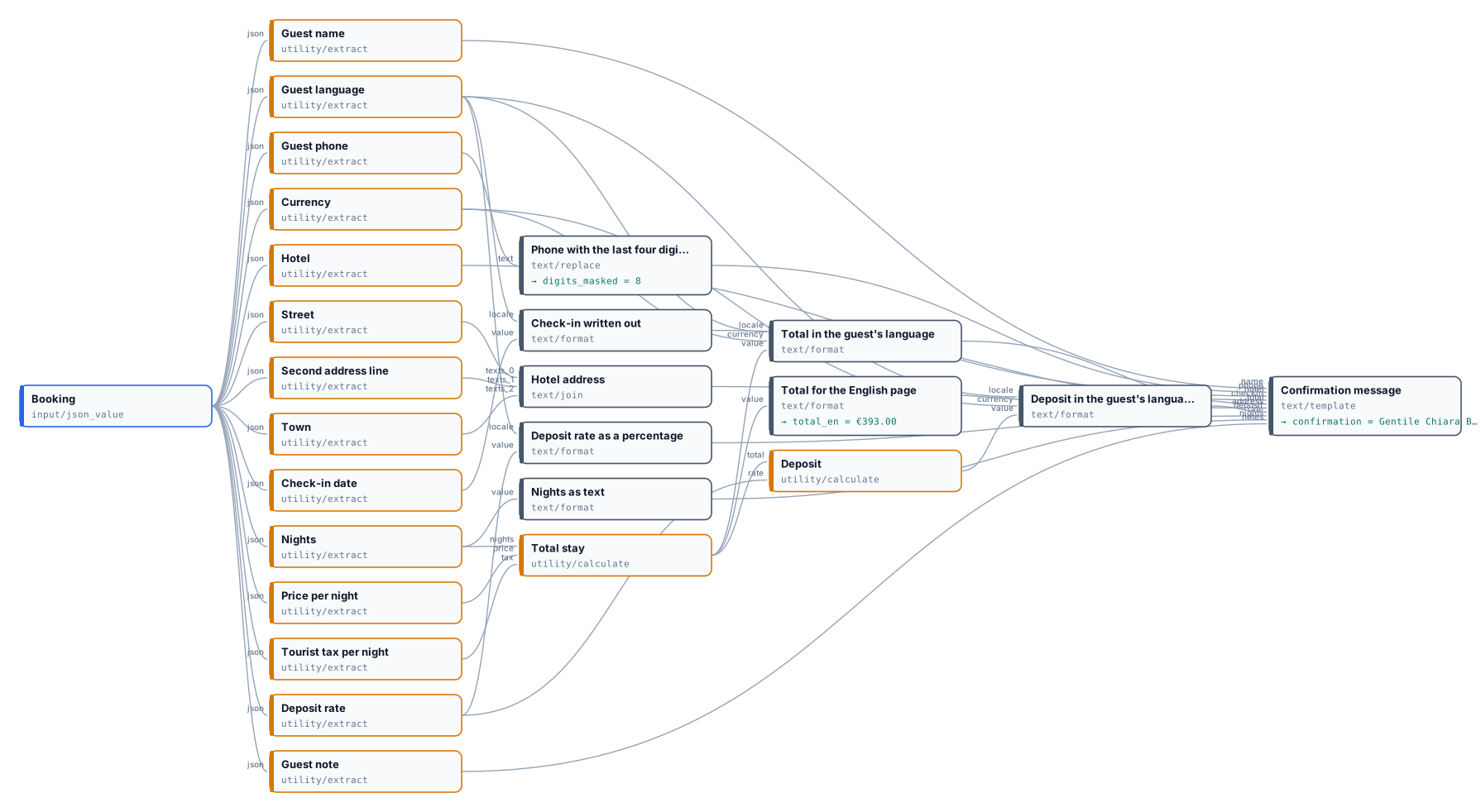
The result, on a reference run:
Gentile Chiara Benedetti,confermiamo la sua prenotazione all'Albergo del Lago per 3 notti, con arrivo sabato 17 ottobre 2026.Totale del soggiorno, tassa di soggiorno inclusa: 393,00 €.Per confermare le chiediamo un acconto del 30%: 117,90 €.Indirizzo: Lungolago Manzoni 4, 22021 Bellagio COTelefono registrato: +•• ••• ••• 4567La sua nota: «Arriveremo verso le 22: potete lasciarci la chiave alla reception?»What each step contributes:
- Calculate computes
3 × (128.50 + 2.50) = 393.00and the depositround(393 × 0.3, 2) = 117.90, exactly. - Format as Text writes them as
393,00 €and117,90 €because the guest’s locale isit-IT; the same total, formatted for an English page, is€393.00. The rate0.3becomes30%, the date2026-10-17becomessabato 17 ottobre 2026. - Join Text builds the address and leaves the empty second line out.
- Replace Text keeps only the last four digits of the phone number, and its
countsays 8 digits were masked. - Text Template puts it all together; the guest’s note is copied as written.
Change the booking — "locale": "de-DE", "currency": "CHF" — and the same workflow writes 393,00 CHF, 30 %
(German puts a space before the sign) and Samstag, 17. Oktober 2026. The sentences around them stay Italian, because
the template is: connect a template per language to its template input, chosen by the guest’s locale.
The run takes a few seconds and costs nothing.
node madoo-install-example.mjs lab-text-without-a-model --api <your Madoo API URL> --key <key.json> --runWhen something goes wrong
Section titled “When something goes wrong”| Code | Node | What happened | What to do |
|---|---|---|---|
TEXT_TEMPLATE_MISSING_TEMPLATE |
Text Template | saved with no template text and nothing connected to template |
write the template, or connect it |
TEMPLATE_PLACEHOLDER_NOT_TEXT |
Text Template | a placeholder (or the template) received an image, a video or another file | connect a text; for a file’s name or link, read it from the asset first |
FORMAT_TYPE_MISMATCH |
Format as Text | the value is not of the kind the format needs: a text for a number format, a date not in ISO form | compute the number with Calculate, keep dates as 2026-10-17 |
INVALID_TEXT_FORMAT |
Format as Text | an unknown language, currency or date style | use a code such as it-IT, EUR, long |
MISSING_INPUT |
Join, Replace | Join received no text at all; Replace received no text |
connect at least one text |
JOIN_INPUT_NOT_TEXT, REPLACE_INPUT_NOT_TEXT |
Join, Replace | an input received a file that is not text | connect a text |
INVALID_REGEX |
Replace Text | use_regex is on and find is not a valid pattern |
check brackets and escapes (\. for a dot, \[ for a bracket) |
REGEX_TIMEOUT |
Replace Text | the pattern ran for more than 2 seconds | simplify it: no nested repetitions, anchor it with ^ or $ where you can |
TEXT_EXPRESSION_UNCONNECTED_VARIABLE (validation) |
Text Expression | the expression reads a variable with nothing connected to it | connect a value to that input, or fix the name |
TEXT_EXPRESSION_INVALID |
Text Expression | the expression does not compile, uses Liquid tags {% %}, or does arithmetic |
check the {{ }} blocks; compute numbers with Calculate |
TEXT_EXPRESSION_FAILED |
Text Expression | the expression failed while writing, or crossed a sandbox limit (time, loops, length) | read the reason in the message; simplify the loop or the text |
TEXT_EXPRESSION_VALUE_MISSING |
Text Expression | a variable it reads has no input connected | connect the value; an optional input left empty is read as empty, {{ if name }} tests it |