

Measuring tone and colour
A picture can look fine in a thumbnail and still be wrong: a room photo blown out by the window, a packshot on a grey
that should have been white, a portrait whose face is lost in a dark painting. Image Statistics (image/statistics)
puts numbers on it. It reads the pixels and returns how bright they are, how many are crushed to black or blown to
white, and what colour each range of tones has — for the whole picture, for the cells of a grid, for given rectangles,
or only inside a mask. No model is asked: the same picture gives the same numbers every time, at no credit cost.
| Domain | The question |
|---|---|
| A shop’s catalogue | does this packshot sit on a white backdrop, as the marketplace asks? |
| Hospitality and real estate | is this room photo well exposed, or blown out by the window? |
| Generated pictures | is this picture too dark or too bright to publish? |
| Publishing and editorial | is the subject lit, even when the picture around it is dark? |
| Layouts and covers | which area of the picture is dark enough for white text? |
What it gives
Section titled “What it gives”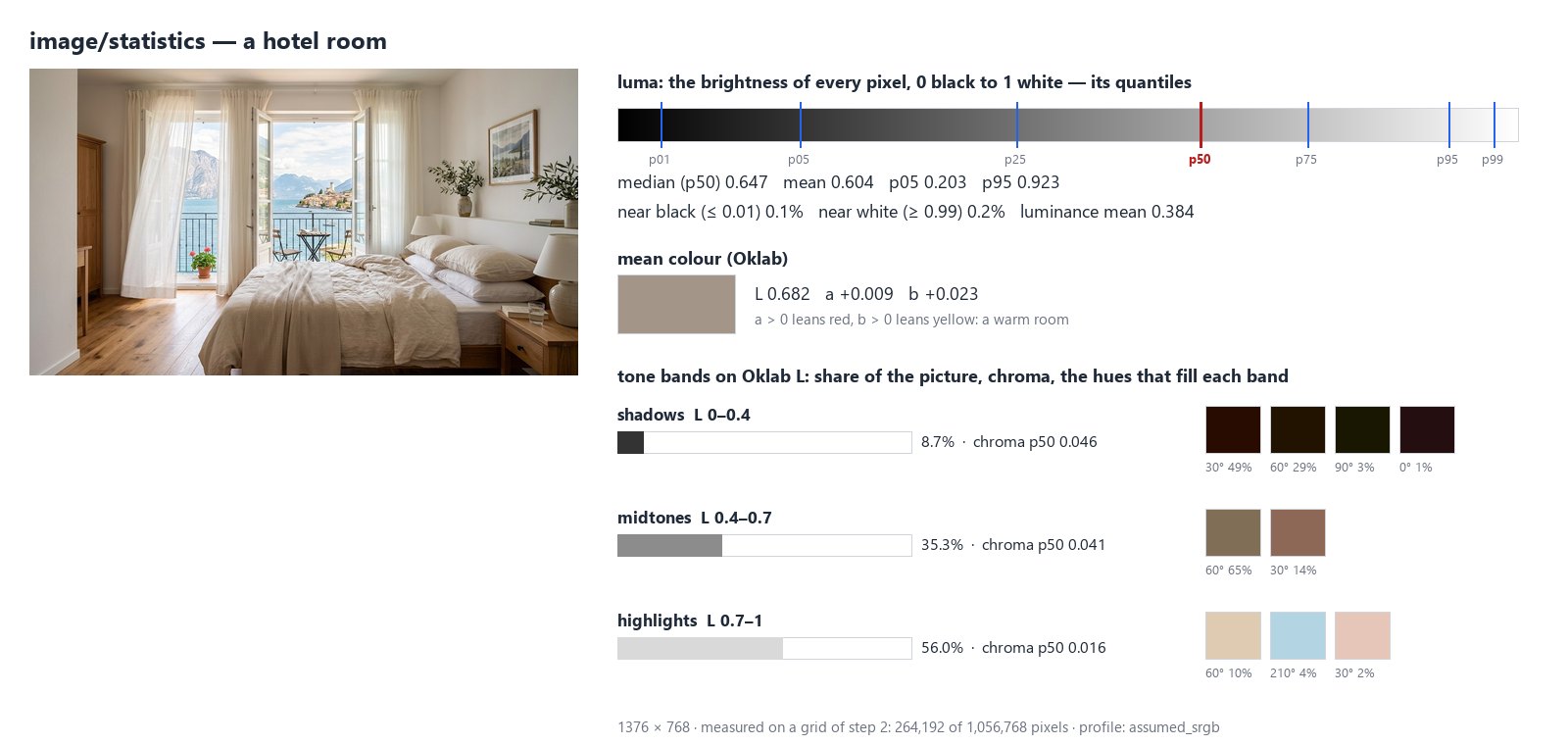
For the whole picture — and for each cell or region — the node returns:
- luma, the brightness of each pixel as the eye reads it on screen (0 black, 1 white): its quantiles
p01,p05,p25,p50(the median),p75,p95,p99and its mean; - the share of pixels near black (luma at or below
near_black, 0.01) and near white (at or abovenear_white, 0.99): crushed shadows, blown-out highlights, or a white backdrop; - luminance, the physical amount of light (linear), mean and median;
- the mean colour in Oklab:
llightness,a(positive leans red, negative green) andb(positive leans yellow, negative blue) — a colour cast reads at a glance; - tone bands: the shadows, midtones and highlights (Oklab lightness 0–0.4, 0.4–0.7, 0.7–1 by default), each with its share of the picture, its chroma quantiles (0 is grey) and the hues that fill it in twelve 30° sectors.
Six outputs carry the result:
| Output | What it is |
|---|---|
statistics |
the whole result as JSON (madoo.image-statistics/v1): global and every region |
median_luma, mean_luma |
the median and mean brightness of the whole picture, 0–1 |
clipped_black, clipped_white |
the share of near-black and near-white pixels, 0–1 |
quality_check |
the check, for a Quality Gate |
The four numbers are ready for a Predicate (median_luma below 0.3); they describe the whole
picture, or only what the mask selects.
Too dark, too bright, blown out
Section titled “Too dark, too bright, blown out”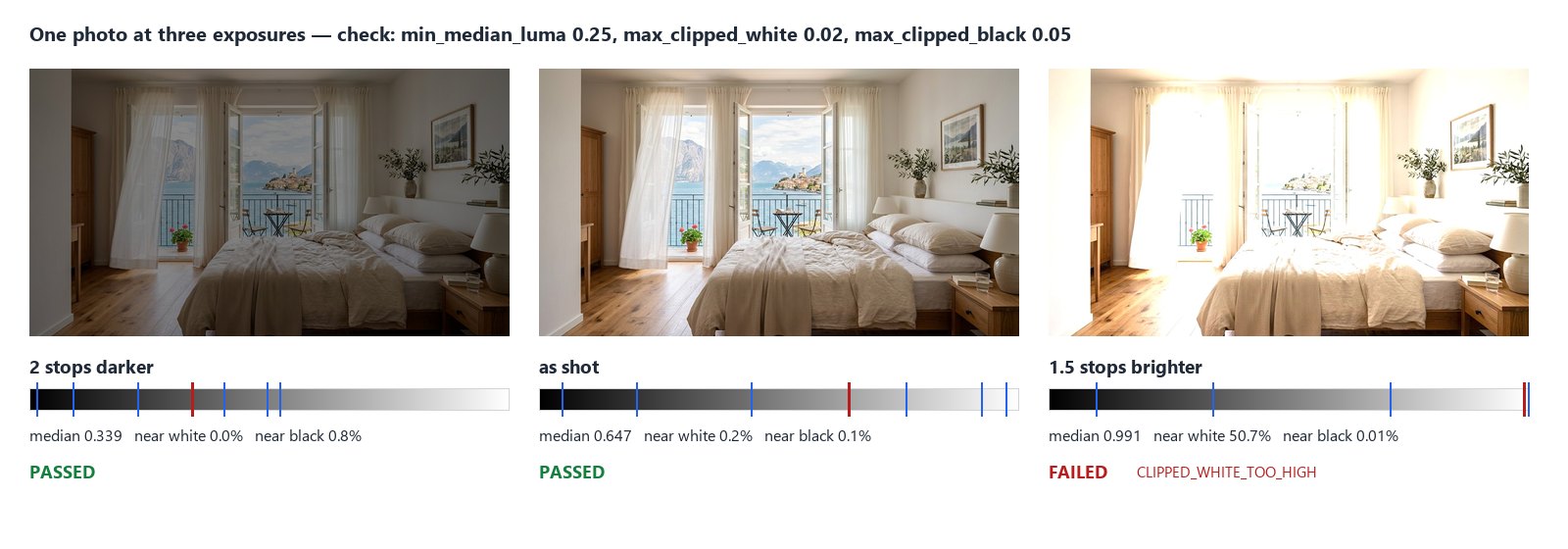
The same room, made two stops darker and one and a half stops brighter in linear light — what a camera does with a shorter or longer exposure. The median follows the exposure; the near-white share tells the overexposed one apart at once: half of it is pure white, where the window, the curtains and the bed were.
Set limits on the node and its quality_check fails when the picture crosses them:
| Limit | Fails when |
|---|---|
min_median_luma |
the median brightness is below it — too dark |
max_median_luma |
the median brightness is above it — too bright |
max_clipped_white |
more of the picture than this is near white — blown out |
max_clipped_black |
more of the picture than this is near black — crushed |
min_white_share |
less of the picture than this is near white — see the next section |
Wire quality_check into a Quality Gate and the picture to deliver through the gate’s value:
a blown-out photo is held back, the others go on. The check fails too when there is nothing to measure (NOT_OBSERVABLE:
a transparent picture, an empty mask). Without limits it always passes and only reports the numbers.
The limits depend on the pictures. A night launch (median 0.147) or a Vermeer (0.162) are dark by intent; a gate set for daylight room photos would hold them back. Measure a few good pictures of your own first, then set the limits a little outside them.
A white backdrop
Section titled “A white backdrop”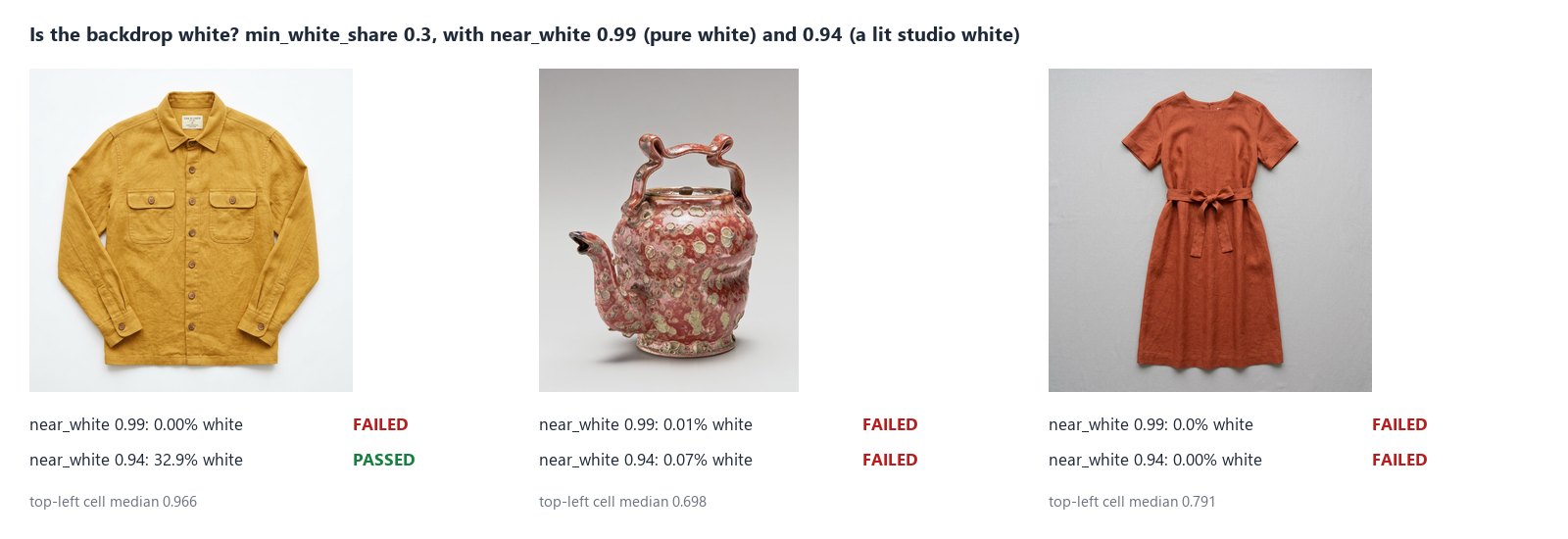
A marketplace that asks for a white backdrop usually means pure white, #FFFFFF. With the default near_white of 0.99,
min_white_share checks exactly that: the share of the picture that is pure white. A studio white lit from one side is
not: the jacket’s backdrop is a bright off-white around 0.96, and none of it reaches 0.99.
To accept a lit studio white, lower Near White to it — here 0.94: a third of the picture is backdrop and the check passes, while the teapot and the dress, on greys of 0.70 and 0.79, still fail. Measure your own backdrop first: the median of a corner cell of a 3 × 3 grid is its brightness.
near_white also decides what max_clipped_white counts as blown out. To check a white backdrop and blown-out
highlights on the same picture, use two Image Statistics steps, each with its own near_white and its own check_id,
both feeding the same Quality Gate.
A grid of cells
Section titled “A grid of cells”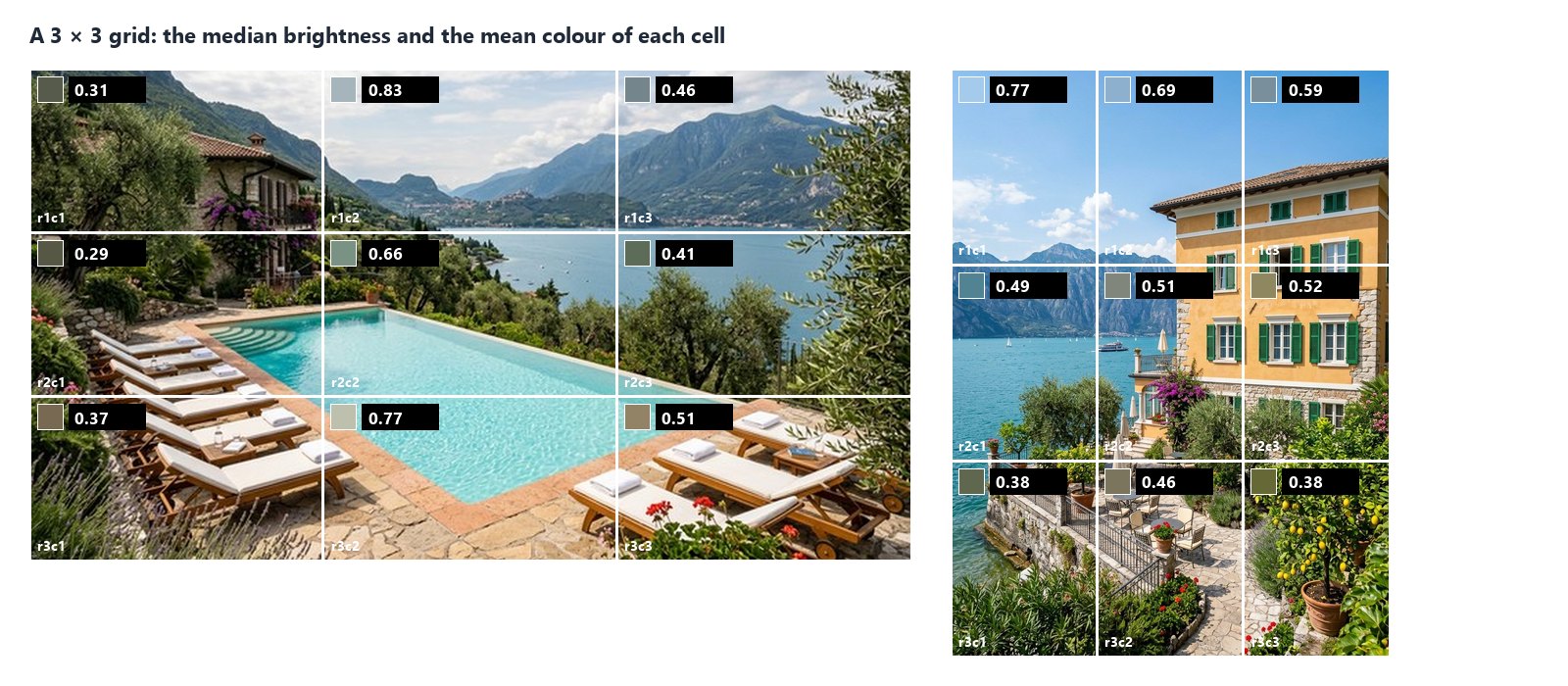
Grid Rows and Grid Columns (1 to 16) divide the picture into equal cells, each measured on its own as well as the
whole picture. The cells come back in statistics.regions, in reading order, named r1c1, r1c2, … — read one with
Extract (regions[0].luma.p50) or all with the JSON Enumerator (array path regions).
A grid answers “where”: which part of a cover is dark enough for a white title (the shaded garden of the pool, at 0.29), whether the sky of a villa is blown out, whether a generated grid of variants has one cell much darker than the others.
Given regions
Section titled “Given regions”Instead of the grid, wire rectangles into Regions: a list [{"x": 0, "y": 0, "width": 512, "height": 512}] (up to
64; an id is optional; cell, bbox or context objects are accepted too), or the measurements of
Measure Subject as they are: the box of each subject it found is measured — a product’s
box, the subject of each cell. The faces of Face Detect work the same way: each face
is a region (face-1, face-2, …), to tell a face in shadow from the bright scene around it.
A region that goes beyond the picture fails the step (REGION_OUT_OF_BOUNDS): it is never cut silently.
Inside the subject
Section titled “Inside the subject”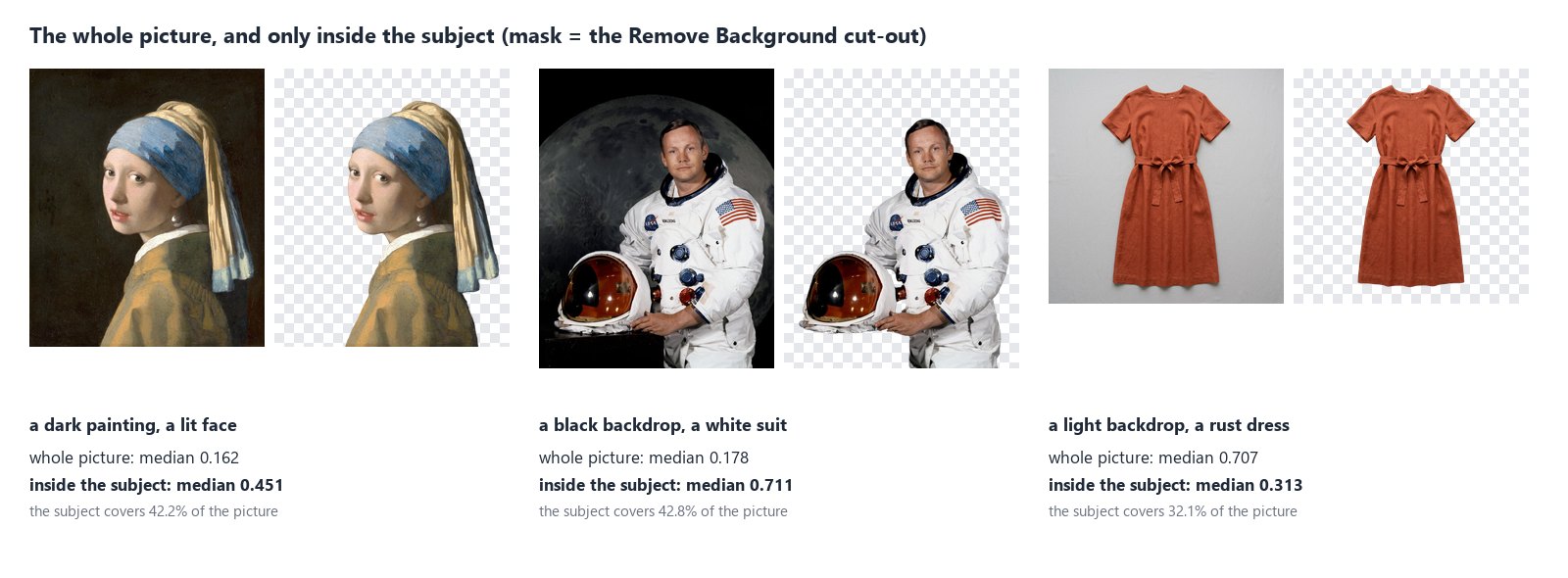
The backdrop is often most of the picture, and it decides the numbers: the Vermeer is “dark” because of its background, a
dress on light grey is “bright” because of the grey. Connect a Mask — the cut-out of Remove Background, or any black
and white mask of the same size — and every number describes only the pixels inside it: the girl’s face is lit (0.451),
the astronaut’s suit is bright (0.711), the rust dress is a dark colour (0.313). Each region also reports mask_share,
the part of it the mask covers. In a scene, the mask of Instance Segment does the same
for a person, an animal or an object it finds — the main person of a portrait, without the café behind.
A pixel is inside when the mask’s alpha — or, on a mask without transparency, its brightness — is above Mask
Threshold (128). A mask of another size fails the step (MASK_SIZE_MISMATCH): it is never stretched.
When the mask selects nothing — Remove Background finds no subject in a landscape, a pool or a night sky — there is
nothing to measure: the region says status: "not_observable" with the reason mask_empty_in_region, the four
numbers are not provided (the steps that need them are skipped, not failed) and the check fails with NOT_OBSERVABLE.
A cut-out can also be measured on its own, without a mask: its transparent pixels (alpha under Alpha Min, 250) are left out, so the numbers are the subject’s.
How it reads a picture
Section titled “How it reads a picture”- Upright. A phone photo stored sideways is turned as its EXIF orientation says before anything is measured; grid cells and regions are in the pixels of the upright picture.
- In sRGB. A picture with a colour profile (Adobe RGB, Display P3, CMYK) is converted to sRGB first; the report says
profile_policy: "converted". A picture without a profile is read as sRGB and says so (assumed_srgb); set Untagged Images tofailto refuse it instead (PROFILE_REQUIRED). A CMYK file without a profile is always refused. - At full resolution. The picture is never scaled down. A region with more pixels than Max Samples (about a
million) is measured on a regular grid of its pixels — every second pixel in each direction, or every third — always
the same ones;
samplingin each region says the step and how many pixels were measured. - At 8 bits. A 16-bit file is measured at 8 bits per channel, with a warning in the report.
- SDR only. An HDR picture (the PQ or HLG curve of HDR photos and videos) cannot be measured as an ordinary picture:
the step fails with
HDR_NOT_SUPPORTED— convert it to SDR first. A photo with a gain map (the “HDR” photos of recent phones) carries an ordinary picture too: that one is measured, with a warning.
Pictures up to 40 megapixels are read; a larger one fails with IMAGE_TOO_LARGE before it is decoded.
Recipes
Section titled “Recipes”An exposure gate for room photos. Room photo → Image Statistics (min_median_luma, max_clipped_white) → Quality
Gate (all_must_pass, route) → delivery through the gate’s value. Photos that pass go on; the others are held back
with the reason in the check.
Packshots on white. Packshot → Image Statistics (near_white set to your studio white, min_white_share) →
Quality Gate. Add Color Palette with background: exclude to describe the product without its backdrop.
Only the subject. Photo → Remove Background → the cut-out into Image Statistics’ Mask, the photo into its Image. The numbers describe the person or the product, not the room.
The darkest area for a title. Cover → Image Statistics with a 3 × 3 grid → JSON Enumerator over regions → a
Predicate on each cell’s luma.p50 (below 0.35) and a Filter → the cells a white title reads on.
A brightness branch. median_luma into a Predicate (below 0.3) and two Filters: a dark generated picture goes to
Exposure for more light, the others go on unchanged.
Settings
Section titled “Settings”| Setting | Default | What it does |
|---|---|---|
Grid Rows, Grid Columns (grid_rows, grid_cols) |
1, 1 | measure the cells of an equal grid too, 1 to 16 each |
Untagged Images (untagged) |
assume_srgb |
read a picture without a profile as sRGB, or fail |
Alpha Min (alpha_min) |
250 | pixels less opaque than this (0–255) are left out |
Mask Threshold (mask_threshold) |
128 | a mask pixel above this is inside |
Max Samples (max_samples) |
1,048,576 | pixels measured per region at most, on a regular grid |
Tone Bands (bands) |
[0, 0.4, 0.7, 1] |
the boundaries of the tone bands on Oklab lightness, at most 8 bands |
Near Black (near_black) |
0.01 | luma at or below this counts as near black |
Near White (near_white) |
0.99 | luma at or above this counts as near white |
Min White Share (min_white_share) |
— | fail when less of the picture is near white |
Max Near-White Share (max_clipped_white) |
— | fail when more of the picture is near white |
Max Near-Black Share (max_clipped_black) |
— | fail when more of the picture is near black |
Min / Max Median Brightness (min_median_luma, max_median_luma) |
— | fail outside these medians |
Check ID (check_id) |
image-statistics |
the check’s name in a Quality Gate |
A wrong setting — a grid of 20 rows, bands that do not increase, a minimum above its maximum — is reported when the
workflow is saved, with INVALID_IMAGE_STATISTICS_PARAMETER. The limits apply to the whole picture (or what the mask
selects), not to each cell.
What it does not do
Section titled “What it does not do”- It measures pixels, not meaning. It knows the window is bright, not that it is a window. To know which part of the picture is the subject, cut it out first (Remove Background) or find its box (Measure Subject).
- It does not judge taste. A dark painting and an underexposed photo have the same numbers; the limits are yours.
- It does not fix the picture. To brighten or darken, use Exposure or Levels; then measure again.
- The colours of a picture — its palette, dominant and accent colours — come from Color Palette; Image Statistics gives the mean colour and the hues of each tone band.
- Fine detail — whether a picture is soft, grainy, over-compressed or sharpened against its reference — comes from Image Detail.
The lab
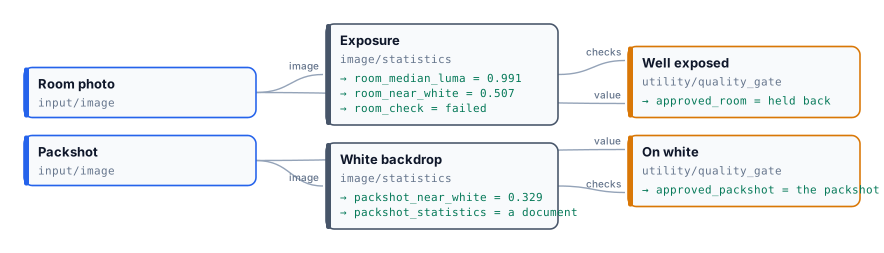
Section titled “The lab”The tone lab runs two of the recipes, at no credit cost:
- the hotel room one and a half stops too bright: median 0.991, half of it near white; the check fails with
CLIPPED_WHITE_TOO_HIGHand the Quality Gate holds the photo back; - the mustard jacket checked for a white backdrop with Near White at 0.94: 32.9% of it is backdrop, the check passes and the packshot is released.
In complete examples
Section titled “In complete examples”- I07 — a hotel’s photos screened for a booking portal: the median brightness and the share of burnt white decide, with the width, the sharpness and the people in the picture, which photos the portal gets.
- I08 — a team page with the same head shot for everyone: the tone measured inside each face, with Face Detect’s faces as regions — 0.50 to 0.59 where the whole photos go from 0.18 to 0.39.
- I09 — generated packshots checked against the real product: the colour and the light of the jacket alone, inside its cut-out, compared with the real one; a colour shift of 0.031 holds the warm shot back.