

I10 — A catalogue in the brand colours: every picture measured, corrected and tried again until it is on brand
A season’s campaign asks for warm, cosy autumn pictures; the brand is navy, cream and ochre. A generator asked for golden hour, pumpkins and a knitted blanket paints exactly that — in oranges and browns. The product is right, the picture is off brand.
This workflow measures every picture against the brand colours with Color Palette — no model, no credits, the same answer every time — and, when the picture is off the palette, makes it again with the measured violations as the correction: which brand colour is missing, which colour came instead, how much of the picture is off the palette. Repeat Until Accepted does it for each product of the catalogue, at most three times, in one run.
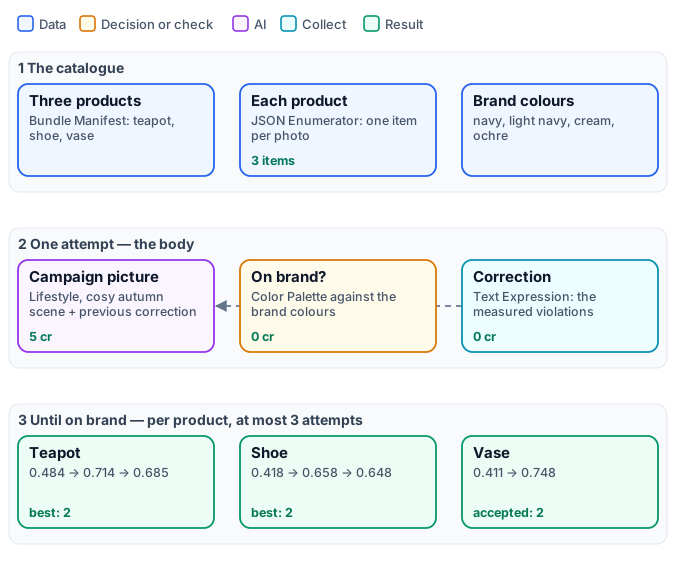
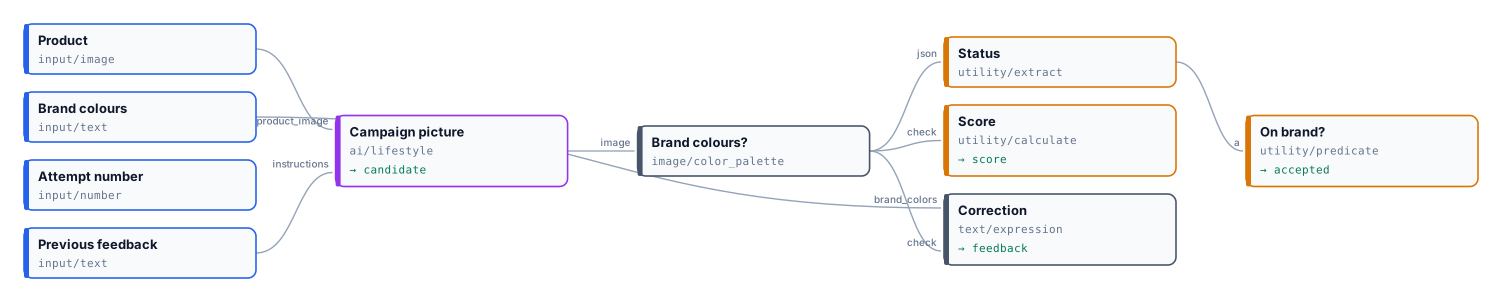
The exact graphs are the workflow (as a diagram) and its body, one attempt (as a diagram).

The case
Section titled “The case”| Input | Who provides it | Reference run |
|---|---|---|
| The products | the brand, as a bundle of photos | three museum pieces of a Delft collection — a teapot, a shoe, a vase with birds — each on a grey studio background |
| The brand colours | the brand | #1F3A6E navy, #2F55A4 lighter navy, #F2EBDD cream, #C9963B ochre |
The brief for the scene is the same for every product: a cosy autumn afternoon, the product on a table by a window at golden hour, with a knitted blanket, pumpkins and a lit candle.
What it shows
Section titled “What it shows”- A judge that is a measurement. Color Palette reads the picture’s colours and checks them against the brand’s
(
reference_colors): each brand colour must be present (a colour of the picture within OKLab 0.12 of it), and at most 30 % of the picture may be in colours far from every brand colour (max_off_palette0.3). Whites, greys and blacks never count against it. The verdict is the check’sstatus: Extractstatus, Predicateequals passed. - A score anyone can read: 1 − the share of the picture off the palette, with Calculate
on the check (
round(1 - check.metrics.off_palette_proportion, 3)). - A correction written by the measurement. Text Expression writes the check’s summary and violations, then the
requirement in full: “The picture is off brand: 2 of 4 reference color(s) found; 58.9% of the image off the palette.
Reference color #1F3A6E is not in the image: the nearest is #51341E, … Keep the product exactly as it is. Change the
setting, the props and the light so that the picture keeps to the brand colours …: no warm orange, red or brown
tones.” It reaches Lifestyle’s
instructionsinput on the next attempt. No model writes it, so it cannot disagree with the verdict. - The whole catalogue in one run. The products come as a Bundle Manifest, the JSON Enumerator opens one item per photo, and the step runs once per item: every product has its own attempts and its own report, in parallel.
The workflow, step by step
Section titled “The workflow, step by step”| Phase | Steps | What they do here |
|---|---|---|
| A — the catalogue | Products, Assets, Each product, Brand colours | Bundle Manifest Input; Extract assets; JSON Enumerator mapping storageRef to the photo and metadata.name to the name |
| B — one attempt (the body) | Campaign picture | Lifestyle, 4:5, the autumn brief; instructions ← Previous feedback |
| Brand colours? | Color Palette, 8 colours, reference_colors, max_distance 0.12, max_off_palette 0.3 |
|
| Status, On brand?, Score | Extract status → Predicate equals passed → accepted; Calculate → score |
|
| Correction | Text Expression from the check and the brand colours → feedback |
|
| C — until on brand | Until on brand | Repeat Until Accepted: the body, max_attempts 3, on_exhausted best; per product |
The reference run
Section titled “The reference run”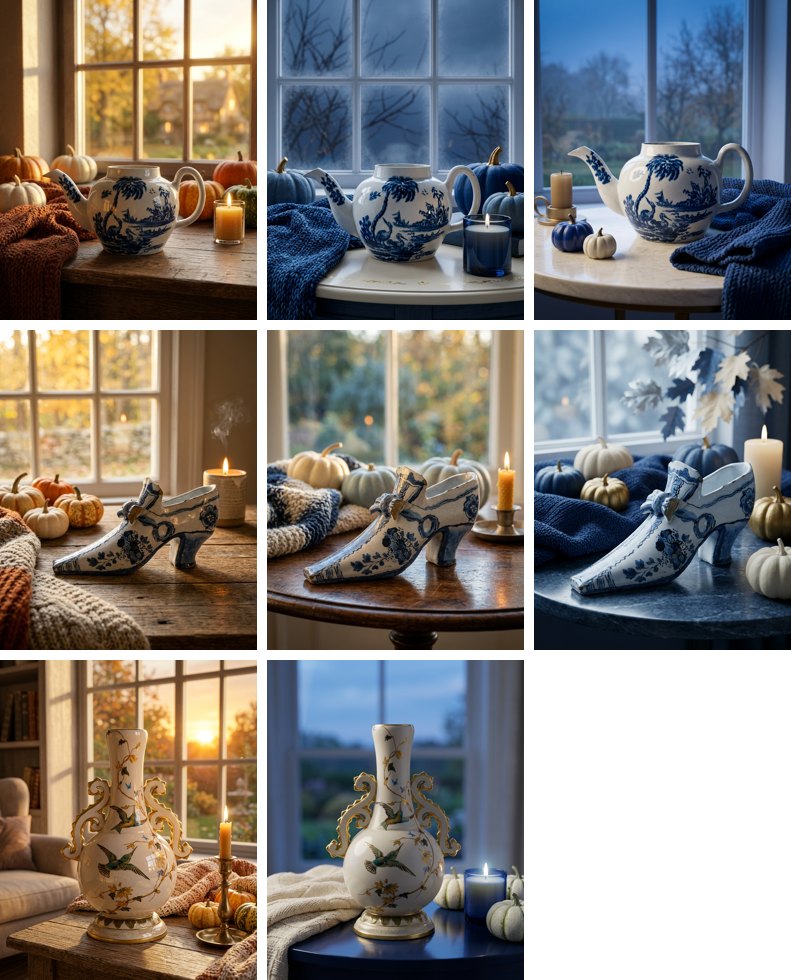
| Product | Attempt 1 | Attempt 2 | Attempt 3 | Delivered |
|---|---|---|---|---|
| teapot | 0.484 — 2 of 4 brand colours, 51.6 % off | 0.714 — 2 of 4, 28.6 % off | 0.685 — 4 of 4, 31.5 % off | attempt 2, best not accepted |
| shoe | 0.418 — 2 of 4, 58.2 % off | 0.658 — 3 of 4, 34.2 % off | 0.648 — 3 of 4, 35.2 % off | attempt 2, best not accepted |
| vase | 0.411 — 2 of 4, 58.9 % off | 0.748 — 4 of 4, 25.2 % off | — | attempt 2, accepted |
40 credits for eight attempts — 5 each, for Lifestyle; the measurement and the correction are free. The worst
case, 45 credits (3 products × 3 attempts × 5), was reserved as soon as the bundle was read, and what was not spent
went back when the run ended. The reports are
the step’s report output, one per product.
What the run shows:
- The first correction does the work. Every product jumped at its second attempt, from about half the picture off the palette to about a quarter, with the warm oranges replaced by navy blankets, blue candles and cream pumpkins. The products themselves did not change: the correction says keep the product exactly as it is.
- A threshold is a line. The teapot’s third attempt found all four brand colours and missed only by its share off
the palette, 31.5 % against 30 %.
on_exhausted: bestdelivers the best attempt anyway, markedbest_unaccepted, for a person to approve or for a looser rule. - The third attempt rarely helps once the first correction has been applied: three is enough.
The same measurement, first set to OKLab 0.08 and 20 %, rejected pictures a person would call on brand: in a photograph the brand navy comes out a little brighter on a blanket. Calibrate a measurement on a few pictures of the kind you will generate, and include the lighter and darker shades the brand allows.
Adapt it
Section titled “Adapt it”- Your brand. The brand colours are one input; add the shades the brand allows. For flat designs (banners, illustrations) a smaller distance and off-palette share hold; for photographs, start from 0.12 and 30 %.
- Your scene. The brief is Lifestyle’s
custom_promptin the body; the correction keeps it, adding only what the measurement found. - More rules. Put other checks in the same body — the subject’s size with Measure Subject, the exposure with Image Statistics — and accept when all pass (Combine Conditions). Write each check’s violations into the correction.
- A person for the rest. Route the step’s
disposition: publishaccepted, sendbest_unacceptedto review.
Install it
Section titled “Install it”node madoo-install-example.mjs i10-brand-catalogue --api <your Madoo API URL> --key <key.json> --run --save catalogueThe installer uploads the three photos, composes the bundle, installs and publishes the body, then the workflow that calls it. Running it generates up to nine pictures: about 40 credits, 45 at most — check with the estimate first (it is deferred until the bundle is read).
The products are public-domain pieces of The Metropolitan Museum of Art (Open Access); the pictures were made by Lifestyle’s default model, for this example.
manifest · workflow · body · reports · the complete graph · the body as a graph