

Layouts, batches and codes
Most image work in a shop or a publishing house is about more than one picture at a time: the four colours of a product side by side, a strip of bestsellers for a newsletter header, the same correction on the three hundred photos of a new season, a label with the code that the till will scan. This page covers the three nodes that put several pictures into one, the way a workflow applies the same steps to a whole batch, and the code node that draws QR codes and barcodes and checks that they scan.
Everything here runs locally and costs no credits. For layouts richer than a regular arrangement — text next to each picture, a page per product, a printed catalogue — a document template is the right tool, and the section on batches below explains when to switch.
Several images into one
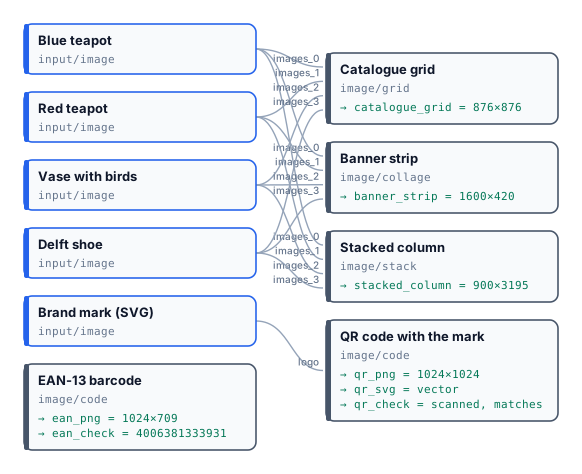
Section titled “Several images into one”Stack, Grid and Collage take their pictures on one list input, images. In a definition you can connect every
picture to images — the order of the connections is the order of the slots — or address a slot explicitly with
images_0, images_1, and so on. The editor shows one port and numbers the slots for you. The result is always a
PNG.
| Node | Arrangement | Sizes | Settings |
|---|---|---|---|
Stack (image/stack) |
One after the other, vertical or horizontal |
Each picture keeps its own size; alignment (start, center, end) lines them up across |
spacing, backgroundColor |
Grid (image/grid) |
columns × rows cells of cellWidth × cellHeight |
Each picture is cropped to fill its cell, from the centre | spacing, backgroundColor, unit (px, in, cm, mm at 96 DPI). Pictures beyond columns × rows are left out |
Collage (image/collage) |
A canvas of width × height split into one row (horizontal), one column (vertical) or the squarest grid that holds them (auto) |
Each picture is cropped to fill its cell | spacing, backgroundColor. freeform places them like auto: there is no positioning by hand |
Grid and Collage crop: a product that fills its photo loses its edges (in the lab, the Delft shoe loses its toe). To show every product whole, make each one a square first — trimmed and centred on white with Place on Canvas — then lay them out.
The same steps on a whole batch
Section titled “The same steps on a whole batch”A workflow written for one picture runs on many with an iteration: the pictures arrive as a list — rows of a CSV with a column of image links, a JSON array, a Value List of images — and every node after the list runs once per picture, in parallel. There is no loop to write; the details are in Iteration. The results come back one per picture, under the same output name.
To turn the batch into one document, an aggregator collects it. For pictures, the aggregator is a template:
Multi-page PDF (aggregate/pdf) fills a page layout once per item — a catalogue
page per product, with its picture, name and price — and Generate JSON (aggregate/json) collects the stored
pictures’ links for a template’s repeating list or for another system. Stack, Grid and Collage are for a handful of
pictures wired one by one; they do not collect an iteration.
QR codes and barcodes
Section titled “QR codes and barcodes”QR Code & Barcode (image/code) draws a code from its content (a parameter, or the content input at run
time) and returns it three ways: svg, a vector file for print; png, up to 4096 px on the longest side
(png_size); and check, the proof that it scans.
| Symbology | Content | Style |
|---|---|---|
qr |
Any text or link | module_shape (square, rounded, circle, dots, diamond, heart, star), eye_frame_shape, eye_ball_shape, foreground_color, eye_color, background_color or transparent_background, quiet_zone, error_correction (L, M, Q, H; automatic: M, or H with a logo), a logo on the logo input (SVG, PNG or JPEG) at logo_size 10–30 % with an optional logo_background |
ean13 |
12 digits (the check digit is added) or 13 (it is verified) | show_text, bar_height, colours in #RRGGBB |
code128 |
Up to 48 characters | show_text, bar_height, colours |
Before returning, the node reads its own code back from the SVG and compares it with the content. With
verify: fail (the default) a code that does not scan — a logo too large, colours with too little contrast — fails
the step with CODE_NOT_SCANNABLE (the message says what to change) and no credit is used; with report the code
is returned anyway and the check records the outcome — scanned, matches and the decodedText (null when
nothing was read) — without a reason field. The check also gives the symbology, the QR version, the number of
modules and the error correction level.
Codes are also a field type in document templates, for badges, tickets and labels (F13 — Event badges).
The lab
Section titled “The lab”The layouts lab takes four product photos — a blue and white teapot, the red teapot, a vase with birds, a Delft shoe — and the brand mark of the compositing lab.
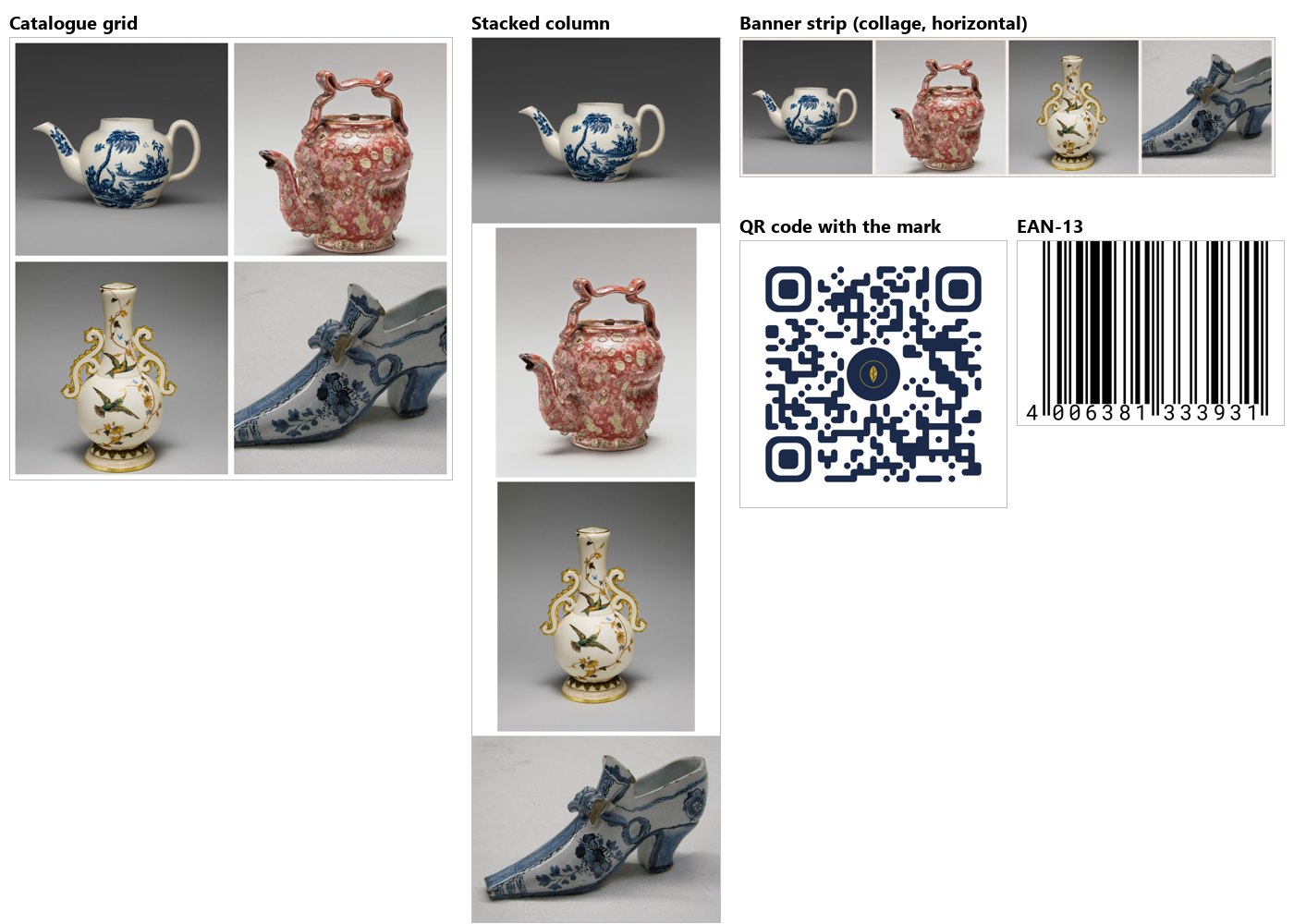
- Catalogue grid: two columns of 420 px cells with 12 px spacing — 876×876; each photo cropped to its cell.
- Banner strip: a Collage
horizontalof 1600×420 on cream — four cells in a row. - Stacked column: the four photos at their own sizes, centred, 900×3195.
- QR code to
https://docs.madoo.ai/images/, rounded modules in navy with the mark in a circle: the node chose error correction H because of the logo, and its check reads the link back — version 4, 41 modules (result-qr-check.json). - EAN-13 from twelve digits,
400638133393: the node adds the check digit and the check reads4006381333931(result-ean-check.json).
The run costs 0 credits.
node madoo-install-example.mjs lab-image-layouts --api <your Madoo API URL> --key <key.json> --run --save layoutsLimits
Section titled “Limits”- Stack, Grid and Collage take pictures wired one by one; an iteration’s pictures are laid out with a template.
- Grid and Collage crop to fill their cells; Stack does not resize, so pictures of different sizes leave gaps.
- No free positioning of pictures on a canvas: for that, Overlay each one on a canvas, or use a template.
- Codes: QR, EAN-13 and Code 128 only; barcode colours as
#RRGGBB.
Photos: “Teapot”, John Bartlam, about 1765–69; “Teapot”, George E. Ohr, about 1897–1900; “Vase”, Greenwood Pottery Company, about 1884–93, porcelain; “Shoe”, 1697, tin-glazed earthenware (Delftware) — The Metropolitan Museum of Art, New York (Open Access, public domain).