

Prompts for other AI steps
An AI step that makes a picture, a clip or a sound is only as specific as its prompt. A fixed prompt makes the same kind of picture for every item; a prompt built from the item — this product’s material, this recipe’s ingredients, this property’s rooms — makes the right picture for each one, across a whole batch. Madoo builds that prompt with the nodes of this section, in four ways.
| Way | How | Strengths | Use it when |
|---|---|---|---|
| Assembled | a Text Template fills a fixed prompt with fields | exact, free, the same for the same data | the item is described by its fields: a colour, a material, a size, a name |
| Written | Text Generation turns the data into a prompt, following an art direction in its system prompt | turns notes into visual detail; translates; one style across items | the data are notes or prose, or in another language; the picture must follow a house style |
| Read from a picture | Image Analysis or Image to Prompt describe a reference | captures a look that is hard to put into words | “one more like this”: a mood board, a reference photo, a previous campaign |
| Carried with the copy | one JSON answer holds the texts and an image_prompt key |
copy and picture written together, from the same facts | a layout where text and picture must agree — a poster, a flyer, a card |
The prompt is ordinary text: before it reaches the AI step it can be completed by a template, cleaned by a Replace, checked, or saved as an output so a person can see what was asked — the public API returns the result of a step, not the prompt a node composed internally.
How to write for an image model — what to keep, how to describe the light, why not to ask for text in the picture — is in Generating and editing with a prompt; for a video model, in Prompts and limits. This page is about producing that prompt from data.
Assembled by a template
Section titled “Assembled by a template”A template is the first choice whenever the fields say what the picture needs: “A [material] [object] in [colour] on a [surface], studio light, white background”. It costs nothing, and the same data always give the same prompt — so two items differ only by what differs in their data, which is what keeps a catalogue consistent.
Its limit is that it can only repeat the fields. “Made with rigatoni, aubergine, tomato, ricotta salata” tells the image model what is in the dish, not how it looks on the plate; the model fills the rest with its own idea of the dish.
Written by a text model
Section titled “Written by a text model”A text model can do what a template cannot: read the notes — “the aubergine is fried in cubes until deep golden and stirred in at the end” — and write what the picture should show: “deep golden fried aubergine cubes resting visibly on top”. It also writes in English for a model that reads English best, whatever the language of the data.
The art direction goes in the system prompt, the same for every item; the item’s data go in the prompt, from a template. A good brief for the model that writes the prompt says:
- the style, the framing and the light, once, for every item — this is what makes a batch look like one series;
- what must never appear: people, hands, text, logos, other brands;
- what to take from the data and what not to add: “name only ingredients that are in the recipe”;
- the length and the form: “one prompt in English, 60 to 90 words, without quotation marks”.
The writing step is cheap — 0.017 credits in the lab, against 5 for the picture it prepares — and it is a model: it can still drift from the facts. In the lab the chef wrote grated ricotta and the prompt asked for shavings. Read a few prompts before running a batch, and keep them as an output.
Read from a picture
Section titled “Read from a picture”When the look is easier to show than to describe — a reference photo, a mood board, a previous season’s campaign — let a vision model describe it. Image to Prompt writes a prompt and a negative prompt for “one more like this”; Image Analysis with your own question describes only what you ask for — the light and palette of a reference, without its subject — so that it can be combined with the item’s own data in a template. Both are in Reading pictures.
Carried with the copy
Section titled “Carried with the copy”When a text and a picture appear together — a poster, a flyer, a recipe card with its introduction — ask one model for
both in one JSON object: {"title": …, "intro": …, "image_prompt": …}. They are then written
from the same facts and cannot contradict each other; Extract sends image_prompt to the
image step and the texts to the layout. The agent-built poster of
the template gallery is built this way.
Try it: a recipe card, twice
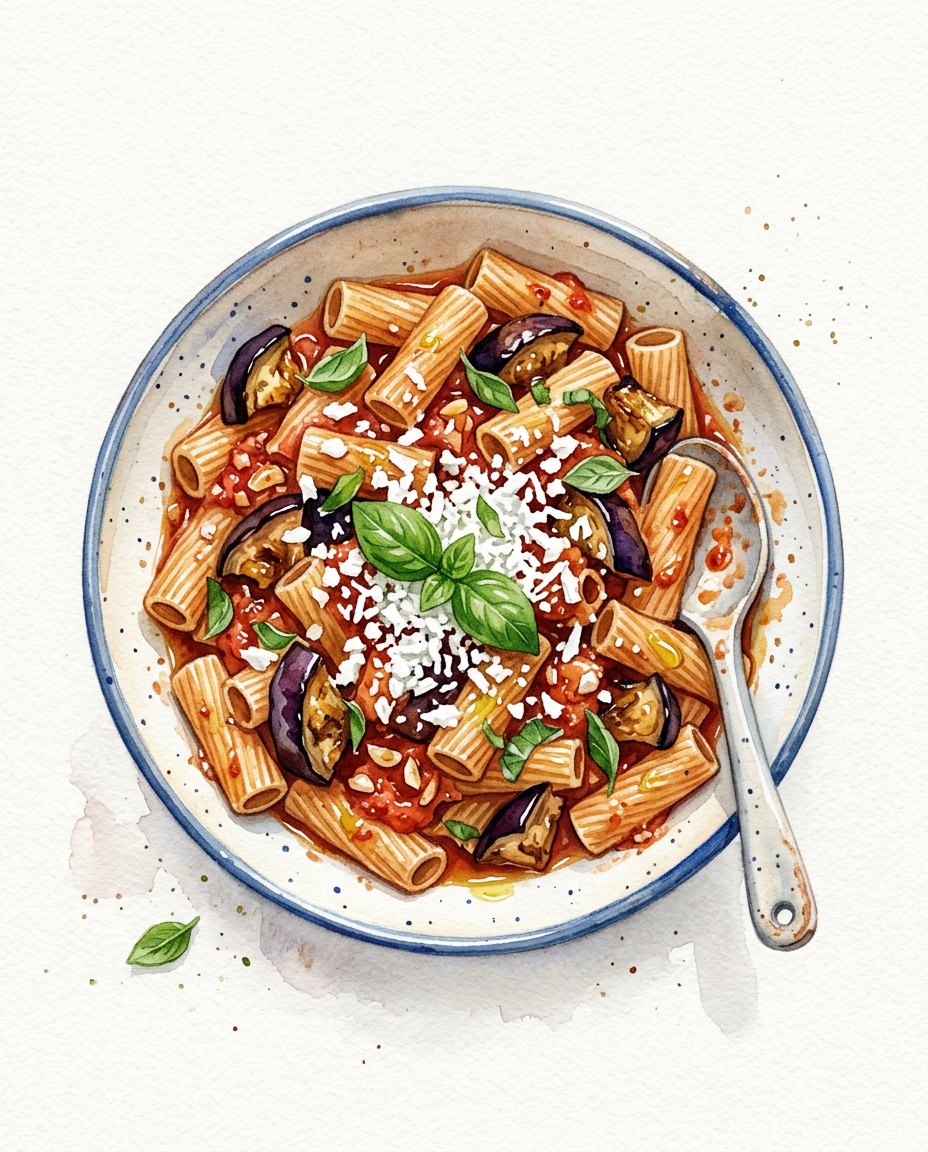
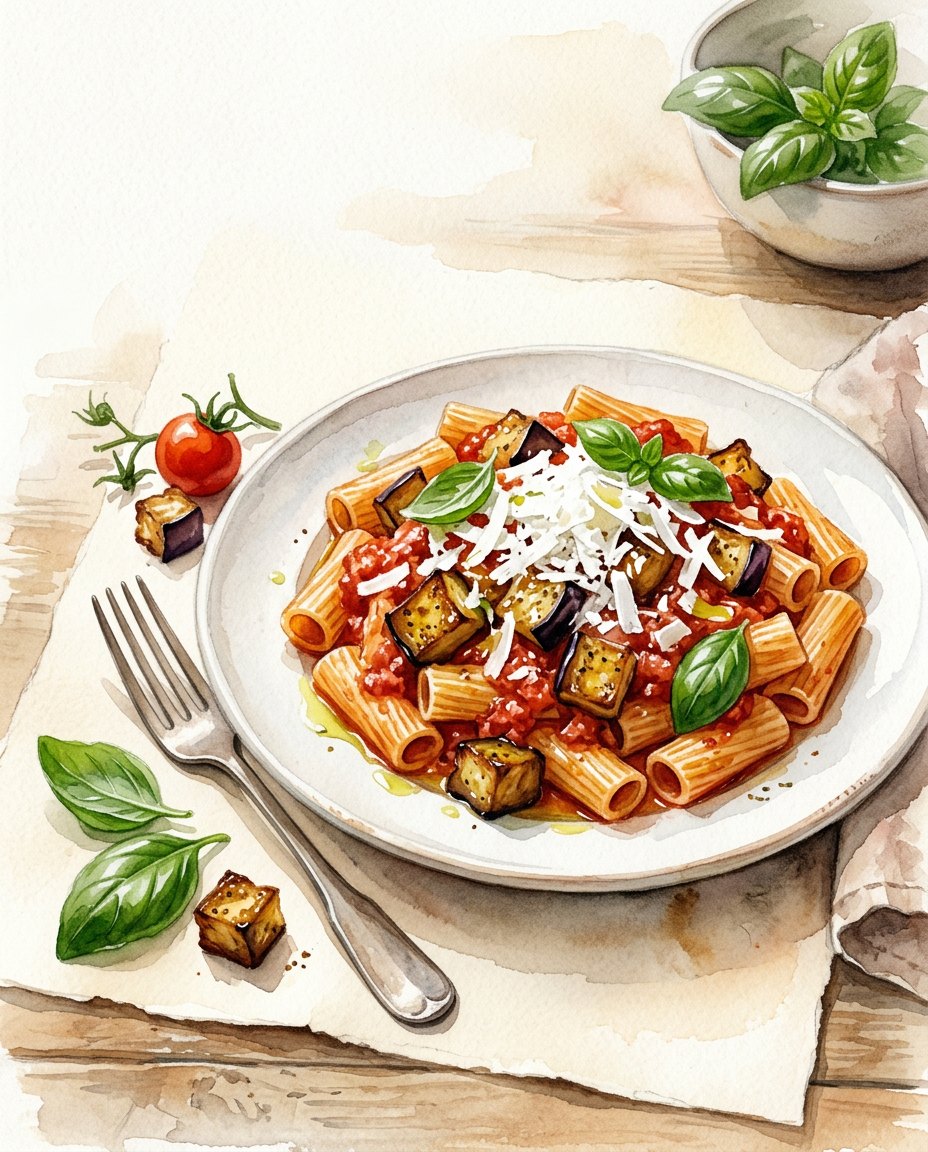
Section titled “Try it: a recipe card, twice”A cooking school illustrates the recipe of the week for its newsletter. The lab makes the picture twice from the same recipe: once from a prompt assembled from the fields, once from a prompt written by Text Generation with the school’s art direction. Both go to Text to Image with the default model, at 4:5.

The recipe:
{ "dish": "pasta alla Norma", "ingredients": "rigatoni, aubergine, tomato, ricotta salata, basil, olive oil, garlic", "chef_notes": "The aubergine is fried in cubes until deep golden and stirred in at the end, so it stays in pieces on top of the sauce. The ricotta salata is grated generously over the plate, white against the red. A few whole basil leaves, never chopped."}The assembled prompt:
A watercolour illustration of pasta alla Norma, made with rigatoni, aubergine, tomato, ricotta salata, basil, oliveoil, garlic. White background, soft light, no text.The written prompt, from the art direction “loose watercolour on warm off-white paper, seen from slightly above, the finished dish on a simple plate with two or three of its raw ingredients beside it, natural daylight from the left, generous empty space at the top for the title; never people or hands, never text”:
Loose watercolour illustration on warm off-white paper, viewed slightly from above: pasta alla Norma served on asimple white plate, rigatoni coated in a rich red tomato sauce, with deep golden fried aubergine cubes resting visiblyon top. Generous snowy shavings of ricotta salata contrast against the sauce, with a few whole glossy basil leavesscattered over the surface and a delicate sheen of olive oil. Place aubergine, tomato and basil beside the plate.Natural daylight from the left, generous empty space above, no people, hands, text, letters or logos.| From the assembled prompt | From the written prompt |
|---|---|
 |
 |
- The assembled prompt gave a good picture of a pasta alla Norma: the image model’s own idea of the dish — aubergine in slices, seen from straight above — and nothing of the school’s style.
- The written prompt carried the chef’s notes into the picture — golden cubes on top, whole basil leaves — and the art direction: warm paper, the raw ingredients beside the plate, the light from the left.
- Neither is exact. The written prompt turned grated into shavings, and the image model left less room at the top than asked. A prompt is a request at every step of the chain: check the first items of a batch before running the rest.
The run costs about 10 credits: 5 for each picture, 0.017 for the prompt that was written.
node madoo-install-example.mjs lab-prompts-for-ai-steps --api <your Madoo API URL> --key <key.json> --runThe two pictures were generated for this lab by the default Text to Image model.
When something goes wrong
Section titled “When something goes wrong”| Symptom | Cause | What to do |
|---|---|---|
| Every picture of a batch looks generic | the prompt repeats the fields and nothing else | write it with a model from the notes, or add the look to the template |
| Pictures of a batch do not look like one series | the style is in the item’s prompt, and varies with it | put the style once in the system prompt of the writing step, or in the fixed part of the template |
| A detail in the picture is not in the data | the writing model added it, or the image model did | forbid additions in the system prompt; save the prompt as an output and read it |
| Text or letters in the picture | the prompt asked for them, or did not forbid them | forbid text in the art direction; add titles afterwards with Text on Image |
The image step fails with MISSING_PROMPT or refuses the prompt |
the prompt was empty, or a branch was skipped | check the writing step’s output; a refused prompt says why in its message |