

D01 — Shop catalog from a price list
A small studio keeps its price list in Excel and sells online. Every new collection means the same afternoon: write a description for each piece, find the tags, keep the SEO title under sixty characters, photograph every object, add VAT to every price, and paste it all into the shop’s import file. This workflow does the afternoon in one run: from the workbook to a Shopify product CSV ready to import, with a product photo for every piece.
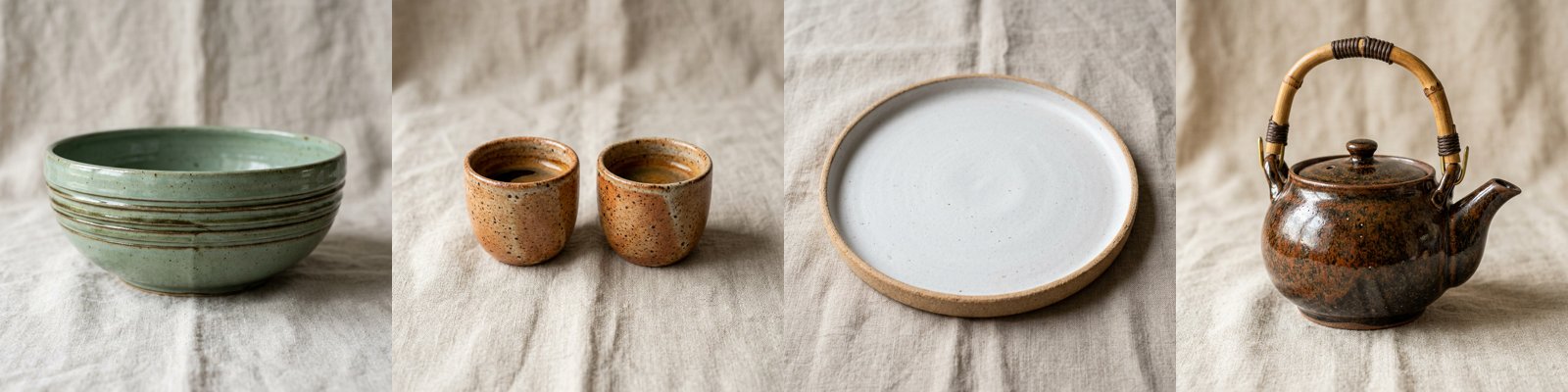
A reference run: 6 rows read, 4 products in the file, 1 held for review, 1 not listed — 20.2 credits. The Shopify CSV (image links shortened) · the run’s outputs.
The case
Section titled “The case”Terra & Glaze (a fictional studio making handmade stoneware in Faenza) prepares its 2026 collection: six pieces in three collections. The price list is the studio’s own workbook — SKU, product, collection, glaze, size, net price, stock and a column of maker’s notes, the facts only the maker knows (“the glaze pools darker in the carved rings”, “hand wash only”).
| Input | Who provides it | Example |
|---|---|---|
| Price list | the studio’s workbook, as it is | source-price-list.xlsx: 6 pieces, one out of stock |
| VAT rate | the shop’s country | 0.22 (Italy) |
| Vendor | the brand | Terra & Glaze |
What it shows
Section titled “What it shows”- Nothing paid for what will not be sold. A Predicate on the stock and a Filter stand in front of the copy: the bud vase has 0 in stock, so its brief, its copy and its photo are never made. It is reported in Not listed, not silently dropped. See Branches and absence.
- The AI writes, a schema decides. The copy step answers in JSON — handle, title, HTML description, tags, SEO title
and description, an idea for the photo — and Validate JSON Schema in
routemode holds it to the shop’s rules: a URL-safe handle, an SEO title of at most 60 characters, a description of 70 to 155, three to eight tags in the shop’s format. Copy that breaks a rule does not reach the shop: its row is cut, no photo is made for it, and it goes to Copy to review with the exact errors. See Schemas and contracts. - Facts from the price list, words from the AI. The instructions let the model use only the facts it is given, so
sizes, materials and care come from the maker’s notes, not from its imagination. Prices never pass through the AI:
Calculate adds VAT exactly (
round(price * (1 + vat_rate), 2): 64.00 → 78.08). See Calculating. - A photo that matches the words. The copy step also writes one sentence about the object; a Template adds the studio’s photo direction (natural linen, soft north light, no props), and the image model makes a square product photo. Every photo in the reference run matches its glaze, shape and size.
- An import file, not a list. Generate CSV writes Shopify’s columns (Handle, Title, Body (HTML), Vendor, Type,
Tags, Variant SKU, Variant Price, Variant Inventory Qty, Image Src, SEO Title, SEO Description, Status…). The Handle
column has
whenAbsent: skip_row, so a piece that was not listed or whose copy was held back leaves the file instead of becoming an empty product. The photos are copied to permanent storage and their links go in Image Src, where Shopify downloads them during the import. - A table, the Madoo way. Data Input reads the workbook and Data Rows gives one iteration per piece, with typed columns. See Spreadsheets and datasets.
The workflow
Section titled “The workflow”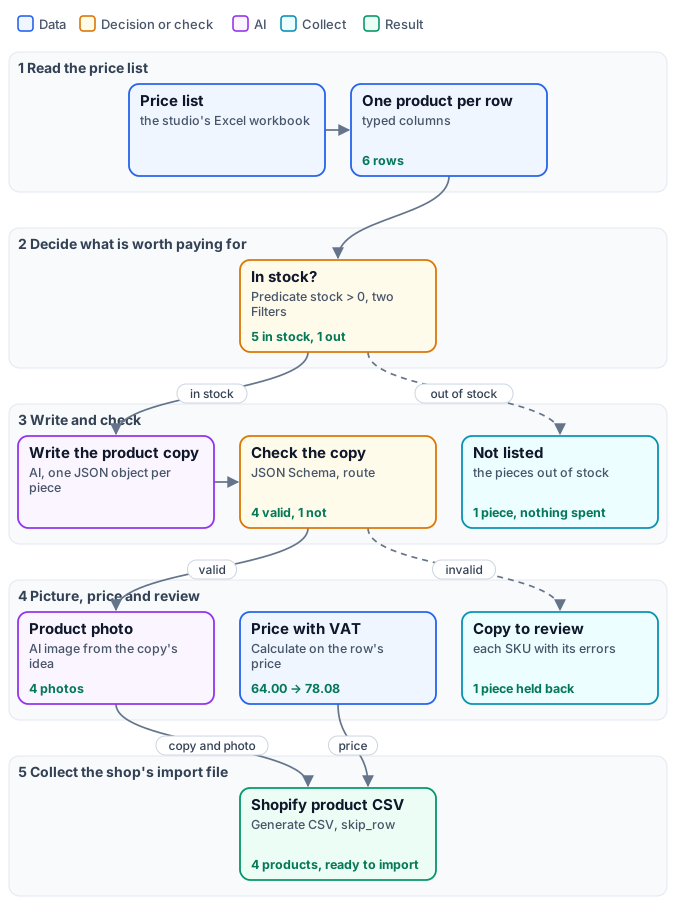
The figure tells the workflow as stages, with the reference run’s results on the cards; the exact graph is the workflow (as a diagram), node by node in the table.
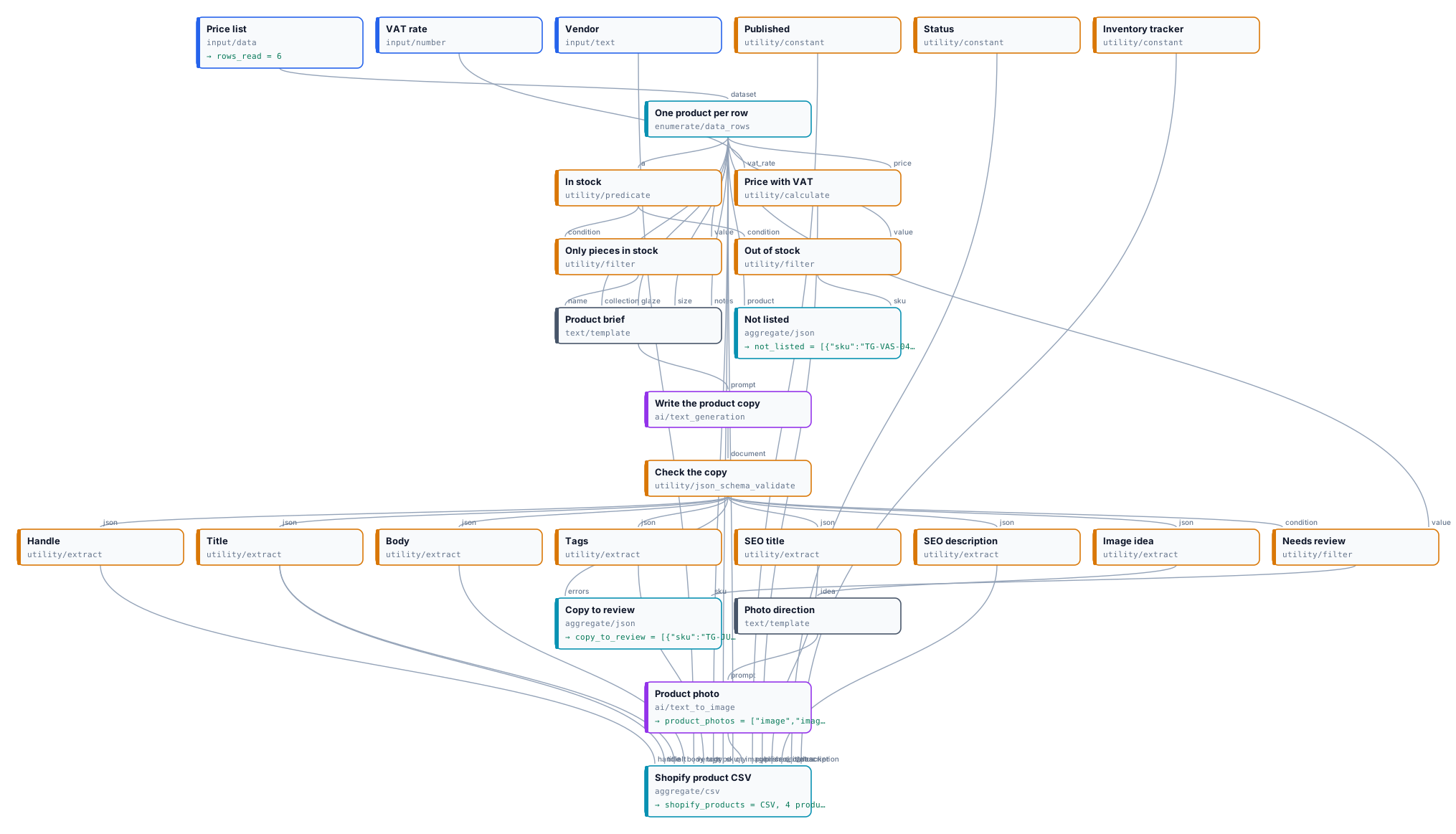
| Node | Type | Why |
|---|---|---|
| Price list | input/data, the workbook as default file |
The table as a dataset, whatever the format; a new list is passed at run time |
| One product per row | enumerate/data_rows |
Typed columns: SKU, name, collection, glaze, size and notes as text, price and stock as numbers |
| In stock / Only pieces in stock / Out of stock | utility/predicate (stock > 0), utility/filter twice, one inverted |
An if/else per piece: the paid branch runs only for pieces in stock |
| Product brief | text/template |
The facts of the row, as the copywriter reads them |
| Write the product copy | ai/text_generation, json_object, temperature 0.6 |
The studio’s voice, facts only, one JSON object per piece |
| Check the copy | utility/json_schema_validate, inline schema, route |
The shop’s limits; an invalid answer cuts the branch |
| Handle … Image idea | utility/extract ×7 |
The fields of the checked copy |
| Photo direction / Product photo | text/template, ai/text_to_image (1:1) |
The object from the copy, the look from the studio |
| Price with VAT | utility/calculate |
Exact decimals, never an AI |
| Needs review / Copy to review | utility/filter (inverted on valid), aggregate/json |
The SKUs held back, each with its errors |
| Not listed | aggregate/json |
The pieces out of stock |
| Published, Status, Inventory tracker, Vendor | utility/constant, input/text |
The same value on every row of the file |
| Shopify product CSV | aggregate/csv, Handle with whenAbsent: skip_row |
One row per published piece, photos as permanent links |
Reading a run: Rows read says how many pieces the list had (6). Not listed names the piece out of stock. Copy to review names the pieces whose copy broke a rule and says which — in the reference run the olive oil jug, whose tags did not follow the shop’s format. The CSV has the four pieces left. The AI is not deterministic: another run may hold back another piece, or none; the review list is how a person finds out, before the shop does.
Cost: 20.2 credits in the reference run — four photos at 5 credits, five copies at about 0.04. The estimate before the run knows the list has six rows, so it reserves for six copies and six photos (about 35 credits). The piece out of stock costs nothing, and a piece held back by the schema costs only its copy, never its photo. Data reading, decisions, checks, calculations and the CSV are free.
Install it
Section titled “Install it”The example installs into your workspace with an API key, through the public API only — see Installing an example:
node madoo-install-example.mjs d01-shop-catalog --api <your Madoo API URL> --key <key.json>It uploads the price list as the workflow’s default file and publishes the workflow. Add --run to run it once
(about 20 credits), and --save <folder> to download the CSV, the photos and the lists.
Change it
Section titled “Change it”- Your catalogue: pass your own workbook on Price list at run time. Keep the column names, or change the mapping in One product per row — inspect the file first.
- Your voice: the instructions of Write the product copy hold the brand’s tone and the words to avoid.
- Your shop’s rules: the limits are in the schema of Check the copy; tighten them, and the review list shows what they catch.
- Your look: the photo direction is one sentence in Photo direction; for photos of the real objects, start from them with an image-editing step instead of generating.
- Another platform: the columns of Shopify product CSV are the import format; another marketplace’s feed is another list of columns.