

Designs on products
A personalised product is sold before it is made: a tote bag with the customer’s logo, a notebook with a name in gold, a cutting board with a family mark. The shop needs a picture of it as it will be made — the thread of the embroidery, the shine of the foil, the dark grain of burnt wood — and a logo pasted flat on a photo does not show that.
Madoo does it in two steps. First, the design is placed on a photo of the blank product with deterministic steps, exactly where and how large it will be. Then an AI product node makes the product picture and applies an effect — a production finish — to the design alone. The blank photo goes with it, so the model can compare the two and knows which part is the design and which is the product.
Effects
Section titled “Effects”An effect is a production finish, chosen from Madoo’s catalogue by its code on the node’s effect setting. There are
66, in 10 families:
| Family | Effects |
|---|---|
| Textile (14) | embroidery, embroidery_3d_puff, embroidery_satin, embroidery_cross_stitch, screen_print, screen_print_vintage, vinyl_htv, vinyl_glitter, sublimation, dtg_print, flock, chenille, applique, patch_sewn |
| Relief (4) | emboss, deboss, emboss_blind, letterpress |
| Metallic (7) | foil_gold, foil_silver, foil_rose_gold, foil_holographic, foil_copper, metallic_chrome, metallic_brushed |
| Surface (10) | engraving, laser_etching, sandblasting, uv_glossy, uv_matte, spot_uv, varnish_glossy, varnish_matte, soft_touch, texture_none |
| Special (10) | glitter, glow_in_dark, thermochromic, reflective, pearlescent, iridescent, raised_ink, puffy_ink, suede_ink, gel_ink |
| Glass (4) | frosted_glass, etched_glass, glass_emboss, glass_deboss |
| Leather (4) | leather_emboss, leather_deboss, leather_hot_stamp, leather_burnish |
| Wood (3) | wood_engraving, wood_burning, wood_carving |
| Metal (4) | metal_engraving, metal_etching, metal_stamping, enamel |
| Adaptive (6) | adaptive_emboss, adaptive_deboss, adaptive_print, adaptive_stamp, adaptive_engrave, adaptive_stitch — made in the product’s own material, when you do not know it in advance |
get_node_type over MCP lists the codes for any node that takes an effect. Each effect adds a sentence of its own to
the node’s prompt: “rendered as professional machine embroidery with visible thread stitches…”.
The nodes that take one
Section titled “The nodes that take one”| Node | Blank product | Makes |
|---|---|---|
| Product Photography | yes | A packshot |
| Lifestyle | yes | A scene |
| Showroom Visualizer | yes | Furniture or decor in a room |
| Background Swap | yes | The same product on another backdrop |
| Magic Swap | yes | The product in another material or colour |
| Virtual Try-On | yes | A garment worn by a person |
| Ad Generator | no | An advertisement |
The product with its design goes on product_image; the same product without it on blank_product_image. The blank
is always sent last, after any reference picture, and the node’s prompt says so: “the last image is the same
product without its design: use it only to identify the design… and do not show it”. The effect is then applied to
that design only.
Without a blank, the node applies the effect to “the design, logo or print on the product” and the model decides what that is — fine for a product whose logo is obvious, risky for a patterned one, where the whole surface may change.
Putting the design on the blank first
Section titled “Putting the design on the blank first”The design reaches the AI step already in place, made by deterministic steps you control:
- Size the logo with Resize (
mode: fit) — Overlay does not resize, and an SVG logo is turned into 2048 px before any image step. - Place it with Overlay:
anchor: centerandx/yto move it onto the printable area; for a name or a date, Text on Image in the brand’s font. - Connect both the marked product and the blank to the AI node.
The position and the size are then yours, the same for every order; the model only renders the finish. One workflow serves every customer: the logo and the name are inputs.
Good practice
Section titled “Good practice”- The blank is the same photo: same framing, same light. Placing the design on it, as above, guarantees that.
- Choose the effect for the material:
wood_burningon wood,leather_hot_stampon leather,embroideryon fabric. For a catalogue of mixed materials, theadaptive_effects follow each product. - A design in the colour of the product fades into it under relief and foil effects — as the navy disc of the lab’s mark on the navy cover. Use a one-colour version of the logo when the finish is one colour.
- Check the design: the model redraws it, and fine lettering can change. For a logo that must be exact, keep the deterministic mock-up next to the rendered picture.
- Set the view you need: Product Photography shoots three-quarter when
angleis empty, as in the lab; setangle: frontto keep the flat view of the photo.
The lab
Section titled “The lab”The designs lab takes three blank products — a canvas tote bag, a navy leather notebook, a beech cutting board — and the brand mark of the compositing lab.
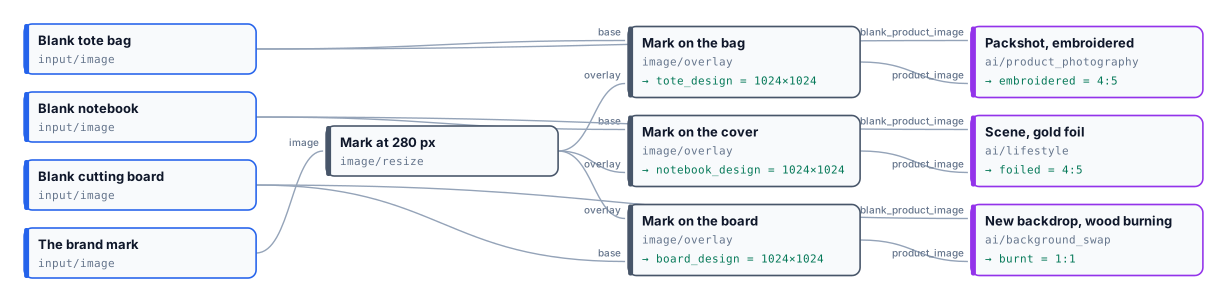
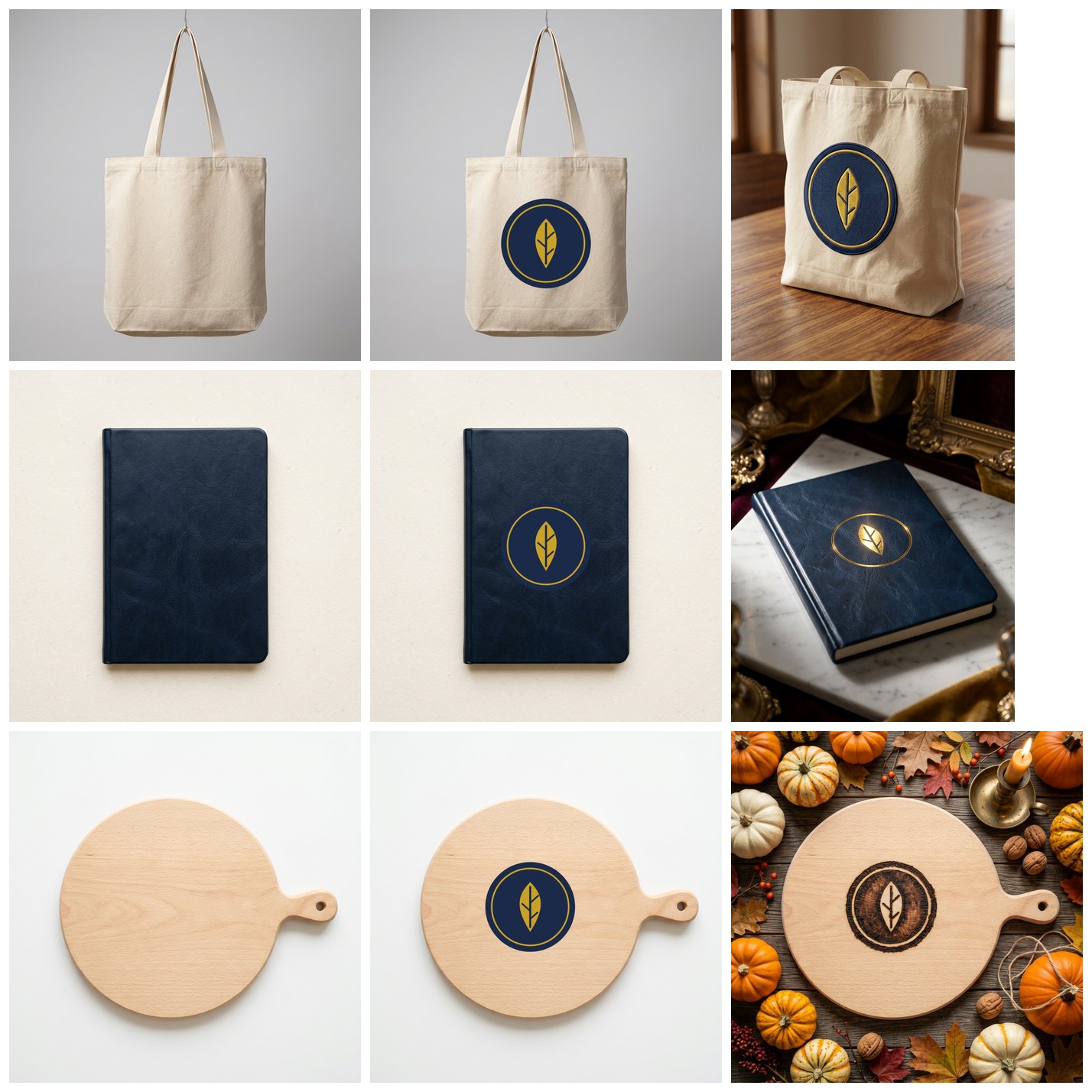
Three pictures, 15 credits; the deterministic steps cost nothing. The finish fell on the mark alone: the bag, the leather and the wood around it kept their own texture, and each mark stayed where Overlay put it.
node madoo-install-example.mjs lab-designs-on-products --api <your Madoo API URL> --key <key.json> --run --save designsLimits
Section titled “Limits”- One effect per step. For two finishes on one product — a foil name and an embossed logo — run a second node on the first result.
- The effect’s intensity is accepted but does not change the prompt yet; describe “subtle” or “bold” in
custom_prompt. - Effects are Madoo’s catalogue; a workspace cannot add its own.
custom_promptcan describe another finish.
The blank products are pictures made with Madoo’s Text to Image node for this lab; the rendered pictures were made by Nano Banana 2 Edit. The mark is a drawing made for these labs.