

Typography on video
Captions carry what is said; the other text on a video is written for it — the title that opens a reel, the name
and role of the person speaking, a price, a line pulled from the interview, the call to action at the end. Text on
Video (video/text_overlay) draws that text into the picture with the fonts you choose, where you choose, for as
long as you choose, locally and at no credit cost. It shares its styling, the Text Style (typography, a
madoo.video-typography/v1 object), with the captions of Video Subtitles: one
brand style can dress both.
System fonts are available to every workspace, in their regular, bold and italic variants and often more:
| Category | Families |
|---|---|
| Sans-serif | Inter, Lato, Montserrat, Nunito, Open Sans, Oswald, Poppins, Raleway, Roboto, Work Sans |
| Serif | Libre Baskerville, Lora, Merriweather, Noto Serif, Playfair Display, PT Serif |
| Display | Abril Fatface, Bebas Neue |
| Handwriting | Caveat, Dancing Script, Pacifico, Permanent Marker |
| Monospace | Fira Code, Roboto Mono, Source Code Pro |
A workspace’s own fonts — a brand typeface, a licensed display face — are uploaded once, in the editor or through the API, as one family with a TTF or OTF file per variant; the regular variant is required:
curl -s -X POST "$BASE_URL/api/v1/fonts" \ -H "Authorization: Bearer $TOKEN" \ -F "displayName=Acme Sans" -F "category=sans-serif" -F "licenseAcknowledged=true" \ -F "files=@AcmeSans-Regular.ttf" -F "files=@AcmeSans-Bold.ttf"licenseAcknowledged records that the licence allows the workspace to use the font. Web formats, variable fonts
and font collections are refused; a file may be up to 20 MB. A new file for the same family is a new revision:
workflows that pinned the earlier one keep it. The assets API
has the details.
A workflow pins the exact font it uses. The font of a Text Style is a madoo.font-reference/v1: the family,
the variant, the weight and style, the version and the fingerprint of its files. A render draws exactly those letters,
next year as today, even after the family gets a new revision or is archived for new work. There is no need to
write a reference by hand: the editor fills it in, and list_fonts returns, for every variant, a ready reference
to paste into the style as it is — in the contract’s own field names (familyGuid, versionGuid). Without a query,
list_fonts lists the families and their variants, to browse; ask the family you choose with query and its variants
come with their references (the references of every font at once would not fit in one answer). Through REST, GET /api/v1/fonts returns the same reference with snake_case field
names, like the rest of the API: write them as familyGuid and versionGuid in a style.
Every character is checked before anything is drawn. If the chosen font has no glyph for a character of the text
— Cyrillic, Greek or Arabic in a Latin-only font, an emoji, a rare symbol — the step stops and names the character
(FONT_GLYPH_COVERAGE_INSUFFICIENT) instead of drawing empty boxes. Scripts that join or reorder their letters, such
as Arabic, Hebrew or Devanagari, are rendered with complex shaping; they need a font that covers them, uploaded like
any other.
One text or many layers
Section titled “One text or many layers”In its simplest form Text on Video draws one Text (text), for the whole video or between Show Start and
Show End (show_start, show_end, in seconds). The text can come from another step on the Text input — a
product name from a spreadsheet, a headline written by a language model — and then it wins over the parameter.
For more than one text, Text Layers (text_track) lists them: each layer has an id, its text, a start and
an end in seconds, and optionally its own typography. All the layers are drawn in one render pass — the
video is encoded once, however many texts it carries — and each can differ in font, size, colour, place and motion:
{ "schema": "madoo.video-text-track/v1", "events": [ { "id": "title", "text": "We are going back", "start": 0, "end": 2.8, "typography": { "…": "…" } }, { "id": "name", "text": "Reid Wiseman", "start": 0.6, "end": 5.6, "typography": { "…": "…" } } ]}The exact shape of a track is madoo.video-text-track/v1, and of a style madoo.video-typography/v1: read either
with get_json_schema, or in the contracts appendix.
The layers can also arrive on the Timed Text Track input from an upstream step — a language model that writes
the titles of a video from its transcript, a spreadsheet of prices with their timings — and then they replace both
Text and Text Layers. A text on the Text input and a track together are refused (TEXT_TRACK_INPUT_XOR). The Text
Style of the node styles a single text, and every layer that does not bring a typography of its own.
When the layout is fixed but some words come from other steps — the name of a place, a formatted price, a title an
AI model wrote — write them as placeholders in the texts of Text Layers: {{place}}, da {{price}} EUR. Each
distinct name becomes a text input of the node, named like the placeholder, and its value replaces the marker when
the step runs. The inputs take text: a number — a price from Calculate, a count — goes through Format as Text
(text/format) first, which writes it the way the language expects (485 → 485 € in Italian). The timings and
styles stay in the track, and the video is still encoded
once, where before every text from another step needed a Text on Video node of its own and an encode of the whole
video. A name is a letter followed by letters, digits or _, at most 32 per node, and it cannot be the name of an
input the node already has (video, text, text_track). Placeholders are filled only in the Text Layers
parameter: a track that arrives on the Timed Text Track input is drawn as it is.
The Text Style
Section titled “The Text Style”The same fields as for captions (see Typography: how captions look), with the ranges that matter when designing text:
| Part | Fields | What to know |
|---|---|---|
| Size | mode fixed (pixels) or relative (% of the video height), value, min, max |
The size of the letters, as in a design tool; relative reads the same at 720p and 4K. min/max bound it (8–500 px). |
| Text | color, opacity, transform (none, uppercase, lowercase), letterSpacing (−10 to 50), lineSpacing (0.75 to 3) |
Condensed display faces in capitals often want a little letter spacing and tight line spacing. |
| Layout | anchor (nine positions), alignment (left, center, right), offsetXPercent/offsetYPercent (−100 to 100), maxWidthPercent (10–100), maxLines (1–8), overflow (fit, clip, fail) |
The anchor puts the text in a corner, on an edge or in the centre of the safe area; the offsets move it by a share of the frame. |
| Safe area | preset none, title-safe, social-portrait, custom; four margins (0–45%) |
social-portrait keeps text clear of the name, description and buttons a vertical feed draws over the video. |
| Legibility | outline (width 0–20), shadow (offset, blur 0–20, opacity), background (a box: colour, opacity, padding 0–200) |
An outline for text over busy pictures, a shadow for a softer look, a box when the text must read on anything. |
| Motion | entrance, exit (none, fade), durationMs (0–2000) |
A short fade — 200 to 350 ms — makes titles appear and leave without a jump. |
The presets of the editor are starting points that set several fields at once: minimal (a thin outline and a
soft shadow, no box, title-safe), social (a box inside the social-portrait safe area), high-contrast (a stronger
outline and a darker box) and lower-third (left-aligned at the bottom left, 65% wide, on a box).
When the text does not fit its lines, fit makes it smaller down to min, clip drops the lines beyond maxLines,
and fail stops the step with TEXT_OVERFLOW — the right choice when a text that does not fit must not be published
smaller than the brand allows.
A Text on Video without a Text Style is drawn by an older renderer with a handful of parameters (font_size,
font_color, position, shadow, margin) and the worker’s fonts; it remains for existing workflows. New
workflows always pass a Text Style — the editor adds one to every new node.
Recipes
Section titled “Recipes”- A title card. Anchor
top-centerorcenter, a display face (Bebas Neue, Abril Fatface, Oswald) at 7–10% of the height, capitals with a little letter spacing, an outline and a shadow, a fade of 250 ms. - A lower third. Two layers anchored
bottom-leftand left-aligned — the name in a bold weight on a dark box, the role smaller on a coloured box — the name moved up by the height of the role (offsetYPercentabout −5%), both inside the social safe area on a vertical video ortitle-safeon a landscape one. - A price or a figure. A heavy weight,
fixedsize so it never shrinks,overflow: fail, in a corner with a box in the brand colour. - A quote. A serif or an italic, centred a little below the middle, three lines at most, a soft shadow.
- A call to action. Dark text on a bright box at the bottom of the safe area, in the last seconds, with a fade.
- Text beside the picture, not over it. On a landscape video presented in a vertical frame, put the text in the bands — the letterbox lab works out the offsets.
The lab
Section titled “The lab”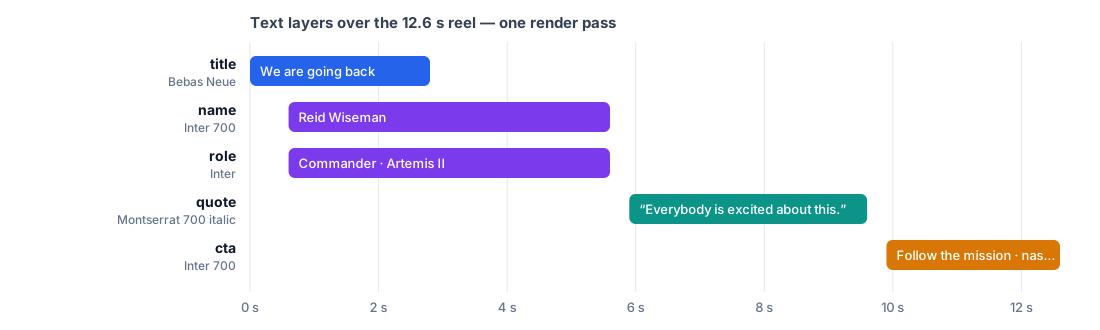
The vertical reel of the editing lab gets five text layers in one Text on Video node, with the system fonts every workspace has:
- title, 0–2.8 s — “We are going back” in Bebas Neue at 8.5% of the height, capitals, an outline and a shadow, anchored at the top of the social safe area;
- name and role, 0.6–5.6 s — a lower third: “Reid Wiseman” in Inter Bold capitals on a dark box, and under it “Commander · Artemis II” in Inter on a yellow box, both at the bottom left;
- quote, 5.9–9.6 s — “Everybody is excited about this.” in Montserrat Bold Italic, centred below the middle, with a soft shadow and a slower fade;
- cta, 9.9–12.6 s — “Follow the mission · nasa.gov/artemis” in Inter Bold capitals, dark on a yellow box, at the bottom.
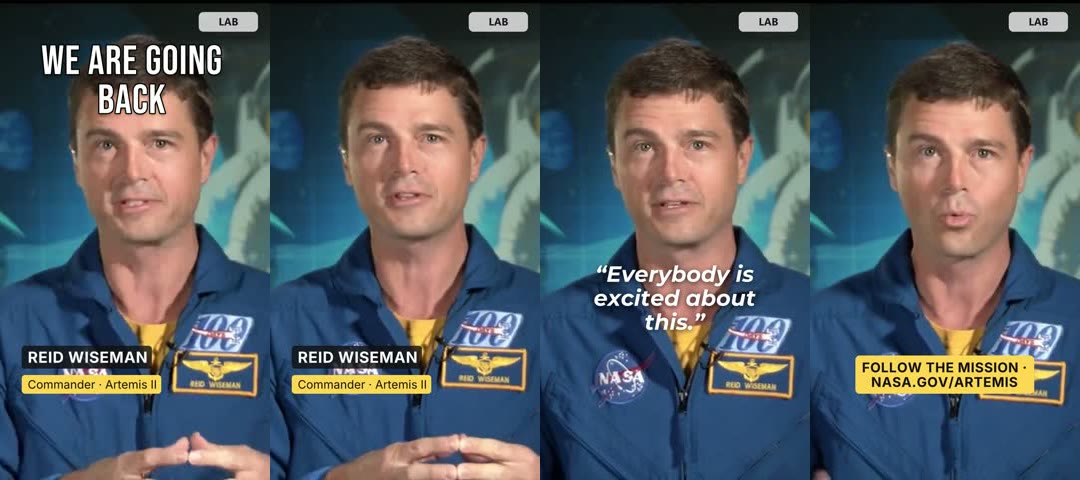
The reel is 720×1280 and 12.6 s, re-encoded at 540×960 for this page. One render pass, 0 credits.
node madoo-install-example.mjs lab-typography --api <your Madoo API URL> --key <key.json> --run --save titledTo dress your own video, replace the texts and timings of the layers; to use your brand’s typeface, upload it and
put its reference from list_fonts in the font of each style.
Media: “Artemis Media Resource — Interview Soundbites”, NASA (public domain; NASA does not endorse this documentation). Music in the reel: “Local Forecast – Elevator” Kevin MacLeod (incompetech.com), licensed under Creative Commons: By Attribution 4.0 License, http://creativecommons.org/licenses/by/4.0/.
When a step fails
Section titled “When a step fails”| Code | Meaning | Fix |
|---|---|---|
EMPTY_TEXT |
there is no text: the parameter is empty and nothing arrived on the Text input | write the text, or connect the step that produces it |
TEXT_TRACK_REQUIRES_TYPOGRAPHY (also at validation) |
the step has a text track but no Typography: a track is drawn only with a typography style | set Typography (the editor fills in its default; through the API, copy the default from get_node_type), or use the single Text instead of a track |
TEXT_TRACK_INPUT_XOR |
a text on the Text input and a track of layers together | keep one of the two |
TEXT_PLACEHOLDER_MISSING |
a layer uses {{name}} and nothing arrived on the input name; the message gives the layer, e.g. $.events[2].text |
connect a text to that input, or remove the placeholder |
TEXT_PLACEHOLDER_NOT_TEXT |
a file other than text or JSON arrived on a placeholder input | connect a text |
TYPOGRAPHY_INVALID |
a Text Style or a layer is incomplete or out of range; the message names the field | start from a preset in the editor, or fix the field |
FONT_REFERENCE_INVALID |
the font is incomplete (a missing version, weight or fingerprint) |
take the reference from list_fonts |
FONT_NOT_FOUND, FONT_VERSION_NOT_FOUND, FONT_VARIANT_NOT_FOUND |
the font, its version or its variant does not exist in the workspace or the system | take the reference from list_fonts, or upload the font |
FONT_MAPPING_REQUIRED |
the font the workflow pins is no longer available | choose a replacement font for it in the editor |
FONT_GLYPH_COVERAGE_INSUFFICIENT |
the font has no letter for a character of the text | choose a font that covers the script, or upload one |
TEXT_OVERFLOW |
a text does not fit its lines at the minimum size and overflow is fail |
allow more lines or a wider line, lower min, or shorten the text |
MEDIA_TOO_LARGE, MEDIA_WORK_CAPACITY |
the video is over 2 GiB, or the worker is busy with other media | cut long videos into segments; a busy worker is retried automatically |