

Measuring fine detail
A picture can keep its colours and its composition and still lose what makes it real: the weave of a fabric smeared
by a model, a product enlarged from a small file, a photo saved once too often as JPEG, grain that was never in the
shot, halos left by sharpening. Seen as a thumbnail, none of it shows. Image Detail (image/detail) looks at the
pixels one small patch at a time, at full resolution, and returns numbers for that fine detail. It also says where to
look: a rectangle around the most detailed patch, ready for Crop, so a vision model can judge that
area at full size instead of a scaled-down picture. No model is asked: the same picture gives the same numbers every
time, at no credit cost.
| Domain | The question |
|---|---|
| A shop’s catalogue | did the generated packshot keep the weave of the fabric, or smear it? |
| Generated and edited pictures | is this picture as detailed as the reference it was made from? |
| Upscaling and delivery | did the enlargement or the compression lose detail the original had? |
| Review by a vision model | which area of the picture should the model see at full size? |
| Publishing and archives | is this scan sharp, or soft, grainy or over-sharpened? |
What it gives
Section titled “What it gives”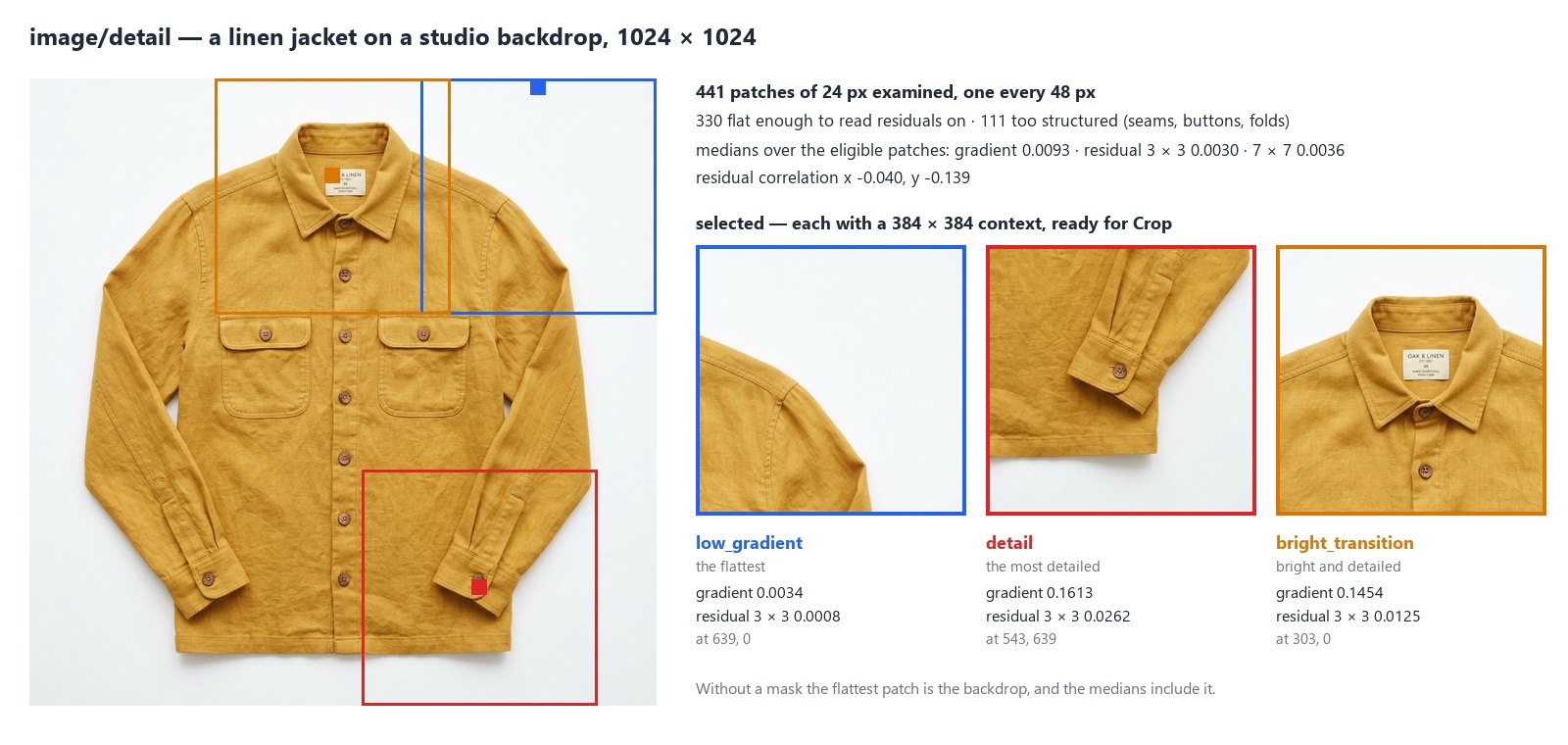
The node lays square patches (24 px, from Patch Size) over the picture every 48 px (Stride; the step grows on a large picture so that at most Max Patches, 4096, are examined). For each patch it reads the brightness of its pixels (luma, 0 black to 1 white) and computes:
- the gradient: how much the brightness changes from one pixel to the next — high on edges and texture, near zero on a smooth area;
- the residuals: what is left of each pixel once the average of its 3 × 3 neighbourhood is taken away (and,
separately, of its 7 × 7 neighbourhood) — the finest detail, at two scales. Their spread is
residual_mad_3andresidual_mad_7(a robust standard deviation); - the residual correlation (
residual_corr_x,residual_corr_y, −1 to 1): whether neighbouring residuals go together. Independent grain gives about −0.17 on a 3 × 3 window; smoothing gives a clearly positive value, because each pixel then resembles its neighbour.
Residuals are only meaningful where the picture is flat: on an edge they measure the edge. So the global figures are
medians over the eligible patches — opaque, inside the mask if there is one, neither too dark nor too bright
(luma_min 0.025, luma_max 0.975) and flat enough (gradient at most Flat Gradient Max, 0.055). The report
counts every patch it left out and why. The same medians are given per tone band — five bands of brightness,
0–0.2 to 0.8–1 — since shadows and highlights do not carry detail the same way.
Then it chooses patches to look at, one per role, in the order of Roles (select), at least Min Separation
(128 px) apart:
| Role | The patch |
|---|---|
low_gradient |
the flattest eligible patch: where residuals read cleanly — grain, noise, compression |
detail |
the most detailed opaque patch: texture, a seam, a button — where sharpness shows |
bright_transition |
the opaque patch where brightness and detail together are highest: a label, a lit edge |
Each comes with a context, a rectangle of Context Size (384 px) centred on it and kept inside the picture. Four outputs carry the result:
| Output | What it is |
|---|---|
detail |
the whole result as JSON (madoo.image-detail/v1): patches, global, bands, selected |
selected_regions |
the context of every chosen patch, best first: [{"role": "detail", "x": 543, "y": 639, "width": 384, "height": 384}] |
best_region |
the first of them: wire it into Crop’s Region |
quality_check |
the check, for a Quality Gate: it fails when no patch is eligible |
A closer look
Section titled “A closer look”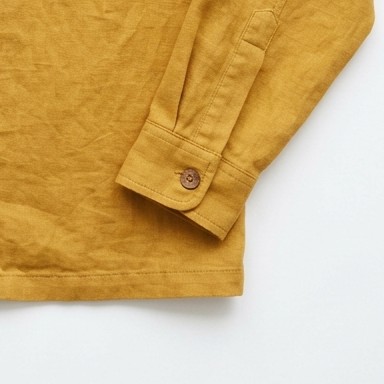
A vision model shown a whole 1024 × 1024 picture sees it scaled down; the weave of a fabric is gone before it is
judged. Wire best_region into the Region of Crop, the same picture into Crop’s Image, and
the crop into Image Analysis: the model sees 384 × 384 pixels of the cuff at full size.
On the jacket it answered linen: a subtly slubby woven surface with natural creases, sharp, no artefacts.
Crop also reads the whole detail document (it cuts the first chosen context) and each item of
selected_regions: enumerate them with the JSON Enumerator to cut every
chosen area. The measuring steps are free; only the vision step costs credits.
Against a reference
Section titled “Against a reference”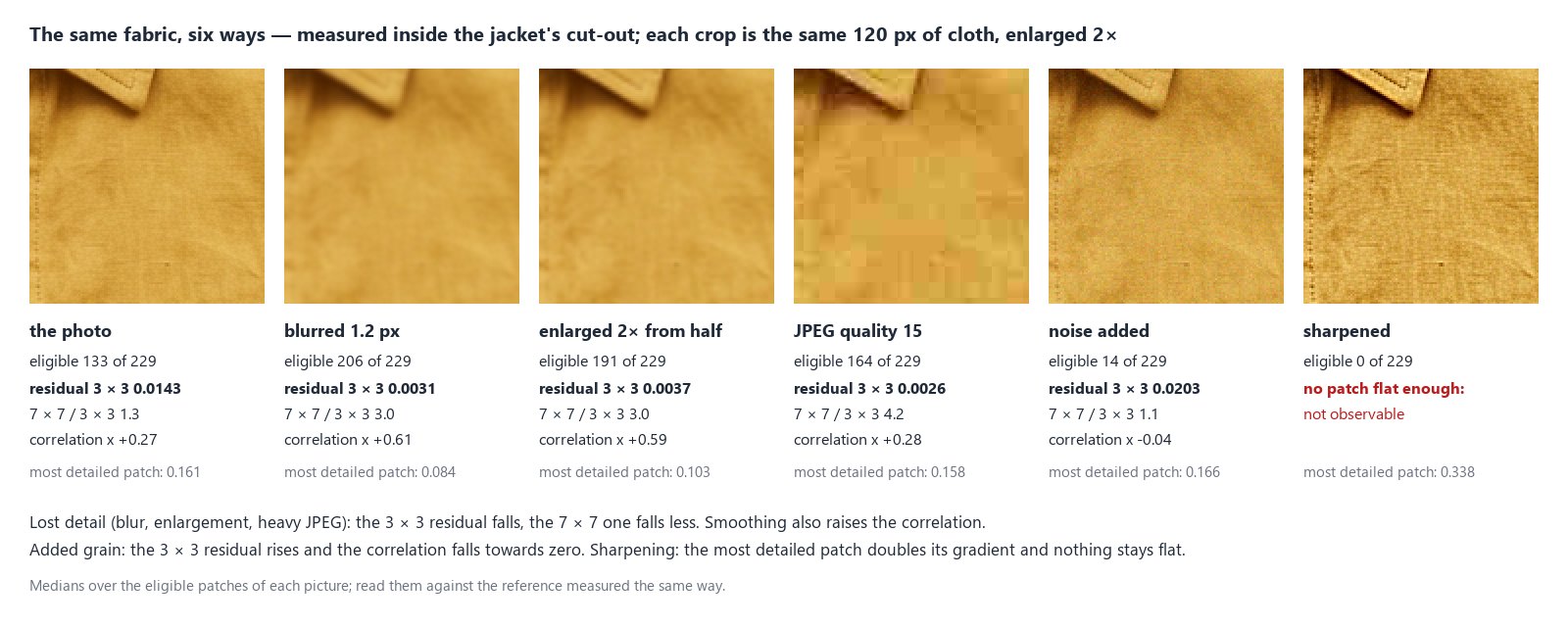
One number alone says little: a linen and a silk, a studio and a phone camera, all have their own fine detail. What the node tells reliably is how a picture differs from its reference — the original photo, the product shot a model was given, the file before it was enlarged or compressed — when both are measured with the same settings. The jacket above was changed in five ways and each version measured inside the cut-out of the original:
| Version | Eligible | Residual 3 × 3 | 7 × 7 / 3 × 3 | Correlation x | Most detailed patch |
|---|---|---|---|---|---|
| the photo | 133 | 0.0143 | 1.3 | +0.27 | 0.161 |
| blurred 1.2 px | 206 | 0.0031 | 3.0 | +0.61 | 0.084 |
| enlarged 2× from half | 191 | 0.0037 | 3.0 | +0.59 | 0.103 |
| JPEG quality 15 | 164 | 0.0026 | 4.2 | +0.28 | 0.158 |
| noise added | 14 | 0.0203 | 1.1 | −0.04 | 0.166 |
| sharpened | 0 | — | — | — | 0.338 |
- Detail lost — a blur, an enlargement, heavy compression: the 3 × 3 residual falls to a fraction of the reference’s (here a fifth to a quarter), the 7 × 7 one falls less, so their ratio rises. More patches become flat enough to be eligible. Blur and enlargement also raise the correlation; JPEG leaves it, but its 8 × 8 blocks are flat inside, which the 3 × 3 residual reads as almost no detail.
- Grain added: the 3 × 3 residual rises, the ratio falls towards 1 and the correlation towards zero; the grain makes most patches too structured to be eligible.
- Sharpened: the most detailed patch doubles its gradient, and nothing stays flat enough to read residuals on.
These are the changes on this jacket; the size of each change depends on the picture and on how much it was altered. Measure the reference and the new picture with the same settings — the same mask, if there is one — and compare them: see the recipe below.
Inside the subject
Section titled “Inside the subject”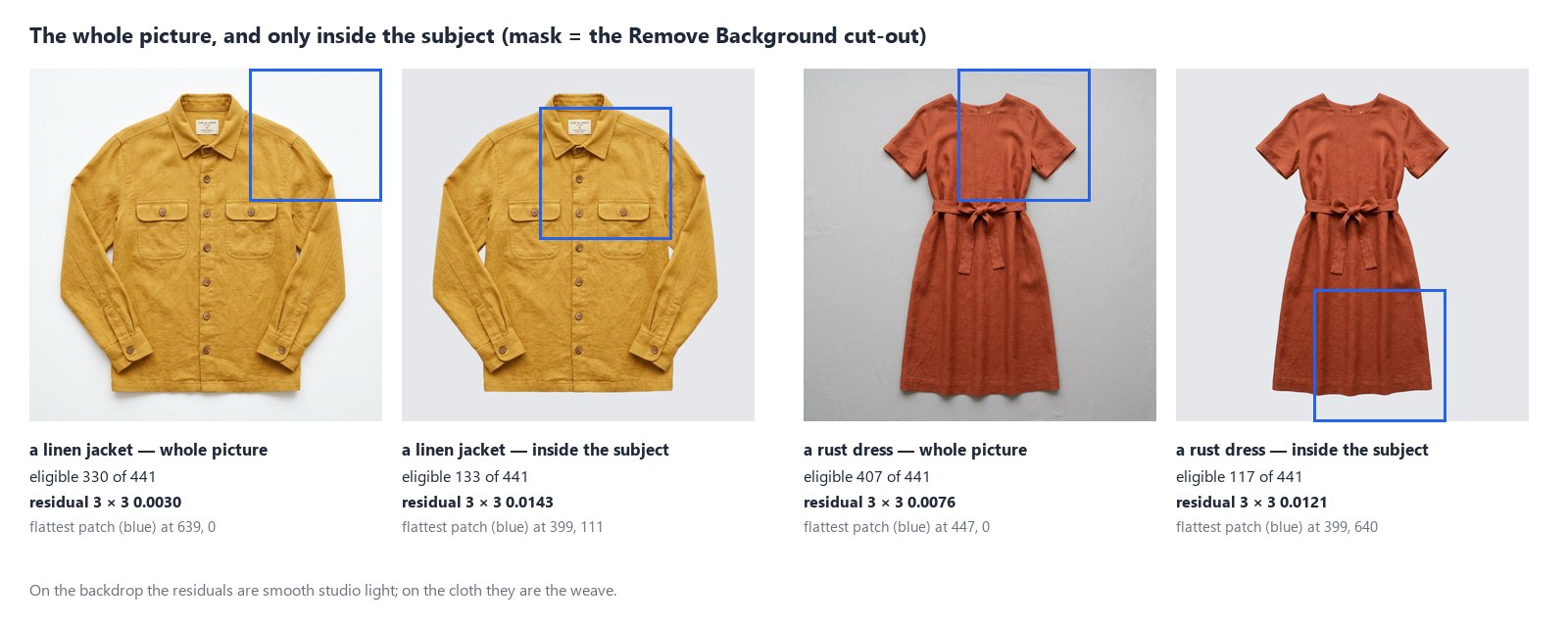
On a packshot most of the flat patches are backdrop, so the medians describe the studio light, not the product: residuals of 0.0030 on the jacket’s whole picture, 0.0143 on the linen alone. Connect a Mask — the cut-out of Remove Background, or any black and white mask of the same size — and only patches whose every pixel is inside it count. The flattest patch then moves from the backdrop to the cloth.
A patch counts as inside when every pixel of the mask under it is above Mask Threshold (128) — its alpha, or
its brightness on a mask without transparency. Patches across the outline are left out (outside_mask), so a thin
subject keeps few patches. A mask of another size fails the step (MASK_SIZE_MISMATCH): it is never stretched. A
cut-out can also be measured on its own, without a mask: a patch with a pixel less opaque than Alpha Min (250),
or within 3 px of one, is left out.
Nothing flat to read
Section titled “Nothing flat to read”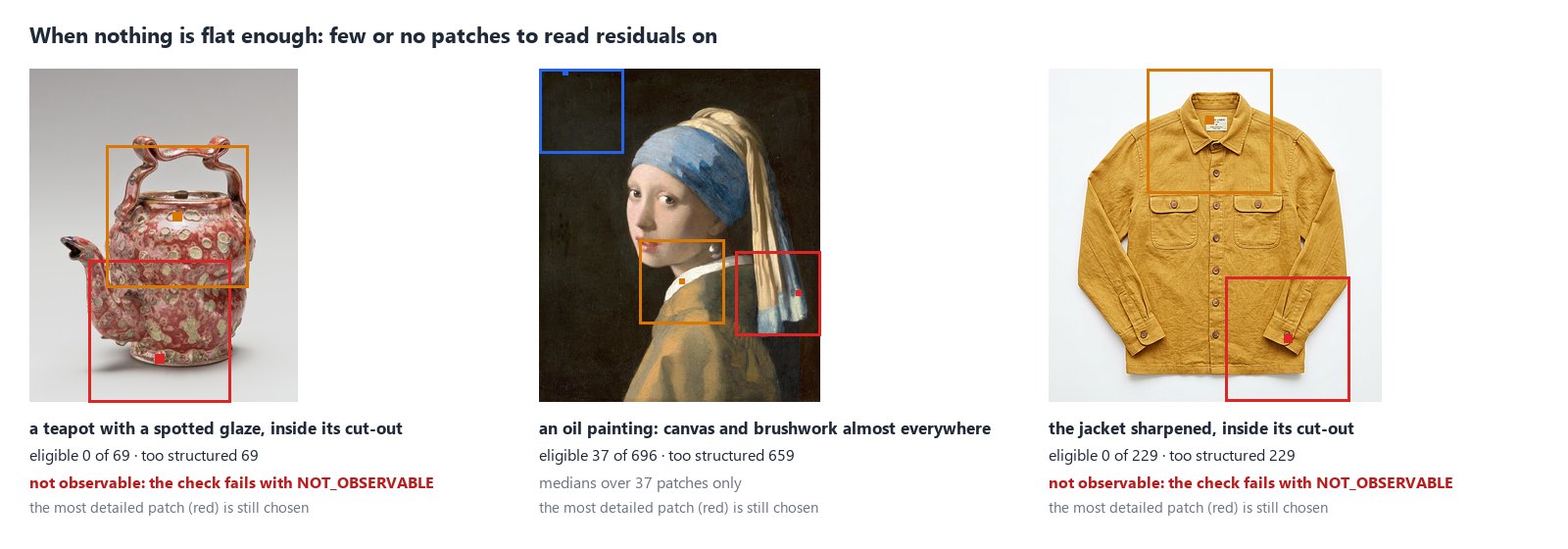
Some pictures have no flat area: a spotted glaze puts an edge in every patch, a painting carries its canvas and its
brushwork everywhere, a sharpened picture has halos on every fold. When no patch is eligible the global figures say
status: "not_observable" with the reason no_eligible_patches, and the check fails with NOT_OBSERVABLE; the
step itself succeeds, and the patches to look at are still chosen among the opaque ones — the most detailed patch
does not need to be flat. Only low_gradient chooses among eligible patches: asked alone on such a picture, it finds
none, and the node gives the centre of the picture instead (role: "center_fallback"), as it does for a picture with
no opaque pixel. With few eligible patches (global.n), read the medians with care.
For a reference that has eligible patches, a new picture with none is itself a finding: it was made much more structured — sharpened, or grained. For a surface that is patterned by nature, Flat Gradient Max can be raised (0.1, 0.2), as long as the reference and the new picture are measured with the same value.
How it reads a picture
Section titled “How it reads a picture”- Upright. A phone photo stored sideways is turned as its EXIF orientation says; every rectangle is in the pixels of the upright picture, as Crop expects.
- In sRGB. A picture with a colour profile is converted to sRGB first (
profile_policy: "converted"); one without is read as sRGB and says so (assumed_srgb). Set Untagged Images tofailto refuse it (PROFILE_REQUIRED). - At full resolution. The picture is never scaled down: fine detail is exactly what scaling would remove. The
brightness is computed patch by patch, never for the whole picture at once;
settings.stepsays the step used. - SDR only. An HDR picture (the PQ or HLG curve) fails with
HDR_NOT_SUPPORTED: convert it to SDR first.
Pictures up to 40 megapixels are read; a larger one fails with IMAGE_TOO_LARGE before it is decoded.
Recipes
Section titled “Recipes”A closer look for a vision model. Photo → Image Detail → best_region into Crop’s Region, the photo into
Crop’s Image → Image Analysis with the question. The model judges the most detailed area at full size.
Every area that matters. Image Detail with Roles ["detail", "low_gradient", "bright_transition"] → JSON
Enumerator over selected_regions → Crop → Image Analysis per crop, and an aggregator to gather the answers.
Did the generated picture keep the detail? Two Image Detail steps with the same settings — one on the
reference, one on the generated picture — each followed by Extract (path global.residual_mad_3, expected_type
number) → Calculate (expression generated / reference) → a Predicate (below 0.5) and two Filters: a picture that
kept less than half of the reference’s fine detail goes to review, the others go on. Measure both inside the
product’s cut-out to leave the backdrop out.
Only the product. Packshot → Remove Background → the cut-out into Image Detail’s Mask, the packshot into its Image: the numbers and the flattest patch are the product’s.
Something to read residuals on. Image Detail’s quality_check into a Quality Gate, with
its own Check ID: a picture with no flat area is held back before a step that needs one.
Settings
Section titled “Settings”| Setting | Default | What it does |
|---|---|---|
Roles (select) |
all three | which patches to choose, in order: low_gradient, detail, bright_transition |
Context Size (context_size) |
384 | the side of the rectangle around each chosen patch, at least Patch Size |
Max Regions (max_regions) |
3 | how many patches to choose, 1 to 3 |
Min Separation (min_separation) |
128 | the least distance between two chosen patches, in pixels |
Patch Size (patch_size) |
24 | the side of each measured patch, 8 to 128 |
Stride (stride) |
48 | the distance between patches; it grows on large pictures |
Max Patches (max_patches) |
4096 | the most patches examined |
Flat Gradient Max (flat_gradient_max) |
0.055 | a patch with more gradient is too structured to be eligible |
Luma Min, Luma Max (luma_min, luma_max) |
0.025, 0.975 | darker or brighter patches are left out |
Alpha Min (alpha_min) |
250 | a patch with a pixel less opaque than this is left out |
Mask Threshold (mask_threshold) |
128 | a mask pixel above this is inside |
Untagged Images (untagged) |
assume_srgb |
read a picture without a profile as sRGB, or fail |
Check ID (check_id) |
image-detail |
the check’s name in a Quality Gate |
A wrong setting — a Context Size below Patch Size, a role that does not exist, a value out of range — is reported
when the workflow is saved, with INVALID_IMAGE_DETAIL_PARAMETER.
What it does not do
Section titled “What it does not do”- It does not name the cause. Residuals include the weave of a fabric, sensor noise, film grain, sharpening and compression alike. A number says how much fine detail there is and how it is shaped, not where it came from; that is what the comparison with a reference, and the closer look of a vision model, are for.
- It does not judge quality on its own. There is no “good” residual: a silk is smoother than a tweed. The limits come from your reference pictures.
- It does not fix the picture. To restore detail use an AI upscale or edit; then measure again.
- Brightness and colour — exposure, a white backdrop, a colour cast — come from Image Statistics; where the subject is from Measure Subject.
The lab
Section titled “The lab”The fine detail lab runs the closer look on the jacket, for about one credit (Remove Background and Image Analysis; the measuring steps are free): Remove Background cuts the jacket out, Image Detail measures the linen inside the cut-out — 133 of 441 patches eligible, the flattest patch now on the chest — and chooses the cuff as the most detailed area; Crop cuts it at full size and Image Analysis judges it: linen, sharp, no artefacts.

In complete examples
Section titled “In complete examples”- I07 — a hotel’s photos screened for a booking portal: the sharpness of the most detailed area screens out the blurred photos, with no AI step.
- I09 — generated packshots checked against the real product: the grain of the linen inside the cut-out, generated against real — whether the packshot kept the texture.