

I08 — A team page from whatever photos people send: the same head shot for everyone
A team page needs everyone to look the same: the same framing, the same size, the faces in similar light. The photos never arrive that way — one is a half-length portrait, one a head shot, one taken in front of a flag, and somebody always sends the company logo. Someone crops them one by one, and someone writes to the person whose photo will not do.
This workflow does both. Face Detect finds each face and frames the same square head shot around it, whatever the photo; a Quality Gate stops the picture without a face; Image Statistics measures the tone inside each face; a template lays out the page. The person without a face goes on a list: ask for a portrait. 0 credits.
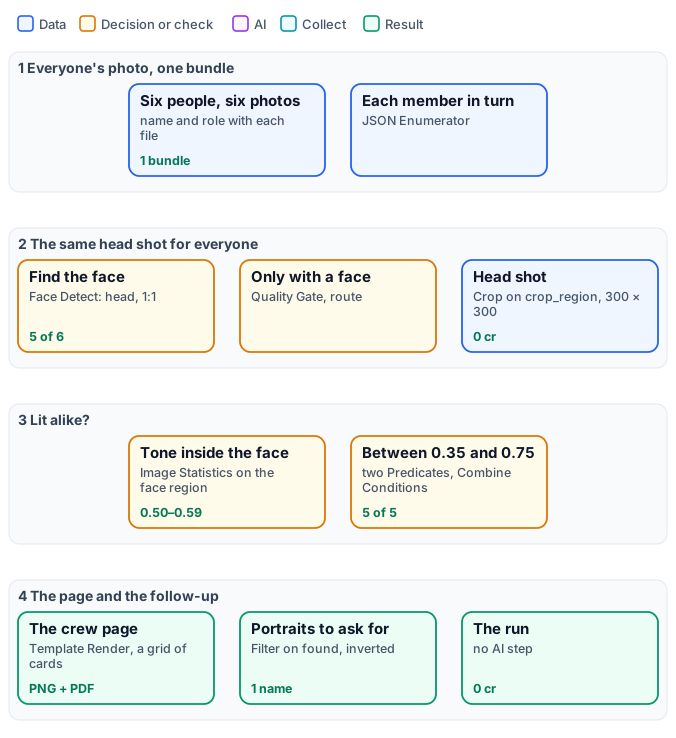
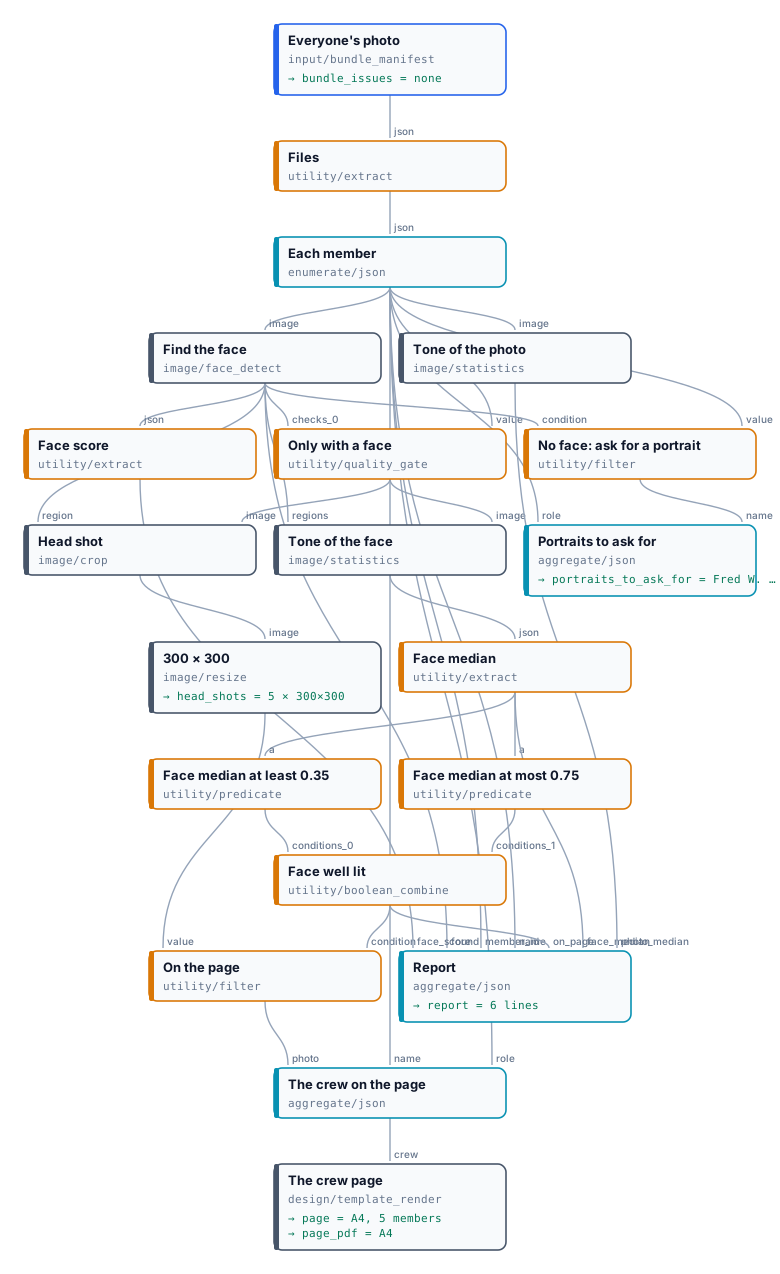
The exact graph is the workflow (as a diagram).
The case
Section titled “The case”| Input | Who provides it | Reference run |
|---|---|---|
| Everyone’s photo, as one bundle, each file with the person’s name and role | the team, or whoever collects the photos | the official NASA portraits of Apollo 11’s prime crew — Neil A. Armstrong, Michael Collins, Edwin E. Aldrin Jr. — and of the backup crew — James A. Lovell Jr., William A. Anders —, and for Fred W. Haise Jr. the mission emblem, as if he had sent a logo |
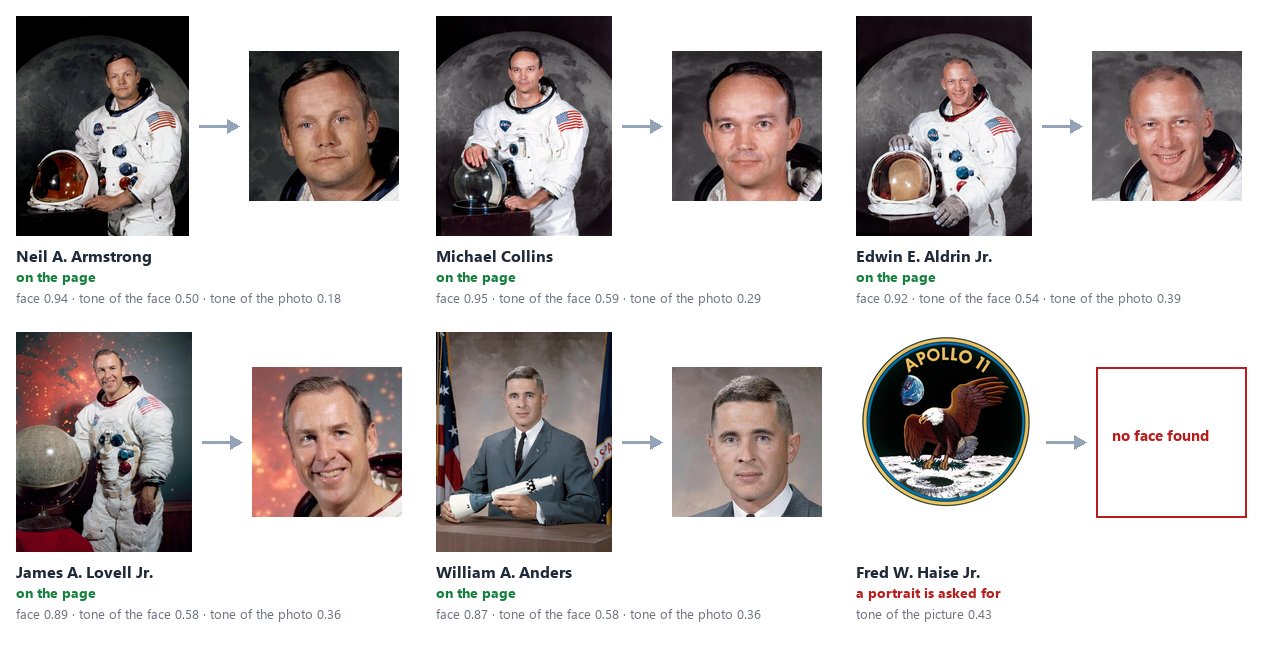
The portraits are as NASA published them (S69-31741, S69-31742, S69-31743, S69-62241, S64-31555; the emblem S69-34875; public domain): half-length figures in front of a Moon or a nebula, Anders in a suit in front of a flag — faces between 16% and 23% of the photo’s side, each in a different place.
What it shows
Section titled “What it shows”- The same framing for different photos. Face Detect frames each face’s head in a square (Framing
head, Aspect1:1); Crop cuts it and Resize makes every head shot 300 × 300. Nobody chooses a rectangle. - A missing face stops one photo, not the page. The Quality Gate (route) lets a photo through only with a face:
for the emblem, Crop and everything after it are skipped, the run completes and the page has five members. An
inverted Filter on
foundputs the sixth on the list of portraits to ask for. - The tone of the face, not of the photo. Measured on the whole picture the photos differ a lot — 0.18 for
Armstrong in front of the black Moon, 0.39 for Aldrin —; measured inside the face (Face Detect’s
facesas Image Statistics’ regions) they are alike, 0.50 to 0.59. Two Predicates check each face is between 0.35 and 0.75 before it goes on the page; a face in the dark or burnt by a flash would be held back. - The page from a template. Generate JSON collects name, role and head shot; Template Render draws them in a grid of three columns (Lists), as an image and as a PDF.
The workflow, step by step
Section titled “The workflow, step by step”| Phase | Steps | What they do here |
|---|---|---|
| A — the photos | Everyone’s photo, Files, Each member | the bundle, its file list, one iteration per person with name, role and photo |
| B — the head shot | Find the face, Only with a face, Head shot, 300 × 300 | Face Detect (head, 1:1); Quality Gate, the photo into Value; Crop on crop_region; Resize fill |
| C — the light | Tone of the face, Face median, two Predicates, Face well lit; Tone of the photo, Face score | Image Statistics with the faces as regions, its regions[0].luma.p50; the same on the whole photo, for the report |
| D — deliver | On the page, The crew on the page, The crew page; No face: ask for a portrait, Portraits to ask for; Report | Filter on the tone, Generate JSON, Template Render; inverted Filter on found, Generate JSON; one line per person |
The reference run
Section titled “The reference run”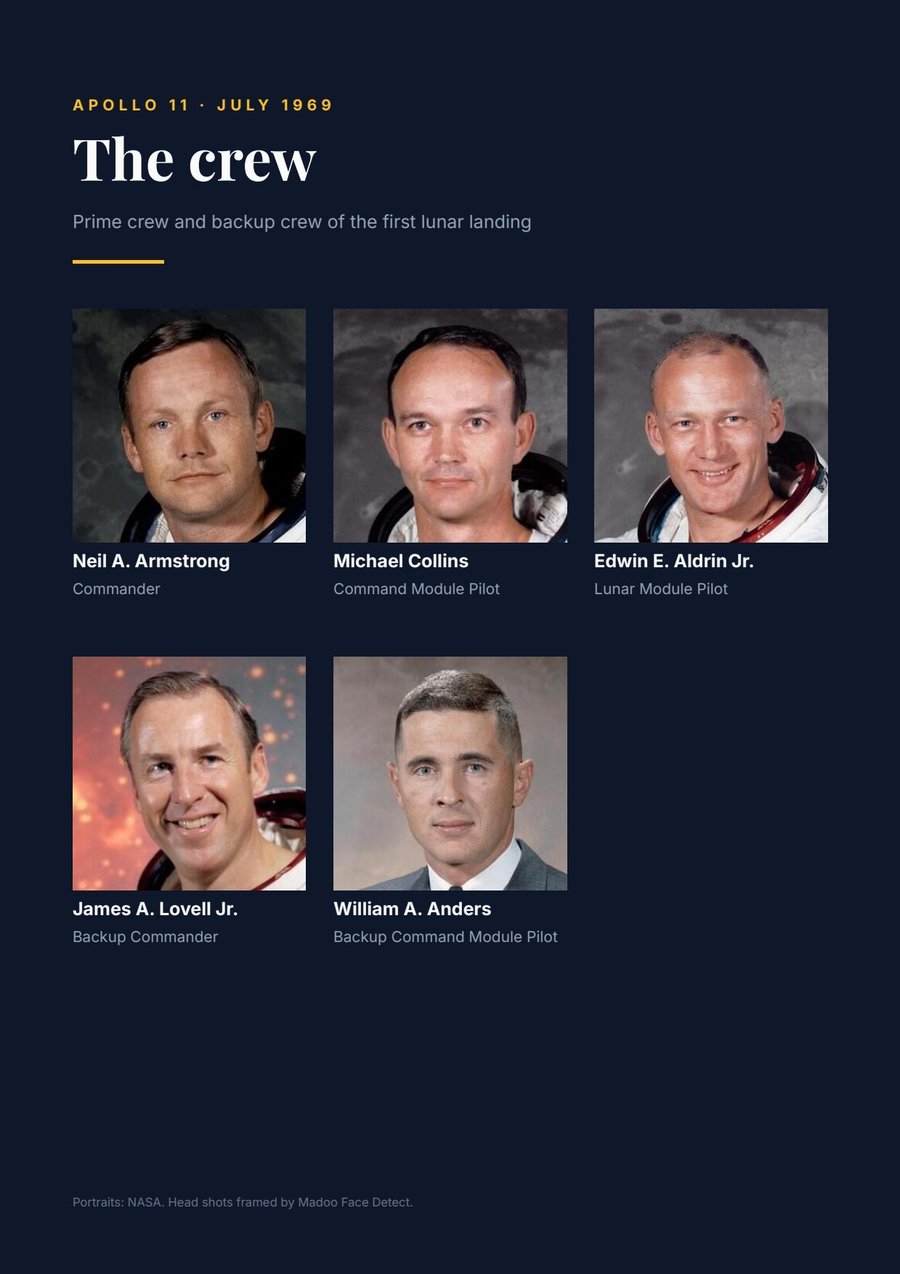
| Output | Result |
|---|---|
page, page_pdf |
the crew page, A4, five members — PDF |
head_shots |
five head shots, 300 × 300 |
portraits_to_ask_for |
Fred W. Haise Jr., Backup Lunar Module Pilot |
report |
one line per person: face found, its score, the tone of the face and of the photo, on the page |
0 credits. Every face was found at 0.87 to 0.95; every head shot came out whole (complete), between 297 and 417
pixels before Resize — the size Resize brings to 300 without visible enlargement.
Adapt it
Section titled “Adapt it”- Your team. Put everyone’s photo in the bundle with
nameandrolein each file’s metadata; change the texts of the template, its colours and its number of columns. - Another shape. Aspect
4:5for a portrait card, Framinghead_and_shouldersfor a speakers’ page; change the template’s image box to the same shape. - Tell them.
portraits_to_ask_foris the list of people to write to: send it to an e-mail or a sheet. A face held back for its light (the Predicates) can go to the same list with a second Filter. - Many pages. One page per department: a bundle per department, or an iteration over them with Multi-page PDF.
Install it
Section titled “Install it”node madoo-install-example.mjs i08-crew-page --api <your Madoo API URL> --key <key.json> --run --save crewThe installer uploads the six pictures — Armstrong’s portrait from the bundles lab folder, the others from this example’s — composes the bundle, creates and publishes the template and installs the workflow.
Portraits and emblem: NASA, public domain.
manifest · workflow · template · bundle spec · report · the complete graph