

Finding the scenes of a video
A video is a sequence of shots. To summarise it, index it, cut it, check it or choose its cover, a workflow first
needs to know where each shot starts and ends, and what it shows. Extract Scenes (video/extract_scenes) answers
the first question by measuring the picture — no AI, no credits, the same result every time — and takes a frame of each
scene, labelled with its time, so that the second question can go to whatever looks at images: a model that sees
images, a person on a contact sheet, a check per frame.
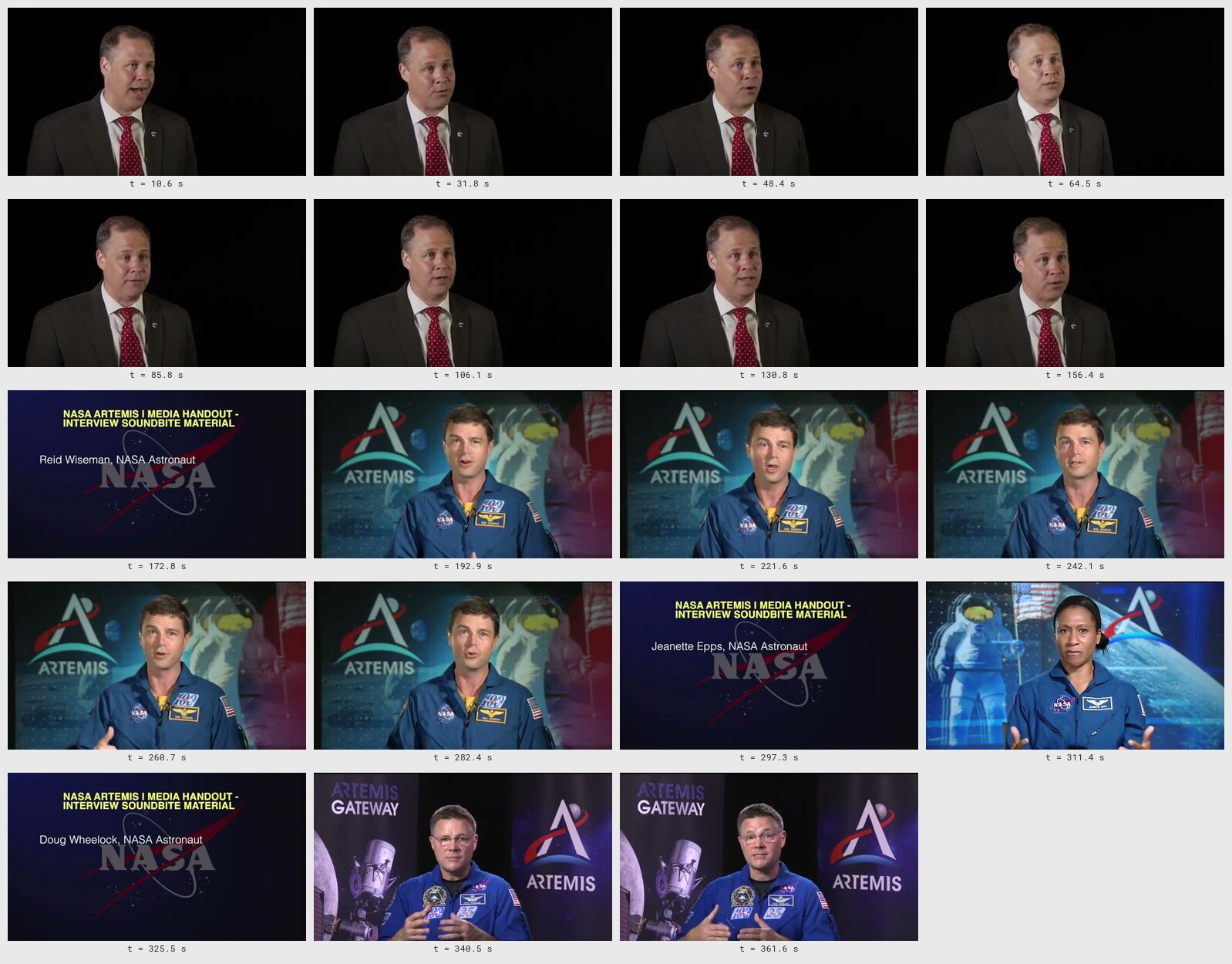
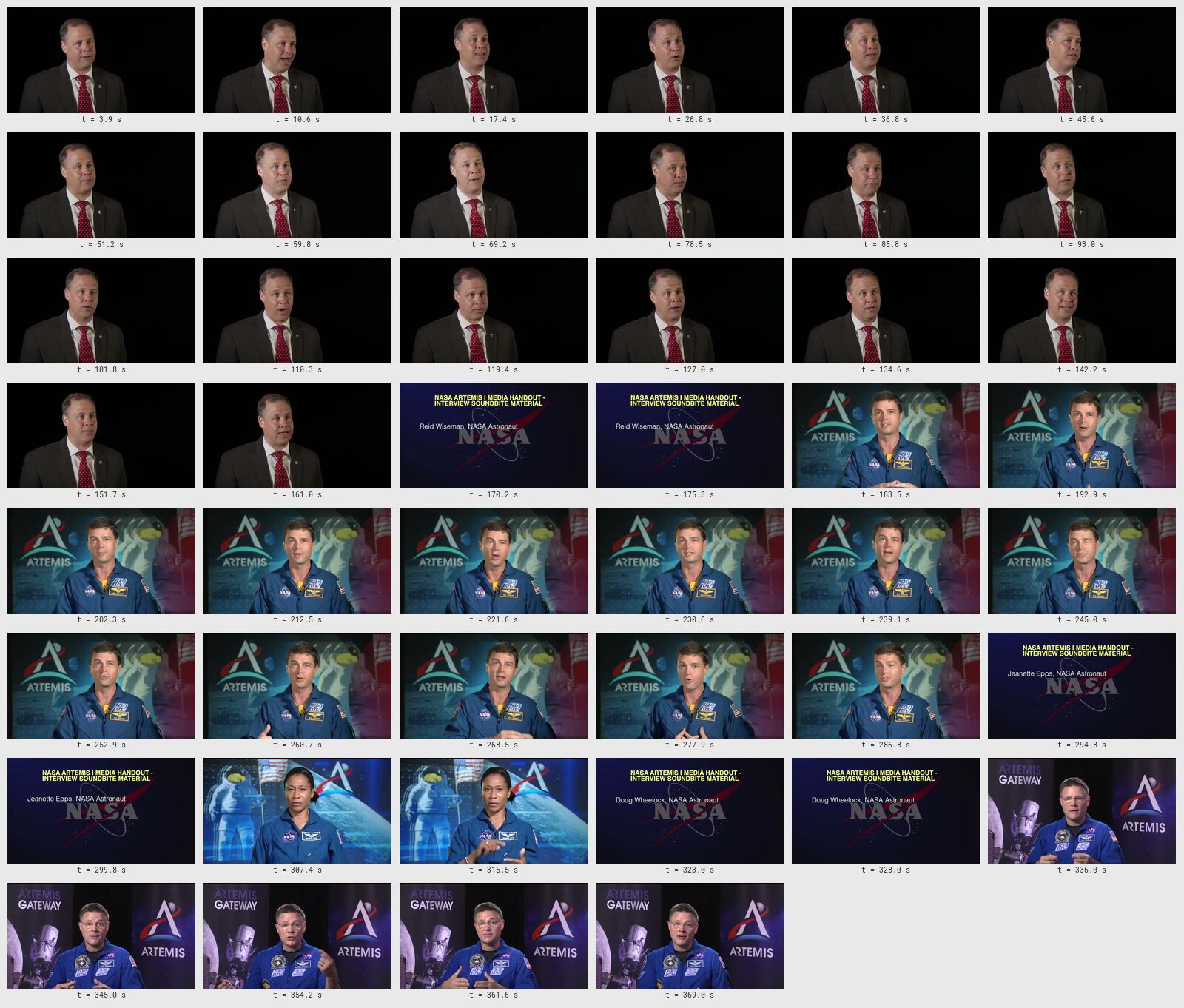
The six-minute briefing of the first lab, one frame per scene: 19 scenes in one image, at no credit cost.
1. What a scene is
Section titled “1. What a scene is”A scene, here, is a stretch of video between two changes of picture: a cut (one frame shows one shot, the next frame another), a fade through black (the picture goes dark and comes back on something else), or a dissolve (one shot blends into the next over several frames). Interviews, briefings and talks change scene at every speaker or title card; commercials and trailers several times a second; a screen recording or a long take may never change at all.
Extract Scenes finds cuts and black gaps reliably; dissolves and camera moves are harder, and section 11 says what happens to them. It does not recognise what a scene shows — that is the job of whatever reads the frames.
2. How the node finds them: the change score
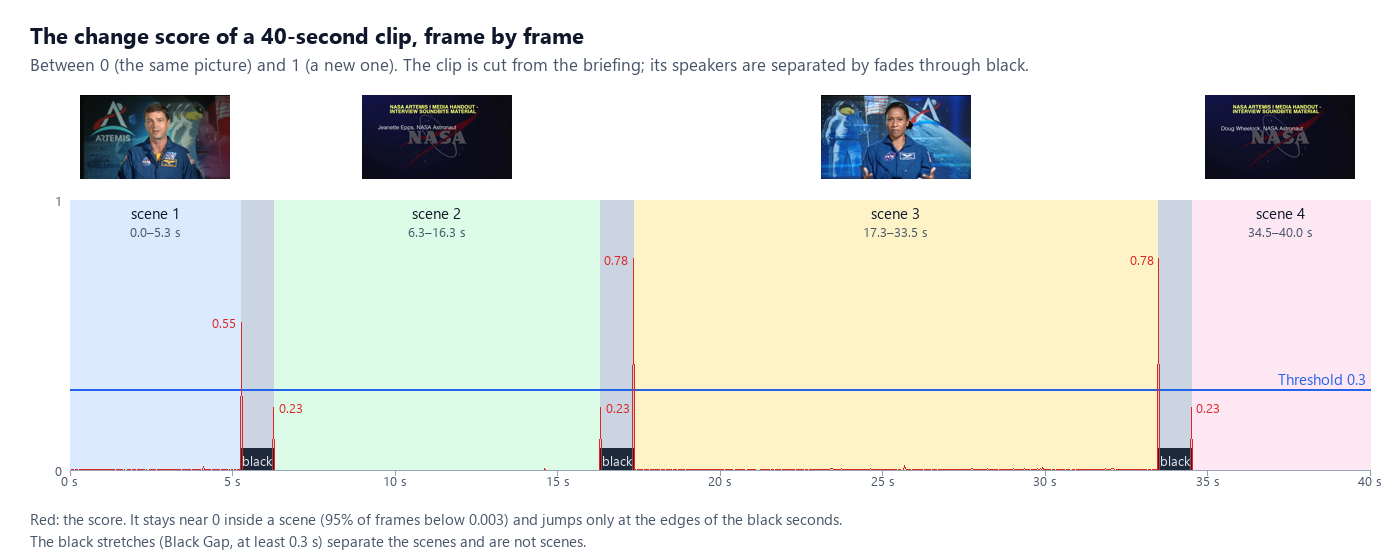
Section titled “2. How the node finds them: the change score”The node compares every frame with the one before and gives it a change score between 0 (the same picture) and 1
(a different one). Inside a scene the score stays near 0 — on the clip below, 95% of the frames score less than
0.003 — and it jumps where the picture changes. Every frame whose score reaches the Threshold (threshold,
default 0.3) is a cut.
The analysis runs on a small copy of the picture (320 pixels wide), so it is fast: a 30-minute 1080p video is read in about 25 seconds. Lower the threshold to find softer changes, raise it when camera movement or flashes produce cuts that are not there; the useful range is 0.15–0.5.
3. Black gaps, short scenes and jump cuts
Section titled “3. Black gaps, short scenes and jump cuts”Black gaps. On this clip the picture never cuts: every speaker fades out to black and the next fades in. The score
jumps at the two edges of each black second — and those black seconds are not scenes. Black Gap
(black_gap_seconds, default 0.3) finds stretches of black at least that long; each one separates two scenes and is
listed in gaps, never as a scene. A cut that falls inside a black stretch, or within 0.1 s of its edge, is the fade
itself and is dropped. Set 0 to treat black as ordinary picture.
Short scenes. A flash, a glitch or two cuts a few frames apart would make scenes of a fraction of a second.
Minimum Scene (min_scene_seconds, default 1) joins a scene shorter than that to the one before it when a cut
separates them, or to the one after it when it is the first of its stretch (after the start or a black gap). A black
gap always stays a separation: a short scene alone between two black gaps is kept — it is picture. Two cuts closer
than 0.1 s count once, the stronger; a cut in the first or last 0.04 s of the video is ignored.
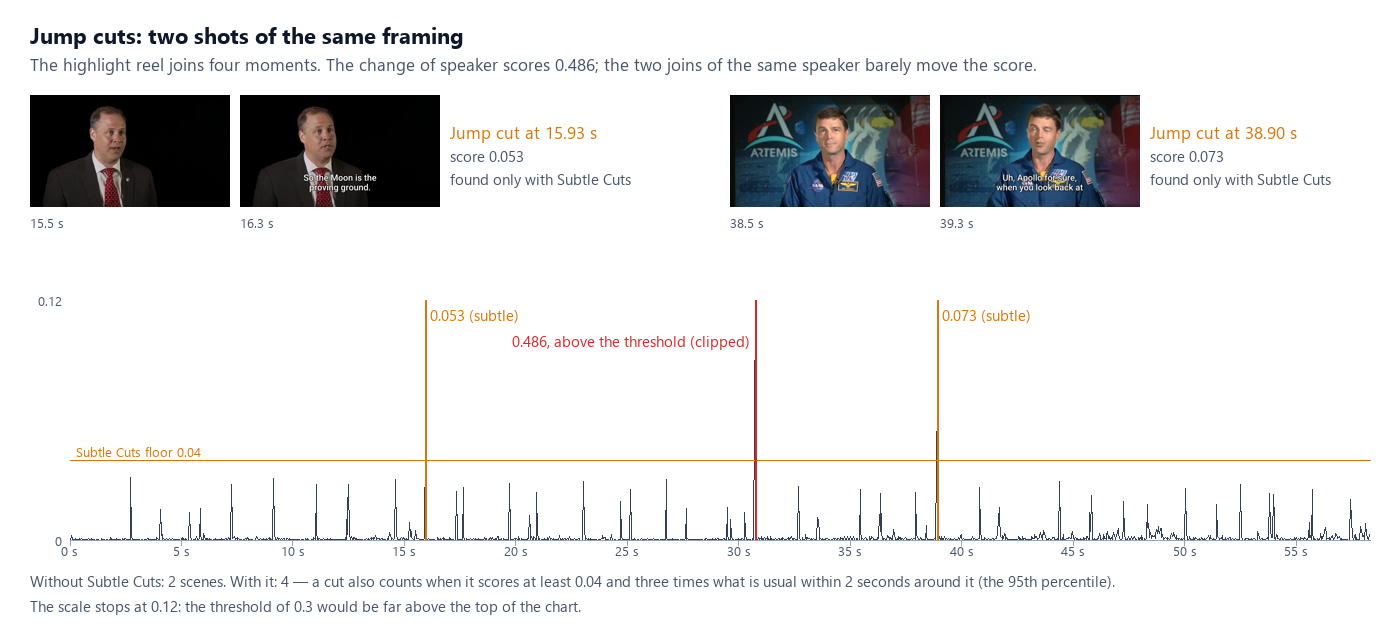
Jump cuts. An interview edited down often joins two moments of the same speaker in the same framing. The picture
barely changes: on the highlight reel of the first lab the change of speaker scores
0.486, but the two joins of the same speaker score 0.053 and 0.073 — far below any useful threshold, and in the middle
of frames that score up to 0.03 just from the speaker moving. Subtle Cuts (subtle_cuts, off by default) also
counts a frame whose score is at least 0.04 and three times what is usual within two seconds around it (the 95th
percentile of that window): a peak that stands out from its neighbourhood, however low.
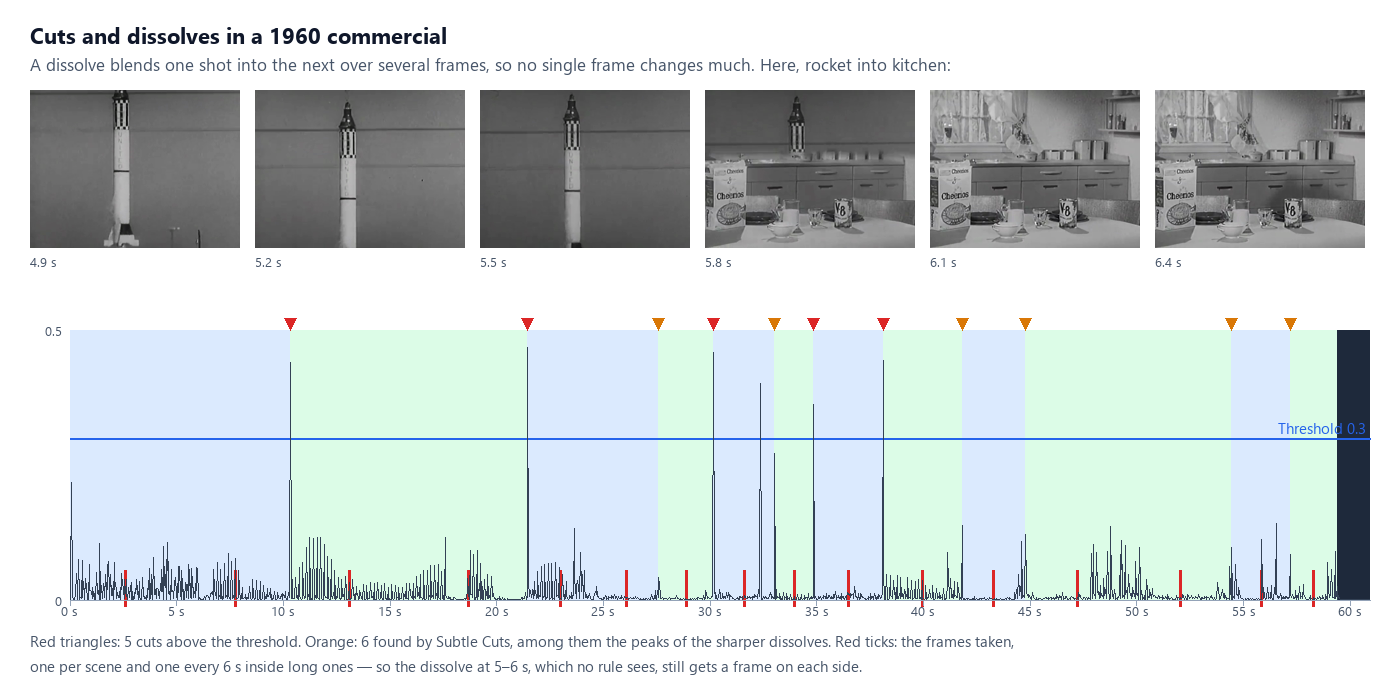
Leave Subtle Cuts off for footage with a lot of motion or with film grain: there it also finds the peaks of dissolves and fast moves (see the commercial) — useful for a storyboard, too many for a precise edit.
4. Modes: which frames to take
Section titled “4. Modes: which frames to take”The scene list is always computed (except in interval mode); Mode (mode) decides which frames are taken from it.
| Mode | Frames | For |
|---|---|---|
scenes |
one per scene | a contact sheet, a scene index, a cover chosen among the shots |
interval |
one every Interval (interval_seconds, default 10), cuts ignored |
a screen recording, a lecture, a long take, a regular sampling |
scenes_and_interval (default) |
one per scene, and one every Interval inside a scene longer than that | reading a video with an image model: no shot is missed, and a long scene is not reduced to one picture |
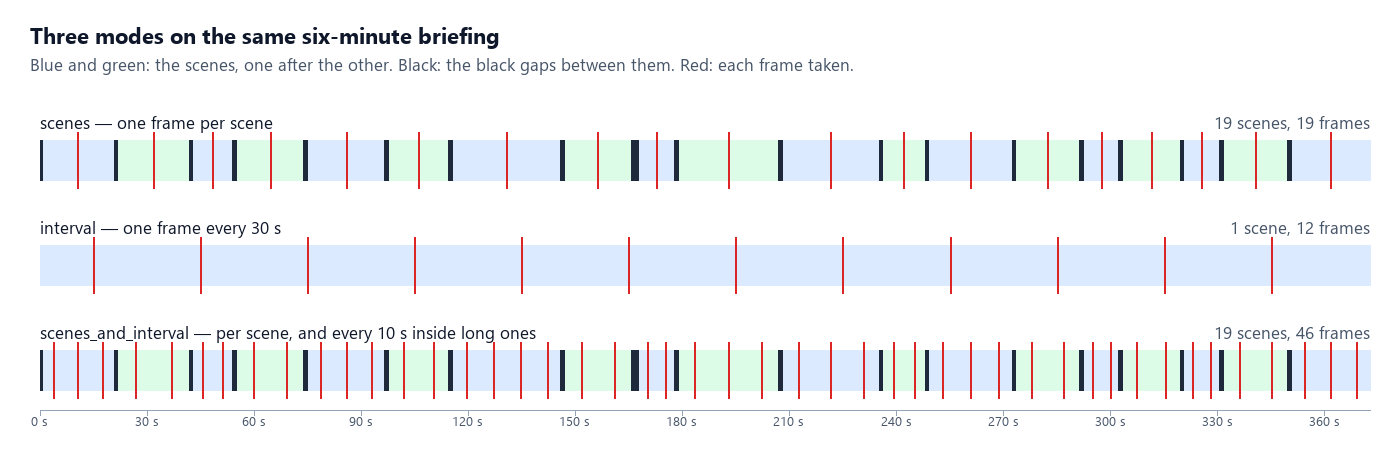
In scenes_and_interval a scene is split into equal parts no longer than the interval and each part gives one frame:
a 5.3-second scene with an interval of 4 s gives two frames (at 1.3 and 3.9 s), a 10-second scene three.
5. Which frame stands for a scene
Section titled “5. Which frame stands for a scene”The node takes the frame in the middle of each scene (or of each part of it), never the one on the cut: near a
cut the picture may still be fading in, blending in a dissolve, or blurred by the motion that started the shot; in the
middle the shot is established. A frame darker than a mean brightness of 16 (out of 255) is looked for again at 40%,
60%, 30% and 70% of its stretch, keeping the brightest; a stretch dark throughout keeps its frame and marks it
"dark": true, so that a check can skip it.
Frames are JPEG at most 1280 pixels wide by default (Max Frame Width, max_frame_width, up to 3840; 0 keeps the
video’s size) — enough for any image model; Frame Format png keeps them lossless.
6. Max Frames: when there are too many
Section titled “6. Max Frames: when there are too many”A two-hour film can hold a thousand scenes. Max Frames (max_frames, default 100, up to 500) caps the frames.
When the plan exceeds it, the node first drops the extra frames of the scenes that have the most (the interval frames
of long scenes go first), then joins scenes across their weakest cuts — black gaps last — until it fits, and sets
"reduced": true in the scene list. The scenes that remain keep their real edges.
7. What comes out
Section titled “7. What comes out”| Output | What it is |
|---|---|
scenes |
the scene list, madoo.video-scenes/v1 (below) |
frames |
the frames as an image set, madoo.image-set/v1: in time order, each with its label (t = 12.4 s) and its time and scene in metadata |
contact_sheet |
every frame on one image with its time (up to 50 cells, spread evenly over the frames when there are more); absent when Contact Sheet (contact_sheet) is off |
scene_count, frame_count, duration |
numbers, ready for Calculate or a Predicate |
The scene list of the 40-second clip, shortened:
{ "schema": "madoo.video-scenes/v1", "video": { "duration": 40, "width": 640, "height": 360, "frame_rate": 30 }, "settings": { "mode": "scenes_and_interval", "threshold": 0.3, "subtle_cuts": false, "black_gap_seconds": 0.3, "min_scene_seconds": 1, "interval_seconds": 4, "max_frames": 100 }, "scenes": [ { "index": 1, "start": 0, "end": 5.267, "duration": 5.267, "opened_by": "start", "frames": [ { "time": 1.317, "frame": 1 }, { "time": 3.95, "frame": 2 } ] }, { "index": 2, "start": 6.267, "end": 16.333, "duration": 10.067, "opened_by": "gap", "frames": [ { "time": 7.944, "frame": 3 }, { "time": 11.3, "frame": 4 }, { "time": 14.656, "frame": 5 } ] } ], "gaps": [ { "start": 5.267, "end": 6.267, "kind": "black" } ], "reduced": false}opened_by says what started the scene — start, cut (with its cut_score, and "subtle": true when only Subtle
Cuts found it) or gap. Each frame’s frame is its number in the image set, so a scene and its pictures can be joined.
An entry of the image set:
{ "index": 1, "image": { "kind": "image_uri", "uri": "…/frame_001.jpg" }, "content_type": "image/jpeg", "width": 640, "height": 360, "label": "t = 3.9 s", "metadata": { "time": 3.856, "scene": 1 } }Both are Madoo contracts — madoo.video-scenes/v1 and madoo.image-set/v1: get_json_schema returns them, and Validate JSON Schema,
Parse JSON and Compose JSON can check a document against them.
8. Using the frames
Section titled “8. Using the frames”Reading a video with a model that sees images
Section titled “Reading a video with a model that sees images”Some models read video — Video Analysis (ai/video_analysis) sends the whole video to one (see
Reading video and documents). Many models that are excellent with pictures
do not. Image Analysis (ai/image_analysis) reads up to 20 images; besides the images wired to images, it reads
an image set on image_set — connect Extract Scenes’ frames there, and every frame arrives preceded by its label,
so the model knows when each one was taken. Put the transcript of the soundtrack (Speech to Text, srt) and the
measured scene edges in the prompt with Text Expression, and an image model describes the video scene by scene:
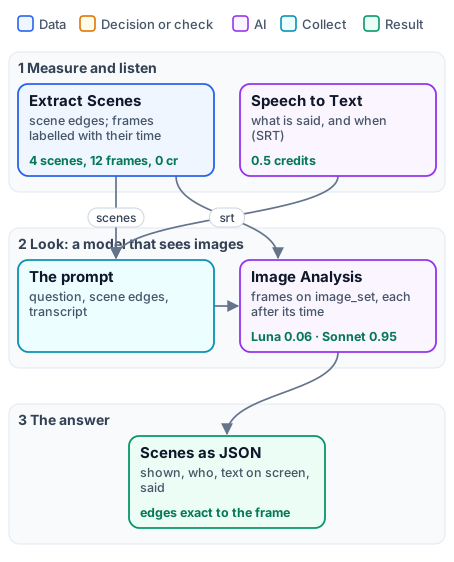
{{ for s in scenes.scenes }}scene {{ s.index }}: {{ s.start }} to {{ s.end }}{{ end }}reads the scene list into the prompt (Text Expression reads a JSON input by member); the model then gives the edges as
measured instead of estimating them from the frames. Above 20 images, Image Set Limit (image_set_limit)
chooses: even (default) spreads the 20 over the set, keeping the first and the last; first keeps the first 20;
fail stops the step (TOO_MANY_IMAGES) before anything is paid. Images wired to images come first and count
toward the 20. Label Images (label_images, on by default) can be turned off for a set whose labels mean nothing
to the model. The second lab compares two image models with a model that
watches video, on the same clip.
An image set may name only images of the workspace that runs it; a set that names another workspace’s picture is
refused before the model is called (IMAGE_SET_FORBIDDEN). Pictures from outside go on images, as links.
One step per scene or per frame
Section titled “One step per scene or per frame”The JSON Enumerator (enumerate/json) opens either document as a list: on frames, arrayPath images, with
image.uri mapped to an image port, label to text and index to a number — every step that follows runs once per
frame (a caption, a check, an upscale); on scenes, arrayPath scenes with start, end and duration — for
example to cut each scene with Trim Video. Generate JSON (aggregate/json) collects the results back into one
list. The third lab writes one storyboard line per frame this way.
Building an image set from other pictures
Section titled “Building an image set from other pictures”An image set is not only for frames: any list of pictures — the photos of a product, the pages of a catalogue, the
results of a fan-out — can reach Image Analysis on image_set, with a label each. Build it with Generate JSON:
output_shape: object, array_key: images, root_fields: {"schema": "madoo.image-set/v1"},
item_fields: {"image": {"kind": "image_uri"}}, nested_names: true, an image column named image.uri and a text
column named label.
Numbers from the scene list
Section titled “Numbers from the scene list”Calculate (utility/calculate) reads the scene list directly: max(scenes.scenes[*].duration) is the longest scene,
avg(scenes.scenes[*].duration) the average, (count(scenes.scenes[*].index) - 1) / scenes.video.duration * 60 the
cuts a minute. Extract (utility/extract) reads one value (scenes[0].duration); a Predicate and a Filter turn a
number into a decision — for example, send a video to review when its longest scene exceeds 12 seconds.
9. Choosing the settings
Section titled “9. Choosing the settings”| Footage | Mode | Settings | Why |
|---|---|---|---|
| interview, briefing, talk | scenes_and_interval, interval 10–20 s |
Black Gap 0.3 | speakers are separated by cuts or fades through black; long answers still get frames |
| edited interview, reel, podcast video | scenes |
Subtle Cuts on | jump cuts between takes of the same framing |
| commercial, trailer, music video | scenes_and_interval, interval 3–6 s |
Minimum Scene 0.5 | many short shots; dissolves are covered by the interval frames |
| slideshow, presentation | scenes |
Threshold 0.2 | each slide is a scene; transitions are often soft |
| screen recording, lecture, long take | interval, 10–30 s |
— | changes are small or continuous; regular frames read it best |
| sport, action, handheld | scenes_and_interval |
Threshold 0.4–0.5 | fast motion and pans raise the score without a cut |
| old film, grainy footage | scenes_and_interval |
Subtle Cuts off | grain keeps the score high everywhere |
10. Recipes
Section titled “10. Recipes”- Chapters with their titles.
scenesmode, frames into Image Analysis with “for each frame that is a title card, give the time and the text” → a chapter list whose times are the measured scene starts. - A cover or a thumbnail. All the frames to Image Analysis on
image_set, asking for the number of the best one as JSON; Extract reads the number, a Predicate compares it with each frame’sindexon the JSON Enumerator, a Filter lets only that frame through (lab 3). - A pacing check. Calculate the cuts a minute and the longest scene; a Predicate on either decides whether an edit goes on or back to review — at no credit cost.
- A contact sheet per video of a batch. Data Rows over a list of videos, Extract Scenes in
scenesmode, the contact sheet to an output: a visual index of a whole library. - A clip per scene. JSON Enumerator on
scenes, Trim Video with eachstartandend, Merge Videos to rejoin the ones a Filter kept.
11. Limits
Section titled “11. Limits”- Dissolves and slow fades spread the change over many frames, so no single frame scores high. The sharper ones
are found by Subtle Cuts; the slow ones stay inside a scene — the interval frames of
scenes_and_intervalstill show both sides of them. - Camera moves, zooms, fast action and flashes raise the score without a change of shot: raise the threshold, or keep Minimum Scene to absorb the flashes.
- Screen recordings and slides may change only a few pixels: use
interval, or a lower threshold. - Very long videos: up to 4 hours; reading one takes about a second per minute of 1080p, and Max Frames limits the output.
- What a scene shows is not recognised: that is for the frames’ reader — an image model, a check, a person.
12. What it costs
Section titled “12. What it costs”Extract Scenes costs no credits: it runs FFmpeg on the worker. The frames and the contact sheet are stored like any output. What follows is priced as usual — Image Analysis by the model and the number of images (the twelve frames of the clip: 0.064 credits with GPT-6 Luna, 0.951 with Claude Sonnet 5.5), Speech to Text by the minute.
Lab 1 — the scenes of a briefing
Section titled “Lab 1 — the scenes of a briefing”The six-minute NASA Artemis I briefing (public domain), read three ways, and the highlight reel of the Highlights lab read with and without Subtle Cuts. No AI, no credits.
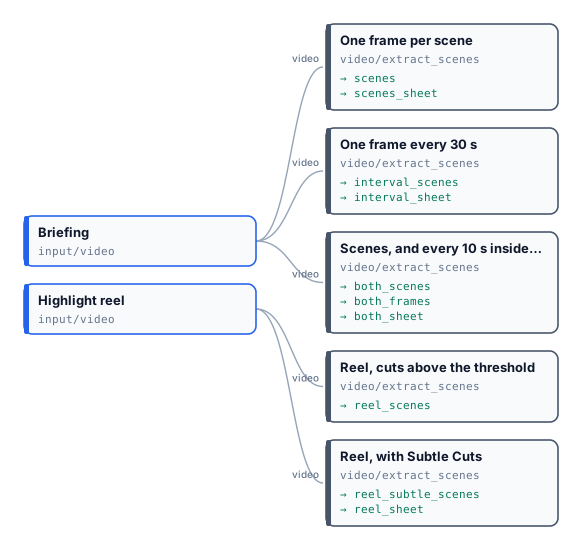
| Step | Scenes | Black gaps | Frames |
|---|---|---|---|
| One frame per scene | 19 | 19 | 19 |
| One frame every 30 s | 1 (the cuts ignored) | — | 12 |
| Scenes, and every 10 s inside long ones | 19 | 19 | 46 |
| Reel, cuts above the threshold | 2 | 0 | 2 |
| Reel, with Subtle Cuts | 4 (jump cuts at 15.93 and 38.90 s) | 0 | 4 |
The contact sheet at the top of this page is the first step’s; the scenes and interval sheet and its image set show the 46 frames. The run took 70 seconds for five readings, about 20 minutes of video in all.
node madoo-install-example.mjs lab-scenes --api <your Madoo API URL> --key <key.json> --runLab 2 — reading a clip with image models
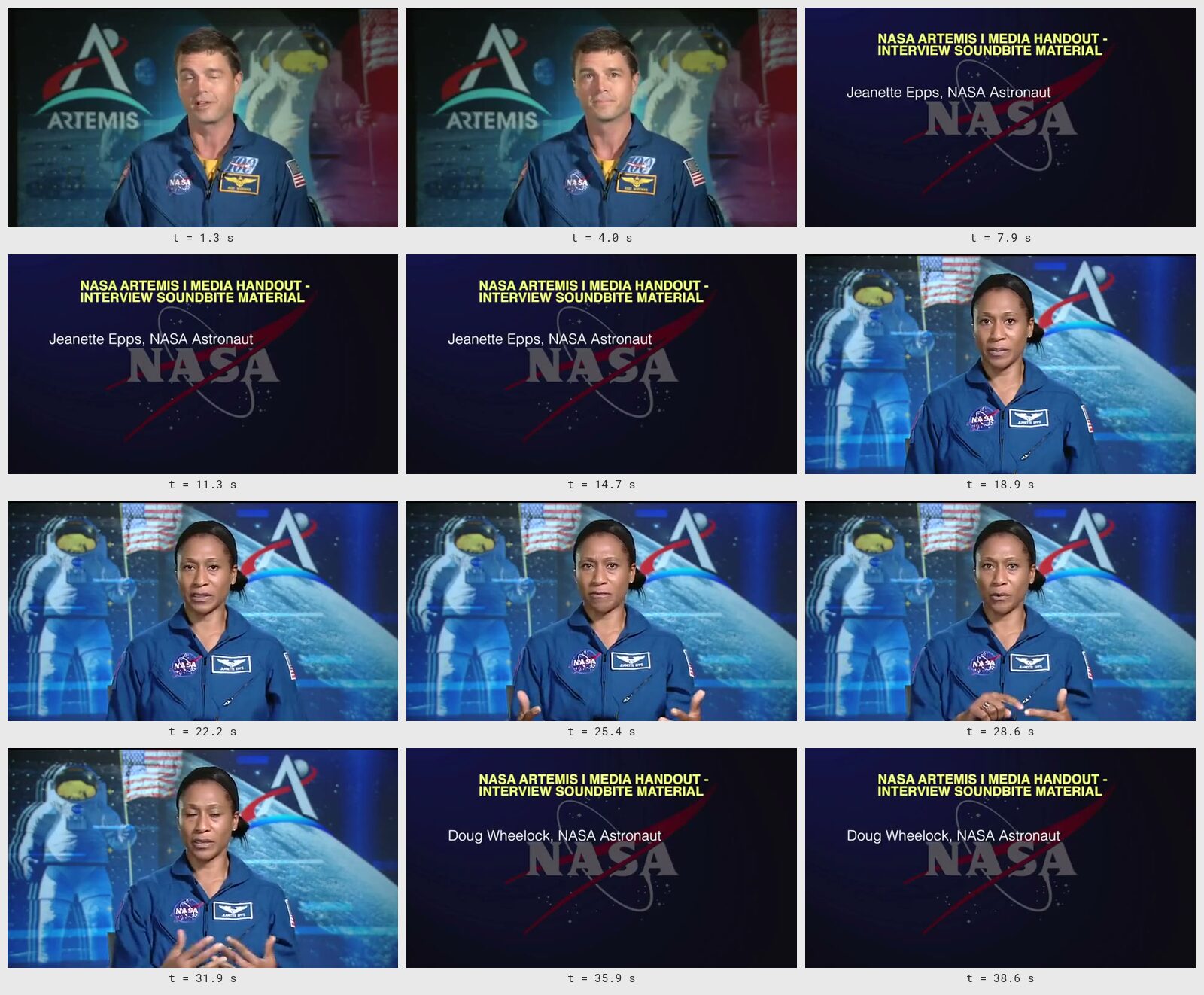
Section titled “Lab 2 — reading a clip with image models”Forty seconds of the briefing (286–326 s: Reid Wiseman, the title card of Jeanette Epps, Jeanette Epps on the Gateway, the title card of Doug Wheelock), read three ways with the same question — describe it scene by scene as JSON: what is shown, who, the text on screen, what is said:

| GPT-6 Luna (frames) | Claude Sonnet 5.5 (frames) | Video Analysis (the video) | |
|---|---|---|---|
| Scene edges | 0–5.267, 6.267–16.333, 17.333–33.5, 34.5–40 — the measured ones | the same | 0–5, 5–16, 16–33, 33–39 — estimated |
| The two title cards | read verbatim, names given | read verbatim, names given | read verbatim |
| The speakers | Jeanette Epps named; the first speaker “an unidentified man” | the same | Reid Wiseman and Jeanette Epps named |
| What is said | quoted per scene from the transcript | summarised per scene | quoted per scene |
| Credits | 0.064 | 0.951 | 0.352 |
Speech to Text added 0.5 credits; the run cost 1.87 credits in all. The image models are exact on the edges because they are given them; the video model recognises the first speaker, whose name the image models were asked to give only if written on screen. Outputs: Luna, Sonnet, Video Analysis, the transcript and the contact sheet.
node madoo-install-example.mjs lab-video-with-image-models --api <your Madoo API URL> --key <key.json> --runLab 3 — a storyboard and a cover for a commercial
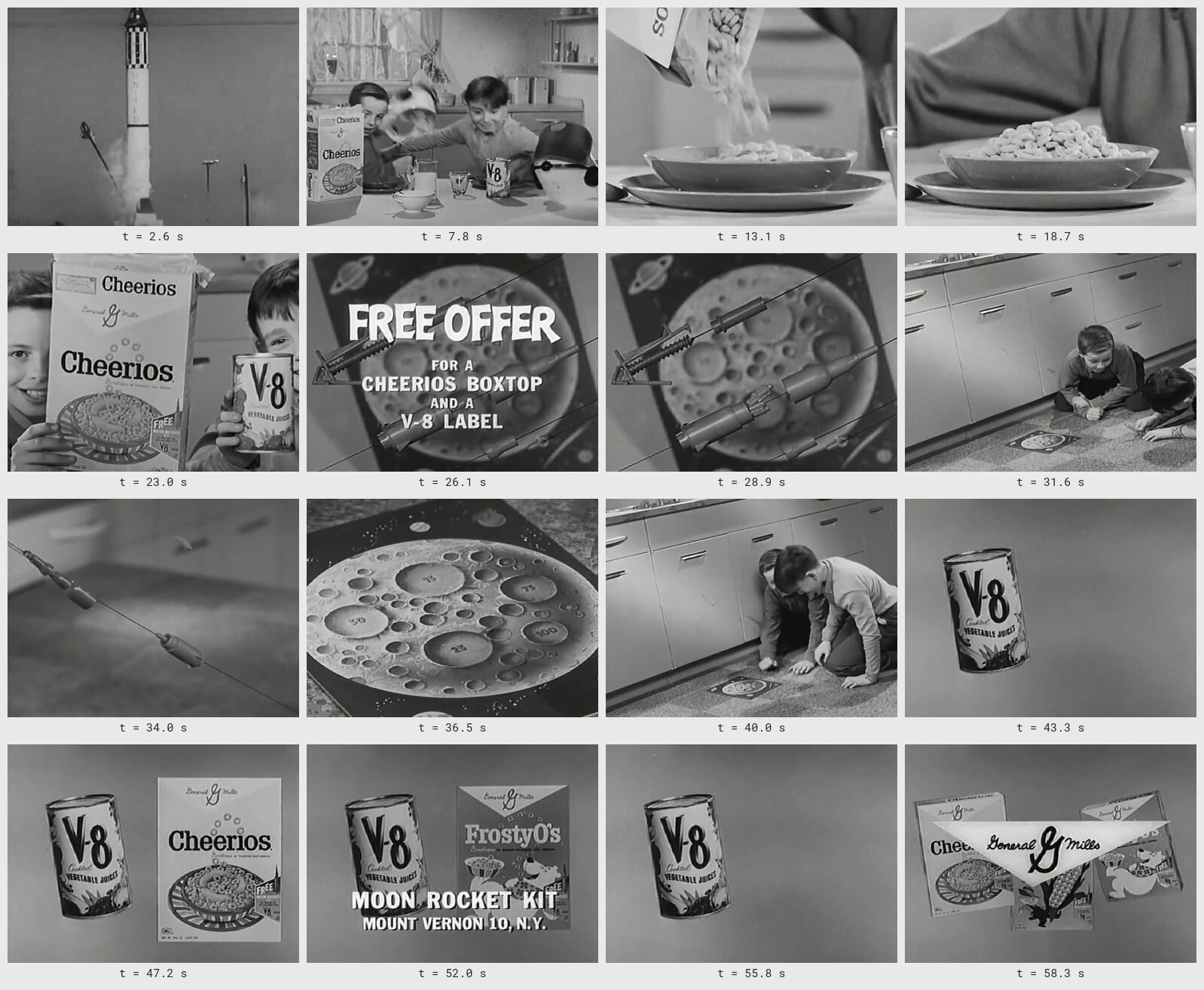
Section titled “Lab 3 — a storyboard and a cover for a commercial”Cheerios/V-8 (1960), a one-minute television commercial from the Prelinger Archives (archive.org, public domain):
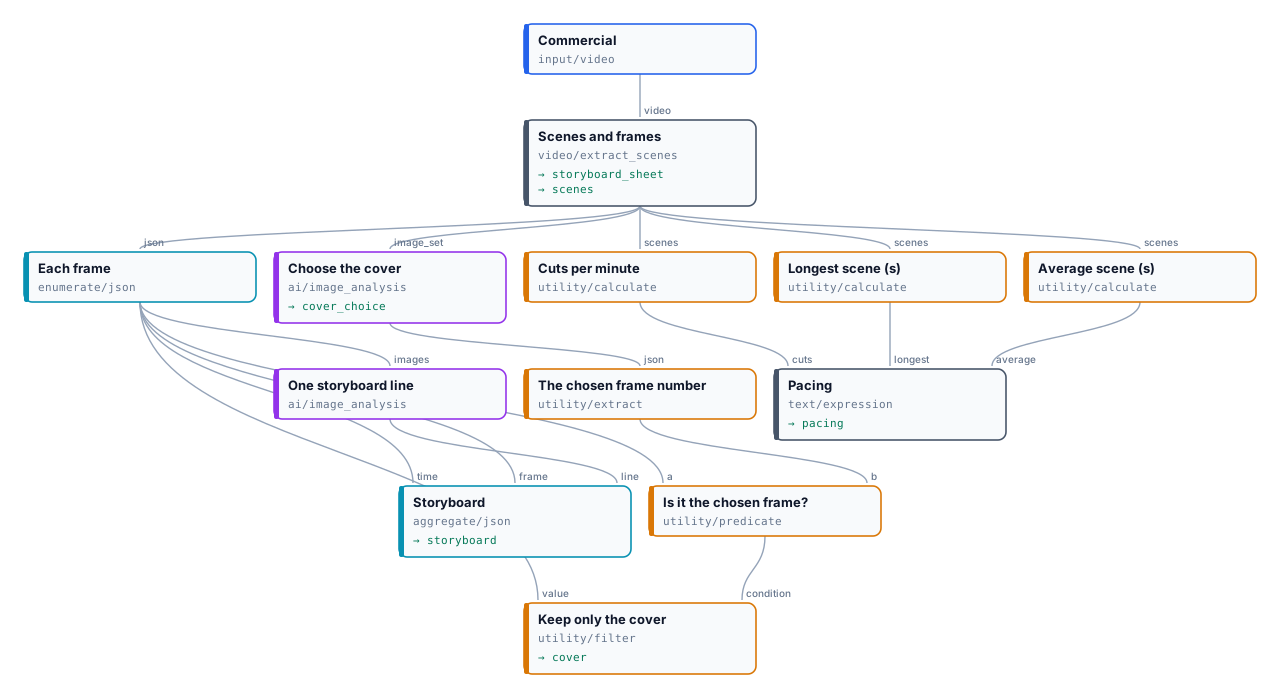
Extract Scenes in scenes_and_interval mode with a 6-second interval and Subtle Cuts; each frame through the JSON
Enumerator to Image Analysis (GPT-6 Luna), which writes one storyboard line; Generate JSON collects the storyboard; all
the frames to Image Analysis again, which chooses the cover; Extract, a Predicate and a Filter keep that frame; three
Calculate steps and a Text Expression write the pacing.

- Scenes: 12 — 5 cuts above the threshold, 6 found by Subtle Cuts (among them the peaks of four dissolves), the black at the end a gap; 16 frames.
- Storyboard: one line per frame, 0.161 credits. Read it before using it: the model calls the two children at 40.0 s “two men”.
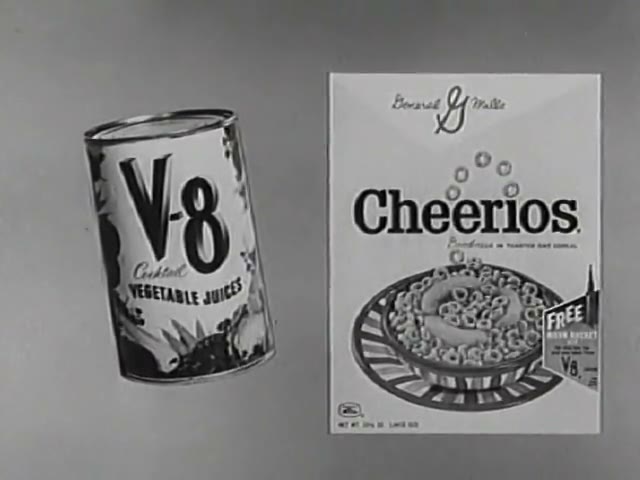
- Cover: frame 13, 47.2 s — “the Cheerios box and V-8 can are both clearly shown with their labels readable”,
0.054 credits. The other fifteen frames come back
absentfrom the Filter, by design. - Pacing: “10.8 cuts a minute; scenes last 4.9 s on average, the longest 11.1 s.”
The run took 43 seconds and 0.215 credits. Outputs: the storyboard, the contact sheet, the cover and why, the scene list.
node madoo-install-example.mjs lab-storyboard --api <your Madoo API URL> --key <key.json> --runErrors
Section titled “Errors”| Code | Step | Cause | Fix |
|---|---|---|---|
invalid_extract_scenes_parameter (on save) / INVALID_EXTRACT_SCENES_PARAMETER |
Extract Scenes | a setting out of range or not one of its values; the message names it | Threshold 0.05–1, Black Gap 0–10, Minimum Scene 0–60, Interval 0.5–3600, Max Frames 1–500, Max Frame Width 0–3840 |
NO_VIDEO_STREAM |
Extract Scenes | the file has sound but no picture | connect a video |
EMPTY_VIDEO |
Extract Scenes | the video has no duration | check the file |
VIDEO_TOO_LONG |
Extract Scenes | longer than 4 hours | trim or split it first |
UNREADABLE_VIDEO |
Extract Scenes | FFmpeg cannot decode the picture | re-encode the file (H.264 MP4) |
SCENE_ANALYSIS_TIMEOUT |
Extract Scenes | the reading took too long (retried) | split a very long or very large file |
CONTACT_SHEET_OFF (absent) |
Extract Scenes | contact_sheet is off |
not an error; turn it on to get the sheet |
missing_images (on save) |
Image Analysis | neither images nor an image set connected | connect one of them |
invalid_image_set_limit (on save) / INVALID_IMAGE_SET_LIMIT |
Image Analysis | Image Set Limit is not even, first or fail |
choose one of the three |
TOO_MANY_IMAGES |
Image Analysis | more than 20 images with Image Set Limit fail |
use even or first, or send fewer |
IMAGE_SET_INVALID |
Image Analysis | not a madoo.image-set/v1 document, or an image that cannot be read |
check the document; build it as in section 8 |
IMAGE_SET_FORBIDDEN |
Image Analysis | the set names an image of another workspace | use images of this workspace; external links go on images |