

Measuring the subject
Remove Background separates the subject of a photo from its background. Measure Subject
(image/mask_measure) then answers the next question: where is that subject, and how big is it? It reads the
transparency of a cut-out — or a black-and-white mask, white for the subject — and returns numbers. No model is
asked and nothing is guessed: the same picture gives the same numbers every time, and the step costs no credits.
Those numbers answer questions that come back in every kind of workflow:
| Domain | The question |
|---|---|
| A shop’s catalogue | does the cut-out product fill enough of the frame, without touching an edge? |
| Generated variants | in a sheet of variants, which cells hold a subject, and which one came out too small or cut off? |
| A batch of photos | which pictures show the subject large enough to keep? |
| Layout | is there room beside the subject for a price, a badge, a line of text? |
| Proportions | how wide is a band of the figure — shoulders, waist, the neck of a bottle — compared with its height, picture after picture? |
What it measures
Section titled “What it measures”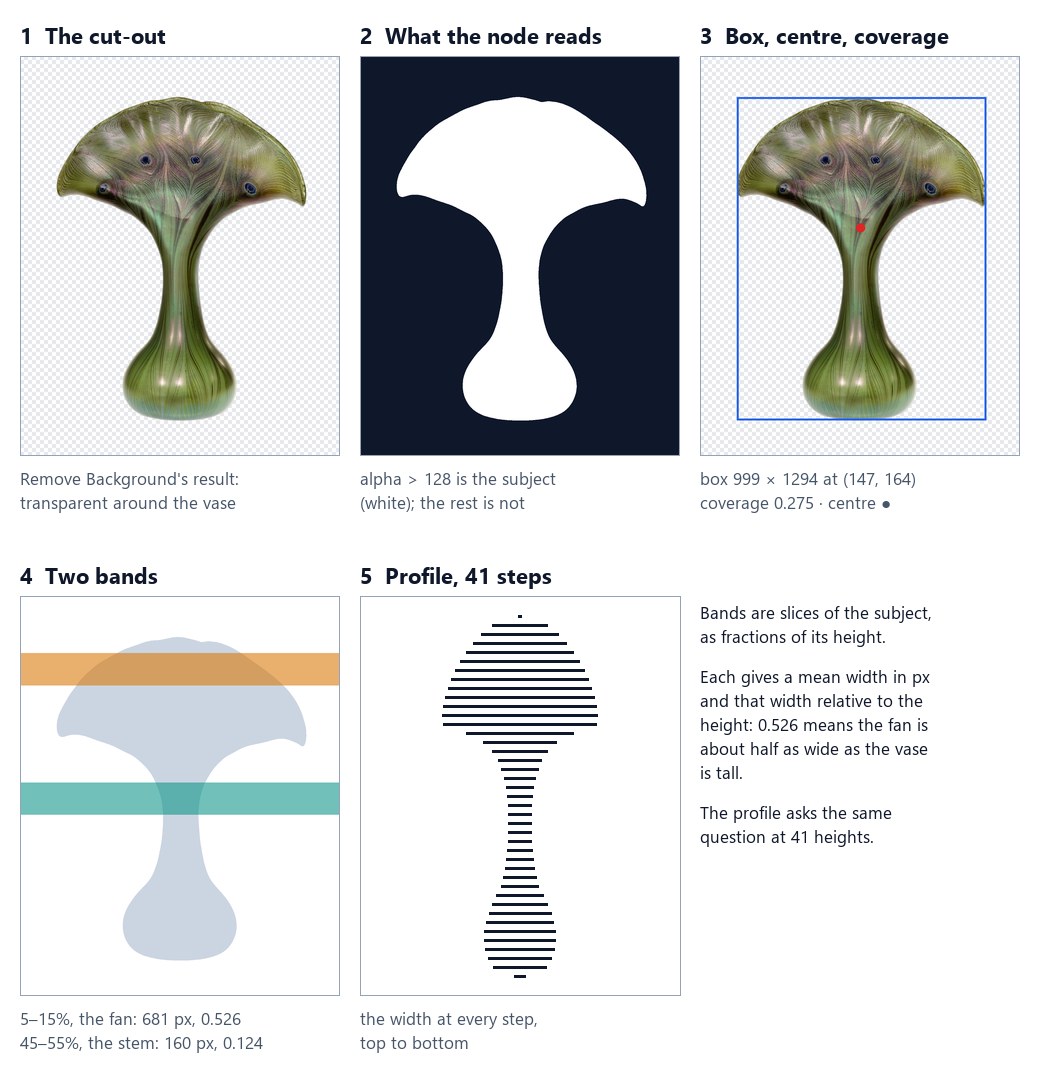
- The cut-out. Remove Background has made the background transparent.
- What the node reads. A pixel is subject when its value is greater than Threshold — 128 out of 255 by
default, so a soft edge counts half in, half out. Source
autoreads the alpha when the picture has transparency and the brightness otherwise (a black-and-white mask); Invert measures dark pixels instead. - Box, centre, coverage. The box around the subject, its centre of mass, and the share of the frame it fills: the vase fills 27.5% of its 1280 × 1600 picture.
- Bands. A band is a slice of the subject, given as fractions of its height. For each one the node returns the mean width in pixels and that width relative to the subject’s height.
- Profile. With Profile Steps 40, the width at 41 evenly spaced heights: forty-one numbers that redraw the outline.
Each region measured — the whole picture, a grid cell, a rectangle — comes back with these fields:
| Field | Meaning |
|---|---|
empty |
no subject in the region |
bbox, bbox_normalized |
the box around the subject, in pixels of the image and as fractions of it |
area, coverage |
the subject’s pixels, and the share of the region they fill (0 to 1) |
centroid, centroid_normalized |
the subject’s centre of mass |
touches |
whether the subject reaches the left, right, top or bottom edge of the region: cut off, or spilling in from a neighbouring cell |
first_line, last_line, extent |
where the subject starts and ends along the Axis, and how many lines it spans |
bands |
for each band, mean_length (pixels), relative_length (÷ extent) and center, per Length Mode |
profile |
the width at N + 1 positions, with Profile Steps N, per Length Mode |
An empty region has area and coverage 0 and touches no edge — those are facts — but no box, extent or bands.
Everything is in measurements, a madoo.mask-measurements/v1 document (get_json_schema returns its schema).
For a single region the node also has typed outputs that connect straight into a Predicate or a Calculate: found,
area, coverage — 0 on an empty picture, so coverage above 0.2 answers false instead of skipping — and bbox_x,
bbox_y, bbox_width, bbox_height, present only when there is a subject.
Bands, axis and proportions
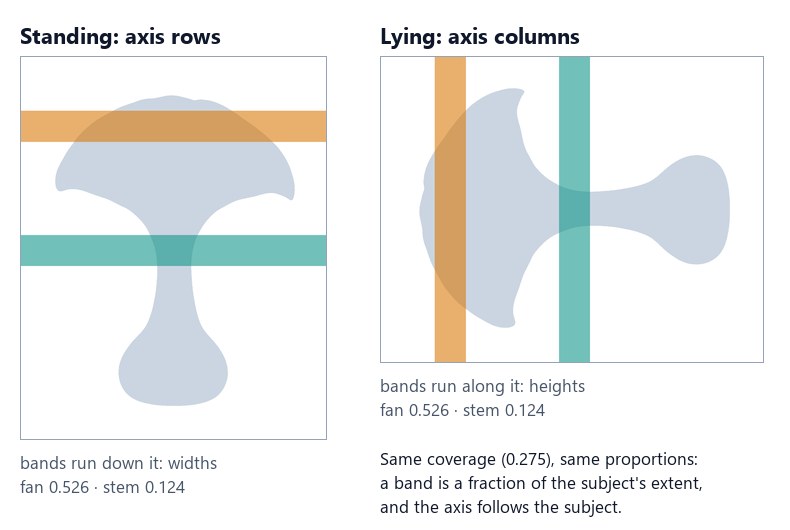
Section titled “Bands, axis and proportions”A band is written [start, end], fractions of the subject’s extent: [[0.35, 0.60]] is the slice from 35% to 60%
of the way down. Axis says which way “down” is. With rows — a standing figure, a bottle, a vase — bands are
horizontal and measure widths; with columns — a sofa, a car, a figure lying down — they run across and measure
heights.
Because relative_length divides by the subject’s own extent, it does not change with zoom or with the distance
from the camera. That is what makes it a measure of proportion: the same band, measured on several pictures of
the same subject, tells how its shape changes — and only its shape. A series of portraits compares the shoulders of
the same person picture after picture; a catalogue checks that every bottle of a range has the same shoulder.
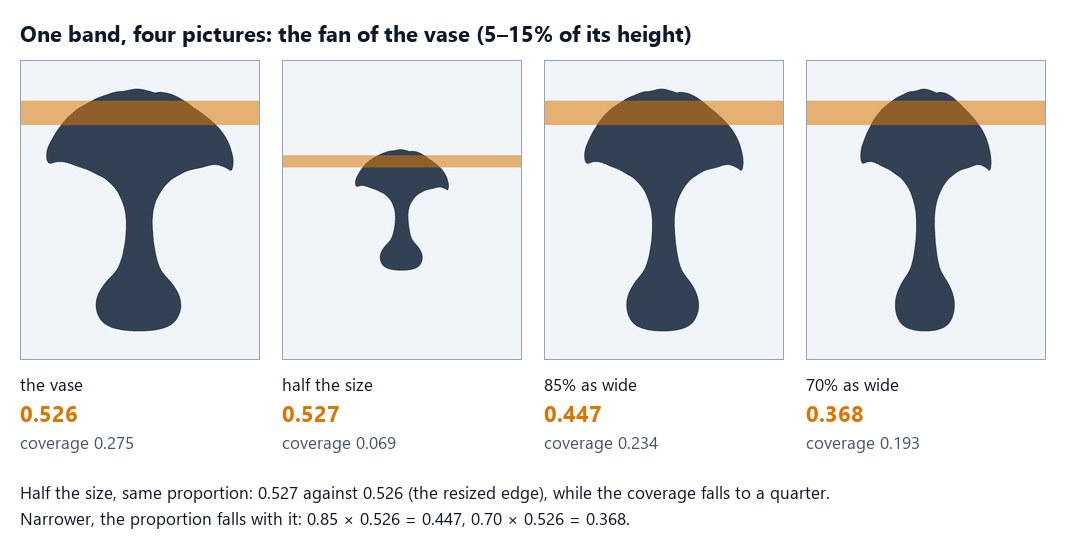
At half the size the vase fills a quarter of the frame, yet its fan is still 0.53 of its height; made narrower, the same band falls exactly with the width: 0.85 × 0.526 = 0.447, 0.70 × 0.526 = 0.368. A workflow that tracks a shape — the shoulder of a range of bottles, the silhouette of a figure across a series of pictures — compares this number, and turns it into what it means for that workflow with a Calculate. The node measures; what the number means is up to the workflow.
Minimum Line Pixels decides where the subject starts and ends: a line counts only with more subject pixels than that. The default 0 keeps everything — a 2-pixel stroke of a logo is content; 3 ignores the specks a background removal can leave around a person.
What a line’s length is: Length Mode
Section titled “What a line’s length is: Length Mode”A band’s width is the mean of the lengths of its lines, and the profile is the length of a line at N + 1 heights. So everything bands and profile say rests on one question: how long is a line of the subject? On a vase seen from the front the question has one answer. On a figure whose arms hang beside the body, a jug with a handle or an amphora with two, it has three — and each one is right for a different job.
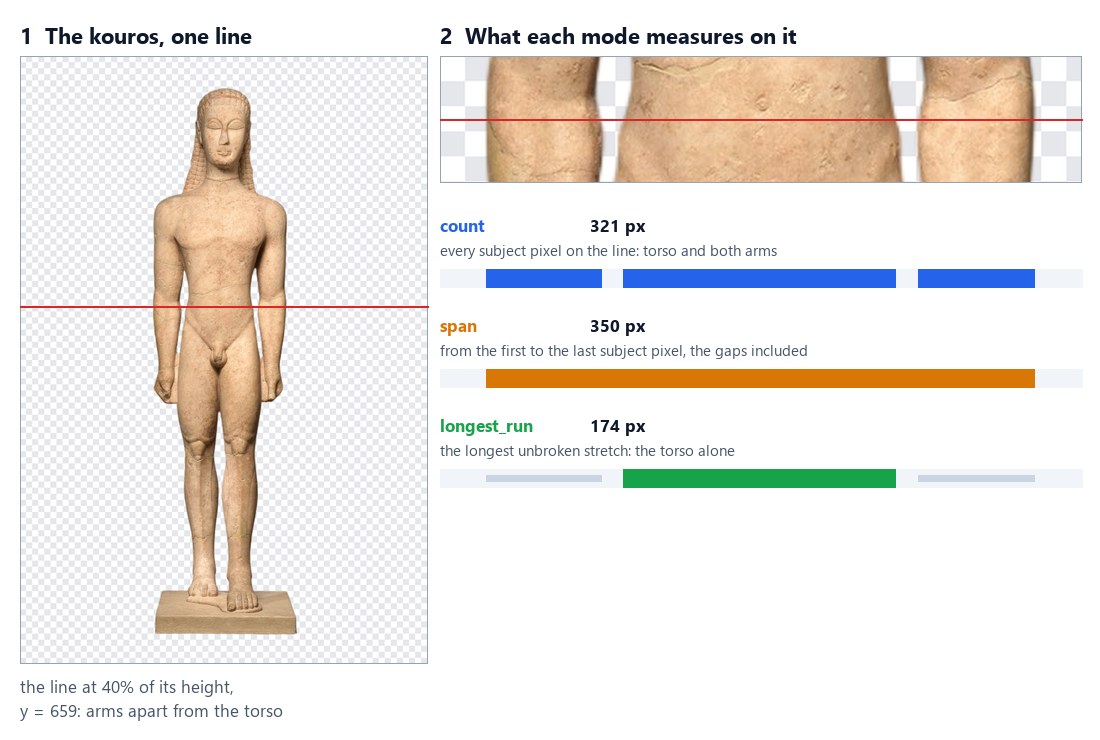
Length Mode (length_mode) gives the answer:
| Mode | The length of a line | Its center |
Use it for |
|---|---|---|---|
count (default) |
every subject pixel on the line, wherever it is | the mean position of those pixels | how much subject there is at that height |
span |
from the first to the last subject pixel, gaps included | the middle of the first and the last pixel | the outer size: how much room the subject takes |
longest_run |
the longest unbroken stretch of subject pixels | the middle of that stretch | the main body, without the parts detached from it |
On the line of the figure, 40% of the way down the kouros: the torso and two arms add up to 321 pixels (count);
from the outer edge of one arm to the outer edge of the other, the line is 350 pixels long (span); the torso
alone, the longest piece, is 174 (longest_run). The default is count, the length the node has always
measured, so a step saved before the parameter existed measures exactly as before.
What changes, and what does not
Section titled “What changes, and what does not”Length Mode changes the lengths that bands and profile report, and nothing else:
| Field | With Length Mode |
|---|---|
bands[].pixels |
the sum of the band lines’ lengths — the band’s subject pixels with count, the pixels the spans or runs cover otherwise |
bands[].mean_length |
pixels ÷ the band’s lines: the mean length per mode |
bands[].relative_length |
mean_length ÷ extent: still independent of zoom |
bands[].center |
the mean position, across the axis, of what was measured: the pixels, the spans or the runs |
profile[].length, profile[].relative_length |
the length of that line per mode |
area, coverage, bbox, centroid, touches |
unchanged: they always count subject pixels |
first_line, last_line, extent |
unchanged: Minimum Line Pixels compares the pixel count of a line |
quality_check |
unchanged: it reads coverage and edges |
The measurements document says which mode it was measured with (length_mode). A document written before the
parameter existed has no length_mode: read it as count.
How the node finds a run
Section titled “How the node finds a run”- A line is a row with Axis
rowsand a column withcolumns. Lengths are widths on rows and heights on columns, andcenteris an x on rows and a y on columns. - A run is a stretch of subject pixels with no gap: a single pixel at or below Threshold ends it. The threshold therefore decides what is joined. On a soft cut-out, a half-transparent edge between an arm and the body can join them at a low threshold and part them at a high one; the default 128 keeps a soft edge half in, half out.
- Two runs of the same length: the first one counts — the leftmost on rows, the topmost on columns — so the result never depends on chance.
- Inside a region, lines start and end at the region’s edges: a run or a span never reaches into the next grid cell.
- The longest run is chosen line by line. Where a line crosses two parts of about the same size — two legs —
longest_runtakes the wider one on each line, and it can switch from one to the other along the band.
The same figure, three bands
Section titled “The same figure, three bands”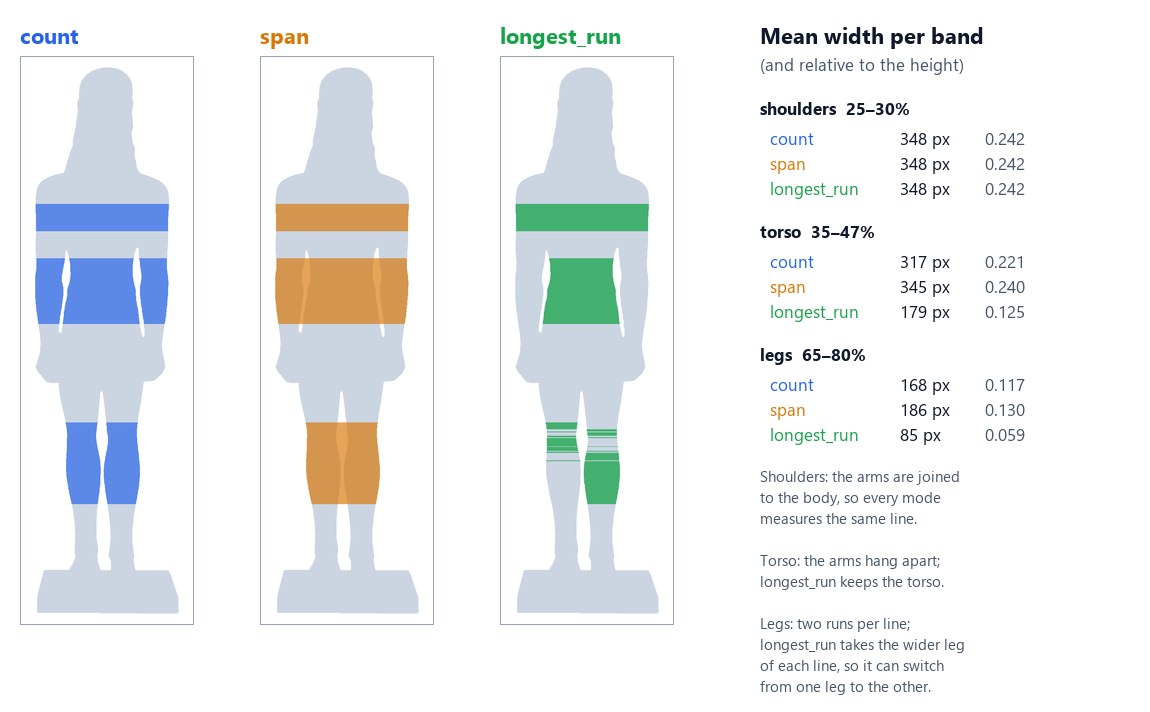
Three bands of the kouros, each measured three times, tell three different stories:
- Shoulders, 25–30%. The arms are joined to the body there, so every line is one piece: the three modes give the
same 348 pixels.
longest_runremoves only what is detached. - Torso, 35–47%. The arms hang apart.
countadds them (317),spanadds them and the gaps between (345),longest_runkeeps the torso alone (179, relative 0.125). This is the measure for comparing the torso of the same figure across pictures whatever the arms are doing. - Legs, 65–80%. Each line crosses two legs.
countgives both (168),spanboth and the gap (186), andlongest_runone leg (85) — the wider on each line. Herelongest_runanswers a different question; pick the mode together with the band.
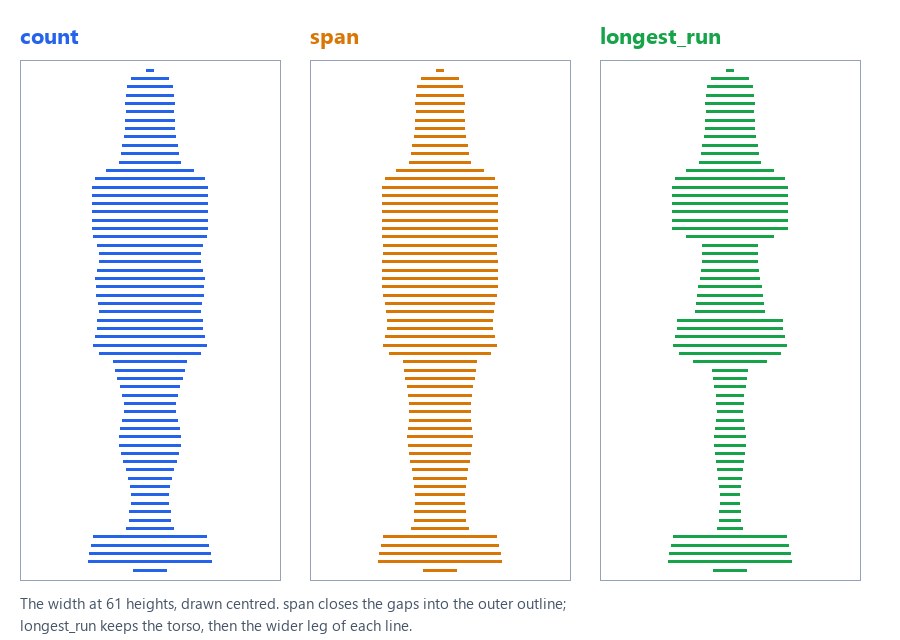
The profile shows the same thing from top to bottom: span draws the outer outline, longest_run the main body.
Handles: an amphora and a jug
Section titled “Handles: an amphora and a jug”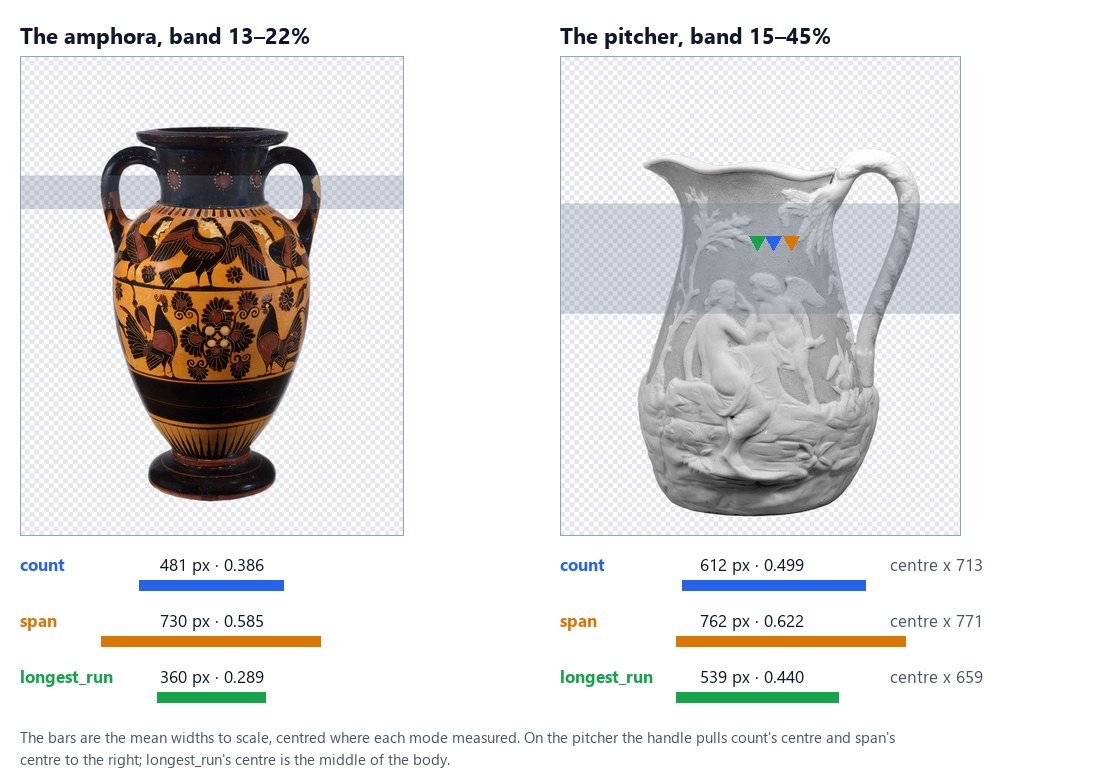
Objects with handles show the two other uses:
- The amphora (band 13–22%, across the handles).
spanis the size of the vase with its handles, 730 pixels — the width a box or a shelf must leave for it.longest_runis the neck alone, 360 pixels: the shape of the vase, whatever handles it has.countmixes the two. - The pitcher (band 15–45%, one handle on the right). Besides the width, the centre moves: the handle pulls
the centre of
countto x 713 and that ofspanto x 771, whilelongest_runputs it at x 659, the middle of the body. To place a label or a price on the body of an object with a handle — or to centre it in a frame — read the centre withlongest_run.
Choosing the mode
Section titled “Choosing the mode”| The question | Mode |
|---|---|
| How much subject is there at that height? (mass, silhouette, the default) | count |
| How much room does the subject take? Will it fit a box, a slot, a column of the layout? | span |
| How wide is the main body — a torso without the arms, a bottle without its handle, a chair without its armrests? | longest_run |
| Where is the middle of the body, not of the body plus its handle? | longest_run, center |
A few patterns, on any picture:
Compare a figure’s torso across pictures, whatever the arms do. Remove Background → Measure Subject with
Bands [[0.35, 0.47]] and Length Mode longest_run → Extract regions[0].bands[0].relative_length. The same
person with the arms along the body or slightly raised gives a comparable number; with count the arms would change
it. Set the band where the arms are apart from the body — around the waist on a standing figure — and check the
pictures: an arm resting on the hip is joined to the body and stays in.
Know whether the arms are apart. Two Measure Subject steps on the same cut-out and the same band, one with
count and one with longest_run → Calculate run / count → Predicate. A ratio of 1 means one piece on every
line: nothing detached, or the arms against the body. Well below 1, something hangs beside the body (0.57 on the
torso of the kouros).
Check that a product fits its slot. Measure Subject with Length Mode span, a band across the widest part —
[[0, 1]] for the whole height — and Calculate on its mean_length, or on the profile’s longest length, against
the room the layout leaves. Handles, spouts and arms count, because they take room.
Put a price on the body of a jug. Measure Subject with longest_run and a band across the body → Extract its
center → Calculate the x of the label from it. With count or span the label would slide towards the handle.
The quality check
Section titled “The quality check”quality_check is a madoo.quality-check/v1 document for the Quality Gate:
| Finding | Status |
|---|---|
no subject in any region (NO_SUBJECT) |
failed |
| a region’s coverage below Minimum Coverage or above Maximum Coverage | failed |
a subject touching its region’s edge (SUBJECT_TOUCHES_EDGE) |
warning; failed with Fail on Edge |
an empty region among others (REGION_EMPTY) |
warning |
A gate with the all_must_pass profile blocks on warnings too; use weighted or advisory when a warning should
let the picture through. Give each check its own Check ID when several feed the same gate.
Recipes
Section titled “Recipes”Each recipe is a short chain of nodes; every step costs nothing except the AI cut-out, when the picture is not one already.
Approve a product photo for the catalogue. Remove Background → Measure Subject with Minimum Coverage 0.2,
Maximum Coverage 0.85 and Fail on Edge → Quality Gate (checks from quality_check, value from the
photo) → Image Output from the gate’s value. Only a photo that fills the frame without being cut off reaches the
output; the others come back absent, with the reason in the gate’s report. The lab does exactly this.
Find the failed variants of a generated sheet. Measure Subject with Grid Rows and Grid Columns set to the
sheet’s layout, Minimum Coverage and Fail on Edge → JSON Enumerator on measurements (arrayPath: regions, mapping index, empty, coverage, touches.bottom) → Generate JSON. The list says which cell to
generate again; the quality_check says whether the sheet as a whole passes.
Keep only the photos where the subject is large enough. Data Rows over a list of photos (an image column) →
Remove Background → Measure Subject → Predicate coverage greater or equal 0.3 → Filter (the photo) → Generate
JSON with whenAbsent: skip_row on the photo. The list that comes out holds only the photos that passed; with
whenAbsent: null and coverage as a column, it holds all of them with their score.
Compare proportions with a reference. Two Measure Subject steps with the same band, one on the reference
picture and one on the new one → Extract regions[0].bands[0].relative_length from each measurements →
Calculate new / reference → Predicate. A ratio of 1 means the same proportion; below 1, narrower. The lying vase
measured against the standing one gives exactly 1.
Check that there is room for a badge. Measure Subject → Extract image.width from measurements → Calculate
width - (bbox_x + bbox_width), the free strip on the right of the subject → Predicate greater or equal 300 →
Filter in front of the badge step. A product placed too far to the right skips the badge instead of being covered by it. On the vase the strip is 1280 − (147 + 999) = 134 px: no room for a 300 px badge.
The lab
Section titled “The lab”The measuring lab checks two things a shop gets from earlier steps. The product cutout is the vase above. The variant sheet is a 2 × 2 sheet of generated variants of the same vase, 1600 × 1600: one is right, one came out too small, one is missing and one is cut off at the bottom.

Measure the product asks for the two bands of the first figure and a catalogue rule: coverage between 20% and 85%, and no edge touched (Fail on Edge). The vase fills 27.5% of its picture, touches no edge, and Catalogue framing releases it.
Measure each variant runs on the sheet with a 2 × 2 grid, a minimum coverage of 10% and Fail on Edge:
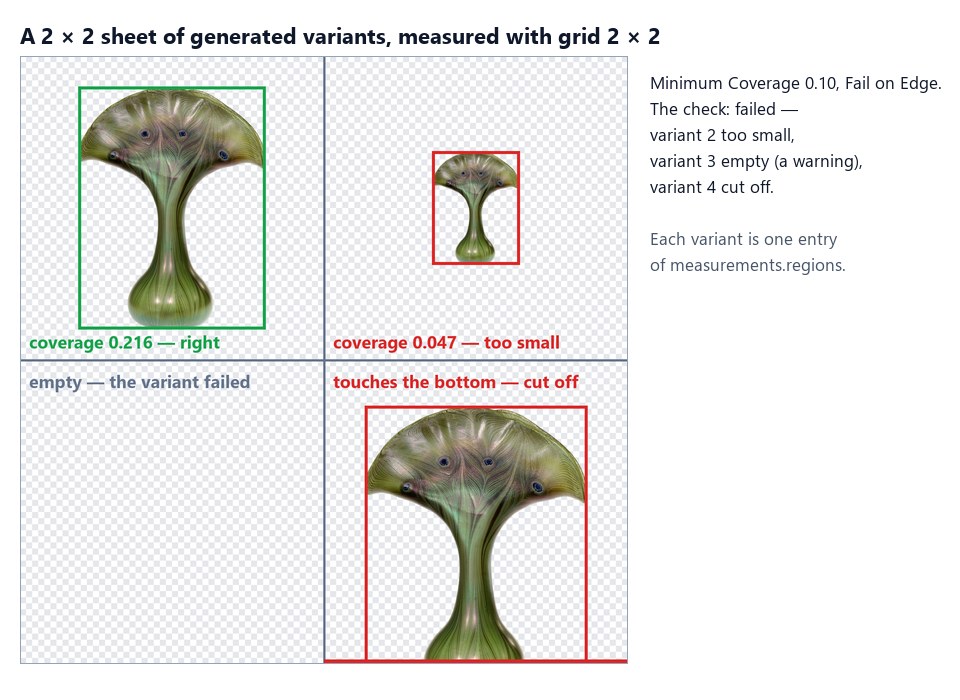
Each variant reads measurements.regions with the JSON Enumerator and Variants collects them:
| Variant | Empty | Coverage | Cut off at the bottom | Finding |
|---|---|---|---|---|
| 1 | no | 0.216 | no | — |
| 2 | no | 0.047 | no | COVERAGE_BELOW_MINIMUM: 4.7% below the minimum 10.0% |
| 3 | yes | 0 | no | REGION_EMPTY (warning) |
| 4 | no | 0.276 | yes | SUBJECT_TOUCHES_EDGE |
The sheet’s check is failed: a workflow that generates variants would generate cells 2, 3 and 4 again, or show
the operator which ones. The run costs 0 credits; the documents are in
result-product.json,
result-variants.json and
result-sheet-check.json.
node madoo-install-example.mjs lab-mask-measure --api <your Madoo API URL> --key <key.json> --runReading a grid
Section titled “Reading a grid”A grid comes back as one entry per cell in measurements.regions, in reading order: left to right, then the next
row. Each entry carries the cell’s index, its rectangle and every field of the table above. Three nodes turn it into
a list you can use: the JSON Enumerator gives one iteration per cell, Extract reads what sits inside a list,
and Generate JSON collects the cells again.
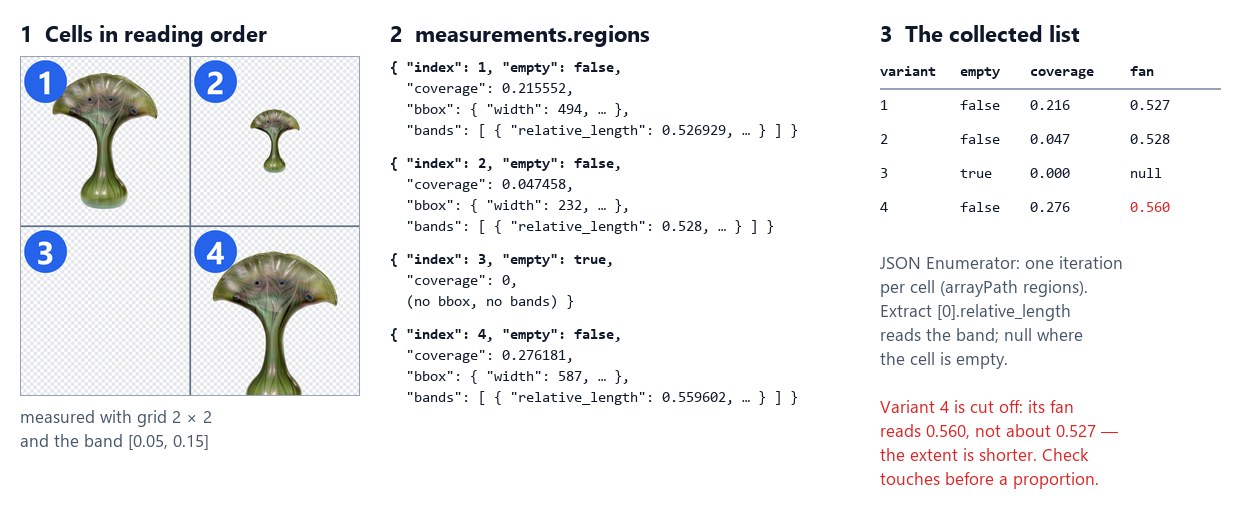
The chain behind the figure — Measure Subject with Grid Rows 2, Grid Columns 2 and Bands [[0.05, 0.15]]:
-
JSON Enumerator (
enumerate/json) onmeasurements, one iteration per cell:{ "jsonConfig": { "arrayPath": "regions", "properties": [{ "sourcePath": "index", "outputPort": "index", "outputType": "number", "selected": true },{ "sourcePath": "empty", "outputPort": "empty", "outputType": "boolean", "selected": true },{ "sourcePath": "coverage", "outputPort": "coverage", "outputType": "number", "selected": true },{ "sourcePath": "bands", "outputPort": "bands", "outputType": "json", "selected": true }] } }A field inside an object is reached with a dot:
touches.bottom,bbox.width,centroid.x. -
Extract (
utility/extract) on each cell’sbands, because a band is an item of a list:path: "[0].relative_length",expected_type: "number",on_missing: "absent". An empty cell has no bands, so the value is absent and the list below writesnull. -
Generate JSON (
aggregate/json) with one column per value,whenAbsent: "null"— or"skip_row"on a column to drop the cells that miss it.
The result is result-grid-variants.json:
| variant | empty | coverage | fan |
|---|---|---|---|
| 1 | false | 0.216 | 0.527 |
| 2 | false | 0.047 | 0.528 |
| 3 | true | 0 | null |
| 4 | false | 0.276 | 0.560 |
Two things to read in it:
- A cut-off subject has the wrong proportions. Variant 4 is the same vase, but its bottom is outside the cell:
the measured height is shorter, so every band looks wider (0.560 instead of about 0.527). Check
touches— or thequality_checkwith Fail on Edge — before trusting a proportion. - An empty cell keeps its place.
empty,area,coverageandtouchesare there (false, 0, 0, false); the shape fields are not. Reademptyfirst, and do not mapbbox.*for a grid that may have empty cells: the JSON Enumerator returns an empty text for a field that is missing.
For a fixed layout, one cell can be read directly without iterating: Extract regions[2].coverage on measurements
is the third cell — 0 on this sheet.
Limits
Section titled “Limits”- The subject is every pixel above the threshold in the region. Two people, or a person and a detached object, are measured together; a raised arm in front of the body widens the band it crosses.
- By default a band’s width counts the subject’s pixels on each line. Length Mode
spanmeasures from the first to the last pixel instead,longest_runthe longest unbroken stretch (What a line’s length is).longest_runleaves out only what is detached: a part that touches the body on a line is part of its run. - Grid cells are equal. For other layouts, list the rectangles in Regions (up to 64).
- Images above 40 megapixels are refused (
IMAGE_TOO_LARGE): resize them first. - The measured box cannot yet be wired into Crop, whose geometry is a set of parameters: set it per run through a custom interface.
Errors
Section titled “Errors”| Code | Cause | Fix |
|---|---|---|
INVALID_MASK_MEASURE_PARAMETER |
a band is not [start, end] with 0 ≤ start < end ≤ 1, a grid is above 16 × 16, a region is not a rectangle, a coverage limit is not a fraction, Length Mode is not count, span or longest_run |
fix the parameter the message names; it is reported when the workflow is validated |
INVALID_MASK_IMAGE |
no image is connected, it cannot be read, or Source is alpha on a picture without transparency | connect Remove Background’s result, or set Source to luminance for a mask |
INVALID_MASK_REGIONS |
a rectangle lies outside the image | list rectangles inside the image |
IMAGE_TOO_LARGE |
more than 40 megapixels | resize first |
Photos: “Vase”, Louis C. Tiffany, 1893–96, Favrile glass; “Marble statue of a kouros (youth)”, Naxian marble, ca. 590–580 BCE; “Terracotta neck-amphora (jar)”, attributed to the Painter of the Cambridge Hydria, ca. 540 BCE; “Pitcher”, Parian porcelain, 1830–70 — The Metropolitan Museum of Art, New York (Open Access, public domain). The cut-outs were prepared for the image labs with Madoo’s Remove Background; the variant sheet, the lying vase and the four variants were composed from the vase for this page. Every number in the figures was measured by Measure Subject.