

T03 — Six photos to a printed catalogue in three languages
Lunardi Antichità, an antiques dealer in Turin, sells to collectors in Italy, Britain and Germany. For the autumn the gallery wants a printed catalogue in each language: the dealer has the records — maker, dating, size, price — and a photo of every piece, but writing six entries three times over, and getting circa, um and c., 11,5 and 11.5, 2.400 € and €2,400 right in each, is an afternoon. This workflow does it in one run, for less than half a credit: three catalogues ready to print, the website’s texts in the three languages, and a list of photos to check — here, a lot filed with the wrong picture.
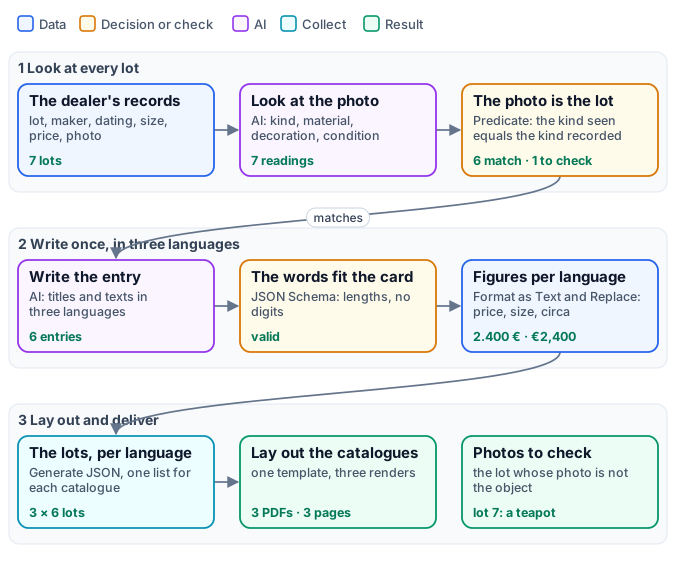
The reference run — 0.36 credits:
| Delivered | What is in it |
|---|---|
| Catalogues: Italian, English, German | three A4 pages each: a cover, then the six lots with photo, title, maker and dating, size, description and price |
| Texts for the website | one row per lot: maker, dating, price, and title and text in Italian, English and German |
| Photos to check | lot 7, Pair of plates: expected plate, the photo shows a teapot |
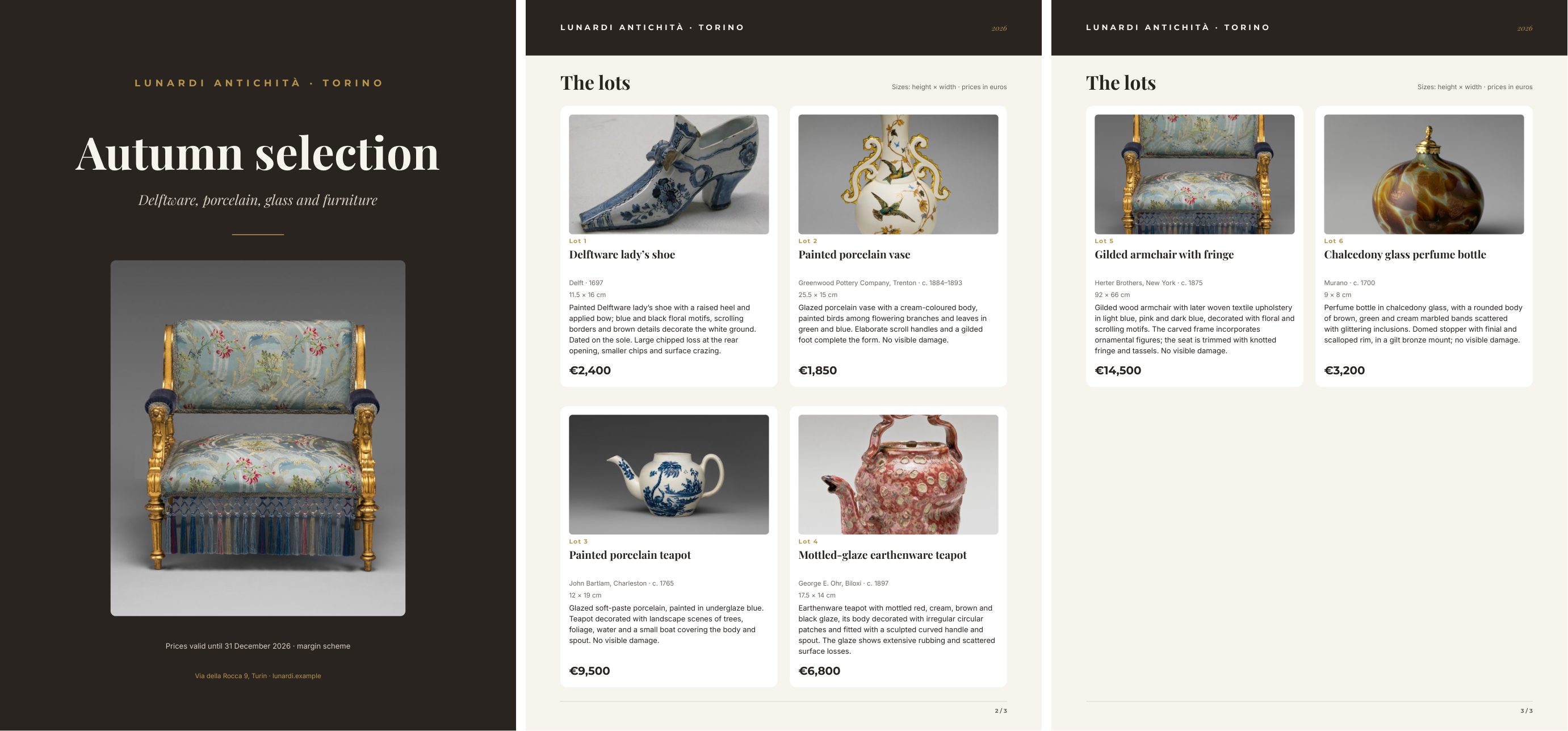
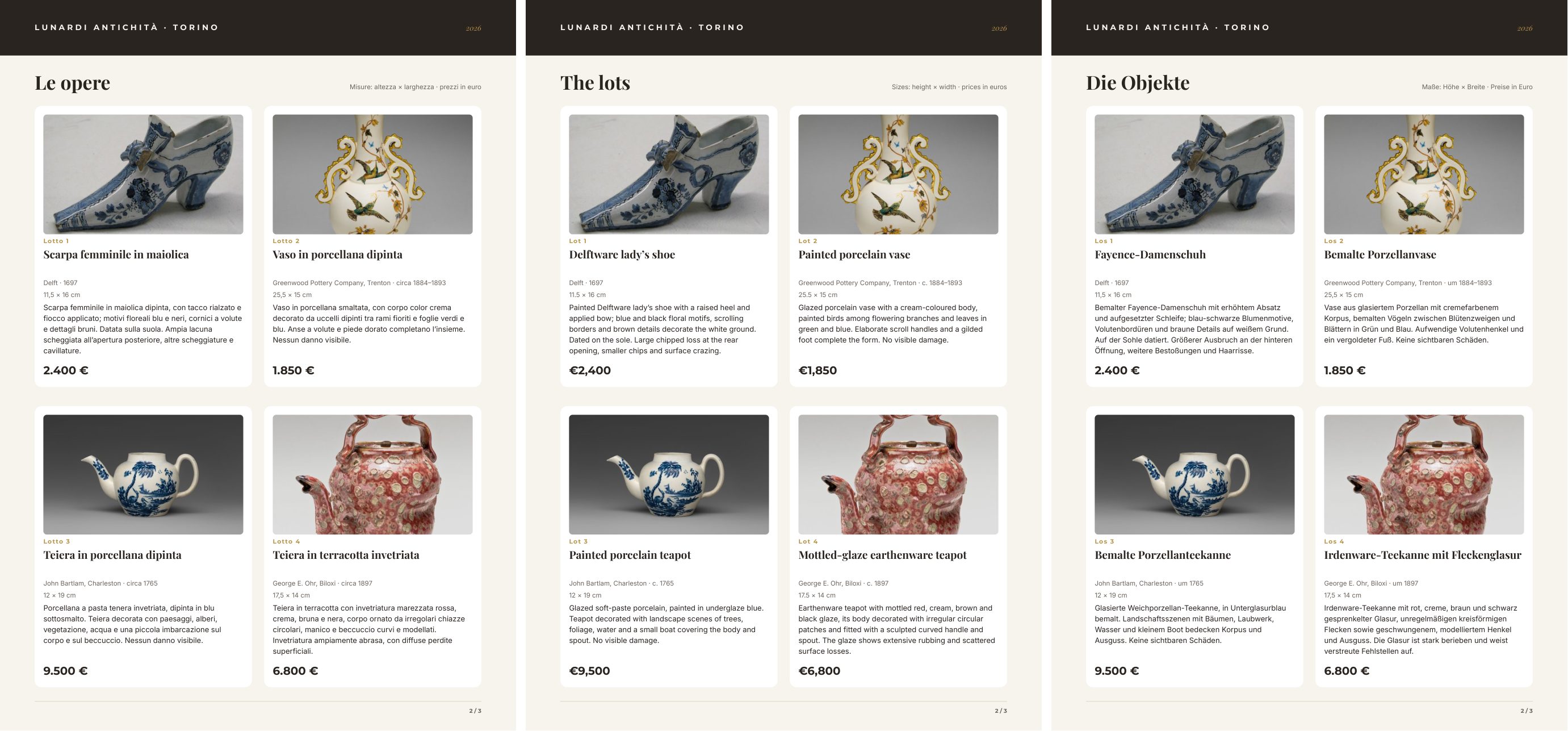
The same page in the three languages — the words written by the model, the figures by the workflow:
The case
Section titled “The case”The dealer’s records are a list, one object per lot — the kind of export a stock system gives:
{ "lot": 3, "object": "Teapot", "kind": "teapot", "maker": "John Bartlam, Charleston", "place": "Charleston", "dating": "c. 1765", "material": "soft-paste porcelain, painted in underglaze blue", "height_cm": 12, "width_cm": 19, "price_eur": 9500, "notes": "One of the earliest porcelains made in America.", "photo": "<the photo>" }Seven lots: a Delftware shoe, a porcelain vase with birds, two teapots, a gilded armchair, a perfume bottle — and a pair of Delft plates whose record points at the photo of a teapot, as happens when a file is attached to the wrong line. The catalogue’s own words — title, subtitle, section heading, the note on sizes and prices, the cover photo — come as a second input, once per language.
The gallery, its records, its prices and its address are fictional. The photos are of objects in The Metropolitan Museum of Art, New York (Open Access, public domain), standing in for the dealer’s stock: “Shoe”, 1697, Delftware; “Vase”, Greenwood Pottery Company, about 1884–93; “Teapot”, John Bartlam, about 1765; “Teapot”, George E. Ohr, about 1897; “Armchair”, Herter Brothers, about 1875; “Perfume bottle”, 17th–18th century, chalcedony glass with a gilded bronze mount.
| Input | Who provides it | Example |
|---|---|---|
| The lots | the stock system, as JSON, with a photo per lot | seven lots |
| The catalogue’s words | the gallery, once per language | {"it": {...}, "en": {...}, "de": {...}} |
What it shows
Section titled “What it shows”- The photo is checked against the record. Image Analysis looks at each photo and says what the object is,
from a fixed list (
shoe,vase,teapot,chair,bottle,plate, …), with its material, decoration and visible condition; a schema checks the answer. A Predicate compares the kind it saw with the kind in the record, and a Filter lets only a matching lot go on. Lot 7 — Pair of plates, with the photo of a teapot — stops there: no entry is written for it, it is not printed, and it is listed in Photos to check. See Reading pictures and Deciding. - One step writes three languages. Text Generation receives the record and the reading of the photo and returns, as JSON, a title and a text in Italian, English and German — written as a native catalogue writer would, with each language’s terms (maiolica, Fayence, Irdenware). One call per lot keeps the three versions saying the same thing. See Languages.
- No figures in the model’s words. The brief forbids numbers, dates, sizes and prices, in figures or in words, and the maker and the town; the schema refuses any digit. Dating, size and price are printed beside the text, from the record.
- Each language writes its own figures. Format as Text writes the price as
2.400 €in Italian and German and€2,400in English, and the size as11,5 × 16 cmor11.5 × 16 cm; Replace Text turns the record’sc. 1765intocirca 1765andum 1765. A Text Template adds the lot label — Lotto, Lot, Los. No model touches a figure. See Without a model. - One template, three catalogues. Generate JSON collects the lots of each language into one list; the same
template, rendered three times, receives the list on
lotsand the language’s words ondata_0. The cards fill a grid that continues on new pages, as in the wine price list. - A missing lot stops the print. If an entry fails — a text too long, a reading that breaks the schema — its lot
reaches the template without words, and the render stops with
DESIGN_PLACEHOLDER_REQUIRED, naming the lot: the catalogue is not printed with a hole in it. A lot the Filter held back is different: it was left out on purpose.
Building it taught four things the brief now says:
- Ask for words, not characters. Asked for 160 to 250 characters, the model wrote 280 in Italian; asked for 28 to 40 words, it stays within the card.
- A short text needs no reasoning. With the default Reasoning Effort, counting words cost the model about 0.2
credits an entry and, once, its whole token budget (
AI_RESPONSE_INCOMPLETE). With Reasoning Effortnonethe entry costs 0.024 credits and is as good. See What text costs. - Keep the record language-neutral. A maker written as Delft pottery or Unknown workshop appeared in English in the Italian and German catalogues; the record now says Delft, Murano, Herter Brothers, New York.
- Name the terms. The German text first called Ohr’s earthenware Fayence, which is tin-glazed; the brief now says which word goes with which material. And it says describe the object, never the photograph: an Italian text had begun la fotografia mostra….
The workflow
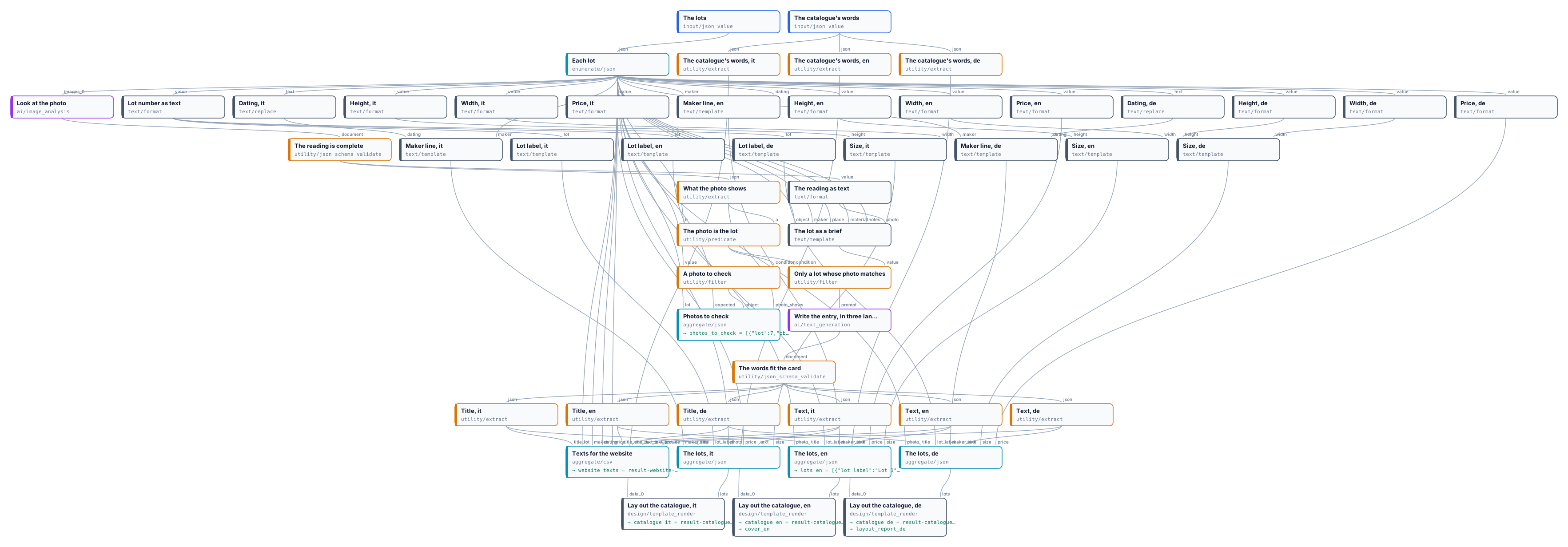
Section titled “The workflow”The figure above tells the workflow as stages; the exact graph is the workflow (as a diagram), node by node in the table.
| Node | Type | Why |
|---|---|---|
| The lots / The catalogue’s words | input/json_value ×2 |
The dealer’s records; the catalogue’s words in each language |
| Each lot | enumerate/json |
One iteration per lot: number, object, kind, maker, place, dating, material, size, price, notes, and the photo as an image |
| Look at the photo | ai/image_analysis, JSON mode |
Kind from a fixed list, material, colours, decoration, visible condition |
| The reading is complete / What the photo shows | utility/json_schema_validate fail, utility/extract |
The reading checked; the kind it saw |
| The photo is the lot | utility/predicate (equals) |
The kind seen against the kind recorded |
| The reading as text / The lot as a brief | text/format json, text/template |
The record and the reading, for the writer |
| Only a lot whose photo matches / A photo to check | utility/filter, utility/filter inverted |
The matching lots go on; the others are listed |
| Write the entry, in three languages | ai/text_generation, JSON mode, Reasoning Effort none |
Title and text in Italian, English and German |
| The words fit the card | utility/json_schema_validate, fail |
Every key; lengths for the card; no digits |
| Title, Text ×3 languages | utility/extract ×6 |
The six texts |
| Lot number as text; Dating, Maker line, Height, Width, Size, Price, Lot label per language | text/format, text/replace, text/template |
The figures written per language: it-IT, en-GB, de-DE |
| The lots, it / en / de | aggregate/json ×3 |
One list per catalogue; a lot without words is left out only when the Filter held it back |
| The catalogue’s words, it / en / de | utility/extract ×3 |
The language’s words for the cover and the headings |
| Lay out the catalogue, it / en / de | design/template_render ×3 |
The words on data_0, the list on lots |
| Texts for the website / Photos to check | aggregate/csv, aggregate/json |
The three languages in one row per lot; the lots held back |
| Outputs | output/pdf ×3, output/image, output/csv, output/json ×3 |
The catalogues, the cover, the website’s texts, the photos to check, the English list and a layout report |
Reading a run: Photos to check lists every lot whose photo did not match, with the kind expected and the kind seen; it is empty when all match.
Cost: about 0.03 credits to look at each photo and 0.024 to write each entry in three languages — 0.36 for seven lots. Formatting, checking and laying out are free.
Install it
Section titled “Install it”The example installs into your workspace with an API key, through the public API only — see Installing an example. It uploads the six photos and installs the document template too:
node madoo-install-example.mjs t03-antiques-catalogue --api <your Madoo API URL> --key <key.json> --run--run makes the three catalogues (about 0.4 credits). To make your own, run the workflow with your lots — each with
a photo — and your words on the two inputs.
Change it
Section titled “Change it”- Your objects: the list of kinds is in the photo reader’s brief and in its schema; a shop of lamps and mirrors, of bags and shoes, of bottles and labels changes the list. The check works the same.
- Another language: add a key to the writer’s brief and its schema, a set of figure steps with the locale
(
fr-FRwrites2 400 €), a list, a render, and the language’s words. - A marketplace instead of print: the website CSV already has the three languages; add the columns the marketplace expects.
- A person in the loop: send Photos to check to whoever keeps the records; the catalogue prints without the lot until its photo is fixed.
manifest · workflow · the complete graph · the template · the lots and words