

Thresholds and uncertainty
Every answer of Decide with a Model comes with a probability, and every question has a threshold: an answer is accepted when its probability reaches it. The threshold is where you trade coverage (how many answers are accepted) for precision (how many accepted answers are right).
What the probability means
Section titled “What the probability means”For a yes/no, the probability that the statement is true; for a choice, the probability of the option chosen; for a score, the probability of the most likely level. The model spreads the probability over every possible answer, and the decision document keeps them all.
The probabilities are calibrated: on our labelled sets, answers given at 0.9 were right about nine times in ten, and the expected calibration error was between 0.00 and 0.14 depending on the question — lowest on clear-cut checks (a watermark, a document’s kind), highest on a subjective scale (urgency), where the model is a little too sure. Calibration holds over many answers, not for a single one: 0.9 means “wrong one time in ten”, and the threshold decides whether that is acceptable for the step that follows.
The defaults
Section titled “The defaults”| Type | Default threshold | Why |
|---|---|---|
yes_no |
0.8 | At 0.8 every yes/no of our sets was right, and 89–100% of the answers were accepted. A yes/no is accepted on either side: 0.8 accepts true from 0.8 up and false from 0.2 down. |
choice |
0.7 | At 0.7 every team, document kind and best variant was right, with 91–100% accepted. |
score |
0.6 | A subjective scale has no threshold that suits everyone (see below): set it on your examples. |
What we measured
Section titled “What we measured”348 decisions on labelled sets, built for the purpose: 11 real photos with a licence (objects of the Metropolitan Museum of Art, NASA photographs, a CC0 labrador, Vermeer — all public domain or CC0) each in six versions (the original, blurred, watermarked, cut off, too dark, heavily compressed); 30 customer messages written in English and in Italian; 16 documents in both languages; 9 product descriptions in both; 12 reviews hiding an instruction; 11 sets of four variants. Accepted = share of answers accepted at the threshold; precise = share of the accepted ones that were right.
| Question | Examples | Right | At 0.7: accepted / precise | At 0.8 | At 0.9 |
|---|---|---|---|---|---|
| Photo in focus | 55 | 100% | 98% / 100% | 91% / 100% | 65% / 100% |
| Watermark | 66 | 100% | 100% / 100% | 100% / 100% | 98% / 100% |
| Well exposed | 66 | 98% | 92% / 98% | 89% / 100% | 52% / 100% |
| Whole subject in the frame | 30 | 100% | 100% / 100% | 100% / 100% | 100% / 100% |
| What the picture shows (6 kinds) | 66 | 91% | 91% / 100% | 83% / 100% | 70% / 100% |
| Item damaged (EN / IT) | 30 / 30 | 100% / 100% | 100% / 100% | 97–100% / 100% | 97% / 100% |
| Which team (EN / IT) | 30 / 30 | 100% / 100% | 93–100% / 100% | 93–97% / 100% | 90–93% / 100% |
| Urgency (EN / IT) | 30 / 30 | 73% / 73–77% | 80–83% / 79–80% | 53–70% / 81–88% | 33–43% / 80–85% |
| Kind of document (EN / IT) | 16 / 16 | 100% / 100% | 100% / 100% | 100% / 100% | 100% / 100% |
| Quality of a description (EN / IT) | 9 / 9 | 100% / 100% | 89–100% / 100% | 89–100% / 100% | 89% / 100% |
| Best of four variants | 22 | 100% | 100% / 100% | 100% / 100% | 100% / 100% |
What it says:
- Clear checks need no tuning: focus, watermark, framing, document kind, team — right nearly every time, and sure.
- A subjective scale is the weak point. Urgency was right three times in four; our own labels are debatable (is
“can I change the delivery address?” low or medium?). At 0.8 the accepted answers were right 81–88% of the time,
but only half to two thirds were accepted. For a score, use the continuous value to sort (
urgency= 1.97 is more urgent than 1.05) and keep the threshold for what must not be wrong. - Wrong answers come with low probabilities. At
lowimage detail every wrong answer on the photo checks and on the teams was below 0.8: that is why the default thresholds accept almost everything that is right and nothing that is wrong. Athighdetail one sharp photo was called blurred at 0.83 — one more reason to keeplowfor whole-photo checks.
Setting a threshold on your own examples
Section titled “Setting a threshold on your own examples”Twenty to fifty of your own items are enough to set a threshold you can trust:
- Collect 20–50 real items — photos from your studio, messages from your inbox, your suppliers’ documents — and write the right answer for each, without looking at what the model says.
- Run the step on them with
mark, inside an iteration, and collect each item’sdecisionwith JSON Aggregator. - Sort the answers by probability and look where the wrong ones are. Put the threshold just above the highest wrong answer, and count how many right answers fall below it — those are the cases that will go to a person.
- Decide what a mistake costs. A wrong publish (a blurred photo on the marketplace) is worse than a wrong review (a good photo checked by a person): raise the threshold of the question that publishes.
- Pin it. Write the threshold in the question and keep the set: after a change of model or of the question, run it again.
Changing the threshold never costs anything — it is applied by Madoo to the probabilities the model returned — so
it can also be tuned on the stored decision documents of past runs.
Four patterns for an uncertain answer
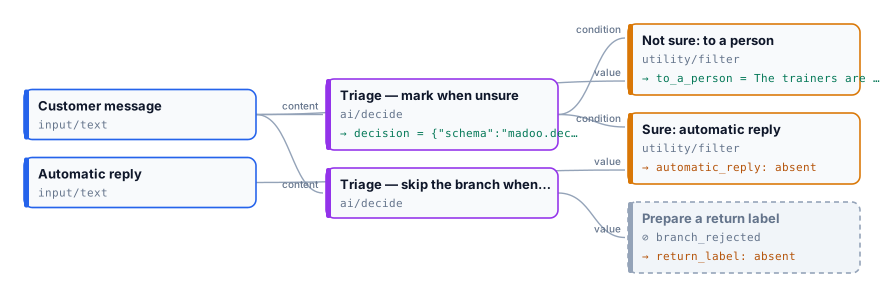
Section titled “Four patterns for an uncertain answer”A person reviews it — mark, and two Filters on all_accepted: the sure cases go on
automatically, the others to a review queue. This is the default and the most common pattern.
Decide (mark) ── all_accepted ──▶ Filter ─────────▶ automatic path └─▶ Filter (invert) ─▶ to a personThe step does not run — skip_branch: the ports of the uncertain answer are cut, so the paid step that reads them
— a generation, a delivery, a message to the customer — is skipped at no cost, while the rest of the decision goes on.
The run stops — fail: the step fails with DECISION_UNCERTAIN and a message naming each answer below its
threshold (“route (uncertain, probability 0.55, threshold 0.70)”). The model call is charged. Use it where an unattended run must
never go on with a guess.
A second, closer look — route the uncertain cases (Filter on all_accepted inverted) to
Image Analysis or Text Generation with a fuller
prompt, or to Decide with a Model again at high image detail. The cheap judge handles the many clear cases; only
the few doubtful ones pay for the expensive one.
Combine sureness and outcome explicitly. “Publish only good photos the model is sure about” is a
Combine Conditions of the checks and all_accepted — all_accepted
alone would also publish a photo the model is sure is blurred. See X01.
The lab
Section titled “The lab”The lab asks the same two questions — which team, and
“The customer will send the item back” (threshold 0.8) — in two steps: one with mark routing on all_accepted,
one with skip_branch feeding the step that would prepare a return label.
| “The trainers are lovely but maybe half a size small? I might keep them, I might not.” | “They are a size too small, I am sending them back for a refund.” | |
|---|---|---|
| Team | other, 0.98 — accepted |
refund, 0.78 — accepted |
| Will send the item back | true, 0.50 — uncertain |
true, 1.00 — accepted |
| All accepted | false |
true |
mark: automatic reply / to a person |
absent / the message, to a person | the automatic reply / absent |
skip_branch: return label |
absent — the step is skipped | “Prepare a return label.” |
0.006 credits a run. The hesitant customer gets a person; the clear one gets the automatic reply and a return label.
The second run’s inputs are in run-inputs-clear.json.
node madoo-install-example.mjs lab-decide-uncertain --api <your Madoo API URL> --key <key.json> --run