

Media files and preflight
A media workflow is only as reliable as the files it is given. A clip sent by a customer may be landscape when the workflow expects portrait, silent when it expects a voice, or a MOV with a codec a platform refuses. This page explains how files enter and leave a workflow, and how a workflow measures a file and decides, before it spends anything or publishes anything, whether the file is fit for the job.
Getting media in
Section titled “Getting media in”A video or an audio file becomes an input of a run in one of three ways.
- Uploaded to the workspace, which returns a storage
path: in one request up to 250 MB, or in parts through a presigned upload for large files — see Assets. Over MCP,create_asset_uploadandfinalize_asset_uploaddo the same. - Imported from a URL: Madoo downloads the file and stores it (Assets §2,
import_asset_from_urlover MCP). - Passed as a URL at run time: a video or audio input also accepts a public HTTPS URL as its value; Madoo downloads and checks the file before any node reads it.
A run gives a stored file to an input as {"asset_path": "uploads/…/clip.mp4"}; the details are in
Executions. When a URL is produced inside a
workflow — an AI answer, a field of a JSON record — Media from URL (utility/media_from_url) turns that text
into a typed video or audio value, after downloading and validating it.
Accepted formats are MP4, WebM and MOV for video and MP3, WAV, OGG, FLAC, AAC and M4A for audio. Madoo checks the bytes, not the name: a file whose content does not match its extension is refused. Caption files (SRT, VTT) are not uploaded as assets; they travel as text, or are produced by the caption nodes.
Getting media out
Section titled “Getting media out”Video Output and Audio Output (output/video, output/audio) name the results of a run. The result of an
execution lists them with a download link each (get_execution_result over MCP, or
Executions). An output that a decision held back comes back absent, with the
reason.
What a file really is
Section titled “What a file really is”Media Technical Info (media/technical_info) opens a file and reports what is in it — the kind of media, the
content type detected from its bytes, size, duration, width and height, frame rate, rotation, video codec, and each
audio stream with its codec, channels and sample rate. It changes nothing and costs nothing. Its outputs give the
facts one by one (duration in seconds, width, height, has_audio) and all together (info, as
madoo.media-technical-info/v1), so the next steps can decide on
them: branch on has_audio, compute a trim from duration, pick a layout from the orientation.
A media policy
Section titled “A media policy”Given a media policy (madoo.media-policy/v1), the same node checks the
file against the rules of a delivery and says which ones fail:
| Rules | Checks |
|---|---|
allowedMediaKinds, allowedContentTypes, maximumSizeBytes |
video, audio or image; MP4 only; at most so many bytes |
minimumDurationMilliseconds, maximumDurationMilliseconds |
not shorter or longer than the platform accepts |
minimumWidth, maximumWidth, minimumHeight, maximumHeight |
resolution, and so orientation: at least 720 wide and 1280 high is portrait |
minimumFrameRate, maximumFrameRate, allowedRotationDegrees |
smoothness; a phone clip stored sideways |
allowedVideoCodecs |
h264, hevc, vp9… |
requireAudio, minimumAudioStreams, maximumAudioStreams, allowedAudioCodecs, allowedChannelCounts, minimumSampleRateHz |
a soundtrack is present, and in the right shape |
The result is a quality_check — passed or failed, a score, and one violation per broken rule with what was
expected and what was found (MINIMUM_HEIGHT: expected 1280, actual 720). The policy can be written in the node or
arrive on its policy input at run time, so one workflow can check a clip against the rules of the platform chosen
for that run. compatible is true when the file is readable and every rule holds.
Hold a clip back: preflight and gate
Section titled “Hold a clip back: preflight and gate”A check does not stop anything on its own. Connect its quality_check to a Quality Gate
(utility/quality_gate), the clip to the gate’s value, and the delivery to the gate’s value output: the clip
goes on only when the policy passes. With mode: route a rejected clip comes back absent with a report and the
run completes; with fail the run stops. Several checks — frame, encoding, loudness — combine in one gate, which
reports each of them. The mechanics of gates, profiles and missing checks are in
Quality checks.
Put the preflight where it saves the most: before a paid step — an upscale, a translation, a voice — so that a wrong file never reaches it, and before a delivery, so that a platform never rejects a file for a reason a workflow could have measured.
The lab
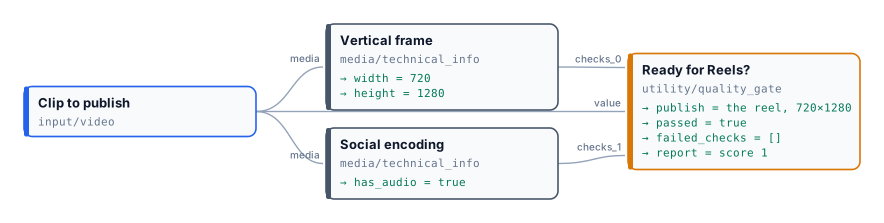
Section titled “The lab”The preflight lab asks one question — is this clip ready for Reels? — with two checks and a gate. Vertical frame requires video of at least 720×1280 (so portrait), at most 90 seconds, 24 to 60 frames per second. Social encoding requires an MP4 with H.264 video, an AAC soundtrack and at most 100 MB. Ready for Reels? releases the clip only when both pass.
| Clip | Measured | Failed checks | Published |
|---|---|---|---|
| The vertical reel from Editing video | 720×1280, 12.6 s, H.264 + AAC | — | yes |
| The landscape interview | 1280×720, 25 s, H.264 + AAC | vertical-frame: MINIMUM_HEIGHT (1280 expected, 720 found) |
no — absent |
| A small silent clip | 540×960, 8.2 s, no audio | vertical-frame: MINIMUM_WIDTH, MINIMUM_HEIGHT; social-encoding: REQUIRE_AUDIO and no audio codec |
no — absent |
Every run completes and costs nothing; the report of each rejected clip says exactly what to fix — reframe the interview to 9:16 (Editing video), and give the small clip a larger source and a soundtrack. The measured facts are in the reports.
node madoo-install-example.mjs lab-preflight --api <your Madoo API URL> --key <key.json> --run--run checks the vertical reel; the other two runs are in
run-inputs-landscape.json and
run-inputs-silent.json.
Media: “Artemis Media Resource — Interview Soundbites”, NASA (public domain; NASA does not endorse this documentation); music “Local Forecast – Elevator” Kevin MacLeod (incompetech.com), CC BY 4.0; product clip by Artem Podrez on Pexels.