

Audio finishing
Speech recorded in a room is rarely ready to publish. It is too quiet or too loud for the platform, the air
conditioning hums under it, a music bed either drowns it or is too shy to be heard, and the music stops before the
voice does. Audio finishing is the set of steps a sound engineer applies before delivery. In Madoo they are six
nodes that run locally, cost no credits, and each measures what it did: every one of them returns a report
and a quality_check, so a workflow knows — not assumes — that the audio it delivers meets the target.
Loudness in one paragraph
Section titled “Loudness in one paragraph”Platforms play everything at a set loudness, measured in LUFS (loudness units relative to full scale, over the whole programme): a file mixed louder is turned down, a quieter one sounds weak next to the rest. The other number is the true peak, in dBTP: the highest point the waveform reaches once decoded, which must stay a little under 0 so that no player clips it. A delivery target is therefore two numbers — for example −14 LUFS and −1 dBTP for social video and music streaming, −16 LUFS for podcasts, −23 LUFS for broadcast television.
The six nodes
Section titled “The six nodes”Enhance Speech (audio/speech_enhance) cleans a voice locally: noise reduction, de-click, de-clip, de-esser,
high- and low-pass filters, a gate and gentle compression. The profile sets them together — light keeps the
room tone, podcast (the default) is balanced, dialogue is stronger for field recordings — and custom exposes
every control. It does not remove echo or reverberation, nor separate a voice from music: that is a model’s job, done
by ai/audio_isolation (paid).
Normalize Loudness (audio/loudness_normalize) brings audio to a loudness and a true-peak ceiling: podcast
(−16 LUFS, −1.5 dBTP), broadcast (−23 LUFS, −1 dBTP), social (−14 LUFS, −1 dBTP), or custom values. The
default two_pass mode measures the whole file first and then applies one correction, so the result is
predictable. It returns the audio with its measurements before and after; with fail_on_target_miss (on by
default) it refuses to publish a file that missed the target — turn it off to route the failed check to a gate
instead.
Loop Music Bed (audio/loop) fits a music track to an exact duration — the length of a voice-over, taken from
Media Technical Info — repeating it with crossfades (crossfade_ms) when it is shorter, cutting it when it is
longer, with a fade in and a fade out that ends exactly on the last frame. It never changes the tempo.
Duck Background Audio (audio/duck) lowers a background (music) under a foreground (voice). The default
phrase technique lowers the music for whole phrases: short pauses between words stay inside the phrase, so the
music does not pump up and down with every word; it starts moving a little before the voice and comes back after
it. voice_over (music 10 dB down under speech) is the default profile, subtle (6 dB) and aggressive (16 dB)
the others; the compressor technique is a classic sidechain compressor that reacts to every word.
output_duration: foreground ends the mix with the voice. If the background is absent — a branch without music —
background_absent_behavior: pass_foreground lets the voice through alone.
Fit Audio Duration (audio/fit_duration) makes a clip last exactly as long as a slot — a line of a dub, a cue in
an ad — by changing its tempo within bounds and keeping the pitch, then padding with silence or trimming when the
bounds are not enough (tempo_then_pad, the default; tempo_then_trim; or tempo alone). natural_speech never
slows or trims speech and reports how much it had to speed it up; the dubbing page explains it. A rate outside the
bounds fails, is clamped or is applied with a warning, as on_out_of_range says.
Audio Quality Report (audio/quality_report) changes nothing: it measures integrated loudness, loudness range,
true and sample peak, near-clipped samples, silence at the head and the tail, and dropouts, and checks them against
a profile (dialogue, music, delivery) or explicit thresholds. It is the last step before a gate.
For simple edits there are also Trim, Split, Merge, Mix, Volume, Speed, Fade and Convert (audio/…), made for short
clips; Mix sums two tracks at the volumes you give it.
The order that works
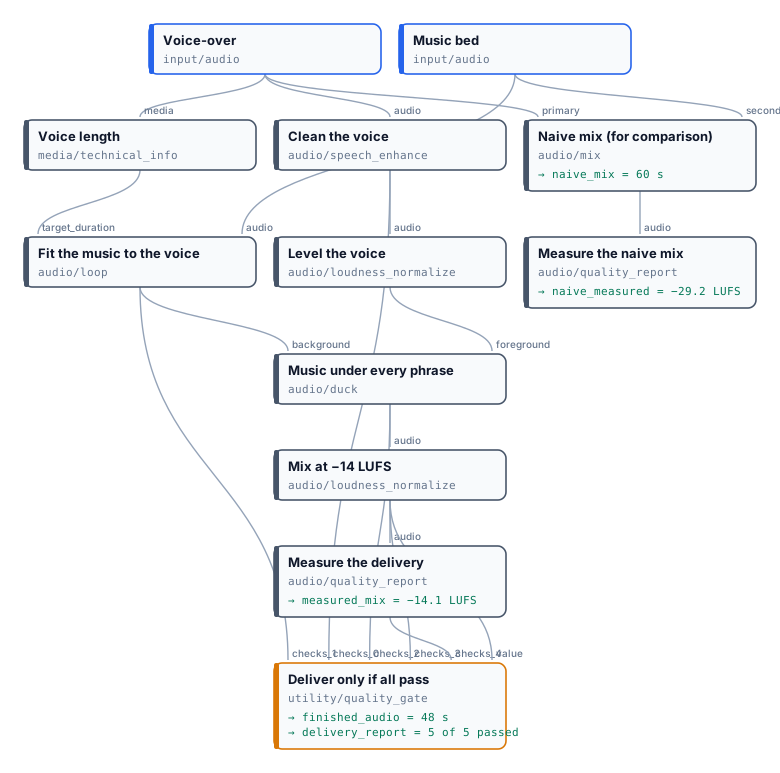
Section titled “The order that works”- Clean the voice (Enhance Speech), then level it (Normalize Loudness,
podcast): the voice enters the mix at a known level, whatever the recording. - Fit the music to the voice (Loop Music Bed, with the voice’s duration from Media Technical Info): a bed shorter than the voice would otherwise stop in the middle — and the ducking check would not notice, because it measures the mix, not the music.
- Duck the music under the voice, ending with the voice.
- Normalize the mix to the delivery target, after the ducking: lowering the music takes about 3 LU off the mix, so a mix normalized before it arrives under the target.
- Measure it (Audio Quality Report) and send every check to a Quality Gate, with the audio on the gate’s
value: the finished audio comes out of the gate only when every step passed.
Give every check its own check_id (voice-cleanup, voice-level, mix-loudness…). Two nodes of the same kind
keep the same default id; a workflow whose gate would receive two checks with the same id is refused when it is
validated, with DUPLICATE_CHECK_ID on the node to rename — before anything runs. How gates count checks, and why a
check in warning blocks all_must_pass, is in Quality checks.
Work in WAV between steps (output_format: wav, lossless 24-bit, 48 kHz) and choose MP3 or AAC only for the file
you deliver.
The lab
Section titled “The lab”The audio finishing lab takes 48 seconds of an interview recorded by NASA and 60 seconds of a music bed, and makes a voice-over over music for a social video, at −14 LUFS. Next to it, the same two files are simply summed at fixed levels with Mix and measured the same way.
| Finished | Naive mix | |
|---|---|---|
| Loudness | −14.1 LUFS (target −14 ± 2) | −29.2 LUFS: 15 LU too quiet |
| True peak | −1.2 dBTP | −8.1 dBTP |
| Duration | 48.0 s, ending with the voice | 60.0 s: the music plays 12 s after the voice |
| The music under the voice | 10 dB down during every phrase, back between answers | constant |
| Gate | passed, 5 of 5 checks | would fail on loudness |
| Listen |
Both results are MP3 copies of the run’s outputs for this page: finished, naive; the full measurements are in the run’s outputs. No credits.
node madoo-install-example.mjs lab-audio-finishing --api <your Madoo API URL> --key <key.json> --run --save mixReplace the voice with your own recording and the music with your bed; for a podcast choose the podcast profile
on the last normalization (−16 LUFS), for a TV spot broadcast (−23 LUFS).
Media: voice from “Artemis Media Resource — Interview Soundbites”, NASA (public domain; NASA does not endorse this documentation). Music: “Local Forecast – Elevator” Kevin MacLeod (incompetech.com), licensed under Creative Commons: By Attribution 4.0 License, http://creativecommons.org/licenses/by/4.0/.
On a video
Section titled “On a video”The finished audio goes back onto the picture with Add Audio to Video in replace mode — see
Editing video. To work on the soundtrack of a video, take it out first
with Extract Audio.