

Images
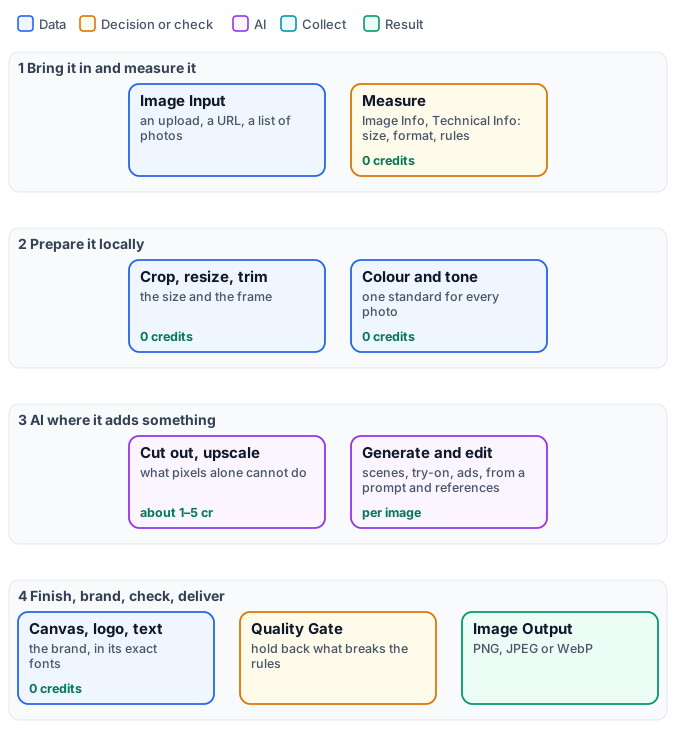
A picture that reaches a customer has usually been through several hands: photographed by a supplier, cut out of its background, set on white for a marketplace, warmed up to match the rest of the catalogue, framed for a story, signed with a logo and a price. In Madoo each of those is a node, and a workflow chains them so that the same result comes out every time — for one product, or for the three hundred products of a season. This section explains how the image nodes work and how they combine, from a single resized photo to a campaign generated with AI.
Three ideas run through every page.
Two kinds of step. Most image work — sizing, cropping, colour, filters, compositing, text, layouts, codes — runs on Madoo’s own workers: it is deterministic, gives the same picture for the same input, and consumes no credits. A model is needed only where pixels alone cannot do the job: separating a product from a real background, enlarging with real detail, placing a product in a scene, dressing a model, generating a picture from a prompt. Those AI steps are paid, and they give a proposal — the same prompt does not make the same picture twice.
Local around AI. A good image workflow prepares a picture locally before the AI step (the right size, the right file, a check that it is usable) and finishes it locally afterwards (the exact format, the brand, the text, a final check). The paid step then receives what it needs and nothing is spent on a file that could never work.
Every page has a lab. Each technique comes with a small workflow you can install and run, built on real photographs — objects from the open-access collection of the Metropolitan Museum of Art — so every claim on these pages was measured on a run, not assumed.
Where to go
Section titled “Where to go”Deterministic — local, 0 credits
| Your task | Read |
|---|---|
| Bring pictures in and out; formats, upright phone photos, transparency, weight, metadata, colour profiles; measure a picture and hold it back | Image files and formats |
| Where the subject of a picture is and how big it is: its box, how much of the frame it fills, whether it is cut off, its proportions; which cells of a generated grid hold one | Measuring the subject |
| The colors of a picture: its palette, dominant and accent colors, the color of a product, a text color that reads on it; whether a picture keeps to the brand colors | The colors of an image |
| How bright or dark a picture is, whether it is blown out or crushed, whether a packshot sits on white, which area is darker, how bright the subject is apart from its backdrop | Measuring tone and colour |
| Whether a picture kept its fine detail against a reference — after a generation, an upscale, a compression; where to look closely, cut out at full size for a vision model | Measuring fine detail |
| Whether a person, an animal or an object is in a picture, how many and where; the mask of the main person to measure or crop it | Finding people and objects |
| A head shot from any photo — square, 4:5, 9:16 — framed around the face; whether a picture shows a face | Finding and framing faces |
| This product, this person or this mark found in a scene and cut out, ready to be judged or measured | Finding a subject in a picture |
| Resize without cutting or stretching what matters; a marketplace square, a story, an email header; crop, trim, frame, turn | Geometry |
| Correct exposure and colour, give a batch one look — levels, curves, vibrance, colour balance, LUT — and the filters | Colour, tone and filters |
| A logo in a corner, text in the brand’s fonts, watermarks, shadows, masks, green screens | Compositing and branding |
| Several pictures into one, the same steps on a whole batch, QR codes and barcodes that scan | Layouts, batches and codes |
Generative AI — paid, a proposal
| Your task | Read |
|---|---|
| How an AI image step works: the default model and the others, credits and variants, model settings, presets, effects, prompts, which images reach the model, estimate and charge | How AI image steps work |
| Generate a picture from a prompt, edit one with several references, fuse products, analyse and classify pictures | Generating and editing with a prompt |
| Product photography, lifestyle scenes, showrooms, background swap, magic swap, ads | Product imagery |
| Put a garment on a model, choose poses and settings, and go on to a fashion clip | People and fashion |
| Show a design on a product as embroidery, foil, engraving or print | Designs on products |
| Let one node invent the picture — a surprise, one idea per variant | Magic Box |
| Cut out, upscale, inpaint, remove objects and text, extend or reframe a picture, fit an exact size | AI edits and utilities |
| Make many pictures look like one shoot and one brand | Consistency and brand |
| Look at a picture with a model before delivering it or paying for it — focus, exposure, a watermark, the framing — or choose the best of several | Checking pictures |
| Find out why an image workflow was refused, failed, cost more or delivered something wrong | Troubleshooting |
The nodes by family
Section titled “The nodes by family”| Family | Nodes | Cost |
|---|---|---|
| In, out, measure | Image Input, Image Output, Media from URL, Image Info, Media Technical Info, Measure Subject, Color Palette, Image Statistics, Image Detail, Instance Segment, Face Detect, Quality Gate | 0 |
| Geometry | Resize, Resize for Platform, Crop, Auto Crop, Place on Canvas, Extend Canvas, Round Corners, Rotate, Flip, Deskew, Perspective | 0 |
| Delivery | Convert Format, Compress, Strip Metadata, Color Profile | 0 |
| Tone and colour | Auto Enhance, Brightness & Contrast, Exposure, Levels, Curves, Shadows & Highlights, Hue & Saturation, Vibrance, Temperature & Tint, Colour Balance, Colour LUT, Grayscale | 0 |
| Filters | Gaussian, Motion and Radial Blur, Unsharp Mask, Denoise, Vignette, Film Grain, Sepia, Colorize, Gradient Map, Posterize, Threshold, Invert, Oil Paint, Emboss, Edge Detect | 0 |
| Compositing | Overlay, Blend, Watermark, Text on Image, Border, Drop Shadow, Apply Mask, Chroma Key, Alpha Set | 0 |
| Layouts and codes | Stack, Grid, Collage, QR Code & Barcode | 0 |
| Generative AI | Text to Image, Image Transform, Image Fusion, product photography, lifestyle, showroom, background swap, magic swap, ad generator, style transfer, virtual try-on, Magic Box | per image, by model |
| AI edits and analysis | Remove Background, Upscale, Perfect Size, Outpainting, Reframe, Inpainting, Object Removal, Text Removal, Image Analysis, Image Classifier, Image to Prompt | per image or per call, by model |
| Judging pictures | Decide with a Model — focus, exposure, watermark, framing, the best of several (Checking pictures) | ≈ 0.006 a picture |
The exact inputs, outputs and settings of every node are in the catalogue (get_node_type over MCP, or
the node types API); the families above are what these pages explain.