

Repeat until accepted — generate, check, correct, try again
A generation model invents part of every result. Most of the time that is what you want; sometimes it invents the wrong thing: the decoration of the vase is redrawn, the scene comes out in warm oranges when the brand is navy and cream, a word of the label changes. A check finds it — Decide with a Model, a measurement, Color Palette — but a check alone can only stop the result. Someone still has to make it again, and say what to change.
Repeat Until Accepted (workflow/repeat) does that in one step. It runs a body — an ordinary workflow that
makes one attempt and judges it — up to max_attempts times. When the body does not accept its result, the next
attempt receives what the body found, as a correction for the generator; when it accepts, the loop stops. The step
then delivers the accepted result, or, if no attempt was accepted, the best one, marked as not accepted.
The engine knows nothing about products, brands or images. What is made, what is judged and how, lives in the body; the step counts the attempts, carries the correction forward, chooses what to deliver and writes a report.
The body — one attempt
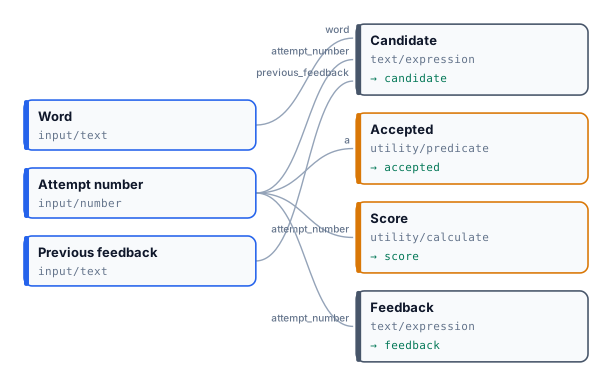
Section titled “The body — one attempt”The body is a workflow of its own: you can open it, run it and test it alone, on one product, before it is ever
repeated. Publish it first; the step names it with workflow, its wf_… ID. To be a body it returns four
outputs:
| Body output | Node | What it is |
|---|---|---|
candidate |
any output | the result of the attempt: an image, a video, a text, a document |
accepted |
Output JSON holding true or false |
the body’s verdict |
score |
Output JSON holding a number from 0 to 1 | how good the attempt is, used to choose the best one when none is accepted |
feedback |
Output Text | what the next attempt must correct |
The outputs are named by their output_name. Output JSON takes a number or a boolean directly on its json port, so
a Predicate’s result or a Calculate’s result goes straight to accepted and score.
It may also read three inputs, which the step fills on every attempt:
| Body input | Node | Value |
|---|---|---|
attempt_number |
Number Input | 1, 2, 3… |
previous_feedback |
Text Input, optional | the feedback of the attempt before; not provided on attempt 1 |
previous_candidate |
an optional input of the candidate’s type | the candidate of the attempt before; not provided on attempt 1 |
Wire previous_feedback to the generator’s instructions input. Every generator driven by a prompt has one
(Product Photography, Lifestyle, Text to Image, the video and audio generators…): its text is added after the prompt
the step composes, so the correction steers the next picture without rewriting the brief. On attempt 1 the input is
not provided — the ordinary absence of an optional input — and the generator simply runs on its prompt.
An input is recognised by its key — the label in lower case with _ for spaces: Previous feedback →
previous_feedback — or by the id of its input node, the two names a run binds a value by. Label the three inputs
exactly Attempt number, Previous feedback and Previous candidate and they are recognised everywhere. The body’s
other inputs become the step’s inputs, by their keys, and receive the same values on every attempt.
The step
Section titled “The step”{ "id": "until_on_brand", "type": "workflow/repeat", "label": "Until on brand", "parameters": { "workflow": "wf_…", "max_attempts": 3, "on_exhausted": "best" } }| Parameter | Default | |
|---|---|---|
workflow |
— | the body, a wf_… ID of the same workspace |
max_attempts |
3 | 1 to 5 |
on_exhausted |
best |
what to do when no attempt is accepted: best, discard or fail |
minimum_score_to_deliver |
— | with best: below this score nothing is delivered |
Its outputs are the same whatever the body:
| Output | Value |
|---|---|
candidate |
the delivered result, of the body’s candidate type |
accepted |
true only when an attempt was accepted |
score |
the score of the delivered attempt |
selected_attempt |
which attempt was delivered |
disposition |
accepted, best_unaccepted or discarded |
report |
every attempt with its run, verdict, score and feedback (madoo.attempts-report/v1) |
Route on accepted or disposition with the free decision nodes: publish an accepted picture,
send a best_unaccepted one to a person.
Choosing the judge
Section titled “Choosing the judge”The judge is the heart of the body: the loop is only as good as the verdict it stops on. Two kinds of judge work, and they can be combined.
| Judge | Good at | Accept on | The correction comes from |
|---|---|---|---|
A measurement — Color Palette against the brand colours, Measure Subject, Image Statistics, any quality_check |
requirements that are numbers: colours, size, position, exposure, length | the check’s status is passed (Extract status, Predicate equals passed) |
the check’s own violations, written with Text Expression: no model, no cost, the same every time |
| A model — Decide with a Model, comparing the result with a reference — on the subject cropped by Locate Subject when it stands in a scene | what only eyes can tell: is this still the same product, the same face, the same style | a score question at its strictest level (faithful), never a yes/no “is it the same?” |
Image Analysis asked to list the differences as instructions |
A measurement is exact and free; it is also literal, so it must be calibrated for the kind of picture. In the brand lab of I10, a colour counted as a brand colour within an OKLab distance of 0.08: right for a flat design, too strict for a photograph, where the navy of a blanket comes out a little brighter. At 0.12, with the lighter shade of the navy among the reference colours and at most 30 % of the picture off the palette, the same pictures were judged as a person judges them.
A model answers the question it is asked. Asked “is this the same product?”, Decide with a Model answered yes with 0.96 for a pharmacy jar whose portrait had changed — it is the same jar — while the score question “how faithfully does picture 1 reproduce picture 2?” answered close, with visible changes with 0.97. Accept on the observable criterion, the level that says no visible change.
Writing a correction that converges
Section titled “Writing a correction that converges”A correction helps only if the generator can act on it. Five rules, each learned on a real run:
- Say what to change and what to keep. “Keep the product exactly as it is. Change the setting, the props and the light so that the picture keeps to the brand colours #1F3A6E, #2F55A4, #F2EBDD, #C9963B” turned a warm autumn scene into navy and cream in one attempt, with the product untouched.
- Never ask for what the brief forbids. Asked for a three-quarter view from above, a jar always looks shorter than in its frontal museum photo. A judge that compared proportions asked three times for “a taller, slimmer vase” and the score did not move. Tell the judge and the correction to ignore what the viewpoint explains — perspective, apparent proportions, background, light — and to look at decoration, figures, colours and lettering.
- Repeat the requirement in every correction. An attempt receives only the feedback of the attempt before, not the whole history: a correction that names the full requirement keeps what was already right.
- Keep verdict and correction consistent. If the judge rejects and the correction writer finds nothing (“none”), the next attempt is only another draw of the same prompt. It may still pass — a generation varies — but the attempt was not corrected. A measurement that writes its own correction cannot disagree with itself; a model that writes it must be told the verdict: write its prompt with Text Expression from the judge’s answer — “a judge rated it close, so the product differs somewhere: list every difference” — and allow none only when the verdict was positive.
- Write the feedback for every outcome. An accepted attempt’s feedback is kept in the report: write it so it
reads right then too (“On brand: 4 of 4 reference colours found”), with
{{ if check.status == "passed" }}.
How many attempts
Section titled “How many attempts”Three is a good default. In every reference run the big step was from the first attempt to the second — the first correction — and the third rarely did better: 0.484 → 0.714 → 0.685, 0.418 → 0.658 → 0.648, 0.411 → 0.748 (accepted). The teapot’s third attempt found all four brand colours and missed only by its share off the palette, 31.5 % against 30 %: a threshold is a line, and the best attempt is still delivered, marked as not accepted. Strong generators keep a product faithful at the first attempt more often than not: then the step costs one attempt and the result is still checked, which is the point.
When no attempt is accepted
Section titled “When no attempt is accepted”on_exhausted |
Delivered | disposition |
The run |
|---|---|---|---|
best |
the attempt with the highest score, the earliest on a tie; nothing below minimum_score_to_deliver |
best_unaccepted (or discarded) |
continues |
discard |
nothing: candidate is rejected, and every step that reads it is skipped at no cost |
discarded |
continues |
fail |
nothing: the step fails with ATTEMPTS_EXHAUSTED |
— | fails |
A technical failure is not a rejection: if an attempt fails — a provider error, a step of the body that fails — the step fails with that attempt’s code and spends no more attempts. A new attempt is for a result that was made and judged not good enough, not for an error.
A whole catalogue in one run
Section titled “A whole catalogue in one run”Inside an iterated branch the step repeats per item: every product of a catalogue, every language, every scene has its own attempts, its own delivered result and its own report, in parallel, and an item that ends unaccepted or failed does not touch the others. I10 sends three products through one Repeat Until Accepted and gets three pictures in the brand’s colours in about two minutes.
The limit of children per step counts every attempt: three attempts for 200 products are 600 child runs, above the default limit of 500, and are refused before anything is charged.
What it costs
Section titled “What it costs”The estimate and the credit hold reserve the worst case: the body’s cost × max_attempts (× the items, inside an
iteration), with the usual margin of the hold. Only the attempts that ran are charged; what was reserved for the
others is released when the run ends. In I10 the worst case was 45 credits — three products, three attempts of 5
credits each — reserved as 49.5 with the margin; the eight attempts that ran cost 40, and 9.5 went back.
A list known only when the run starts — the products of a bundle, the rows of a file — is estimated as deferred; its worst case is reserved as soon as the list is known, before the first attempt. If the credits are not enough the step fails then, without running any attempt.
Because the worst case must be reserved, the body must have an exact cost and call no other workflow; otherwise the
estimate and the submission refuse it with REPEAT_COST_UNBOUNDED.
Seeing the attempts
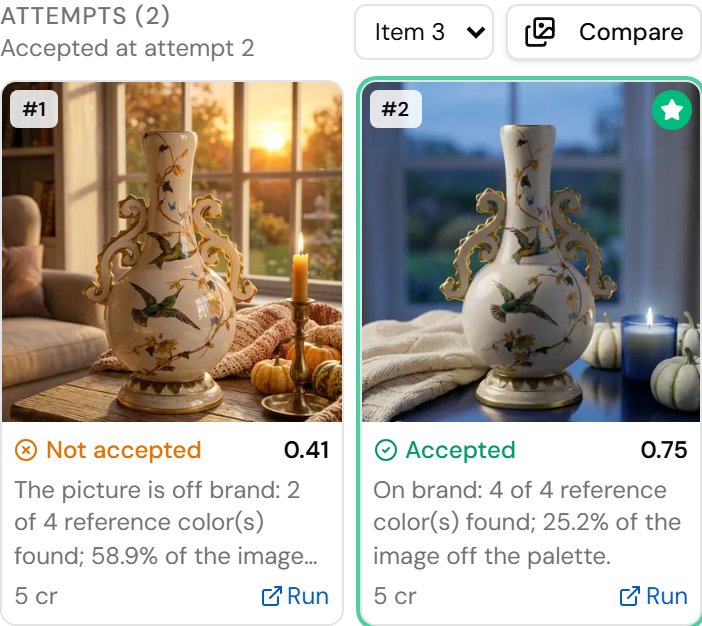
Section titled “Seeing the attempts”A loop that judges pictures is checked by looking at them. Select the Repeat Until Accepted step in the editor while it runs, or open the run on the Executions page and unfold the step in its pipeline: the Attempts show one card per attempt, as soon as it starts.
| On each card | |
|---|---|
| the candidate | the picture, the first frame of a video, the first lines of a text |
| the verdict | Accepted or Not accepted, and the score |
| the correction | the feedback the attempt passed to the next one; for an attempt whose body broke the contract, why |
| the star | the attempt that was delivered — none when the result was discarded |
| the credits and Run | what the attempt cost, and its own run, with every step of the body: the crop, the judge’s answer |
Above the cards a line says how the step ended — Accepted at attempt 2, None accepted — the best, attempt 2, was delivered, Repeating… while it runs. Compare opens the candidates full screen, one after the other with their verdicts, to see what each correction changed. When the step repeats per item — a catalogue, a campaign — a selector picks the item.

Agents and integrations read the same attempts from the run’s trace (get_execution_trace, or
GET /api/v1/executions/{id}/trace): each attempt with its run, status, verdict and whether it was delivered, and a
link to a picture of its candidate. See Watching the attempts.
Reading the report
Section titled “Reading the report”{ "schema": "madoo.attempts-report/v1", "body": { "workflow": "wf_…", "version": 7 }, "policy": { "max_attempts": 3, "on_exhausted": "best", "minimum_score_to_deliver": null }, "item": 2, "attempts": [ { "attempt": 1, "execution": "run_…", "accepted": false, "score": 0.411, "feedback": "The picture is off brand: 2 of 4 reference color(s) found; 58.9% of the image off the palette. Reference color #1F3A6E is not in the image: the nearest is #51341E, …" }, { "attempt": 2, "execution": "run_…", "accepted": true, "score": 0.748, "feedback": "On brand: 4 of 4 reference color(s) found; 25.2% of the image off the palette." } ], "selected_attempt": 2, "disposition": "accepted", "reason": "Attempt 2 was accepted."}The report is written from the attempts’ own runs, never from text a model wrote. Each attempt’s execution is a run
of its own: its trace shows every step of that attempt, so a surprising verdict can be followed to the picture and the
check that made it. item is the item of the iteration, null for a single call. The body runs at the version it
had when the step started, for every attempt.
The lab
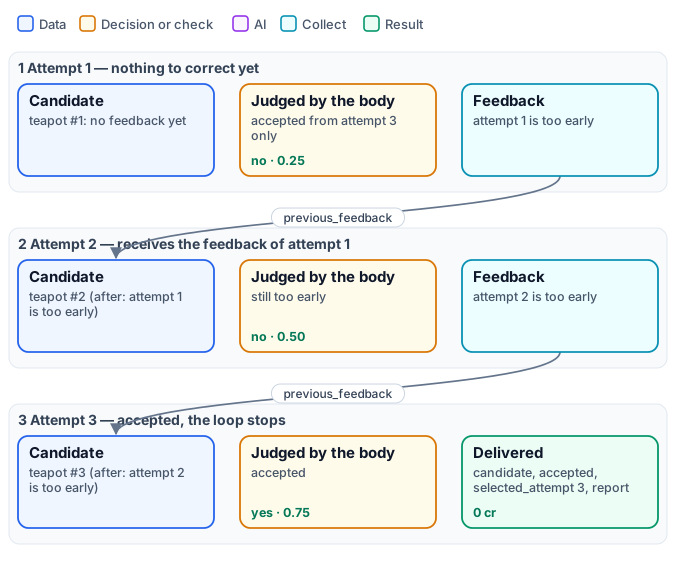
Section titled “The lab”The lab shows the mechanics with no model and no credits. Its body names its candidate after the attempt (“teapot #2 (after: attempt 1 is too early)”), accepts it only from attempt 3, scores it attempt ÷ 4 and writes its feedback. The step runs it three times and delivers “teapot #3 (after: attempt 2 is too early)”, accepted, with a report of the three attempts.
node madoo-install-example.mjs lab-repeat-until-accepted --api <your Madoo API URL> --key <key.json> --runChange max_attempts to 2 and run it again: no attempt is accepted, and best delivers attempt 2 as
best_unaccepted. Set on_exhausted to discard and the candidate is rejected; to fail and the step fails with
ATTEMPTS_EXHAUSTED.
Complete examples
Section titled “Complete examples”| Example | What it shows | Credits |
|---|---|---|
| I10 — A catalogue in the brand colours | three products in a cosy autumn scene, each measured against the brand colours by Color Palette and made again with the measured violations as its correction; one Repeat Until Accepted per product | ≈ 40 (45 reserved) |
| I12 — The same model across a campaign | the brand’s model in three campaign scenes, found by portrait and role, her face rated on features, skin and hair against her portrait, the differences as the correction | ≈ 15 (≈ 50 reserved) |
| I11 — A product placed in a scene, faithful to the real one | a sixteenth-century pharmacy jar on an old pharmacy counter, cropped by Locate Subject and judged by Decide with a Model against the museum photo on what a viewpoint cannot explain, and corrected by Image Analysis told the verdict; with the judging mistakes made on the way | ≈ 5 (17 reserved) |

Building it with an agent
Section titled “Building it with an agent”The order is always the same, on every surface (the editor, REST, MCP, the AI agent):
- Build and test the body alone. Give it the four outputs and the three inputs; run it once on one product and
read its
accepted,scoreandfeedback. Fix the judge here, where an attempt costs one run. - Publish the body, then create the workflow that calls it: a
workflow/repeatnode withparameters.workflow= the body’swf_…ID, connected to the body’s other inputs by their keys. - Validate. The contract is checked before anything runs.
- Estimate: the worst case is the body ×
max_attempts(deferred for a list built at run time). - Run, then read
dispositionandreport.
| Code | When |
|---|---|
repeat_body_contract_invalid |
the body lacks candidate, accepted, score or feedback, returns several values for one of them, or declares a reserved input of the wrong type or as required |
repeat_reserved_input |
a connection into attempt_number, previous_feedback or previous_candidate: the step fills them |
repeat_settings_invalid |
max_attempts outside 1–5, an unknown on_exhausted, or minimum_score_to_deliver outside 0–1 or without best |
repeat_feedback_unused (warning) |
the body does not read previous_feedback: every attempt starts again from the same inputs |
REPEAT_COST_UNBOUNDED |
the body’s cost is not exact, or it calls another workflow |
ATTEMPT_CONTRACT_INVALID |
an attempt returned no candidate, an accepted that is not a boolean or a score outside 0–1 |
ATTEMPT_FEEDBACK_MISSING |
an attempt was not accepted, another remains, and it wrote no feedback |
ATTEMPTS_EXHAUSTED |
no attempt was accepted with on_exhausted: fail |
The contract for integrators — parameters, outputs, report and errors — is Repeat Until Accepted in the API guide.
Limits
Section titled “Limits”- At most 5 attempts; each attempt sees only the feedback and the candidate of the attempt before.
- The body cannot call another workflow (its cost must be known), and it must return one value per output.
- The loop is only as good as its judge: a lenient judge accepts the first result, a judge that asks for the impossible spends every attempt. Test the body alone first.
- Strong generators often get it right the first time. The step then costs one attempt, and the result is checked.