

X01 — Product photos screened before a marketplace listing
A marketplace refuses a listing whose photo is blurred, too dark, watermarked or cut off — or worse, accepts it and the product does not sell. A person who checks photos one by one is slow and inconsistent; a language model asked for a JSON verdict is slower and more expensive than it needs to be. This workflow checks each photo with five questions in one Decide with a Model step, and prepares for the marketplace only the photos that pass.
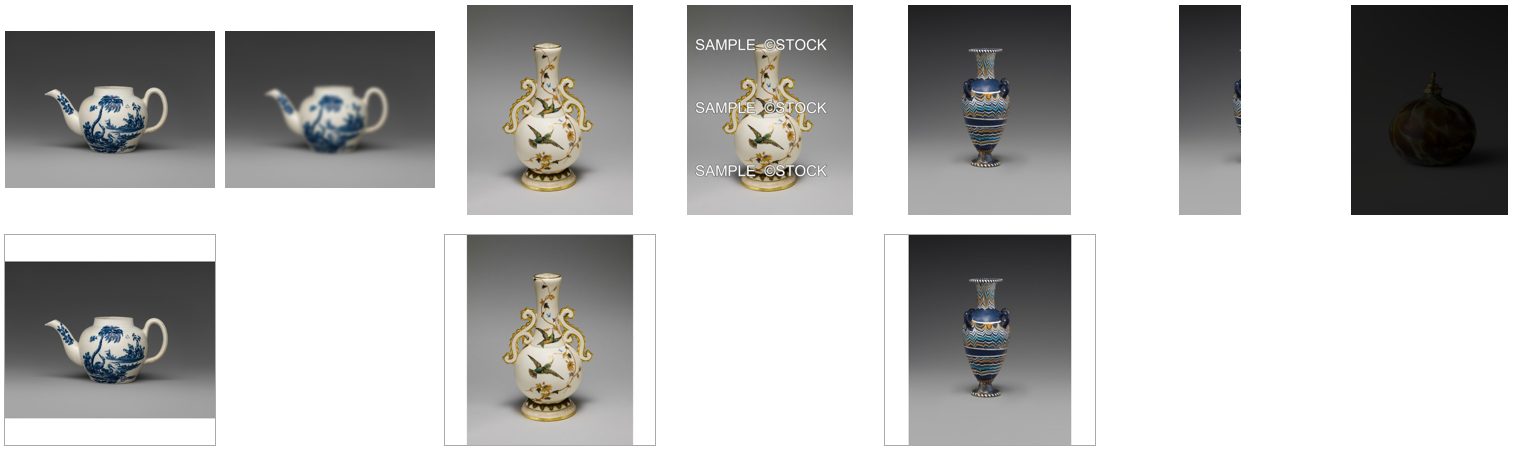
A reference run: 7 photos in, 3 ready to list, 4 held back with the reason — 0.048 credits. The run’s outputs.
The case
Section titled “The case”A ceramics shop sends seven photos for its marketplace listings: a teapot, a vase, an amphora and a perfume bottle — objects of the Metropolitan Museum of Art, photographed on a plain grey background (Open Access, public domain). Three are fine. The others have the faults of a real batch: the teapot shot out of focus, the vase delivered with the photographer’s watermark, the amphora cropped in half, the perfume bottle far too dark.
What it shows
Section titled “What it shows”- Five checks, one call. In focus, well exposed, free of watermarks and overlaid text, the whole product in the frame and what is behind it are asked together: the photo is read once, about 960 tokens, 0.006–0.007 credits. See Checking pictures.
- Sure is not the same as good.
all_acceptedsays the model is sure of every answer — it is sure the blurred teapot is blurred. The photo is publishable when every check is good and every answer is sure: a Combine Conditions of the four yes/no answers, a Predicate on the background, andall_accepted. - A doubtful photo is not delivered. The cropped amphora’s framing came back uncertain (
model_sure: false): it is held back with the others, and the report says so — a person decides. - Every photo is accounted for. The Screening report has a row per photo with every answer; Ready to list has
only the delivered ones (
whenAbsent: skip_row). See Branches and absence. - The free step behind the cheap one. Resizing is free; here it only runs on the photos that passed. Put any paid step there — a background removal, an upscale, a lifestyle scene — and the screening protects it.
The workflow
Section titled “The workflow”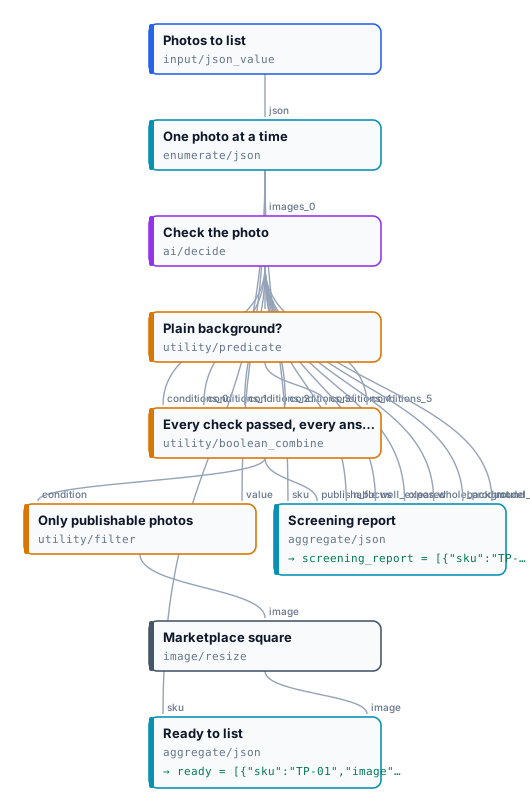
| Node | Type | Why |
|---|---|---|
| Photos to list | input/json_value |
The batch: each photo with its SKU |
| One photo at a time | enumerate/json |
One iteration per photo |
| Check the photo | ai/decide, low detail |
Four yes/no checks at 0.8 and the background as a choice at 0.7 |
| Plain background? | utility/predicate equals plain |
The background answer as a condition |
| Every check passed, every answer sure | utility/boolean_combine all |
The four checks, the background and all_accepted |
| Only publishable photos | utility/filter |
The photo passes or is cut |
| Marketplace square | image/resize, 1600 × 1600, pad, white |
The marketplace’s format |
| Ready to list | aggregate/json, the image with whenAbsent: skip_row |
SKU and square image of the delivered photos |
| Screening report | aggregate/json |
Every photo with every answer |
Reading a run
Section titled “Reading a run”| SKU | Publishable | In focus | Well exposed | Clean | Whole product | Model sure |
|---|---|---|---|---|---|---|
| TP-01 teapot | yes | yes | yes | yes | yes | yes |
| TP-02 teapot, blurred | no | no | yes | yes | yes | yes |
| VS-01 vase | yes | yes | yes | yes | yes | yes |
| VS-02 vase, watermarked | no | yes | yes | no | yes | yes |
| AM-01 amphora | yes | yes | yes | yes | yes | yes |
| AM-02 amphora, cropped | no | yes | yes | yes | no | no |
| PB-01 perfume bottle, dark | no | yes | no | yes | yes | yes |
Every background came back plain. Start from the report: a no says what to fix — reshoot, ask for the file without
the watermark, crop wider — and model_sure: false says a person should look.
Cost: 0.048 credits for seven photos, about 0.007 a photo; resizing is free. A thousand photos cost about 7 credits.
Install it
Section titled “Install it”node madoo-install-example.mjs x01-marketplace-photos --api <your Madoo API URL> --key <key.json> --runIt uploads the seven photos, fills the batch with their storage paths, publishes the workflow and, with --run, runs
it once (about 0.05 credits); --save <folder> downloads the outputs.
Change it
Section titled “Change it”- Your standard: the statements and thresholds of Check the photo are the rules. Add “The product is centred”, “There is a single product”, or a choice of backgrounds allowed.
- Your format: the size, mode and background of Marketplace square; for several marketplaces, several resize steps behind the same Filter.
- A paid step: put Remove Background, an upscale or a product scene behind Only publishable photos.
- Your photos: pass your own list at run time,
[{"sku": "…", "photo": "<storage path>"}].