

W02 — A screen recording, finished for publishing
A small bike workshop records a one-minute tour of its booking board to train new staff and post on its site. The recording is honest and useful, and it sounds like what it is: a laptop microphone, a quiet voice, the hum and hiss of the room, nothing under the voice, no subtitles for people watching without sound. This workflow turns it into a video ready to publish, and it does so in stages you can hear one by one: the recording, the cleaned voice, the music bed, the finished mix.
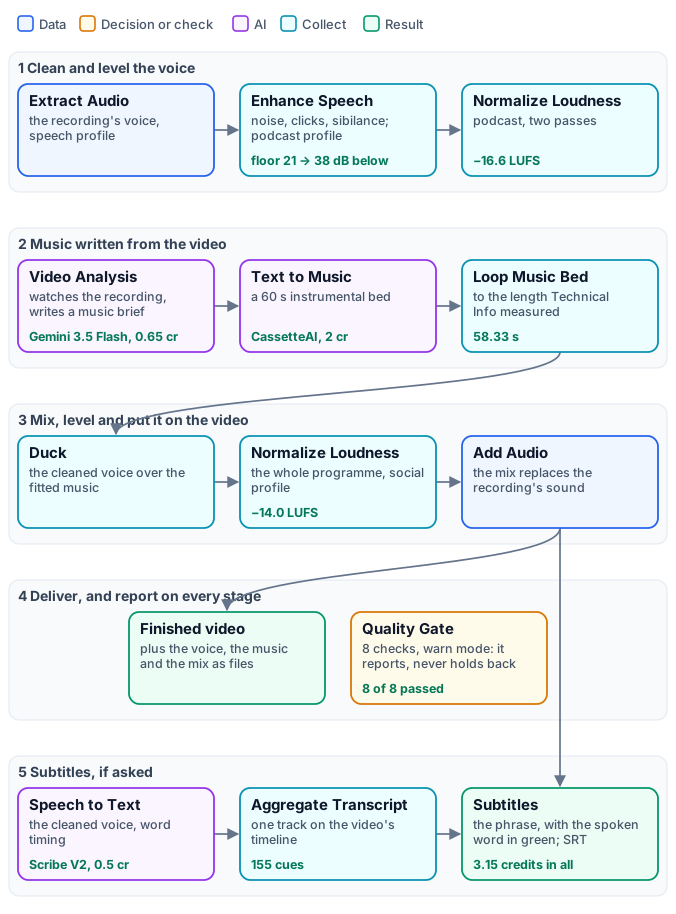
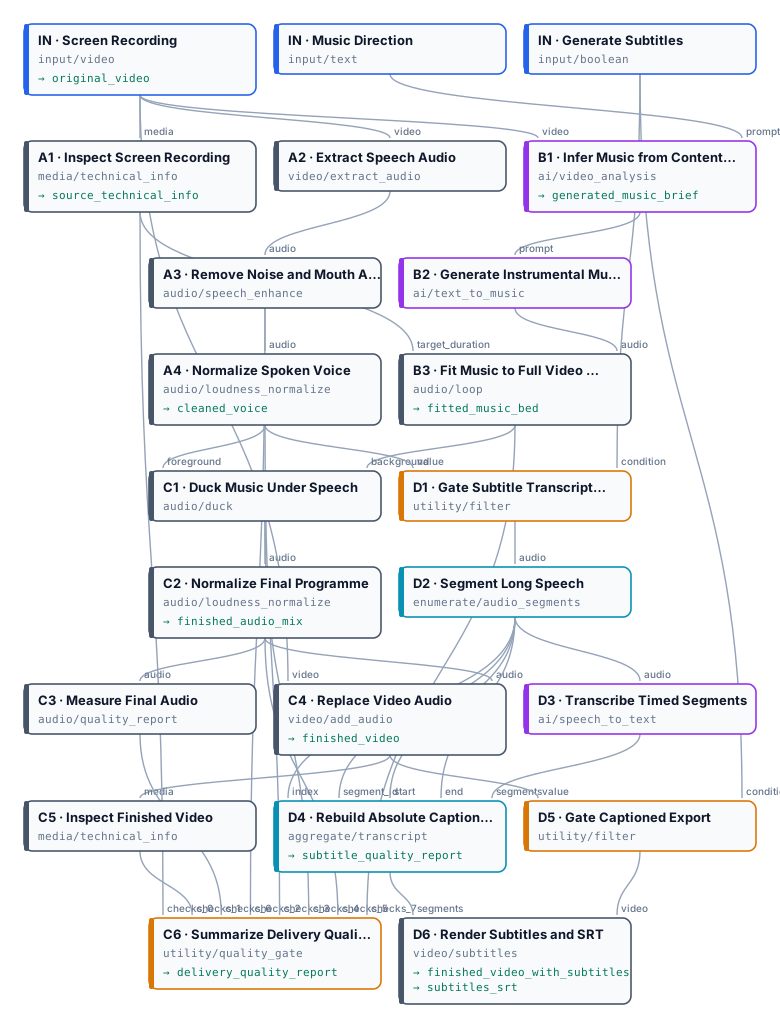
The figure tells the workflow as stages, with the reference run’s results on the cards; the exact graph, 33 nodes, is the workflow (as a diagram).
The case
Section titled “The case”“Spoke & Chain” is a fictional workshop, and its booking board a small web app made for this example; the walkthrough was recorded from it, and narrated by a synthetic voice to which the room noise, hum and low level of a laptop microphone were added. So the source is a typical raw screen recording — and one that shows no real person, customer data or third-party software:
- 58 seconds at 1280×720, 30 frames per second, one mono audio track;
- the voice at −31.8 LUFS, far below any platform’s target, with a noise floor only 21 dB below it;
- six short paragraphs: the board, the status colours, a new booking, a job put on the stand, a job marked ready with its invoice.
What it shows
Section titled “What it shows”- Clean the voice first, and alone. The voice is extracted, cleaned and levelled on its own — so the music never gets cleaned with it, and the transcription later hears the clean voice, not the room.
- An AI that watches, not one that guesses. Video Analysis sees the whole recording — the topic, the pace, the audience — and writes a short brief for an instrumental bed. A person can steer it with the Music Direction input; by default it infers the style.
- Music fitted by measurement. The bed is generated at 60 seconds and fitted to the length Technical Info measured on the video, looping with crossfades if the video is longer: a two-minute video gets a two-minute bed.
- Music that makes room for the voice. Duck lowers the music whenever the voice speaks and brings it back in the pauses; the programme is then levelled as a whole.
- Deliver first, report everything. Eight checks from every stage go into a Quality Gate in
warnmode: the report says what passed and what did not, and the finished video is delivered either way. An imperfection is reported; only a file that cannot be built stops a branch. - Every stage is an output. The cleaned voice, the fitted music, the finished mix, the music brief and both reports come back beside the videos: an app can let its users listen to each layer without running anything again.
The workflow, step by step
Section titled “The workflow, step by step”| Stage | Nodes | Settings that matter |
|---|---|---|
| Inputs | Screen Recording, Music Direction, Generate Subtitles | the direction defaults to “infer a subtle instrumental style”; subtitles default to on |
| Measure | A1 Technical Info |
a media policy: 1 second to 1 hour, at least one audio stream; fail_on_policy off — a violation is reported, not blocking |
| Clean the voice | A2 Extract Audio, A3 Enhance Speech, A4 Normalize Loudness |
speech profile; podcast cleaning (noise reduction, de-click, de-esser, compression, ambience not kept); podcast loudness, −16 LUFS, two passes |
| Write and make the music | B1 Video Analysis, B2 Text to Music, B3 Loop Music Bed |
a system prompt asking for one generation prompt only — mood, energy, tempo, instruments, no vocals, no abrupt end; a 60-second instrumental bed; loops with 1.5 s crossfades, 0.5 s fade-in, 1.5 s fade-out, the target length from A1 |
| Mix | C1 Duck, C2 Normalize Loudness, C3 Audio Quality Report |
phrase ducking, voice-over profile: the music goes 10 dB down under each phrase and holds across pauses shorter than 0.9 s, so it does not pump between words; social loudness, −14 LUFS; a report on −14 ± 2 LU, true peak ≤ −1 dBTP, no clipped samples |
| Deliver | C4 Add Audio, C5 Technical Info, C6 Quality Gate |
the mix replaces the recording’s sound; the finished video measured with the same policy; eight checks, all_must_pass, warn |
| Subtitles | D1 and D5 Filter, D2 Audio Segments, D3 Speech to Text, D4 Aggregate Transcript, D6 Subtitles |
both branches pass only when Generate Subtitles is on; segments of up to 10 minutes, so an hour-long recording works too; word timing; highlight-word in green, Roboto Medium, two lines, title-safe; SRT beside the video |
The music and the voice branches run side by side: the music is being written while the voice is cleaned, and the transcription runs while the music is fitted. The whole run took about two minutes.
The reference run
Section titled “The reference run”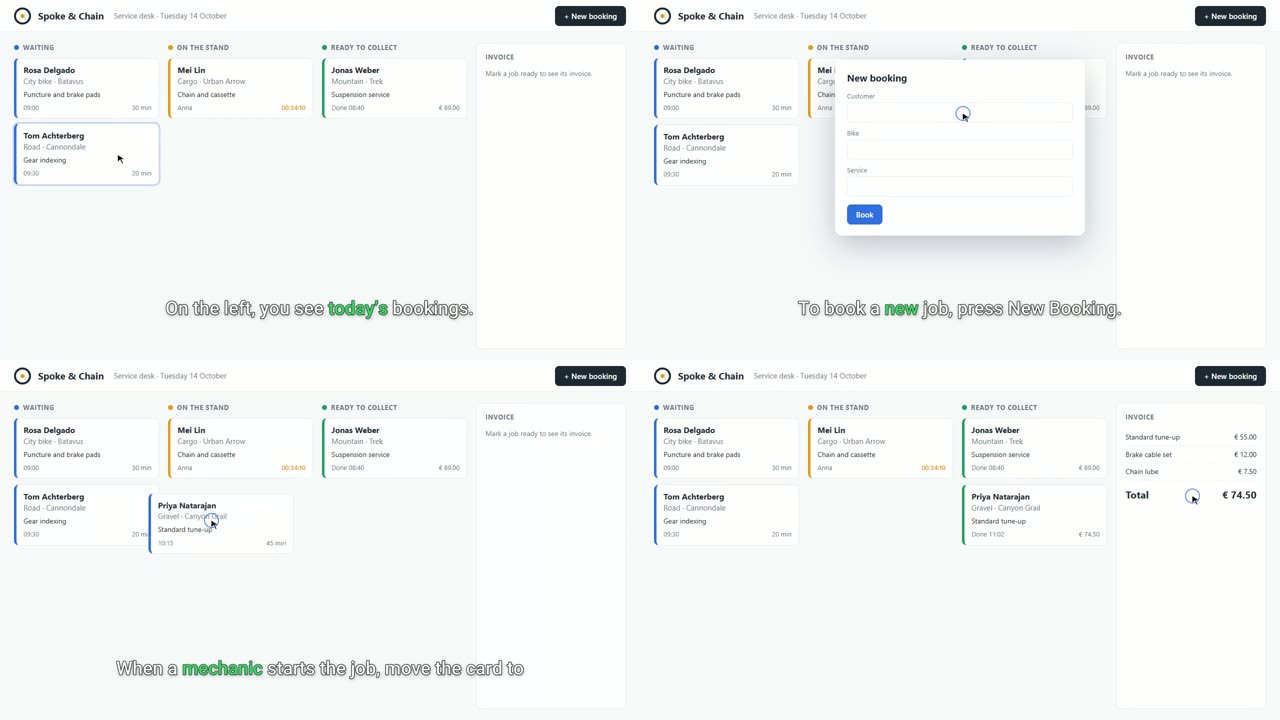
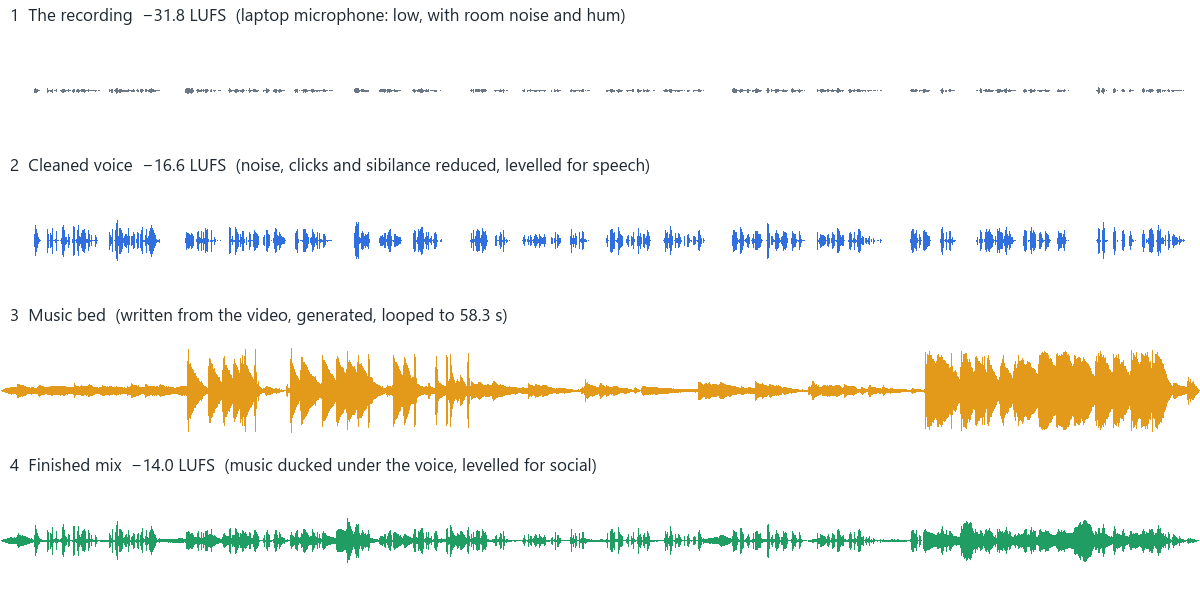
Listen to the first 24 seconds of each layer: the recording · the cleaned voice · the music bed · the finished mix.
| Measure | Recording | Finished |
|---|---|---|
| Integrated loudness | −31.8 LUFS | −14.0 LUFS |
| True peak | −10.7 dBFS | −1.1 dBFS |
| Noise floor below the voice | 21 dB | 38 dB (cleaned voice) |
| Length | 58.33 s | 58.33 s |
| Quality checks | — | 8 of 8 passed |
| Subtitles | — | 155 cues, one segment |
The music brief Video Analysis wrote, from the recording alone:
An uplifting and focused mid-tempo instrumental track, featuring clean, warm electric guitar plucks, soft ambient synth pads, and a gentle, steady acoustic percussion rhythm. The mood is professional and optimistic, maintaining a light and unobtrusive presence that sits perfectly under narration, with a smooth, continuous progression and a gentle fade-out.
What to review. The transcription heard “Spoken Chain” for “Spoke and Chain” in the first line — a brand name it
could not know. Names are what to check in the SRT
before publishing. To correct one, fix the SRT and give it to Video Subtitles on its captions input instead of the
transcript: the video is captioned again at no credit cost, in block presentation — an SRT carries phrases, not
the word timing the highlight needs. The delivery report
and the subtitle report are
the run’s own.
What it cost
Section titled “What it cost”| Step | Credits |
|---|---|
| Video Analysis — the music brief (Gemini 3.5 Flash) | 0.65 |
| Text to Music — a 60-second bed (CassetteAI) | 2 |
| Speech to Text — one started minute (Scribe V2) | 0.5 |
| Everything else — cleaning, fitting, ducking, loudness, mixing, subtitles, checks | 0 |
3.15 credits. The music costs the same for any length; the analysis grows with the length of the video, the transcription by 0.5 per started minute. For a longer recording, run the estimate with it before the first run.
Limits worth knowing
Section titled “Limits worth knowing”- Cleaning is not separation. Enhance Speech reduces steady noise, clicks and sibilance; it does not remove strong echo, and it cannot take out music already in the recording — the new bed would play over it. For a recording with music, separate the voice first: see Audio finishing.
- A brief is a proposal. Read the music brief: when it misreads the video, write a direction on Music Direction — “calm piano, 70 BPM” — rather than changing the system prompt.
- Loops are audible on long videos. A 60-second bed under a ten-minute tutorial repeats ten times; longer crossfades hide the joins but soften the rhythm. Ask Text to Music for up to 180 seconds when the video is long.
A long recording
Section titled “A long recording”The same workflow finishes a recording of half an hour or an hour: every audio and video step works file to file, on the whole master, whatever its length (Long media). What changes is what a long recording costs, how long it takes and what it sounds like — six settings, and a rehearsal. W03 is this workflow with those settings applied, and rehearsed.
Before you upload. A file can be at most 250 MB, whichever way it is uploaded, although the nodes read up to 2 GiB. Screen recordings compress well: this one is 1.8 MB a minute, about 110 MB an hour. A recording made at a high bitrate — 4K, 60 frames per second — should be encoded again at 1080p or 720p and 30 frames per second before uploading; nothing in the finish needs more.
Rehearse on three minutes. Put video/trim (start “0”, end “180”) after the input and run once: the voice
cleaning, the music and the subtitles can all be judged on three minutes, for a few credits. Remove the trim and
run the whole recording only when they sound right.
| Step | On a long recording | Set |
|---|---|---|
A1 and C5 Technical Info |
the policy accepts up to one hour; a longer recording fails the check — reported, not blocking | raise maximumDurationMilliseconds in both policies to the recording’s length |
B1 Video Analysis |
it reads the whole video: the cost and the time grow with the length, while the style of a tutorial is set in its first minutes | give it an excerpt: video/trim from 0 to 180 s between the input and B1, the other steps keep the whole video |
B2 Text to Music |
a 60-second bed under thirty minutes repeats thirty times | Duration (s) 180, the most the default model makes: it repeats every three minutes |
B3 Loop Music Bed |
the joins are heard more often on a long, quiet programme | Loop Crossfade (ms) 3,000: smoother joins, at the cost of a softer beat at each join |
D2 Audio Segments |
the transcription is cut at pauses into segments of up to 12 minutes, 5 seconds of overlap each | Target clip duration 540 s and Maximum clip duration 590 s: with the overlap each segment stays under ten minutes and is billed ten started minutes, not eleven |
D3 and D6 speakers |
segment by segment, speaker numbers restart; one narrator needs no labels | Identify Speakers off on D3, Speaker Labels hide on D6 |
D6 Subtitles |
highlight-word suits a short social clip; on a long tutorial the moving word tires the eye, and burning them in encodes the whole video again |
Caption Presentation block; for a video that will play in a web player, Output Mode sidecar: the SRT only, the video not encoded again |
The estimate. The transcription is estimated deferred: how many segments a recording makes is known only
when the run cuts it. The music is 2 credits for any length; the transcription is 0.5 per started minute of each
segment — about 15 credits for half an hour — and the analysis of a three-minute excerpt is a small part of the
rest. Submit a long run with admission_limits so that it stops before it spends more than you meant
(Executions).
What to listen to. On a long recording, check the places a short one does not have: a long pause, where the music comes back up; the joins of the loop, every three minutes; the first minutes after a cut in the subtitles, every ten; and the end, where the music fades.
Run it yourself
Section titled “Run it yourself”node madoo-install-example.mjs w02-screen-recording-finish --api <your Madoo API URL> --key <key.json> --run --save finishedThe installer uploads the recording, creates and publishes the workflow and runs it; --save downloads the outputs.
Installing an example explains the installer.
| You want | Change |
|---|---|
| your own recording | the Screen Recording input: anything from 1 second to 1 hour with an audio track |
| a given style of music | the Music Direction input, in plain words |
| no subtitles | Generate Subtitles false: no transcription, no captioned video |
| classic subtitles instead of highlighted words | D6 Subtitles, Caption Presentation block |
| music more or less present | C1 Duck: Duck Depth (how far it goes down under a phrase) and Background Gain |
| another loudness for the platform | C2 and C3 together: the target and the check must match |
| a stricter delivery | a check that must hold — C3, C5 — with its fail option on, or the Quality Gate in fail mode |
The workshop, its app, its customers and the narrator’s voice are fictional, made for this example.