

Building an app with Lovable
Lovable builds web apps from a conversation. With a Madoo API key, it builds both halves of an AI app: the app the user sees, and the Madoo workflow that produces its pictures, text, video or documents. You describe what the app does; Lovable finds the right Madoo steps, publishes the workflow, and wires the app to it. You never open Madoo’s editor.
The work happens in two phases, with the same key:
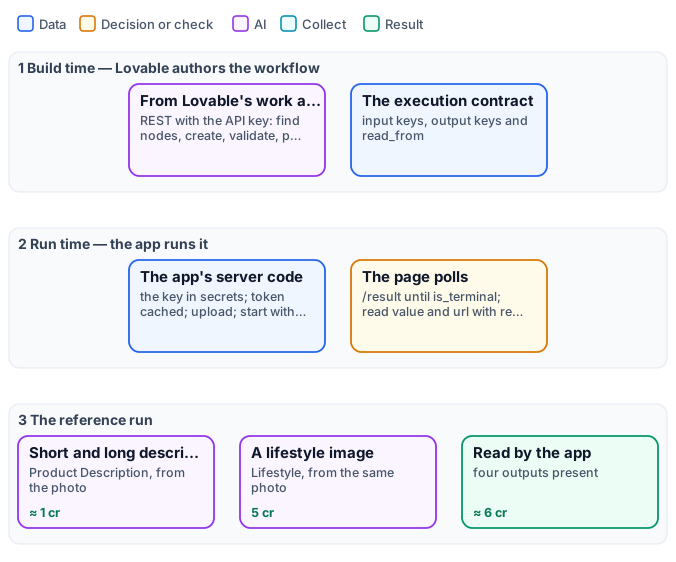
- Build time — Lovable authors the workflow. From its own work area (not from the app), Lovable calls the authoring API: it searches the catalog of node types, creates a draft, validates and publishes it, then reads its execution contract — which inputs it takes, under which keys, and where each result is read.
- Run time — the app runs it. The app’s server-side code (a server function, or a Lovable Cloud function) holds the key and calls the REST API: it uploads the user’s file, starts the run and returns at once; the page polls until the result is ready. The key never reaches the browser, and the app holds no code that creates or changes workflows.
Before you start
Section titled “Before you start”- A Madoo account in the environment you will use (in these steps:
https://testing-api.madoo.ai), with credits in the workspace: every run spends them, as the estimate says. - Admin rights on that workspace, to create the API key.
- A Lovable account.
1. Create a Madoo API key
Section titled “1. Create a Madoo API key”- In Madoo, click your name at the bottom left → API Keys, and create a key with a name you will recognise
(
Lovable — <app name>). Give it the permissions it offers: Lovable needs to read the catalog, write and publish workflows, run them, read executions and upload files (Authentication). - Copy the client id and the client secret somewhere safe before closing the window: the secret is shown once.
The workflows Lovable creates land in the key’s workspace.
2. Start the project and give Lovable its project knowledge
Section titled “2. Start the project and give Lovable its project knowledge”A Lovable project is created by its first message. Start with the look only — the Madoo part comes later, as its own prompt, so each is short and clear. For the starter app:
Build a "Listing Kit" app: the user uploads one product photo and can type the product name.A Generate button, and a result area showing a lifestyle photo of the product, a shortdescription, a long description and the tags. Just the UI for now.Then download lovable-project-knowledge.md and paste its whole text in the project’s Settings → Knowledge (project knowledge). It tells Lovable, in its own terms:
- how to author: from its work area, never inside the app; discover node types instead of guessing them; leave the AI model out so each step uses its tested default; name inputs and outputs for the app; publish, then read the contract;
- how to run: the key only on the server, a token reused until it expires, one call that starts the run and
returns at once, the page that polls, an
Idempotency-Keyper click so a retry never charges twice; - how to read: every value at the contract’s
read_frompath, from the root of the/resultresponse, already parsed; - that a published app spends credits, so it should ask about sign-in or a daily cap before you share it.
Paste it in every new project.
3. Ask Lovable to build the Madoo part
Section titled “3. Ask Lovable to build the Madoo part”The starter app, tested from start to finish on Testing:
Now make Generate work with Madoo, following the Madoo guide in this project's Knowledge.I'll give you a Madoo API key as the secrets MADOO_BASE_URL, MADOO_CLIENT_ID andMADOO_CLIENT_SECRET (MADOO_BASE_URL is https://testing-api.madoo.ai).First, from your work area with that key, design and publish a Madoo workflow that takes thephoto and the optional name and returns four separate outputs: short_description,long_description, tags and lifestyle_image. Then read its execution contract and wire theform through server-side code exactly as the guide says. Show each output in its own place,keep the result after it arrives, and tell me the workflow id and its execution contract.Lovable checks which secrets are missing and opens a secure form for each value: paste the client id, the
client secret, and MADOO_BASE_URL = https://testing-api.madoo.ai. They are stored encrypted in the project and
read only by server-side code. It then
publishes a workflow like this one — Product
Description and Lifestyle on the same photo — and builds the server code and the page. A run costs about 6
credits and takes from half a minute to a couple of minutes.

The same photo gave the copy in this result. To
skip the authoring, install the workflow and give Lovable
its wf_… id instead.
Before you share the app: anyone who opens it can press Generate, and every run spends the workspace’s credits. Ask Lovable for sign-in, a daily cap on generations, or both.
Prompts that work
Section titled “Prompts that work”- Say what goes in and what comes out, with names: “inputs: photo, name (optional); outputs: headline, body, cta, hero_image”. The names become the keys the app reads.
- One output per thing the app shows. Three texts are three outputs; an object is one JSON output. Lovable then has nothing to cut apart.
- Ask for the contract at the end (“tell me the workflow id and its execution contract”): it is the proof the workflow was published and the map the server code follows.
- Point Lovable to the knowledge base for the craft. “Read https://testing-docs.madoo.ai/images/product-imagery.md before choosing the nodes” — every page is available as markdown, and llms.txt lists them all.
- Change the workflow in words: “in the Madoo workflow, make the lifestyle photo square and the tone luxury”. Lovable updates the published workflow (a new version, used at once). If inputs or outputs change, ask it to update the server code in the same step.
A second app, in plain words: four profile photos and a PDF book
Section titled “A second app, in plain words: four profile photos and a PDF book”The prompts do not have to be copied from a guide. This app was built by talking to Lovable in Italian, in three messages and one secure form, with the same API key and project knowledge:
- “I’d like an app that lets me upload a photo of a person and get back four profile photos of the same person, for four different uses among the typical ones of a profile photo. For now build the UI; then I’ll explain which service to call from the backend.” — Lovable built the page, with simulated results.
- “For the backend we’ll use Madoo. I need to give you the API endpoint and the secrets: they must be used only on the server, never in the frontend. As the project knowledge says, you’ll use the API both to author the workflows on Madoo and to run the app. Give me a way to pass you the endpoint and the secrets.” — Lovable opened a secure form for each value, then authored and published the workflow and wired the app; it tested it from start to finish.
- “Besides the four photos to download one by one, I’d like a PDF with a suitable cover, a page for each profile photo and a final page with a grid of all four. Madoo can create templates and render PDFs from them; the online documentation is at https://testing-docs.madoo.ai.” — Lovable designed a document template, added it to the workflow and checked a sample PDF page by page before handing over.
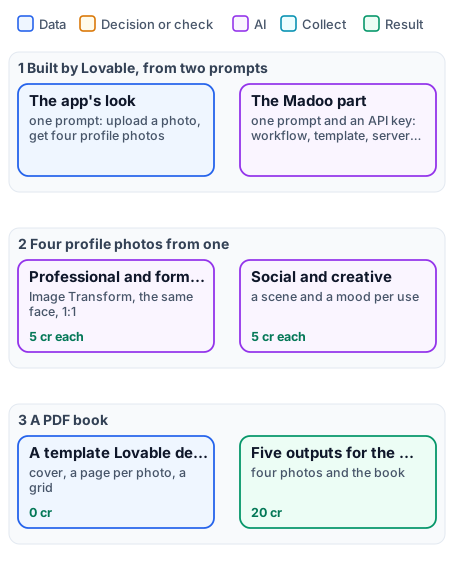
The workflow Lovable wrote is this one: four Image Transform steps on the same photo, each with a prompt for its use, and a Template Render that lays the four pictures out with its template. Rerun here on a person made with Text to Image:

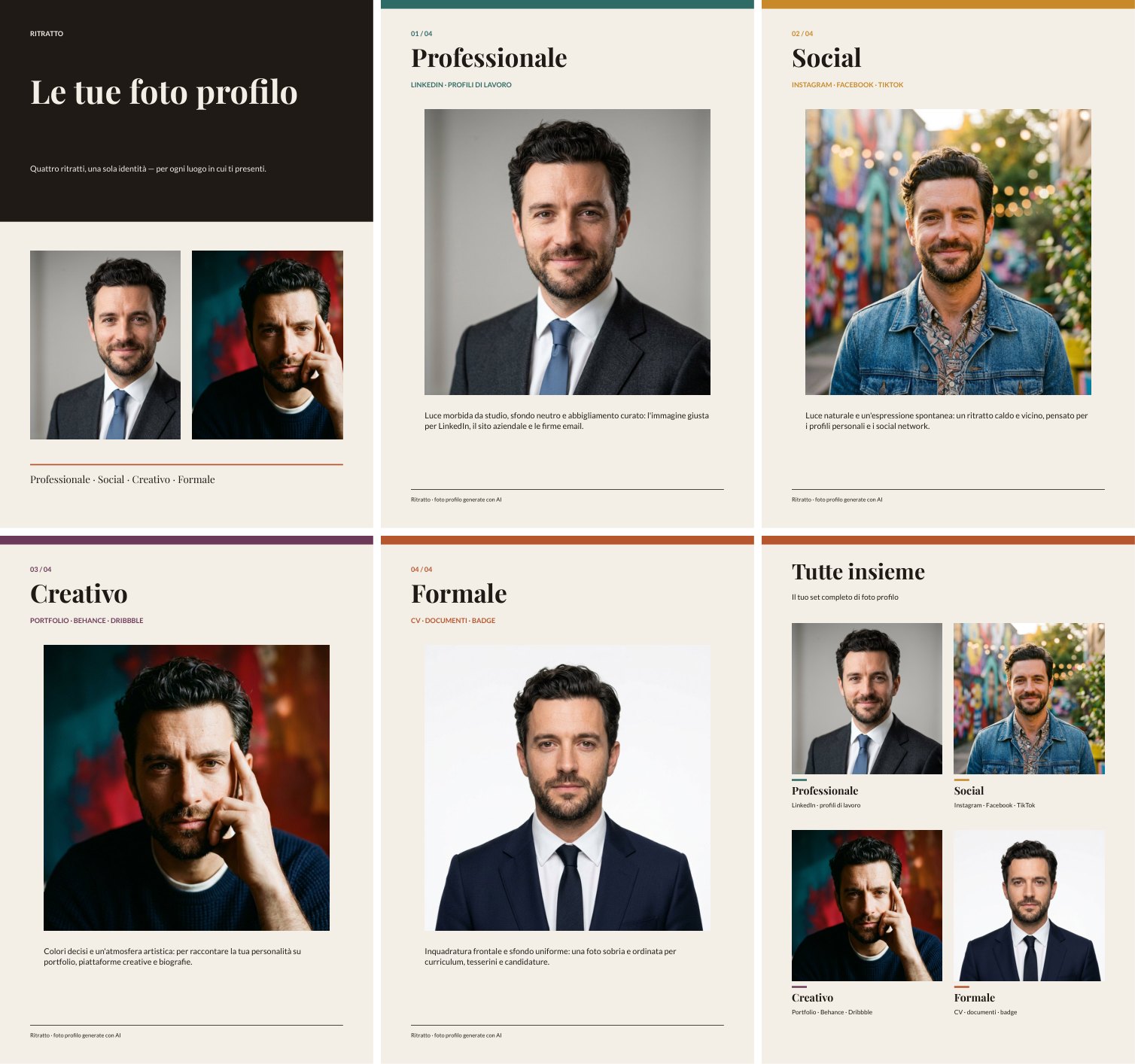
20 credits per run (5 per portrait; the PDF costs nothing); the book is 6 pages. The template’s pictures are about 170 dpi: right for a screen, a little light for print. To install the workflow and its template in your workspace, see Installing an example.
Photos of people only with their consent. An app like this changes a person’s portrait: use it on yourself, on people who agreed, or on people made with AI — as here.
When something goes wrong
Section titled “When something goes wrong”| What you see | What it means | What to do |
|---|---|---|
| Lovable cannot find the Madoo keys | The secrets are missing or misnamed | Check MADOO_BASE_URL, MADOO_CLIENT_ID, MADOO_CLIENT_SECRET |
| 401 or invalid_client | The client id or secret was copied wrong | Create a new key and paste both again |
| workflow_not_found | A wrong wf_… id, or a key from another workspace |
Ask Lovable to use the id it published; check the key’s workspace |
| validation_error with malformed value | A text was sent raw, not JSON-encoded | Ask Lovable to JSON-encode every input value, as the knowledge says |
| The run is completed but the page shows nothing | The page reads the wrong path | Ask Lovable to read each output at its read_from path, from the root of the /result response (body.result.by_key[...]) |
| The page freezes, or a server call times out | The server code waits for the run | Ask Lovable to return the run id at once and poll from the page |
| insufficient_credits | The workspace has no credits left | Top up, or use a cheaper workflow (ask Lovable to estimate first) |
| credit_cap_reached | A daily or monthly usage limit is reached | Wait until resets_at_utc, or ask an owner or admin to raise the limit — credits do not help |
| too_many_requests | Too many calls in a minute | Poll every 3–5 seconds; reuse the token |
Lovable may also report success it did not reach. The proof is in Madoo: the workflow is in your workspace, published, and its runs appear in Executions with their outputs.
What it costs
Section titled “What it costs”Authoring spends nothing: searching, validating, estimating and publishing are free. Credits are spent by runs — the app’s, and a check run if you ask Lovable for one. Ask Lovable to estimate the workflow before wiring it, and put the figure in the app if your users should see it.
Optional: the Madoo MCP connector
Section titled “Optional: the Madoo MCP connector”Lovable can also connect to Madoo as an MCP connector (Connectors → custom MCP server,
https://testing-api.madoo.ai/mcp, OAuth; MCP server), which gives it tools
designed for agents and signs it in as you rather than as a key. Lovable’s connection currently lasts up to an
hour — then the connector shows Token expired and needs Reconnect — so the API key alone is the simpler way
for a workshop or a hackathon. The app always runs through the REST API, with or without the connector.