

X03 — Four generated pictures, the one that fits the brief delivered
Image models are generous: four variants cost little more than one, and one of them is usually better than the others — the right object, the background asked for, nothing added. Picking it is a person’s job, or the first variant by default. This workflow lets Decide with a Model pick it, against the brief, and says when it cannot.
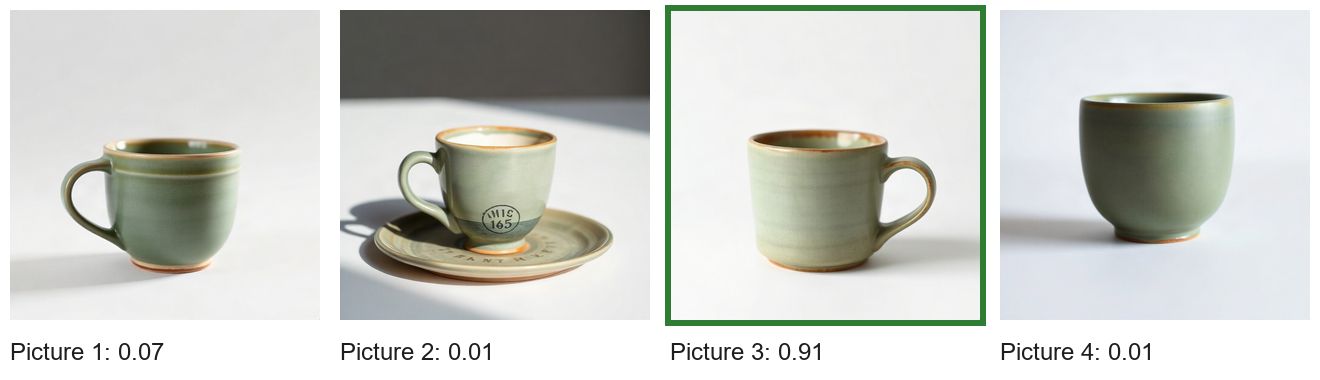
A reference run: four pictures, one delivered — 4.009 credits, of which 0.009 for the choice. The run’s outputs.
The case
Section titled “The case”The brief of a homeware brand: “A hand-thrown stoneware espresso cup in matte sage green, on a plain white background, seen from the side at eye level, soft daylight, no saucer, no text, no logo.” FLUX Schnell makes four pictures from it in one step.
What it shows
Section titled “What it shows”- The brief is part of the content. A Text Template puts the brief in front of
the pictures — “The brief the four pictures were made from: … The pictures follow, labelled Picture 1 to Picture
4.” — so the model judges each picture against what was asked. With several pictures the step labels them
Picture 1… in order; the options are
picture_1topicture_4. - The probabilities say why. Picture 2 has a saucer and a printed logo, both excluded by the brief: 0.01.
Picture 4 has no handle — a tumbler more than an espresso cup: 0.01. Picture 1 is close (0.07); Picture 3, a plain
sage-green cup seen from the side on white, is chosen at 0.91, above the threshold of 0.7: the answer is
accepted. - A second check in the same call. “None of the pictures shows text, letters, numbers or a logo”:
false, 0.01 — accepted, and right: Picture 2 carries a logo. The check is about the set; the choice already left that picture out. - A tie would be reported, not hidden. When two variants fit the brief equally, the probability is shared, the
answer is
uncertainandall_acceptedisfalse. Select by Key still delivers the most probable, and the workflow can send the tie to a person instead (a Filter onall_accepted), or deliver both. Image models are not deterministic: every run makes four new pictures, and some runs end in a tie. - Select by Key delivers. The choice is a value (
picture_3) and the variants are on its cases: the chosen picture is the output, the others stay in the run. See Choosing.
The workflow
Section titled “The workflow”
| Node | Type | Why |
|---|---|---|
| Brief | input/text |
What the picture must show |
| Four pictures from the brief | ai/text_to_image, FLUX Schnell, 4 variants |
The candidates |
| Brief for the judge | text/template |
The brief, as the content of the decision |
| Choose the picture that fits the brief | ai/decide, low detail |
best (picture_1 … picture_4, at 0.7) and no_text |
| The chosen picture | utility/select_by_key, valueType: image, cases picture_1 … picture_4 |
The variant the decision named |
4.009 credits: 4 for the four pictures (1 credit each with FLUX Schnell) and 0.009 for the decision — reading the brief
and four pictures at low detail. With a more expensive image model the decision costs the same: about a thousandth of
the pictures it chooses between.
Install it
Section titled “Install it”node madoo-install-example.mjs x03-best-variant --api <your Madoo API URL> --key <key.json> --runChange it
Section titled “Change it”- Your brief and model: any brief, any image model of the Text to Image step; more variants (up to four on that
node), and the options of
bestwith them. - Your rule for a tie: a Filter on
all_accepted— sure choices delivered, ties to a person — or deliver the two most probable. - More checks: “The cup is the only object in the picture”, “The background is plain white” — each a yes/no about all the pictures, or the choice’s description.
- Regenerate instead: when no picture fits (a yes/no “At least one picture fits the brief” comes back false), run the generation again in a second workflow.