

Long media
A recording of an hour is not a clip of a minute made longer. Some steps work on it exactly as on a clip; some have a limit on how much they accept at once; some are faster when the work is shared out. This page explains which is which, how to cut a long recording into segments when a step needs it, how the segments are processed side by side, and how they are put back together on the timeline of the whole recording — without losing a word at the cuts or a second at the end.
The rule of thumb fits in one line: keep the master whole, cut only where a step needs it, and join on the master’s timeline.
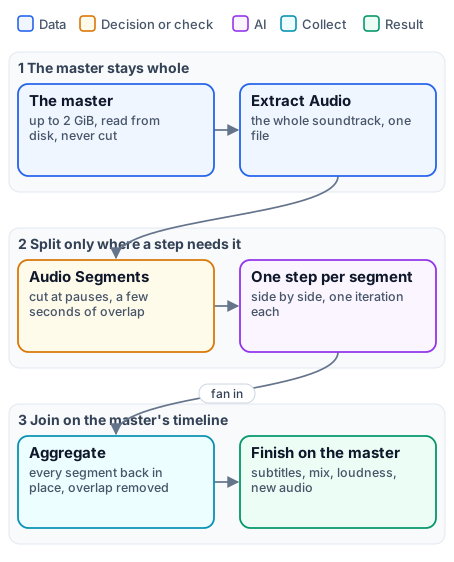
What takes the whole master, and what needs it cut
Section titled “What takes the whole master, and what needs it cut”Every media node in Madoo works file to file: the worker reads the source from disk and writes the result to disk, so memory does not grow with the length. Most steps therefore take the whole master, whatever its length, up to 2 GiB:
| Takes the whole master | Examples |
|---|---|
| Editing and finishing | Trim, Resize, Overlay, Extract Audio, Add Audio (the picture is copied, not re-encoded), Normalize Loudness, Duck |
| Captions and text | Video Subtitles (up to 10,000 captions), Selectable Caption Tracks (the video is not even copied), Text on Video |
| Measuring | Media Technical Info, Audio Quality Report |
| Transcription | Speech to Text — one request per file, with no length limit set by Madoo |
A long recording needs cutting only for one of three reasons:
- A provider limit. Stem Separation accepts at most 90 seconds per request; the dubbing engine cuts the soundtrack into 76-second segments for it. Highlight analysis works on candidate segments of up to 180 seconds.
- Time. Twenty minutes of speech in four segments are transcribed side by side — faster than one request of twenty minutes, when the time matters more than the details below.
- One result per part. A chapter thumbnail, a clip per answer, a decision per segment: the segment is the unit of the result.
Everything else is better done on the whole master: one file, one step, nothing to join.
One pass or segments: the transcription choice
Section titled “One pass or segments: the transcription choice”Transcription is the step where the choice matters most, and it is a real trade-off. The lab at the end of this page transcribes the same briefing — six minutes, four people — both ways:
| One pass | Segments | |
|---|---|---|
| Speakers | named consistently from start to end: the same person keeps the same number | numbered again in each segment: speaker_0 is a different person in different segments |
| Billing | the minute is rounded up once | each segment is rounded up to its started minute, overlap included |
| Time | one request, as long as the provider needs | segments side by side: faster on long recordings |
| Length | the whole recording; the dubbing engine keeps one pass up to an hour | any length |
Speakers are the deciding point. A transcription tells the speakers apart within what it hears. Two separately
transcribed segments do not know each other: the same voice gets speaker_0 in one and speaker_1 in the next,
and two people can be merged in a segment where one of them says little. Aggregate Transcript keeps the labels but
marks them valid only within their segment (speaker_scope segment) and warns SPEAKER_LABELS_SEGMENT_SCOPED.
When who speaks matters — a voice per speaker in a dub, a speaker’s name on a caption, a report of who said what —
transcribe in one pass. A transcription done in one pass marks its speakers valid for the whole track (track).
Billing is the second point. Speech to Text with ElevenLabs Scribe V2 costs 0.5 credits per minute, rounded up to the started minute per request — and each segment is a request. Six minutes in one pass cost 3.5 credits (seven started minutes); the same six minutes in four segments of about 100 seconds cost 4 (eight). Segments of 62 seconds would count two minutes each. Keep segments just under a whole number of minutes, and long: the default of ten minutes makes the rounding negligible.
Time is the argument for segments on long recordings. On six minutes it is nothing: the lab’s one-pass request took 12 seconds, the segmented path 14 (7 to cut, 7 to transcribe). On two hours, twelve segments transcribed side by side finish long before one request would.
Cutting: Audio Segments and Video Segments
Section titled “Cutting: Audio Segments and Video Segments”Audio Segments (enumerate/audio_segments) and Video Segments (enumerate/video_segments) cut a master into
segments and open one iteration per segment: the steps connected after them run once
per segment, side by side.
| Setting | Audio default | Video default | Meaning |
|---|---|---|---|
Mode (mode) |
automatic |
automatic |
how cut points are chosen, see below |
Target Duration (targetDurationSeconds) |
600 s | 120 s | the length aimed at (10–3600) |
Maximum Duration (maximumDurationSeconds) |
720 s | 180 s | the longest a segment may be (10–7200) |
Overlap (overlapSeconds) |
5 s | 1 s | seconds each segment repeats from the end of the one before (0–30) |
Maximum Segments (maximumSegments) |
120 | 300 | the most segments the node will make (1–1000) |
The modes. automatic cuts at pauses: it listens for silences (−35 dB for at least 0.35 seconds) and cuts in the
middle of the pause nearest the target, anywhere from 60% of the target to the maximum — so no word is cut in half.
If a cut has no pause within reach, it plans the whole recording again with fixed cuts and records a warning.
silence_aware insists on pauses and fails (SILENCE_BOUNDARY_UNAVAILABLE) when it cannot find them;
fixed_duration cuts every target seconds, ignoring pauses — right when every segment must have the same length, as
for the separation’s 90-second limit. A recording no longer than the maximum is always one segment.
What a segment carries. Each iteration receives the segment, its stable segment ID, its index and its start and end in seconds on the master’s timeline — what the aggregators need to put it back in place. Video segments cut on video and pauses in the audio track, not on keyframes.
Segments are working copies. Audio segments are re-encoded for speech — MP3, mono, 16 kHz — which is what a transcription or an analysis needs, not what a listener should hear; video segments are re-encoded as H.264. Use segments to compute, and deliver from the whole master.
Limits. The master may be up to 2 GiB; a recording that would need more segments than Maximum Segments fails
before anything runs (SEGMENT_LIMIT_EXCEEDED): raise the target or the maximum.
Working side by side
Section titled “Working side by side”Each segment is an iteration, and iterations run side by side: each worker runs several at once, and more workers run more. A step after a segmenter needs nothing special to run per segment — connect it, and it iterates.
Two rules concern paid steps inside the iterations:
- Estimates are deferred. The cost of a transcription depends on the measured duration of each segment, known
only when the segments exist:
estimate_executionreports such steps as deferred, and the run reserves and settles on the measured durations. - Steps priced at run time are refused inside iterations, because their total cannot be admitted up front —
validation reports
RUNTIME_PRICING_ITERATION_UNSUPPORTED. Text to Speech (priced per thousand characters) and Stem Separation (priced per second) are the exceptions, admitted over all the segments at once. Speech to Text is not priced at run time and iterates freely.
Joining: back on the master’s timeline
Section titled “Joining: back on the master’s timeline”A segmented step ends with an aggregator that makes one result again. Choose it by what the segments produced:
| Aggregator | Joins | What it guarantees |
|---|---|---|
Aggregate Transcript (aggregate/transcript) |
transcripts of audio segments | every segment present, in order, without gaps; cues moved to the master’s timeline; the overlap removed — a repeated cue dropped, a cue across the cut trimmed, repeated words at a segment’s start stripped. With Speech Ready, phrases a voice can say and a viewer can read |
Aggregate Caption Track (aggregate/caption_track) |
translated caption blocks | the original lines, IDs, times and speakers, with the new text |
Audio Timeline (aggregate/audio_timeline) |
clips placed at given times | each clip at its start, silence between, up to 10,000 cues and 6 hours |
Aggregate Audio Merge (aggregate/audio_merge) |
audio clips end to end | up to 100 clips, joined without re-encoding |
Aggregate Video Merge (aggregate/video_merge) |
video clips end to end | up to 20 clips, 512 MiB in all, re-encoded, with an optional transition |
The merges join clips end to end and do not remove overlap: segments that will be merged must be cut with
Overlap 0, as the dubbing engine does for the background. The transcript aggregator is the one that
understands overlap — which is why transcription segments keep a few seconds of it, so that no word is lost at a cut.
Several stages in one workflow
Section titled “Several stages in one workflow”A real long-media workflow often splits and joins more than once, on different units, and comes back to the whole master at the end. The dubbing engine is the complete case:
- the soundtrack is transcribed — in one pass up to an hour, in segments beyond — and joined into one caption track;
- the track is cut into caption blocks of 24 lines, translated side by side, and joined into one translated track;
- the lines are voiced one per iteration, in up to three rounds, and placed on one dialogue timeline;
- the original mix is cut into 76-second segments for the separation — without overlap, because they are merged — and joined into one background;
- everything returns to the whole master: the mix, the loudness, the new soundtrack, the subtitles.
Each stage splits on its own unit — minutes of audio, blocks of lines, single lines — and each aggregator puts its results back on the same timeline, the master’s. That shared timeline is what keeps the voice, the subtitles and the picture together at the end.
| Trap | What happens | What to do |
|---|---|---|
| A video cut into more segments than a merge accepts | Video Segments allows up to 300 by default, Aggregate Video Merge joins 20 | size the segments for the merge, or join with Audio Timeline or work on the whole master |
| Merging segments cut with overlap | the overlapping seconds are heard twice | overlapSeconds 0 for anything merged |
| Delivering a segment | audio segments are speech-quality MP3 | deliver from the whole master |
| Segments just over a minute | each counts two minutes of transcription | aim just under whole minutes, or long segments |
| Speakers across segments | numbers restart; people can be merged | one pass when speakers matter |
| A master bigger than an upload | nodes take 2 GiB, but the public API uploads 250 MB per file (import from a URL 100 MB) | the upload is the limit today: compress the file before uploading it |
| A paid step priced at run time inside the segments | refused at validation | keep it outside the iteration, or use one of the admitted nodes |
Lab: one pass or segments
Section titled “Lab: one pass or segments”
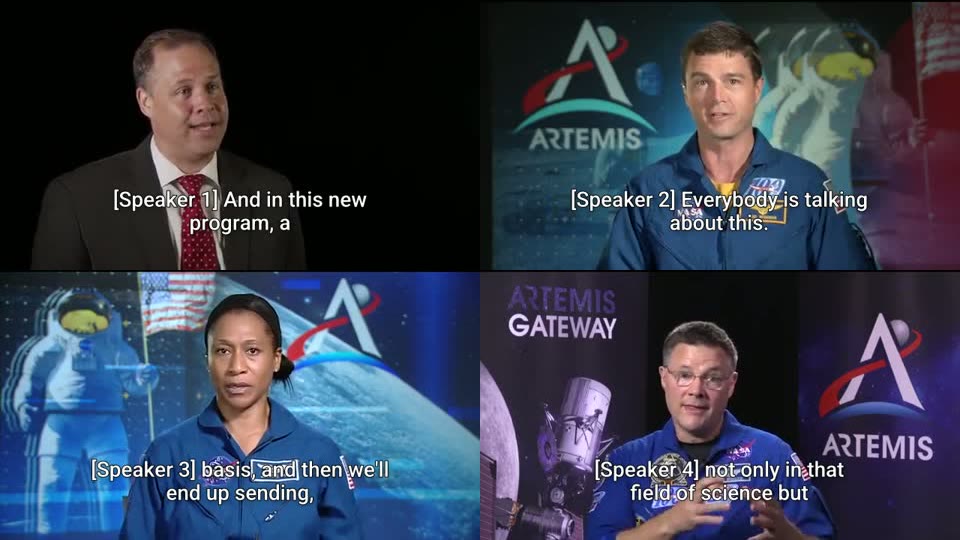
The six minutes of the dubbing example — the NASA Administrator and three astronauts — take both paths from the same speech audio. A transcribes it in one pass with speaker identification and burns the captions, with the speaker’s label, into the whole video, uncut. B cuts it at pauses into segments of about 100 seconds with 5 seconds of overlap, transcribes them side by side and joins them with Aggregate Transcript.
| Segment (B) | Time | Who speaks | Labels, one pass (A) | Labels, segments (B) |
|---|---|---|---|---|
| 1 | 0:02 – 1:34 | Bridenstine | speaker_0 |
speaker_0 |
| 2 | 1:29 – 2:44 | Bridenstine | speaker_0 |
speaker_0 |
| 3 | 3:01 – 4:30 | Wiseman | speaker_1 |
speaker_0 |
| 4 | 4:26 – 6:10 | Wiseman, Epps, Wheelock | speaker_1, speaker_2, speaker_3 |
speaker_0, speaker_1 |
One pass: 107 captions, four speakers with stable numbers, 3.5 credits, 12 seconds. Segments: 96 captions, the
numbering restarts at segment 3 — Wiseman becomes speaker_0, like the Administrator — and in segment 4 three
people share two labels; the transcript warns SPEAKER_LABELS_SEGMENT_SCOPED; 4 credits, 14 seconds. Same words,
different speakers.
The captioned briefing is result-captioned-briefing.mp4; the captions are the one-pass SRT and the segmented SRT.
node madoo-install-example.mjs lab-long-media --api <your Madoo API URL> --key <key.json> --run --save long-mediaFor an hour-long recording, keep path A up to about an hour; beyond it, path B with segments of about ten minutes — and, if speakers matter, a person to check the voices at the segment borders.
Media: “Artemis Media Resource — Interview Soundbites”, NASA (public domain; NASA does not endorse this documentation). The title card with press contacts at the start of the original is not part of the example.
When a step fails
Section titled “When a step fails”| Code | Meaning | Fix |
|---|---|---|
SEGMENT_LIMIT_EXCEEDED |
the recording would need more segments than Maximum Segments | raise the target or the maximum duration, or the maximum segments |
SILENCE_BOUNDARY_UNAVAILABLE |
silence_aware found no pause for a cut |
use automatic, or a longer maximum duration |
RUNTIME_PRICING_ITERATION_UNSUPPORTED |
a step priced at run time is inside segments | move it out of the iteration |
INPUT_MEDIA_TOO_LONG |
a step with a duration limit received a longer segment (Stem Separation: 90 s) | cut with fixed_duration under the limit |
MEDIA_TOO_LARGE |
a file over 2 GiB | compress it |
SPEAKER_LABELS_SEGMENT_SCOPED (warning) |
speakers numbered per segment | transcribe in one pass when speakers matter |