

Consistency and brand
An AI step invents part of every picture: the grain of the surface, the angle of the light, the props at the edge. One picture at a time that is welcome; a catalogue of fifty products made that way looks like fifty shoots. A brand needs the opposite — pictures that belong together at a glance — and Madoo gives it in two layers: what the models share, and what is not left to a model at all.
What holds a series together
Section titled “What holds a series together”From the strongest to the weakest:
- One reference picture for all. The product nodes take a picture whose world they copy:
Product Photography (
reference_image: background, surface, light), Lifestyle (reference_image: light, palette, style), Background Swap (background_image), Showroom Visualizer (room_image), Style Transfer (style_image), Virtual Try-On (background_image,pose_reference_image). The same picture connected to every product makes the same world — the strongest bond there is. Make it once with Text to Image, or use a photo of your own set. - The same settings. The same presets — surface, lighting, angle, frame — and the same model, over the whole catalogue: run the products through an iteration so they share one set of steps.
- The same person. For garments, the same model photo on every Try-On: the face and body are kept, so the collection is worn by one person.
- A brand layer that is not AI. The mark placed with Overlay, the name set with Text on Image in the brand’s fonts, a colour grade with a LUT, the size cut with Resize for Platform — these steps give the same result every time, on every picture.
- A seed, on the models that honour one (Text to Image), repeats a picture with the same settings. It helps to redo one picture, not to make different products look alike.
What does not hold a series together: variants (they are there to differ) and Magic Box, whose purpose is a new idea every time. Use them to find a direction, then fix it with a reference picture.
Good practice
Section titled “Good practice”- Make the reference first, alone. Try the scene with Text to Image until it is right, then save it as an asset and connect it to every product: the set is decided once.
- Keep the frame the same on every product node (
aspect_ratio), so the pictures line up in a grid. - Put the brand in the deterministic layer: a model draws a logo differently each time; Overlay does not.
- Grade last: one LUT or one Curves setting at the end evens out the small colour differences between pictures.
- Correct with words, not with a new prompt. When a check finds what is wrong with one picture — Decide with a
Model, or Image Analysis with the reference — connect its request to the next generation’s
instructions: it is added to the composed prompt, so the reference, the presets and the series stay the same (How AI image steps work). - Let the workflow try again. Repeat Until Accepted runs the generation, the check and the correction as one body, up to five times, until the picture passes — the brand colours measured by Color Palette (I10), the product judged faithful by Decide with a Model (I11) on its crop by Locate Subject, so the judge sees the product and not the scene. The same holds for a person: I12 keeps a brand’s model the same across a campaign, her face rated on features, skin and hair against her portrait.
- Check the series side by side — a Collage in the workflow shows at once which picture does not belong.
The lab
Section titled “The lab”The consistency lab makes a house scene once — an empty travertine shelf by a sage-green wall in morning light — and gives it to three different products of the museum-shop collection through Product Photography. Each picture is then signed with the same mark, and the three are gathered in one strip.
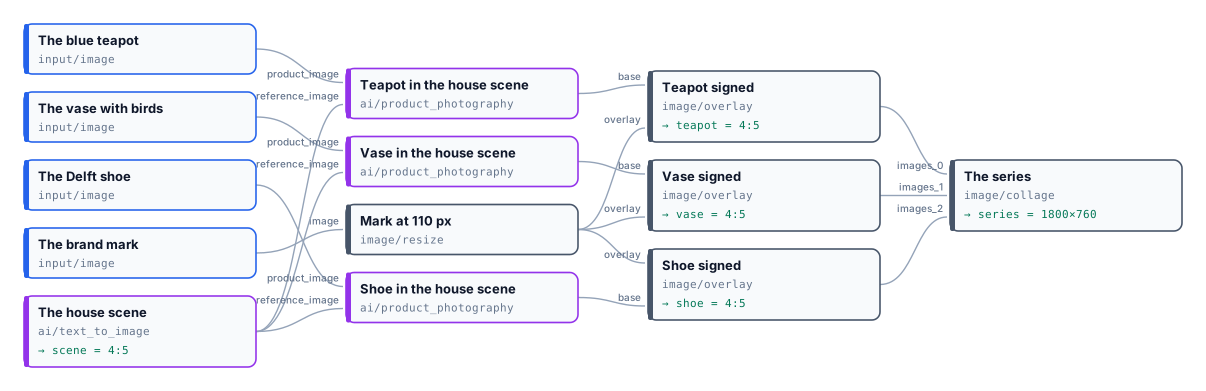
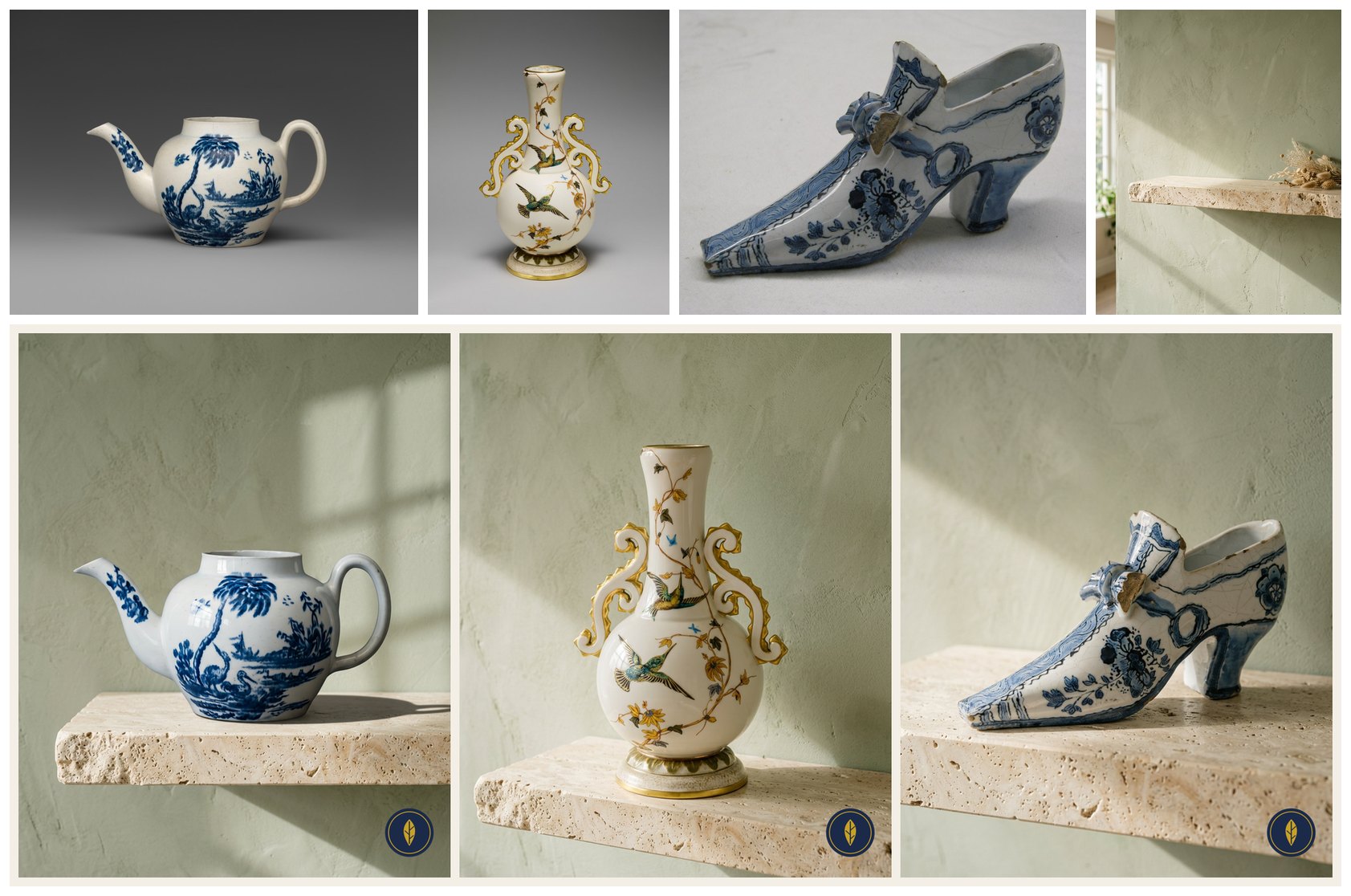
Four pictures, 20 credits; the mark and the strip cost nothing. The three products stand on the same stone, before the same wall, in the same window light, with the same shadows — and each is exactly the object of its photo. The reference’s dried grasses did not follow: the node takes the reference’s world, not its objects.
node madoo-install-example.mjs lab-brand-consistency --api <your Madoo API URL> --key <key.json> --run --save seriesLimits
Section titled “Limits”- A reference gives the world, not the exact position of the product in it: each picture places its product afresh.
- Different products still differ in size and shape; the frame and the light are what line them up.
- Variants and Magic Box are made to differ; do not use them for a uniform series.
Photos: “Teapot”, John Bartlam, about 1765–69; “Vase”, Greenwood Pottery Company, about 1884–93; “Shoe”, 1697, Delftware — The Metropolitan Museum of Art, New York (Open Access, public domain). The scene and the product pictures were made by Nano Banana 2, for this lab.