

Quality checks
A decision compares values you already have. A quality check first measures something —
the pixels of a photo, the loudness of a mix, the timing of a transcript — and then says whether it meets a
requirement, why, and by how much. The Quality Gate (utility/quality_gate) collects those checks and turns them
into one decision: the result goes on, or it is held back with a report that names what failed.
Every check is measured on the real file by deterministic code, never judged by an AI model, and the gate itself costs nothing. That is what makes a gate trustworthy at the end of a workflow, and cheap at the beginning — in front of a paid step it keeps a bad input from spending credits.
What a quality check is
Section titled “What a quality check is”A check is a small JSON document (madoo.quality-check/v1) with:
| Field | Meaning |
|---|---|
checkId |
its name, used by the policy — print-resolution, speech-ready |
status |
passed, failed, warning or not_applicable |
score |
from 0 to 1: how much of the requirement is met |
summary |
one line a person can read |
violations |
what failed, each with a code and a message (MINIMUM_WIDTH, width is below the minimum.) |
metrics |
the measured facts the decision was based on |
Nodes that measure produce one on their quality_check output: Media Technical Info (media/technical_info,
dimensions, format, duration, codecs, streams against a media policy), Measure Subject (image/mask_measure, how much
of the frame the subject of an image fills and whether it touches an edge — see
Measuring the subject), Color Palette (image/color_palette, whether a picture
keeps to the brand colors — see The colors of an image), Image Statistics
(image/statistics, too dark, too bright, blown out, a white backdrop — see
Measuring tone and colour), Image Detail (image/detail, whether there is a
flat area to read fine detail on — see Measuring fine detail), Instance Segment
(image/instance_segment, whether a person, an animal or an object is in the picture — see
Finding people and objects), Face Detect (image/face_detect, whether a
face is in the picture — see Finding and framing faces), Audio Quality Report
(audio/quality_report),
Loudness Normalize, Duck, Speech Enhance and Fit Duration among the audio nodes, Aggregate Transcript for speech,
Template Render for a laid-out document, and the video highlight and dubbing nodes. Give each check a
unique check_id when several feed the same gate.
The policy
Section titled “The policy”The gate decides with a policy. The simplest is set with two parameters: Profile and Minimum Score. A
named policy (madoo.quality-policy/v1), saved in the node or connected to the Policy input, says more:
| Field | Meaning |
|---|---|
profile |
all_must_pass, weighted or advisory — see below |
minimumScore |
the threshold for weighted, from 0 to 1 |
rules |
the expected checks: checkId, required and weight |
onMissing |
what happens when a required check does not arrive: fail, warn or ignore |
The profiles:
- All must pass (
all_must_pass) — every required check must bepassed. Awarningblocks too: a check that is not sure is not a pass. The score is reported but does not decide. - Weighted (
weighted) — the weighted average of the scores must reachminimumScore. A failed check lowers the score instead of blocking on its own. - Advisory (
advisory) — never blocks. The report is the product: use it to collect evidence without stopping anything.
A check marked not_applicable is left out of the average. With rules, a check that arrives but is not listed is
reported as a warning and does not count. With onMissing: fail, a required check that never arrived blocks the
decision — this is how a policy requires a check instead of trusting whatever was connected.
Route, warn or fail
Section titled “Route, warn or fail”Mode decides what the gate does when the policy is not met:
| Mode | The gate… | The run |
|---|---|---|
route (default) |
completes; passed is false; the value is rejected |
completes; the branch after the value is skipped |
warn |
completes; passed is false; the value is still rejected |
completes; the rejection is also logged |
fail |
fails with QUALITY_GATE_FAILED, naming the blocking checks |
fails |
The Value input is what makes a gate a barrier. Connect the result to deliver — the photo, the mix, the
document — to Value, and wire the delivery from the gate’s Value output, not around the gate. The value comes
out unchanged when the policy passes, and is rejected otherwise, in every mode: whatever reads it is skipped, at
no cost, and the output is reported as absent. passed, score, report and failed_check_ids are produced
either way, so the reason is always delivered.
Prefer route when a rejection is a normal outcome — a photo that is too small, a take that needs another pass —
and fail when it means something is broken and a person must look. In fail mode the run stops at the gate, so
save any diagnostic output you need before it.
The lab
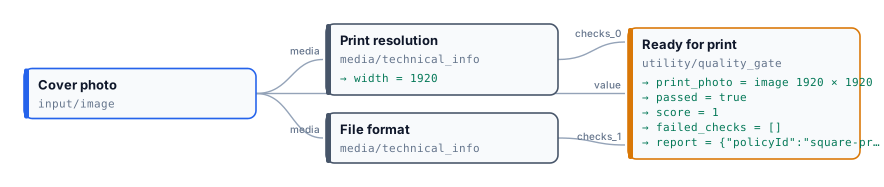
Section titled “The lab”The quality lab checks a cover photo for a 20 × 20 cm square
print. At 150 dpi that is 1181 pixels per side. Two Media Technical Info nodes measure the same file against two
media policies — Print resolution (an image, at least 1181 × 1181) and File format (JPEG, PNG or TIFF, at most
20 MB) — and a Quality Gate with the named policy square-print-cover (all must pass, both checks required,
onMissing: fail) releases the photo only when both pass. The photo is Earthrise, taken from Apollo 8 in 1968
(NASA, public domain), in two sizes.
| Earthrise, 1920 × 1920 | Earthrise, 640 × 640 | |
|---|---|---|
| Print resolution | passed, score 1 |
failed, score 0.33: MINIMUM_WIDTH, MINIMUM_HEIGHT |
| File format | passed, score 1 |
passed, score 1 |
passed |
true |
false |
score |
1 | 0.67 |
failed_check_ids |
[] |
["print-resolution"] |
| Print photo | the photo | absent |
Both runs complete in a few seconds at no cost. The small photo’s resolution check scores 0.33 because it meets one
of the three requirements that apply to an image (the media kind) and misses two (width and height); the gate’s
score is the average of the two checks. With all_must_pass the score only informs: one failed check is enough to
hold the photo back. With weighted and a minimum of 0.6, the same photo would pass — which is why a policy for print
requires every check.
node madoo-install-example.mjs lab-quality --api <your Madoo API URL> --key <key.json> --runThe installer uploads both photos; the second run is in
run-inputs-small.json.
Reading the report
Section titled “Reading the report”The report output (madoo.quality-report/v1) is self-contained: the policy and its fingerprint, the verdict and
the score, every check as it arrived, failedCheckIds, missingCheckIds and warnings. Store it next to the
delivered result — it answers why a photo was printed or held back, weeks later, without running anything again.
When a gate says failed with score 1, the score is not the reason: look at failedCheckIds and missingCheckIds,
because under all_must_pass a warning or a missing check blocks even when every score is perfect.
Errors
Section titled “Errors”| Code | Cause | Fix |
|---|---|---|
MISSING_QUALITY_CHECKS |
no check reached the gate | connect at least one quality_check |
TOO_MANY_QUALITY_CHECKS |
more than 32 checks | split the checks across two gates |
INVALID_QUALITY_CHECK |
a connected value is not a valid madoo.quality-check/v1 document |
connect a producer’s quality_check output, not another JSON |
QUALITY_CHECK_TOO_LARGE |
a check is over 128 KiB | connect the check, not a whole report |
DUPLICATE_CHECK_ID |
two checks connected to the same gate have the same id — reported when the workflow is validated, before it runs | give each producer its own check_id |
INVALID_QUALITY_POLICY |
the policy is not a valid madoo.quality-policy/v1 document |
fix the field the message points to |
INVALID_QUALITY_GATE_MODE |
Mode is not route, warn or fail |
choose one of the three |
QUALITY_GATE_FAILED |
mode fail and the policy was not met |
read the blocking checks in the message, or use route |