

Editing video
Most of what an editor does to a clip before it is published is mechanical: keep the good seconds, join them, make the picture fit the platform, put the brand in a corner and a soundtrack underneath. In Madoo each of these is a node that runs on Madoo’s own workers with FFmpeg, gives the same result every time and costs no credits. This page explains them one family at a time, then puts them together in a lab: a landscape interview becomes a vertical reel.
Time: keep the seconds you want
Section titled “Time: keep the seconds you want”Trim (video/trim) keeps one continuous range, start to end, written in seconds (12.5) or as HH:MM:SS;
an empty start means the beginning and an empty end the end of the video. Both values can also arrive on
input ports — from a transcript, a highlight plan, an AI analysis — and then they win over the parameters. Cutting
on a pause rather than in the middle of a word is what makes a cut sound edited rather than chopped: the lab below
cuts where a transcript with word timing says a sentence ends.
Split (video/split) cuts one video into several ranges at once, up to 20, each on its own output
(segment_0, segment_1…). For a long recording cut into equal parts to be processed one by one, use
segments instead: they iterate, Split does not.
Speed (video/speed) plays the whole clip faster or slower, from 0.25× to 4×, keeping the audio with its pitch
corrected (keep_audio). Speed Ramp (video/speed_ramp) changes speed along the clip from keypoints such as
[{"time": "2", "speed": 0.3}, {"time": "4", "speed": 1.0}], smoothly (linear) or at once (step) — the slow
motion on the moment that matters. Loop (video/loop) repeats a clip a number of times and Reverse
(video/reverse) plays it backwards.
Joining clips
Section titled “Joining clips”Merge Videos (video/merge) joins 2 to 8 clips in order, connected to videos_0, videos_1 and so on, with a
transition between each pair: fade (the default), dissolve, wipes, slides, circleopen, zoomin and others,
each lasting transition_duration seconds. A transition overlaps the two clips, so every one shortens the result by
its duration: two clips of 5.3 s and 7.7 s joined with a 0.4 s fade last 12.6 s. aspect_ratio: original keeps the
size of the first clip; set 9:16, 1:1 or 16:9 to make clips of different shapes fit one frame.
For a soft cross-fade from one clip to the next, choose fade. dissolve is a different effect: the next clip
appears pixel by pixel, with a grainy, blocky look that is rarely what a promotional video wants.
Clips produced one per item of an iteration — one shot per product, one scene per
line of a script — are joined back in their order by Merge Videos (Aggregate) (aggregate/video_merge), up to
20 clips and 512 MB in all, without a transition unless you choose one.
Every video Madoo encodes comes out as H.264 in 4:2:0, the format that plays in every browser, on phones and on the
social platforms. A video that arrives from elsewhere in another format — H.264 in 4:4:4 or 10-bit — gets a
WEB_PLAYBACK_PIXEL_FORMAT warning from Media Technical Info; passing it through Resize Video re-encodes it.
Frame: one video, every platform
Section titled “Frame: one video, every platform”Resize Video (video/resize) sets the output size, by a platform preset — 1080p_9:16 for Reels, Shorts and
TikTok, 1080p_1:1, 1080p_16:9, 1080p_4:3 and their 720p versions — or by width and height. When the shape
changes, fit_mode decides what happens to the picture:
fit_mode |
What you get | Use it when |
|---|---|---|
letterbox (default) |
the whole picture, with bars of background_color |
nothing may be cut: a slide, a screen, a product in full |
crop |
the frame filled, the edges cut | the subject is near the centre: a speaker, a product on a table |
stretch |
the frame filled, the picture distorted | almost never |
crop cuts evenly around the centre; it does not follow a face. From 16:9 to 9:16 it keeps only the middle third
of the width (405 of 1,280 pixels), so a speaker framed off-centre can end up half outside. Check one frame before running a batch — or frame
the subject in the middle when you shoot.
On the picture: a logo, a badge
Section titled “On the picture: a logo, a badge”Video Overlay (video/overlay) places an image over the whole video — a logo, a watermark, a badge — at one of
nine positions, scaled as a percentage of the video’s width, with an opacity and a margin in pixels from the
edges. Use a PNG with transparency. Text on video — titles, lower thirds, captions word by word — has its own nodes
and its own page, on typography.
Sound: music, voice, silence
Section titled “Sound: music, voice, silence”Add Audio to Video (video/add_audio) puts an audio track on a video without re-encoding the picture:
replaceswaps the soundtrack. Withreplace_duration: shortest(the default) the result stops with the shorter of the two, so music longer than the picture is cut at its end;longestkeeps the whole of the longer one — the choice for a dub or a voice-over that may run a little past the picture.mixplays the new track over the video’s own, ataudio_volumeandoriginal_volume— ratios, where 1.0 leaves a track as it is. The defaults, 1.0 and 0.3, put the original under the new track; for music under a voice turn it round: the voice at 1.0, the music around 0.1–0.25. A limiter keeps the sum from clipping. A video with no sound of its own — an AI-generated clip, a screen recording — is fine: the new track is laid alone, cut at the end of the picture.
The run records both durations and whether the new audio was cut or runs past the picture
(madoo.video-add-audio/v1 in the output’s execution metadata), which is how a dubbing delivery proves nothing was
lost. For music that must dip under every phrase of a voice, rather than stay at one level, use Duck Background
Audio before this node; the audio finishing page explains it.
Extract Audio (video/extract_audio) takes the soundtrack out, as MP3, WAV, AAC, OGG or FLAC — or, with
profile: speech, as a compact 16 kHz mono MP3 made for transcription. Remove Audio (video/remove_audio)
returns the video silent.
Stills and previews
Section titled “Stills and previews”Extract Frame (video/extract_frame) returns one frame as a lossless PNG, at a timestamp or a
frame_number — a cover, a thumbnail, an image for a vision model. Video to GIF (video/to_gif) makes an
animated GIF of the whole clip or a range, with a colour palette computed for it (quality: optimized), at fps
and max_width. GIF is an old, heavy format: the three-second preview of the lab weighs 4.5 MB, more than half the
whole 12-second reel. Where the page or the chat accepts video, a short muted MP4 looks better and weighs a tenth.
These are steps of a workflow, to deliver a still or a preview. To check a video a run produced — twelve timed frames and its waveform, a transition looked at closely, the pixel format and the silences — no step is needed: see Checking what a run produced.
Clips and long recordings
Section titled “Clips and long recordings”Every node on this page works file to file on inputs up to 2 GiB: the video is read from disk and the result written to disk, never held whole in memory. What grows with the length is time — trimming, resizing or overlaying re-encodes every frame — so a long recording is cut into segments that are processed side by side, and joined back with Merge Videos (Aggregate). Reverse Video is the exception: playing backwards starts from the last frame, so FFmpeg holds the whole clip while it works — keep it to clips of seconds. See the section overview.
The lab
Section titled “The lab”The editing lab turns 25 seconds of a landscape interview into a vertical reel for social media. The interview is NASA astronaut Reid Wiseman talking about the Artemis programme; the music is a bed that should stay under the voice.
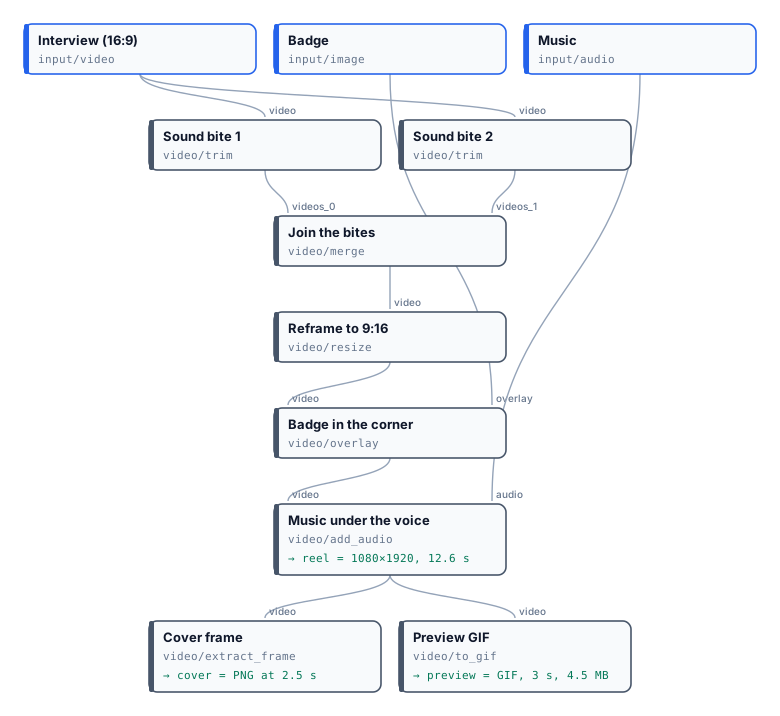
Two Trims keep two sound bites cut on whole sentences — the word timing of a transcript says where “…the
Artemis program” ends (5.7 s) and where “Everybody is excited about this” begins (17.0 s). Merge Videos joins
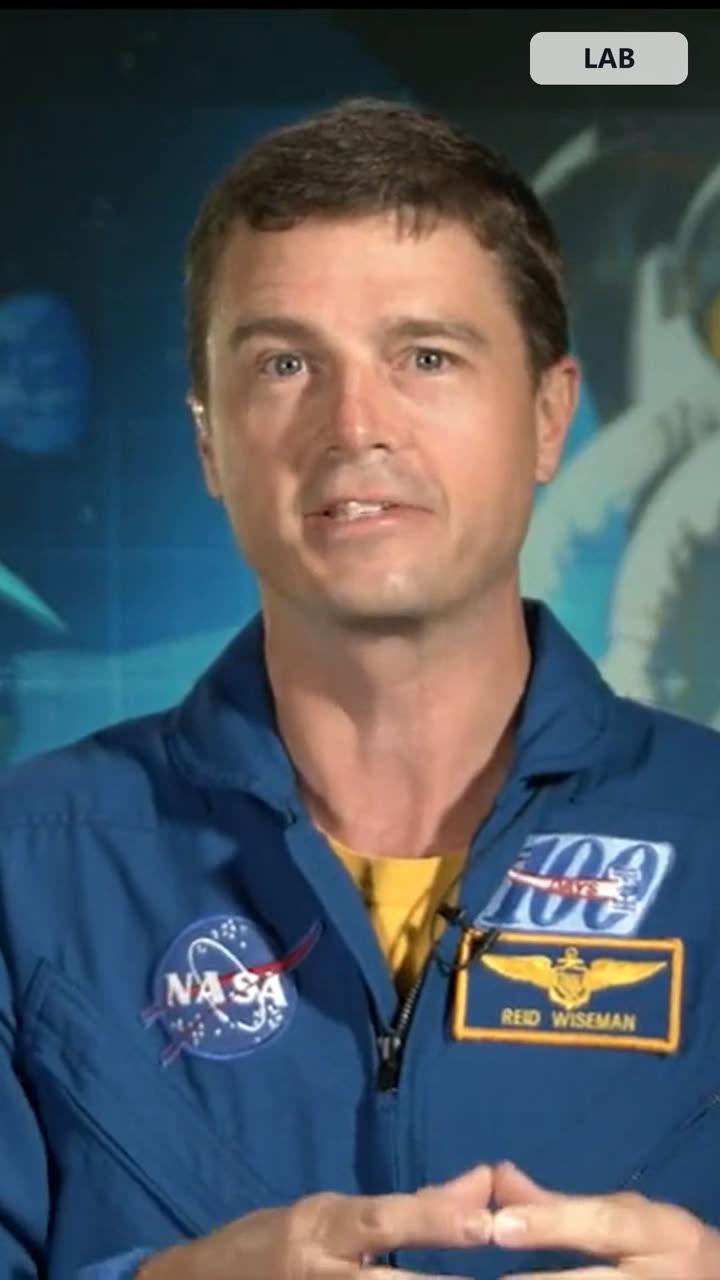
them with a 0.4 s fade. Resize Video reframes the 1280×720 result to 1080×1920 with crop: the astronaut sits
near the centre, so the vertical frame keeps him whole. Video Overlay puts a badge in the top-right corner at
22% of the width, and Add Audio to Video mixes the music at 0.12 under the voice at 1.0. From the reel, Extract
Frame takes the cover and Video to GIF a three-second preview.
The reel, re-encoded at 720×1280 for this page (MP4, 1.0 MB); the run’s own output is 1080×1920, 7.9 MB. The cover frame.
| Step | Result |
|---|---|
| Sound bites | 5.3 s and 7.7 s, cut on sentence ends |
| Joined | 12.6 s: the fade overlaps 0.4 s |
| Reframed | 1080×1920, the speaker whole in the frame |
| Music under the voice | the voice as it was, the music at 12%; peaks held under −1 dBFS |
| Cover and preview | a PNG frame at 2.5 s; a 3 s GIF of 4.5 MB |
| Credits | 0 |
node madoo-install-example.mjs lab-editing --api <your Madoo API URL> --key <key.json> --run --save reelTo make the same reel from your own interview, replace the two Trims’ times with the sentence ends of your transcript, and the badge with your logo.
Media: “Artemis Media Resource — Interview Soundbites”, NASA (public domain; NASA does not endorse this documentation). Music: “Local Forecast – Elevator” Kevin MacLeod (incompetech.com), licensed under Creative Commons: By Attribution 4.0 License, http://creativecommons.org/licenses/by/4.0/.
When a step fails
Section titled “When a step fails”| Code | Meaning | Fix |
|---|---|---|
INSUFFICIENT_CLIPS |
Merge Videos received fewer than 2 clips | connect at least videos_0 and videos_1 |
EMPTY_CLIP, EMPTY_VIDEO |
a clip arrived empty | check the step that produced it |
NOT_A_VIDEO, NOT_AN_AUDIO |
Add Audio to Video was given a file without a video (or audio) stream | connect a video to video and an audio file or a video with sound to audio |
INVALID_VIDEO_DURATION_POLICY |
replace_duration is neither shortest nor longest |
choose one of the two |
ADD_AUDIO_ERROR |
FFmpeg could not mux the two files | probe both with Media Technical Info; the message names the cause |