

Product imagery
A product is photographed once, often badly: on a kitchen table, under a lamp, against the wall of a warehouse. The shop then needs it on white for the marketplace, in a scene for the home page, in a room for the furniture catalogue, in the four colours it is sold in, and in the format of every channel an ad runs on. Each of those used to be a shoot.
The product nodes make them from the one photo. Each is an AI step built for one job, with a prompt template written
by Madoo that tells the model what to keep — the product, exactly: its shape, its label, its proportions — and
what to change. Their settings are presets rather than free text, so a hundred products come out in the same style;
custom_prompt adds your own words at the end. All of them run on Nano Banana 2 Edit by default, at 5 credits per
picture, with up to four variants (How AI image steps work).
The nodes
Section titled “The nodes”| Node | Makes | Main settings (presets) | Extra pictures |
|---|---|---|---|
Product Photography (ai/product_photography) |
A studio packshot | surface (27: white_seamless, marble_white, natural_wood, acrylic_black, linen_fabric…), lighting (15: soft_diffused, natural_window, rim_light, golden_hour…), angle (15: front, three_quarter, top_down, hero_shot, detail_close…), mood, aspect_ratio |
reference_image: a scene to copy the background and light from |
Lifestyle (ai/lifestyle) |
The product in a scene, in use | mood (16), surface, aspect_ratio |
reference_image: a picture whose light, palette and style are copied |
Showroom Visualizer (ai/showroom_visualizer) |
Furniture or decor in a room | showroom (30 rooms: scandinavian_living, industrial_loft, hotel_lobby…), placement (24: near_window, against_wall, shelf, above_sofa…), product_type (32: armchair, rug, pendant_light…), aspect_ratio |
room_image: a real room to place it in, with its perspective, scale and light |
Background Swap (ai/background_swap) |
The same product, another backdrop | environment (41: studios, beaches, cities, seasons, events, textures), aspect_ratio |
background_image: your own background |
Magic Swap (ai/magic_swap) |
The product in another material or colour | material (156: leathers, velvets, silks, woods, metals, stones… each in several colours), color (14), or custom_color in words; target_area: which part changes |
— |
Ad Generator (ai/ad_generator) |
An advertisement with its text | format (10 channel formats), style (10 ad styles), title, subtitle, cta, language (6) |
brand_assets: the logo or brand pictures to place |
Style Transfer (ai/style_transfer) |
The picture as a painting or drawing | style (20: watercolor, oil_painting, ink_wash, pop_art, pixel_art…) |
style_image: a picture whose style is copied |
Six of them also take a blank product and an effect, to render a design printed, embroidered or engraved on
the product; that is explained in Designs on products. The preset codes of each category
are listed by GET /api/v1/presets?category=showroom, and by get_node_type over MCP.
What the extra pictures are for
Section titled “What the extra pictures are for”The extra pictures are references, and each node tells the model exactly what to take from them — which is why they are not interchangeable:
- Product Photography: the reference is a scene — its background, surface, colour temperature and light are
copied; nothing else of it may appear. A
surfacepreset still wins over the reference’s background; thelightingpreset is then not used, because the light comes from the reference. - Lifestyle: the reference gives light, palette and style; the mood preset is not used when it is present.
- Showroom Visualizer: the room picture is the room, kept as photographed — walls, windows, framing and
shape — and the product is added to it, on its floor, at the scale of its doors and windows, in its light. Without
a room picture, the
showroompreset builds a room around the product. - Background Swap: the background picture is a place to photograph the product in — the product, kept exactly, is photographed there at its real size, in the place’s light and perspective, with contact shadows. The framing may move a little, as a photographer’s would. See A product in a real place.
- Ad Generator: the brand pictures are placed on the advertisement, clearly and without distortion.
- Style Transfer: the style picture gives the style only — colours, brushwork, technique — applied to the first picture, whose composition stays.
All of them need a model that reads several pictures. The default does; a model that reads one stops the step before any charge rather than silently ignoring the reference.
A product in a real place
Section titled “A product in a real place”Give Background Swap a photo of a place — a courtyard, a shop, a room — and the product is photographed there as in one shoot: on the place’s surfaces, in its light, with the colour of the ground reflected on it and shadows where it touches it. Virtual Try-On does the same with a person (People and fashion).
The product keeps its real size. A shoe is smaller than a flower pot, a teapot smaller than a fireplace. In a photo of a whole courtyard or a whole room, a small product is therefore small in the picture — true, but not a product shot. For a picture where the product is the subject, give the node the place at the product’s scale: Crop the part of the place where the product will stand — a corner with pots and tiles, a shelf, a table top — and swap into that. The crop is exact and free; the AI step then has a place it can make believable.
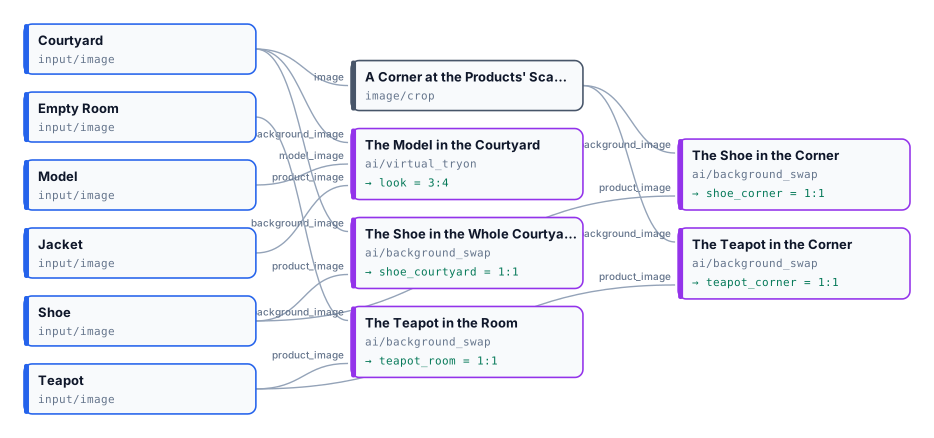
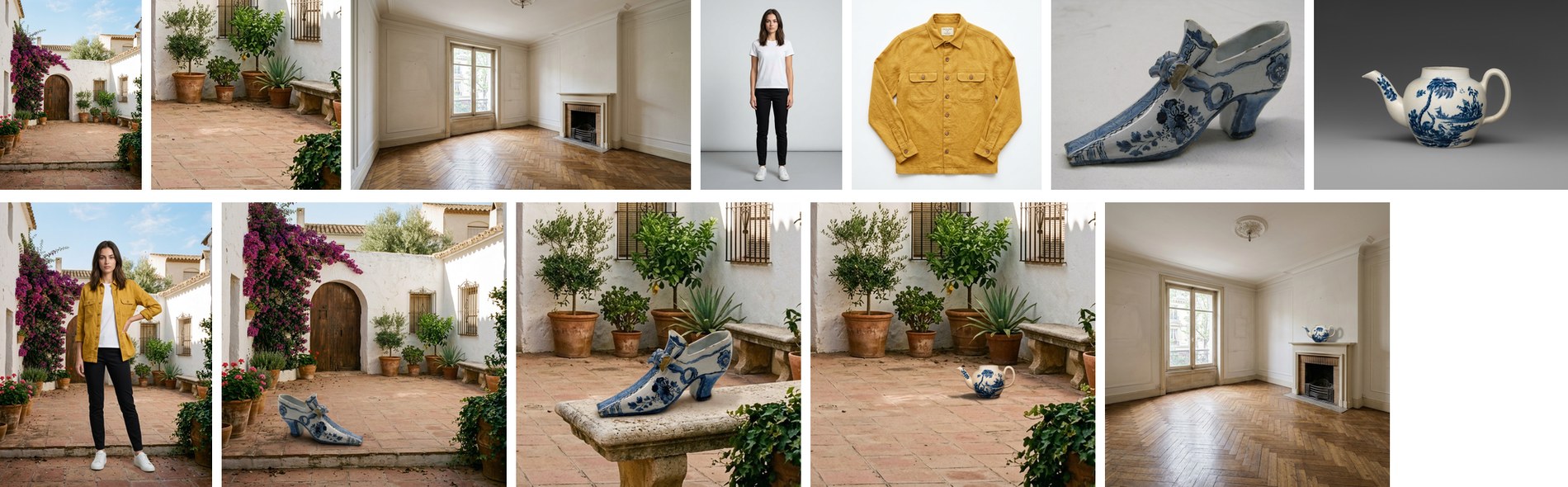
The lab (25 credits) puts both rules side by side: the teapot in the whole room is in scale and almost invisible; in the corner it is in scale and the subject of the picture. Run a product in a place more than once, or with variants, and choose: the model still decides where in the place the product stands.
Formats and frames
Section titled “Formats and frames”The nodes with aspect_ratio take the five frames 1_1, 4_5, 3_4, 16_9, 9_16. The Ad Generator takes a
channel format instead: instagram_square, instagram_story, tiktok, pinterest, twitter_post,
facebook_post, linkedin, billboard, banner_web, email_header. A format whose proportion the model does not
make exactly is made at the nearest one it does — Facebook and LinkedIn (1.91:1) at 16:9, the web banner and the email
header (3:1) at 21:9 — so crop the result to the exact size with
Resize for Platform or Resize with fill.
Style Transfer has no frame setting and, on the default model, answers in a square; to keep the proportions of the
picture, set the model’s own aspect_ratio to auto.
Good practice
Section titled “Good practice”- Start from a clean cut-out when the photo’s background is busy: Remove Background (1 credit) first, then the product node. The model then has only the product to keep.
- Keep the settings, change the product: a catalogue run with the same presets gives pictures that belong together; run the products through an iteration.
- Say what must not change in
custom_promptwhen a detail matters — “keep the label text exactly as it is”. - Text on an ad is drawn by the model: check the spelling, and when it must be exact or in your fonts, generate the ad without text and set it with Text on Image.
- Negative prompts written by the templates do not reach the default model, which does not take one; say what you do not want in positive terms (“on a plain background”) instead.
The lab
Section titled “The lab”The product lab runs seven nodes on five photos of the museum-shop collection and the brand mark of the compositing lab.
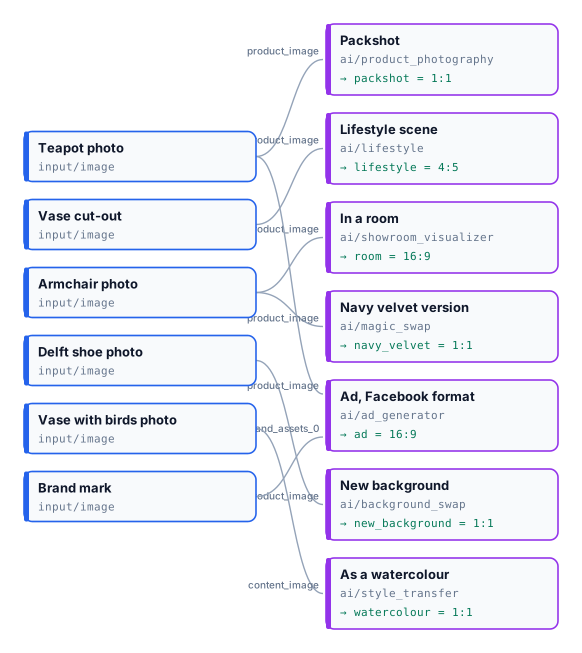
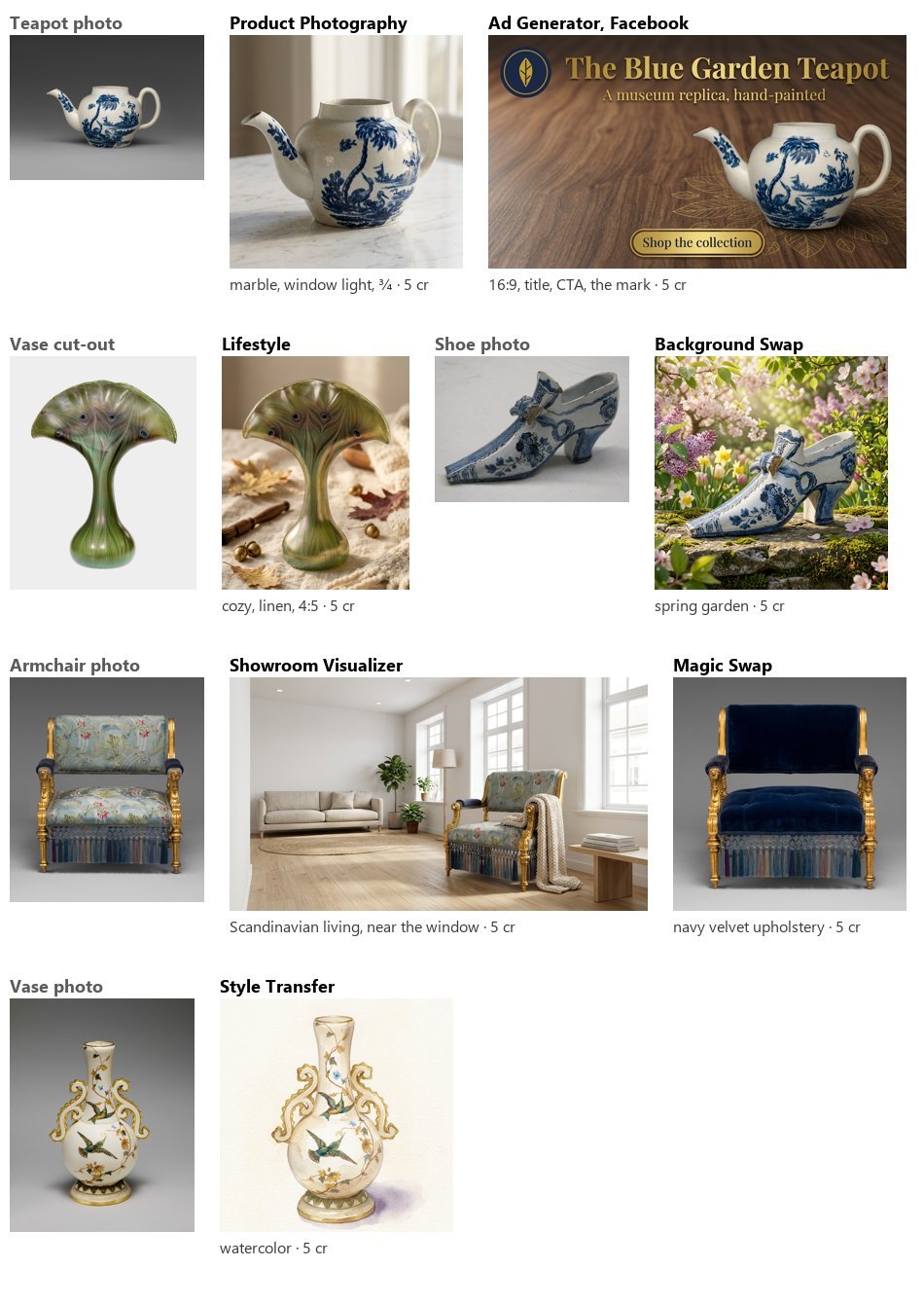
Seven pictures, 5 credits each, 35 in all, estimate equal to the charge. In every one the product kept its shape and its decoration — the teapot’s painting, the vase’s feather pattern, the armchair’s gilding and fringe — and only what the node is for changed.
node madoo-install-example.mjs lab-product-imagery --api <your Madoo API URL> --key <key.json> --run --save productsLimits
Section titled “Limits”- Presets are Madoo’s catalogue: a workspace cannot add its own surfaces, rooms or styles;
custom_promptand the reference pictures are the way to go beyond them. - A preset left empty is not replaced by a default preset: the template’s own wording applies (“a clean white seamless studio background”).
- Ad formats come out at the nearest proportion the model makes; crop to the exact size afterwards.
- The model decides small things you did not set — the props of a scene, the other furniture of a room. Variants are the way to choose.
Photos: “Teapot”, John Bartlam, about 1765–69; “Vase”, Louis C. Tiffany, 1893–96; “Armchair”, Herter Brothers, about 1875; “Shoe”, 1697, Delftware; “Vase”, Greenwood Pottery Company, about 1884–93 — The Metropolitan Museum of Art, New York (Open Access, public domain). The courtyard, the empty room, the model and the jacket of the place lab are pictures made with Madoo’s Text to Image node; the model is not a real person. The generated pictures were made by Nano Banana 2 Edit, for these labs.