

I07 — A hotel's photos screened for a booking portal: the good ones sized, the others with the reason
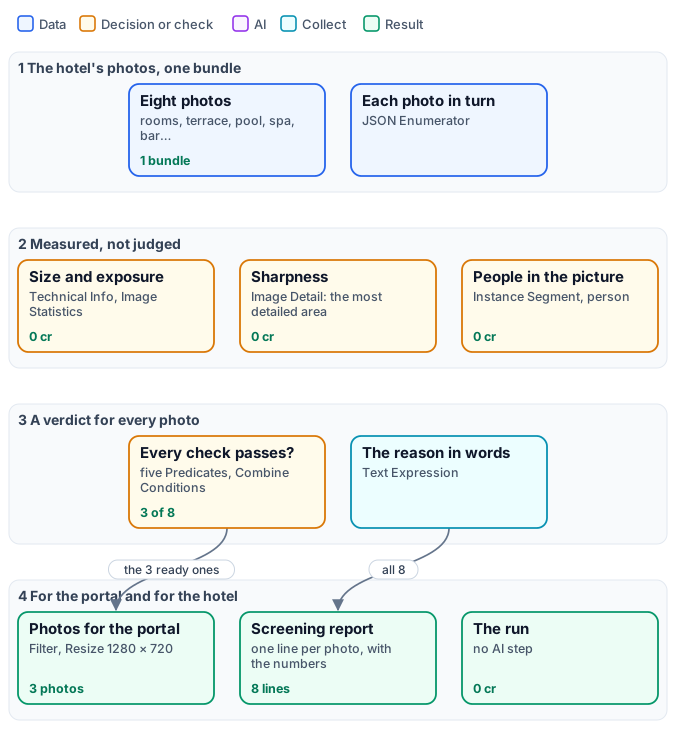
A booking portal is strict about photos: big enough, well exposed, sharp, and no guests in the picture. A hotel sends a batch and, today, someone opens every photo, decides, and writes back what is wrong. This workflow does the screening by measuring each photo: it delivers the ones that pass, already cut to the portal’s size, and writes for every photo a line with the numbers and, for the others, the reason in words — “too dark: median brightness 0.05”, “4 people in the picture”.
It is the screening of D02 done the other way. D02 asks an AI model to judge each photo; here every verdict comes from a measuring node. On the same photos the verdicts are the same — and the run costs 0 credits.
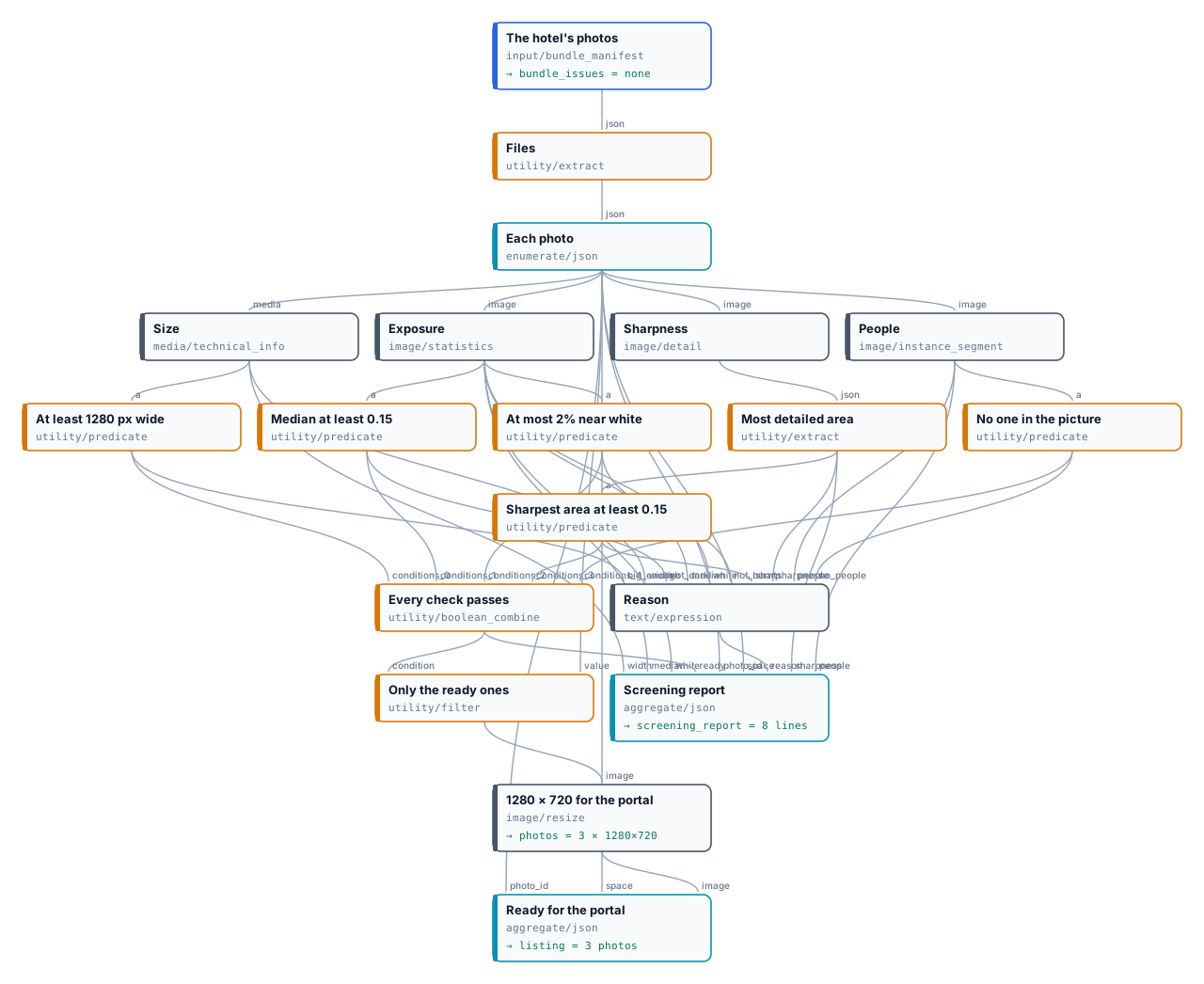
The exact graph is the workflow (as a diagram).
The case
Section titled “The case”| Input | Who provides it | Reference run |
|---|---|---|
| The photos, as one bundle | the hotel | eight photos of Hotel Villa Limoni, each with the space it shows |
The photos: the six of D02’s shoot — terrace, room, breakfast, pool, spa, restaurant —, generated once and degraded the way real files are (the pool sent at 640 pixels, the spa shot with a shaking hand, the restaurant far too dark); the lounge bar, the café portrait of the Lovable example, a person made with Text to Image with three guests behind him; and a second shot of the room, the first one made far too bright.
What it shows
Section titled “What it shows”- Measured, not judged. Each criterion is a number from a node that reads the picture: the width from Technical Info, the median brightness and the share of burnt highlights from Image Statistics, the sharpness of the most detailed area from Image Detail, the people from Instance Segment. No model looks at the photos; the same photo always gets the same numbers.
- One threshold, one place. Each rule is a Predicate: width at least 1280, median at least 0.15, at most 2% near white, sharpest area at least 0.15, nobody in the picture. Combine Conditions joins them; a Filter lets only the ready photos through.
- A reason anyone can act on. Text Expression writes, from the same values and verdicts, “too small: 640 px wide” or “burnt: 50.7% of the picture is near white” — the photographer knows what to redo.
- Nothing is lost. The measurements come before the Filter, so the report has a line for every photo, the rejected ones included; the listing collects only the photos that went through.
The workflow, step by step
Section titled “The workflow, step by step”| Phase | Steps | What they do here |
|---|---|---|
| A — the photos | The hotel’s photos, Files, Each photo | the bundle, its file list, one iteration per photo with its id, space and image |
| B — measure | Size, Exposure, Sharpness → Most detailed area, People | width; median brightness and near-white share; Image Detail with select ["detail"], the gradient of its patch read with Extract (selected[0].gradient); Instance Segment with Class Filter ["person"] |
| C — decide | five Predicates, Every check passes, Reason | one rule each; ALL of them; the sentence of the reasons |
| D — deliver | Only the ready ones, 1280 × 720 for the portal, Ready for the portal, Screening report | Filter, Resize fill with Never Enlarge, two Generate JSON: the ready photos with their image, every photo with its numbers and reason |
The reference run
Section titled “The reference run”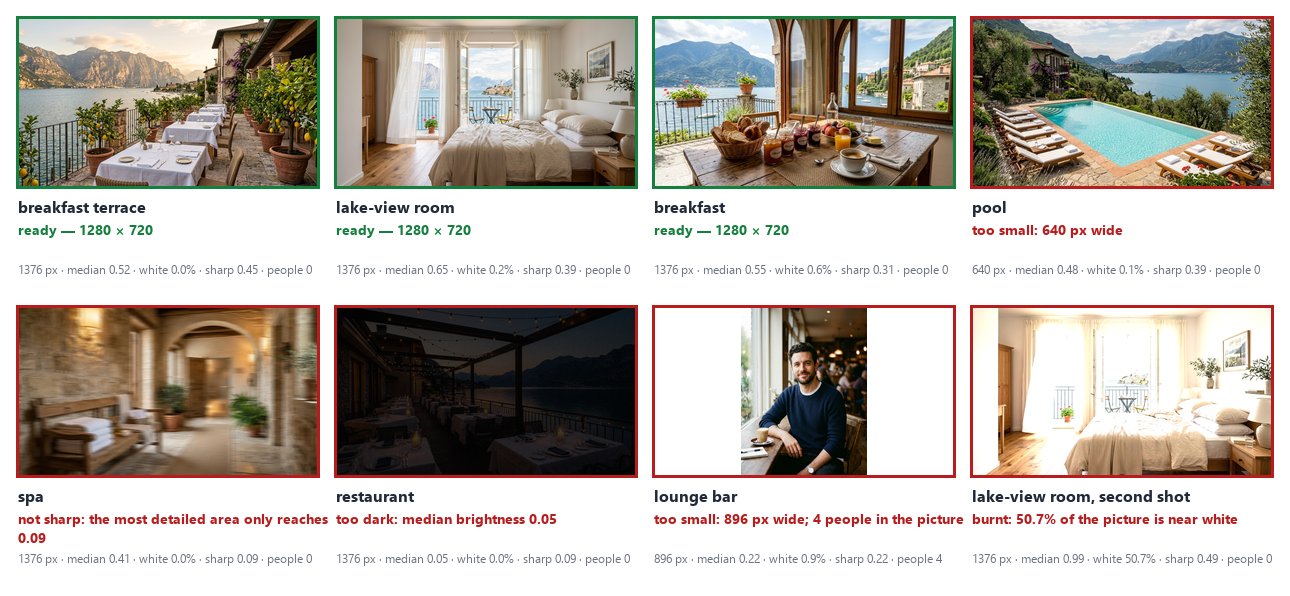
| Photo | Width | Median | Near white | Sharpness | People | Verdict |
|---|---|---|---|---|---|---|
| breakfast terrace | 1376 | 0.52 | 0.0% | 0.45 | 0 | ready |
| lake-view room | 1376 | 0.65 | 0.2% | 0.39 | 0 | ready |
| breakfast | 1376 | 0.55 | 0.6% | 0.31 | 0 | ready |
| pool | 640 | 0.48 | 0.1% | 0.39 | 0 | too small |
| spa | 1376 | 0.41 | 0.0% | 0.09 | 0 | not sharp |
| restaurant | 1376 | 0.05 | 0.0% | 0.09 | 0 | too dark |
| lounge bar | 896 | 0.22 | 0.9% | 0.22 | 4 | too small; people |
| room, second shot | 1376 | 0.99 | 50.7% | 0.49 | 0 | burnt |
The whole report is the screening_report
output; photos holds the three ready photos at 1280 × 720 and listing their list. 0 credits.
The six photos D02 screens get the same verdicts here as from D02’s AI judgement — terrace, room and breakfast publishable; pool too small; spa blurred; restaurant underexposed — and the two photos D02 never saw are caught by checks a judgement asked only about sharpness and exposure would not make: guests in the picture, burnt highlights.
The restaurant’s sharpness is low too (0.09) — in a picture this dark there is little detail to measure — so its reason names only what is wrong for sure: the darkness. The expression mentions sharpness only for a photo bright enough to judge it.
Where the thresholds come from
Section titled “Where the thresholds come from”They were set on these photos’ numbers, not guessed: the sharp photos reach 0.22 (the bar) to 0.49 in their most detailed area, the blurred spa 0.09, so 0.15 sits between them with room on both sides; the darkest well-exposed photo, the spa, has a median of 0.41, the restaurant 0.05; the other photos burn at most 0.9% of their pixels, the overexposed one half. For your own photos, run the workflow once on a batch you have already judged, read the report, and move each Predicate where your good photos and your bad ones part.
Adapt it
Section titled “Adapt it”- Another portal, another size. Change the Resize (or use Resize for Platform) and the width rule.
- Other rules. A Predicate on another measurement — a
clipped_blackshare, the count of chairs from Instance Segment, the colour of Color Palette — and one more condition in Combine Conditions. - Send the reasons back. The report’s lines with
ready: falseare a to-do list for the photographer: write them into an e-mail or a sheet (Generate CSV). - Then the paid steps. Put an AI step after the Filter — captions, a video as in D02 — and it runs only on photos worth it.
Install it
Section titled “Install it”node madoo-install-example.mjs i07-listing-photos --api <your Madoo API URL> --key <key.json> --run --save listingThe installer uploads the eight photos — six from D02’s folder, one from the Lovable example, one from the statistics lab — composes the bundle and installs the workflow.
manifest · workflow · bundle spec · screening report · the complete graph