

Structured answers
Prose is for people; the next step of a workflow needs data. When an AI answer has to be read field by field — a category that picks a branch, a score that is compared, an order number that goes into a ticket, a title and a description that go into two different places on a page — ask the model for a JSON object instead of a text. The object travels on its own port, is checked against a contract, and each field is then read exactly, with the techniques of Data and decisions.
| Step | Node | Read about it in |
|---|---|---|
| 1. The model answers with one object | Text Generation, Image / Video / Document Analysis, Response Format: JSON Object | this page |
| 2. The object is checked against a contract | Validate JSON Schema, mode route |
Schemas and contracts |
| 3. Each field is read with its type | Extract JSON Value | Reading JSON |
| 4. The fields are used | Template, Format, Calculate, a decision, an output | Text without a model, Deciding |
Asking for JSON
Section titled “Asking for JSON”Four nodes have Response Format (response_format): Text Generation, Image Analysis, Video Analysis
and Document Analysis. With json_object:
- the answer still arrives as text on
result, and the object arrives on thejsonport, already parsed — wire the next steps fromjson; - an answer wrapped in a Markdown code fence (
```json … ```) is read without the fence; - OpenAI models need the word “JSON” in what they receive: when neither the prompt nor the system prompt says it, Madoo adds “Answer with a single JSON object.” for you.
A model without a JSON mode, or an answer that wraps the JSON in prose, still reaches the next steps: connect its text
to Parse JSON (utility/json_parse) — Find first takes the JSON inside the prose — and wire the next steps from
its json (Reading JSON).
Other AI nodes return structured results of their own and need no setting: Product Description has a port per text, Image Classifier a category and a confidence, Image to Prompt a prompt and a negative prompt, Caption Translation and Analyze Highlight Segment a JSON document each — see Reading pictures.
Describing the object
Section titled “Describing the object”JSON mode makes the model answer with an object; which object is up to the prompt. Describe it in the system prompt, key by key, as a contract:
Answer with one JSON object and nothing else, with these keys:- customer_name: the name the customer signs with- topic: one of order, delivery, damaged_item, plant_care, refund, other- urgency: low, normal or high (high when a plant is damaged or a delivery is due within two days)- needs_reply: true or false- order_number: the order code as written, such as GC-24817; leave this key out when the email has none- summary: one sentence in English, at most 140 characters- Name every key and say what it holds, in the words a colleague would need.
- Give closed lists for anything a later step decides on (
topic,urgency): a decision on free text is a decision on a guess. - Ask for the right type:
true, not"yes";85, not"85". Extract reads types exactly and does not convert them (The expected type). - Leave out what is not there. Ask the model to omit a key that has no value, rather than to write
null. A field that is missing can be given a default or skip a branch; a field that is present withnullis a value, and Extract refuses it as the wrong type (When the field is missing). - One object. For a list, ask for an object that contains it:
{"items": [...]}. A bare list is refused.
When the answer is not an object
Section titled “When the answer is not an object”If the model’s answer is not one JSON object, the step fails — it does not pass on a broken answer — and says what to change. The tokens the model read and wrote were billed by the provider, so the failed step is charged them — nothing more.
| Code | What happened | What to change |
|---|---|---|
INVALID_STRUCTURED_RESPONSE |
the answer is not valid JSON: prose, a half-written object, two objects | describe the object in the prompt, key by key; raise Max Tokens if the answer is long |
STRUCTURED_RESPONSE_NOT_OBJECT |
valid JSON, but a list or a single value | ask for one object, such as {"items": [...]} |
AI_RESPONSE_INCOMPLETE |
the model reached Max Tokens before closing the object | raise Max Tokens; with a reasoning model, or lower its reasoning effort |
A valid object is not yet the right one
Section titled “A valid object is not yet the right one”JSON mode guarantees an object, not your object. A model can forget a key, write "urgent" where you listed high,
return a summary of 200 characters, or add a key you did not ask for. The schema you described in the prompt is not
imposed on the model — it is checked afterwards. Put Validate JSON Schema right after the AI step, with the same
contract written as a schema, in mode route, and wire everything that follows from its Normalized JSON:
- an answer that breaks the contract is rejected: the steps that read it are skipped at no cost,
validisfalseanderrorssays which field broke which rule; maxLengthis how a length becomes a rule rather than a request — a model asked for “at most 140 characters” does not always stop at 140 (Writing with a model).
When the answer arrives as text (Parse JSON above), the same check is one node: Parse JSON with the schema and mode
route reads the text, checks the object and rejects a broken answer in one step.
How to write the schema, the three modes and the shape of the errors are in Schemas and contracts.
Reading the fields
Section titled “Reading the fields”From Normalized JSON, Extract JSON Value reads each field with its type: topic as text, needs_reply as a
boolean, a score as a number. An optional field — the order number that a question about watering does not have —
is read with When Missing default or absent, so the rest of the workflow works with or without it. The fields
then go where they are needed: into a Text Template, a
decision, a calculation, a layout.
To deliver the object itself as a result — to an app, a caller, a webhook — connect it to JSON Output
(output/json): through its json port from the AI step or the schema check, or through its text port when you
have JSON written as text; the output is checked as real JSON either way, and reads back as an object.
Try it: sorting customer emails
Section titled “Try it: sorting customer emails”A garden centre receives its customers’ emails in several languages. The lab sorts one email into a ticket: the model answers with one object, a schema checks it, Extract reads the fields, a template writes the ticket line.
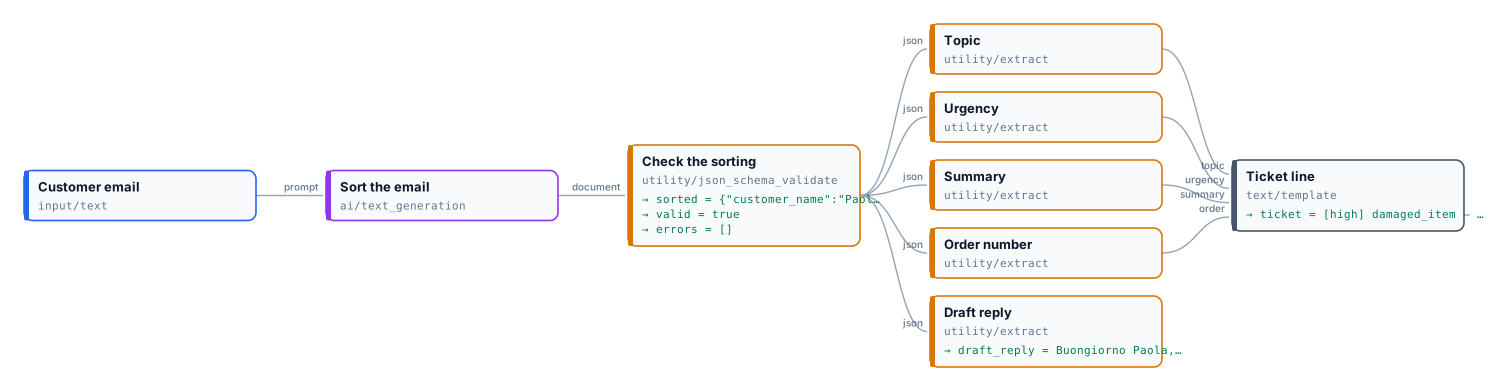
The email:
Buongiorno, ho ordinato tre olivi in vaso (ordine GC-24817) che mi sono stati consegnati ieri, ma uno è arrivato con il vaso spaccato e la terra sparsa nella scatola. La pianta sembra sana. Potete sostituire il vaso o la pianta? Sono a casa solo il pomeriggio. Grazie, Paola Ferretti
The object, on a reference run with GPT-5.6 Luna:
{ "customer_name": "Paola Ferretti", "topic": "damaged_item", "urgency": "high", "needs_reply": true, "order_number": "GC-24817", "summary": "One of three olive trees arrived with a broken pot and spilled soil; the plant appears healthy.", "reply_language": "it", "draft_reply": "Buongiorno Paola, ci dispiace per il vaso danneggiato e la terra sparsa. Per valutare la sostituzione del vaso o della pianta, può inviarci una foto del danno indicando l'ordine GC-24817? Terremo conto della sua disponibilità nel pomeriggio. Cordiali saluti,\nVivaio Le Gaggiole"}and the ticket line:
[high] damaged_item — One of three olive trees arrived with a broken pot and spilled soil; the plant appears healthy. (order: GC-24817)A second email — “I bought a lemon tree from you in May and the leaves are turning yellow at the edges… Tom
Avery” — comes out as plant_care, low, with a reply in English and no order_number key: the ticket reads
(order: none), the default of the Extract step. Had the model written "order_number": null, the Extract step would
have failed — which is why the prompt asks to leave the key out.
The run costs about 0.02 credits.
node madoo-install-example.mjs lab-structured-answers --api <your Madoo API URL> --key <key.json> --runWhen something goes wrong
Section titled “When something goes wrong”| Symptom | Cause | What to do |
|---|---|---|
The AI step fails with INVALID_STRUCTURED_RESPONSE or STRUCTURED_RESPONSE_NOT_OBJECT |
the answer was not one object | describe the object key by key; for a list, {"items": [...]} |
| The run completes, but the steps after the schema check are skipped | the answer broke the contract (valid: false) |
read errors: tighten the prompt on that field, or relax the schema if the answer was right |
Extract fails with EXTRACT_TYPE_MISMATCH |
a field has another type: "true" for true, or null |
ask the model for the right type; ask it to leave out keys with no value |
Extract fails with JSON_PATH_NOT_FOUND |
the model left out a key the workflow needs | require the key in the schema, so the answer is rejected before it reaches Extract; or give Extract a default |
| A text field is too long for where it goes | the model ignored the length in the prompt | add maxLength to the schema |