

I12 — The same model across a campaign: every picture checked against her portrait
A brand that works with a model, or with a character created for it, needs her to be her in every picture: the same face, the same skin, the same hair, whatever the scene, the pose and the outfit. A generator given her portrait usually keeps her — but not always, and a campaign is judged on its weakest picture.
This workflow makes each scene of a campaign with the model’s portrait and checks her before the picture is used: Locate Subject finds her among the other people, Face Detect frames her face, Image Analysis compares it with her portrait on features, skin and hair, and Repeat Until Accepted makes the picture again, with what differed as the correction, when she is not kept.
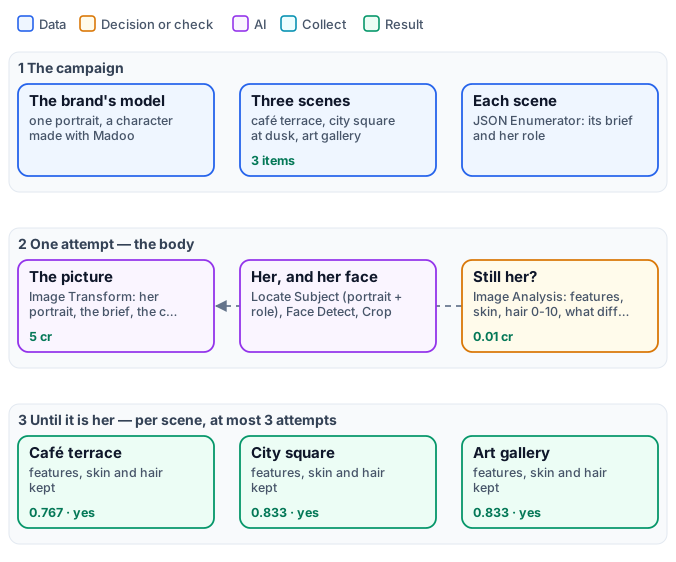
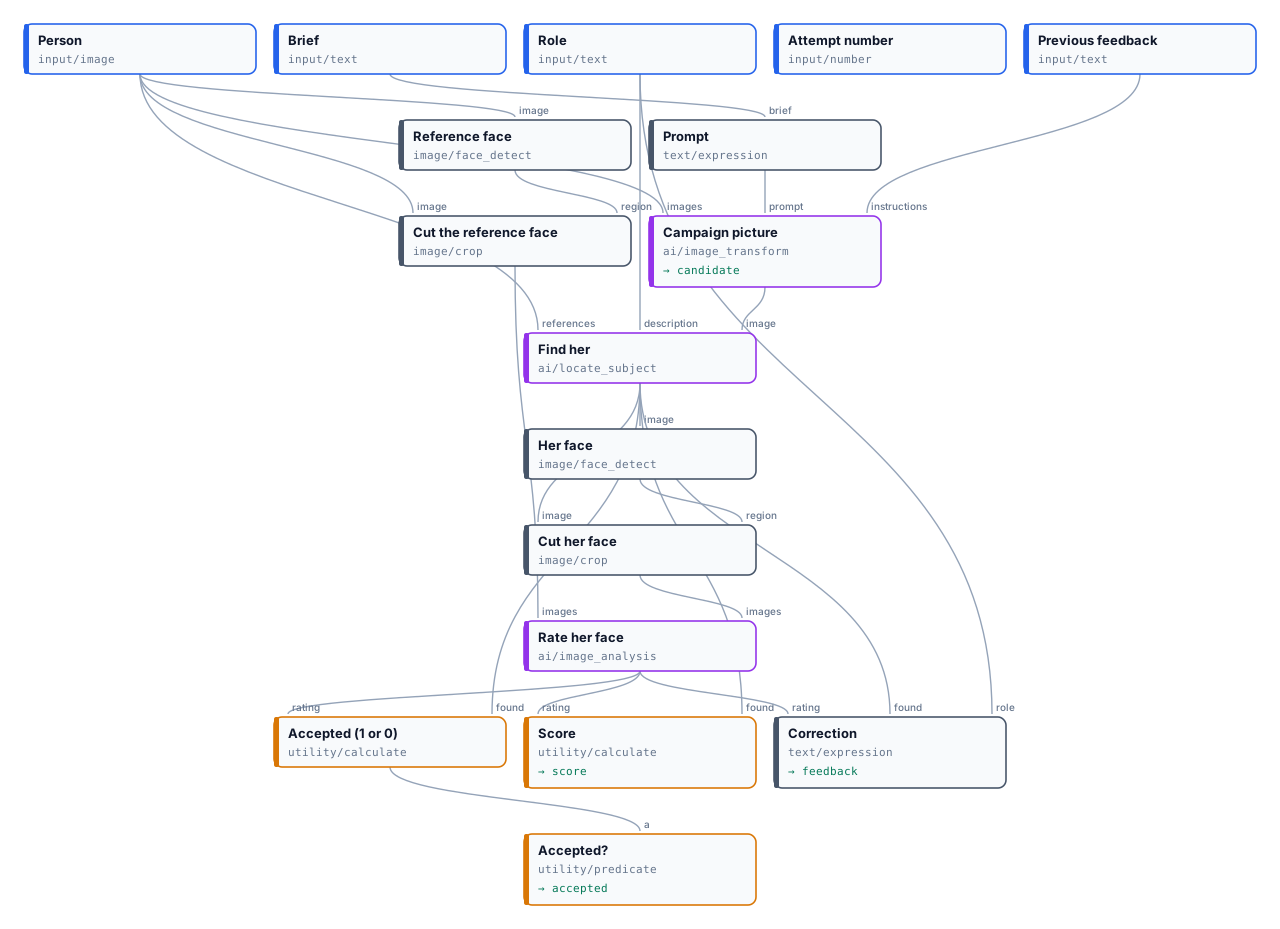
The exact graphs are the workflow (as a diagram) and its body, one attempt (as a diagram).

The case
Section titled “The case”| Input | Who provides it | Reference run |
|---|---|---|
| The model’s portrait | the brand | the model of I04: a character made with Madoo’s Text to Image, full figure, on a grey backdrop — no real person |
| The scenes | the campaign brief, as a JSON list | three scenes of an autumn coat campaign, each with its brief and her role in it |
| Scene | Brief | Her role |
|---|---|---|
| café terrace | she sits at a café terrace with a friend, in a camel wool coat, holding a cup; late afternoon | the woman in the camel wool coat holding a cup |
| city square | she walks across a city square at dusk among other people, in a camel wool coat | the woman in the camel wool coat walking in the foreground |
| art gallery | she looks at a large painting among other visitors, in a camel wool coat, three-quarter view | the woman in the camel wool coat looking at the painting |
What it shows
Section titled “What it shows”-
Find the person by portrait and role. Locate Subject receives her portrait as reference and her role as description. In the café scene her friend has the same long dark hair: the role — the woman in the camel coat holding a cup — says which one. Measured on ten scenes with four models: with the portrait alone they found her in all six scenes where she was kept, even among twelve passers-by; when she had been changed — thirty years older, or another woman — most of them pointed to the most similar other person. With her role too, all four found her in the four hardest scenes.
-
Judge what can be seen, not who she is. The judge does not ask “is this the same person?” — models hedge on identity, and a workflow should not do face recognition. It rates observable characteristics, each from 0 to 10:
- features: the shape of the face, the eyes, eyebrows, nose, lips and jaw;
- skin: freckles, moles, wrinkles and marks — none added, none missing;
- hair: colour, length and style;
and the attempt is accepted when she was found and features ≥ 6, skin ≥ 5, hair ≥ 3 (Calculate on the JSON answer). Hair has the lowest bar because a campaign may tie it back; a brand that fixes the hairstyle raises it.
-
The judge writes the correction. Its
differences— “many freckles”, “pixie-cut silver hair instead of long dark hair” — go to Image Transform’sinstructionson the next attempt, after “Keep her face, her skin and her hair exactly as in the reference photo”. -
The faces are compared at their own scale. Face Detect frames the head in the person’s crop and in the portrait, Crop cuts both, and the judge sees two faces side by side, not two pictures.
The judge, measured
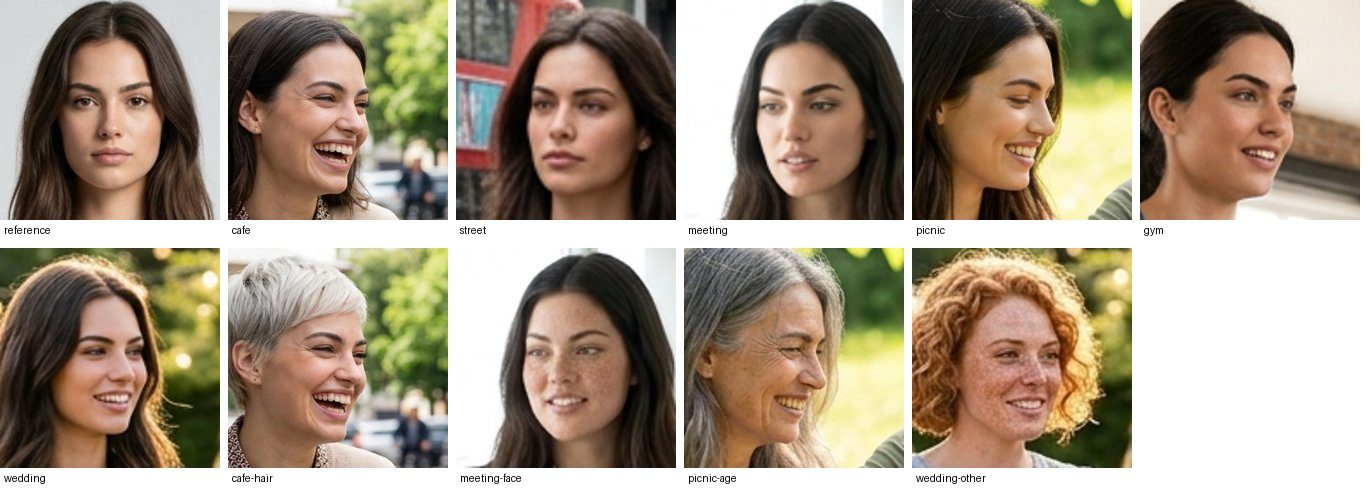
Section titled “The judge, measured”Before the campaign the judge was measured on ten faces cut from generated scenes: six where the generator kept the model, four where one thing about her was changed on purpose.
| Face | Features | Skin | Hair | Accepted |
|---|---|---|---|---|
| six faithful faces | 7–8 | 7–9 | 4–9 | all six |
| short platinum hair | 4 | 5 | 0 | no |
| freckles added | 8 | 2 | 8 | no |
| thirty years older | 2 | 0 | 2 | no |
| another woman | 4 | 1 | 0 | no |
With GPT-6 Luna, the default model of Image Analysis, at a hundredth of a credit a face; GPT-6.1 Sol gave the same verdicts on all ten. What did not work, on the same faces: Decide with a Model asked “the same person?” answered similar for most of the faithful faces; asked yes/no about skin and features it rejected most of them too. A rating with a named difference is the judge to use for people.
The reference run
Section titled “The reference run”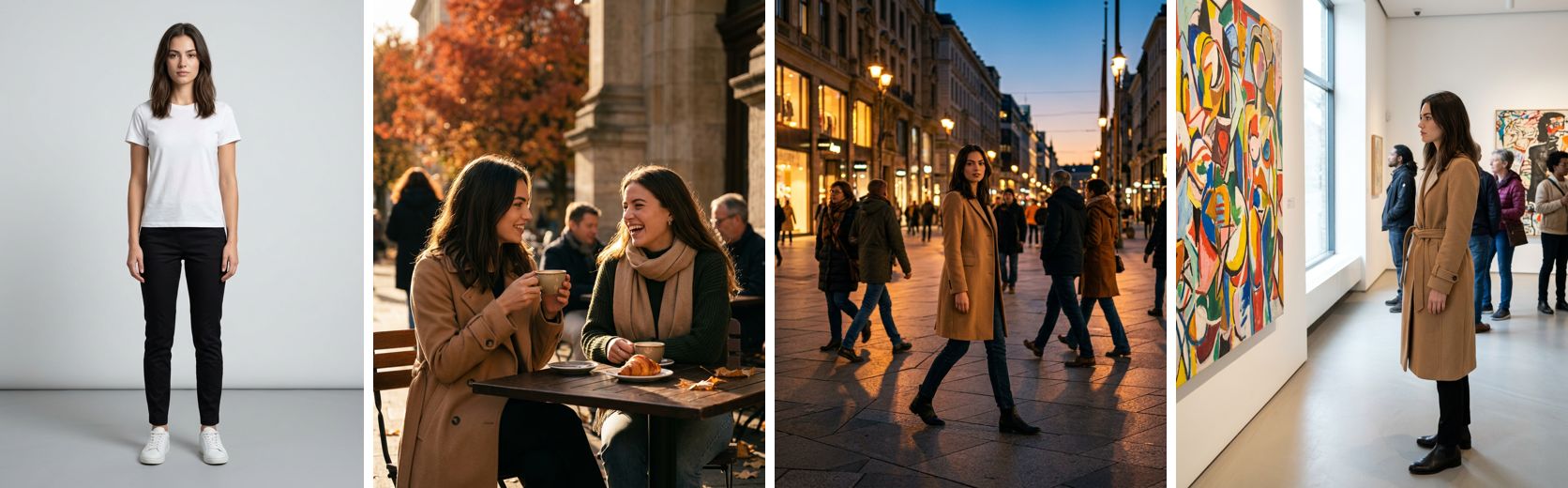
| Scene | Score | Disposition | What the judge noted |
|---|---|---|---|
| café terrace | 0.767 | accepted, attempt 1 | the hair’s part and texture differ; features hard to compare at that angle |
| city square | 0.833 | accepted, attempt 1 | the hair a little darker and less full |
| art gallery | 0.833 | accepted, attempt 1 | the hair’s parting, features slightly different |
15 credits for the three scenes — 5 for each picture; Locate Subject and the judge cost a few hundredths. The worst
case, about 50 credits for three scenes and three attempts each, was reserved when the list was read and released
when the run ended. The reports are the step’s
report output, one per scene. A second run of the same workflow gave three more accepted pictures, of the same
woman, at the same cost.
The generator kept her in every scene, so no correction was needed: the step cost one attempt per scene, and every picture was checked before it was used. When a scene changes her, the judge names what changed and the next attempt receives it.
Use it responsibly
Section titled “Use it responsibly”Use it with people who have agreed to it — the brand’s own models, under their contract — or with characters made for the purpose, like this one. It is built to keep a known person consistent across a brand’s own pictures, never to look for people in pictures of others. It does not identify anyone and gives no identity: only where a person stands in a picture, and how her face, skin and hair compare with a portrait you supplied.
Adapt it
Section titled “Adapt it”- Your model. One clear portrait, front-facing, even light; a second one in three-quarters helps Locate Subject.
- Your campaign. The scenes are a JSON list of
briefandrole; the role names what tells her apart in the scene — the outfit, the place, what she holds. - What the brand fixes. Raise the hair bar when the hairstyle is part of the character; add Color Palette on her crop when the outfit’s colours are.
- A product too. Put a Locate Subject for the product and its judge in the same body, and accept when both pass.
Install it
Section titled “Install it”node madoo-install-example.mjs i12-campaign-model --api <your Madoo API URL> --key <key.json> --run --save campaignThe installer uploads the model’s portrait from I04’s folder, installs and publishes the body, then the workflow that calls it. A run makes three to nine pictures: about 15 credits, about 50 at most — the estimate is deferred until the list of scenes is read.
The model is a character made with Madoo’s Text to Image node for I04; the campaign pictures were made by Image Transform’s default model, for this example.
manifest · workflow · body · reports · the body as a graph