

How AI image steps work
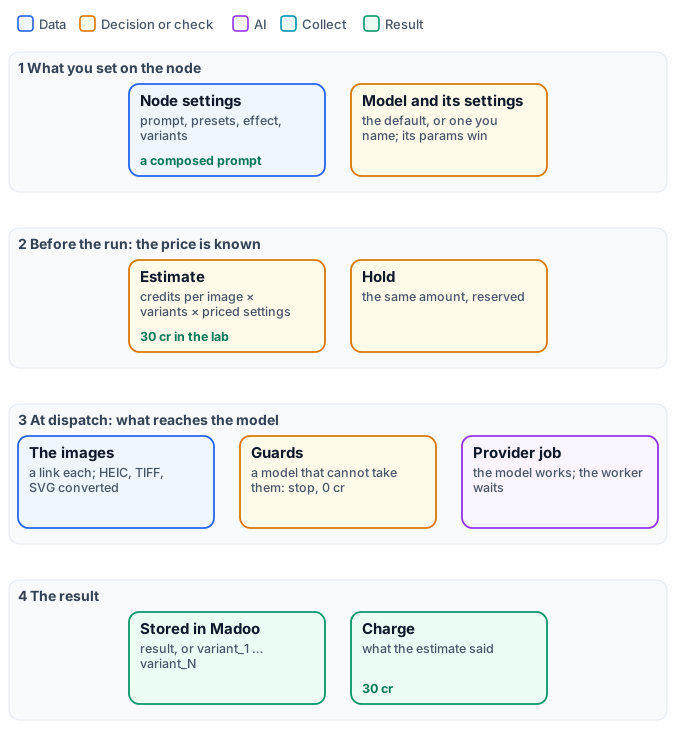
An AI image step looks like any other node — inputs, settings, an output — but three things make it different. It costs credits, because a model runs on a provider’s hardware. It gives a proposal, not a certain result: the same prompt makes a different picture every time. And what the model receives is not exactly what you typed: the node composes a prompt from your settings, chooses the model, turns your pictures into what the model can read, and checks that the model can do what you asked before anything is paid.
This page explains that machinery once, for every AI image node: the generic ones — Text to Image, Image Transform, Image Fusion — the specialised ones for products and fashion, and the edits. Knowing it is what makes a step cheap and predictable: the right model for the job, a price known before the run, and no credits spent on a request the model could never honour.
The model: a default, and the others
Section titled “The model: a default, and the others”Every AI node is tied to a capability — generating from text, editing an image, removing a background — and each capability has a default model, chosen by Madoo for quality and price. A workflow that names no model uses it, and follows it when Madoo changes it.
| Node | Default model | Credits |
|---|---|---|
| Text to Image | Nano Banana 2 (Gemini 3.1 Flash) | 5 per image at 1K |
| Image Transform, Image Fusion, and the product, scene, try-on, ad, style and swap nodes | Nano Banana 2 Edit | 5 per image at 1K |
| Remove Background | BiRefNet v2 | 1 |
| Upscale | Topaz | 5 |
| Inpainting, Object Removal | FLUX Fill | 2 |
| Outpainting | Image Outpaint | 2 |
| Image Analysis, Image to Prompt, Image Classifier | GPT-6 Luna | by tokens, usually under 1 |
To use another model, name it on the node — in a definition, "model": {"model": "flux-schnell"}. The models a node
accepts, with the effective default of your workspace, are listed by GET /api/v1/node-types/{category}/{name}/models
and by get_node_type over MCP (selectable_models); in the editor, in the model picker of the node. They range
from 1 credit (FLUX Schnell at 1 megapixel, GPT Image 2.5 at low quality) to 26 (GPT Image 2.5 at max quality and 4K).
Choose by the job, not by the price alone: models differ in how faithfully they keep a product, how well they write text, which sizes they make and how many images they can read. Nano Banana 2 Edit reads up to 14 images in one request, which is why it is the default of every node that combines pictures; GPT Image 2.5 Edit reads up to 16.
The model’s own settings
Section titled “The model’s own settings”Each model has settings of its own — a resolution, a quality level, a style, a seed — described by
GET /api/v1/models/{model}/params-schema and shown in the editor under the model. They are written next to the model:
"model": { "model": "nano-banana-2", "params": { "resolution": "2K" } }Settings require the model to be named; a setting the model does not declare is dropped with a warning
(unknown_model_parameter). The same holds when a step changes model in the editor: a setting the new model does not
have (GPT Image’s image size on a step moved to Seedream) is removed, and a run never sends it. A value the model does not accept — a resolution it cannot make, a duration it does not
offer, an aspect ratio written 3_4 where the model takes 3:4 — is refused when you save, validate, estimate or
publish the workflow (invalid_model_parameter, with the values the model allows), so it never reaches a run.
The model’s settings win. When a node setting and a model setting mean the same thing — an aspect ratio, a scale
factor — the one written on the model is what the model receives: the node’s value is the fallback for when the model
says nothing. A frame chosen with a node’s aspect-ratio preset reaches the model in the model’s own terms: the nearest
ratio it makes (4_5 becomes 3:4 on MAI Image, which has no 4:5), or the nearest image_size on GPT Image, and it
is priced as such. When the model has an aspect ratio of its own, the editor shows it under the model, with every frame
the model offers; set there, it wins over the preset.
Some settings change the price, and the estimate shows it before the run:
| Kind of setting | Example | Effect on credits |
|---|---|---|
| A resolution tier | Nano Banana 2 resolution: 0.5K, 1K, 2K, 4K |
× 0.75, 1, 1.5, 2 |
| A quality level | GPT Image 2.5 quality: low, medium, high, xhigh, max |
1, 1, 3, 5, 10 credits at 1024 × 768 |
| A size | GPT Image 2.5 image_size: 1024 × 1024, 2K, 4K |
× 1.46, 1.53, 2.77 of 1024 × 768 |
| The images read | GPT Image edits: each input image | + 0.8 credit |
| A combination of settings | Nano Banana 2.1: resolution × thinking level × web search × images read | 1K 3, 2K 4, 4K 9 per image; high thinking + 2; web search + 1 to 2; an edit up to + 2 for 14 images |
| The size in megapixels | FLUX models | per megapixel of 1024 × 1024, rounded up |
| A speed | Ideogram V3 rendering_speed: TURBO, BALANCED, QUALITY |
× 0.6, 1, 1.6 |
| A style | Recraft V3 vector styles | × 2 |
A step’s price is rounded up to the whole credit: Nano Banana 2 at 2K is 5 × 1.5 = 7.5, charged 8.
A GPT Image edit with image_size: auto keeps the size of the picture it reads, up to 4K, so its price cannot be
known before the run: it is charged as 4K (8 credits at high quality with one input image). Choose a size, such as
landscape_4_3, to pay for that size only (4 credits).
An edit that charges for the images it reads (GPT Image, Grok Imagine Image, Nano Banana 2.1) is estimated with one input image, because the count is known only when the run collects them: with more, the charge is higher — on Nano Banana 2.1 Edit by up to 2 credits per image, with 14 pictures.
Presets, effects and the prompt
Section titled “Presets, effects and the prompt”Most AI image nodes do not send your words to the model as they are. Each has a prompt template — written and maintained by Madoo — that turns the node’s settings into a full instruction: what to keep, what to change, how to light it, which image is which. Three kinds of setting feed it.
Presets are named choices from a catalogue: a surface, a lighting style, a pose, an environment, a mood, an aspect
ratio. Each is referenced by its code within a category ("surface": "marble_white"), and brings a sentence into
the prompt and sometimes a technical value — the aspect-ratio presets carry a width and a height. The codes of a
category are listed by GET /api/v1/presets?category=surface, and by get_node_type over MCP (preset_codes).
A preset changes the price only through a size it sets, on a model priced by megapixel. When a preset is left empty,
the template uses its own default wording — “a clean white seamless studio background” — not a preset.
Effects are production finishes applied to a design on a product — embroidery, gold foil, engraving, screen print: 66 of them, in 10 families. They are explained in Designs on products.
Your own words go in custom_prompt on the specialised nodes, and are added at the end of the composed
prompt: they refine it, they do not replace it. On Text to Image and Image Transform your
prompt is the instruction: Text to Image adds the style, mood and quality fragments of its presets; Image Transform
sends it as it is.
A correction from another step goes on instructions, an input every generator driven by a prompt has —
images, video, audio and 3D alike. Its text is added after everything else, separated by a blank line: the presets,
the template and custom_prompt stay as they are. It is how a check upstream — Decide with a Model, Image Analysis,
or a Text Generation that turns their answer into a request — tells a second generation what to fix (“the label must
face the camera”) without rewriting the prompt the author composed. Left unconnected, or empty, it changes nothing.
A model that reads no text at all would drop it in silence, so the step stops before any charge with
MODEL_IGNORES_INSTRUCTIONS.
The composed prompt is recorded with every result for Madoo’s own diagnostics, but the public API and MCP do not return it today.
Which images reach the model
Section titled “Which images reach the model”A picture travels to the model as a link that Madoo signs for one hour. On the way:
- JPEG, PNG, WebP and GIF go as they are; HEIC, AVIF, TIFF and BMP are converted to PNG; an SVG is drawn into pixels on white. The picture is not resized: the model receives the original pixels.
- A node that uses several pictures sends them as a list, the first being the main one — the product, the person, the photo to edit — and the others references (a style, a brand mark, a background, a garment).
- Some models read only one image. Given two or more, such a model would silently keep the first and bill the
result; Madoo stops the step instead, before any charge, with
MODEL_TAKES_ONE_IMAGE. Choose a model that reads a list — the defaults do.
Variants
Section titled “Variants”variants (1–4) asks for several proposals in one step. The node then has one output per proposal —
variant_1, variant_2, … — instead of result, and the price is multiplied by their number. Models that make one
image per request cannot honour it: the step stops before the provider is called (MODEL_ONE_IMAGE_PER_CALL), at no
cost. If a provider returns fewer images than asked, the step fails and is not retried, because a retry would pay the
provider again. Variants are the cheapest way to choose: two proposals of the default model cost 10 credits and differ
more than two different prompts usually do.
Price: known, held, charged
Section titled “Price: known, held, charged”- Before the run the estimate prices every AI step: the model’s credits per image, times the variants, times its
priced settings, with the size the step will really ask for.
estimate_executionover MCP, orPOST /api/v1/workflows/{id}/estimate. - When the run starts the same amount is held on the balance.
- When the model answers, the result is stored in Madoo and the step is charged what the estimate said. A step stopped by a guard or a refused setting costs nothing, and the hold is released.
Generations run as provider jobs: the worker hands the request over and is free until the model answers, usually in 10–60 seconds for an image.
The lab
Section titled “The lab”The AI steps lab runs one still-life prompt — a blue
and white teapot on a linen tablecloth by a window — with the presets product_photo, fresh and 16_9, three ways,
then makes two edits from a product photo.
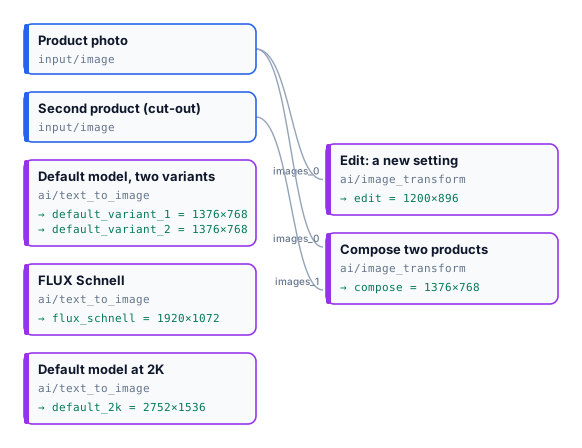
| Step | Model and settings | Size | Estimate | Charged |
|---|---|---|---|---|
| Default model, two variants | Nano Banana 2, 1K | 1376 × 768 each | 10 | 10 |
| FLUX Schnell | 1 credit per megapixel | 1920 × 1072 (2 MP) | 2 | 2 |
| Default model at 2K | Nano Banana 2, resolution: 2K |
2752 × 1536 | 8 | 8 |
| Edit: a new setting | Image Transform, Nano Banana 2 Edit | 1200 × 896 | 5 | 5 |
| Compose two products | Image Transform, two images | 1376 × 768 | 5 | 5 |
| Run | 30 | 30 |
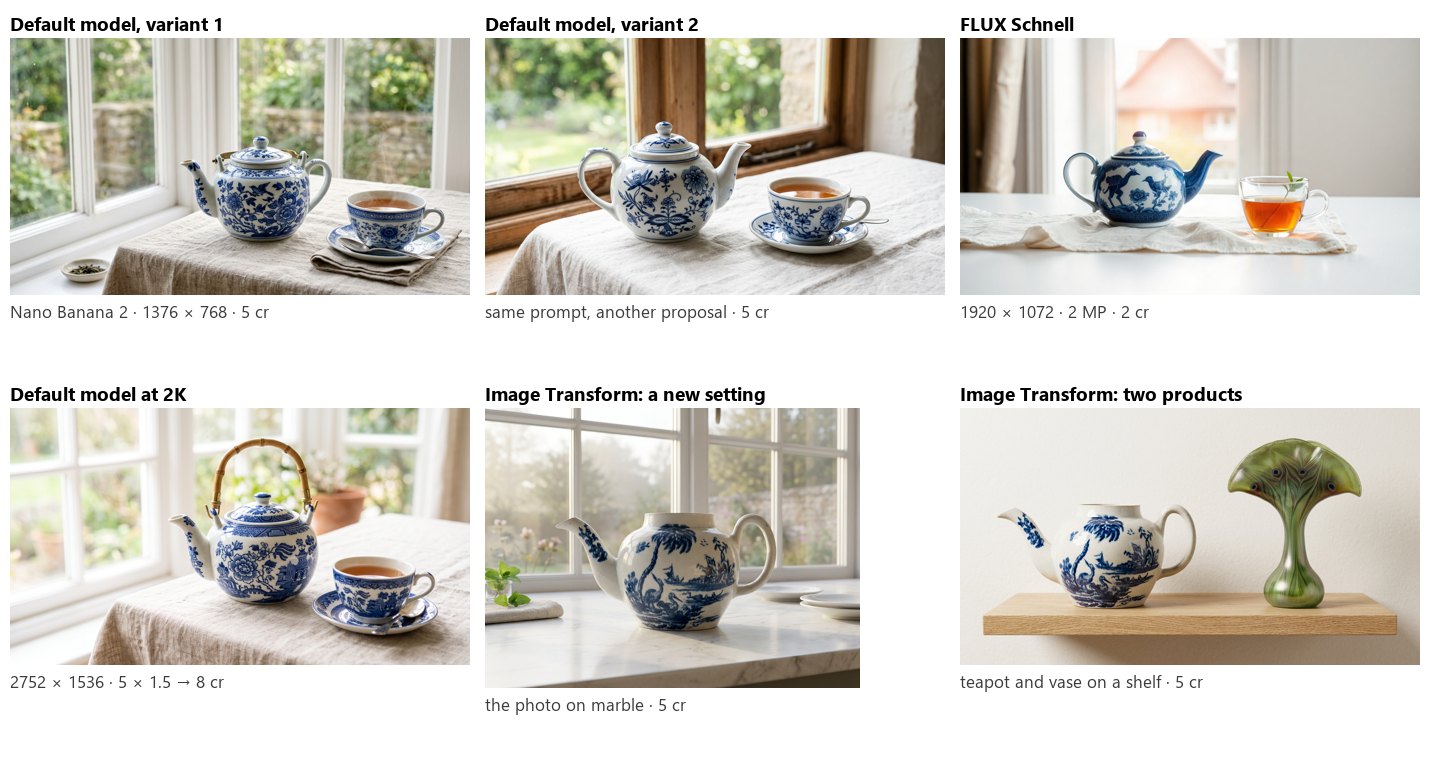
The two variants show what “a proposal” means: the same prompt gave two different teapots. The edits show the other side: given the product itself, the model kept its shape and painting and changed only what the prompt asked.
node madoo-install-example.mjs lab-ai-image-steps --api <your Madoo API URL> --key <key.json> --run --save proposalsLimits
Section titled “Limits”- The composed prompt is not returned by the public API or MCP.
- A preset left empty is not replaced by a default preset: the template’s own default wording applies.
- The intensity of an effect is accepted and stored but does not change the prompt yet.
- Pictures are sent at their original size: a very large photo may be refused by a provider; resize it first.
- Variants go up to 4, and not on every node — see each node’s
dynamic_portsinget_node_type.
Photos: “Teapot”, John Bartlam, about 1765–69, and “Vase”, Louis C. Tiffany, 1893–96, The Metropolitan Museum of Art, New York (Open Access, public domain). The generated pictures were made by the models named, for this lab.