

I09 — Two generated packshots checked against the real product before they are published
A generated packshot can be beautiful and still wrong: the model changes the surface and the light, as asked — and sometimes the product with them. An ochre jacket that comes out orange is a return waiting to happen. Today someone compares each picture with the real product by eye; a vision model asked “is it the same?” answers with an impression.
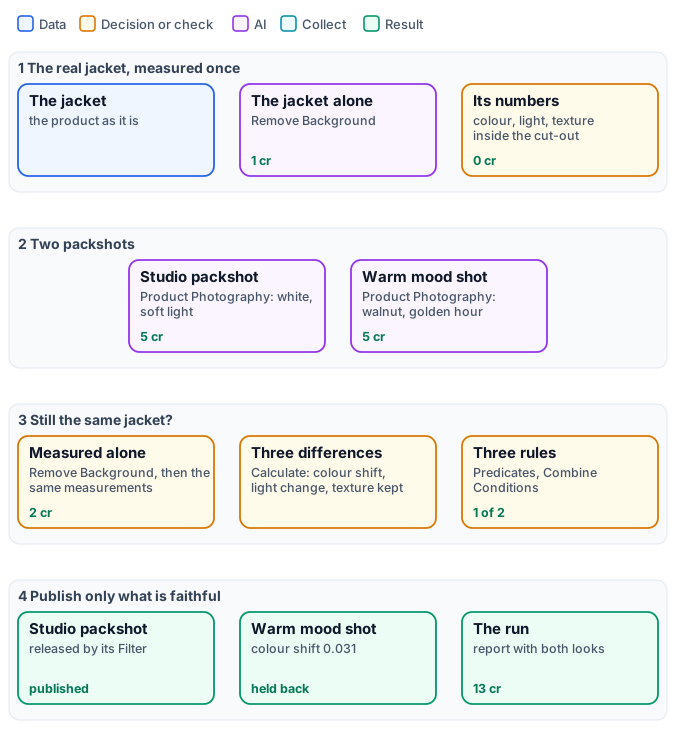
This workflow measures the product, and only the product. The real jacket and each packshot are cut out with Remove Background; inside each cut-out Image Statistics reads the colour and the light, Image Detail the fine texture of the fabric. Three differences against the real jacket decide whether a packshot is published: the background may change, the jacket may not.
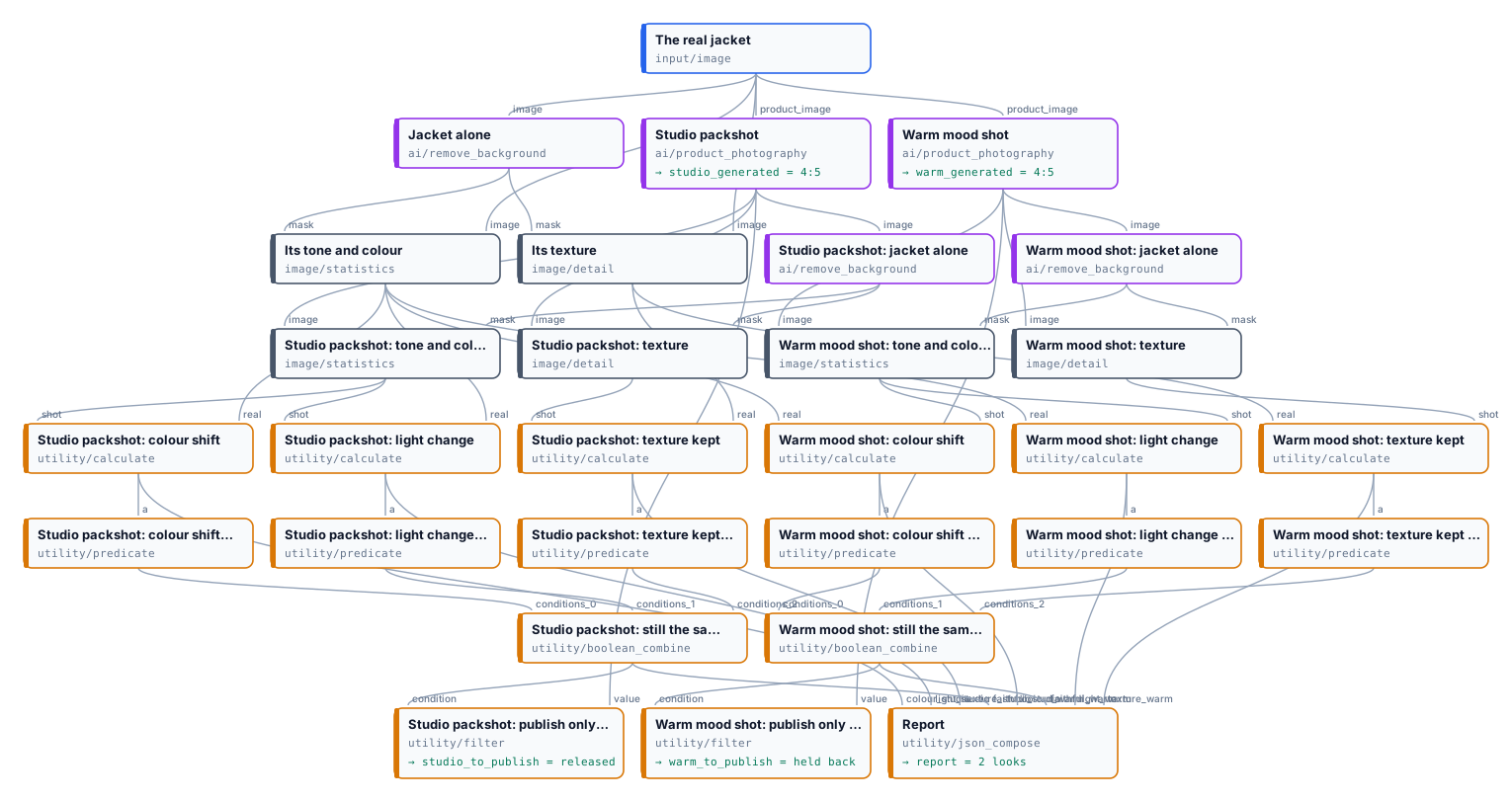
The exact graph is the workflow (as a diagram).
The case
Section titled “The case”| Input | Who provides it | Reference run |
|---|---|---|
| A photo of the product | the brand | the ochre linen overshirt of I04, laid flat on a light backdrop |
The brief asks for two pictures: a studio packshot for the catalogue (white seamless, soft diffused light) and a warm mood shot for social media (walnut wood, golden-hour light, a cosy mood). Both come from Product Photography with its default model.
What it shows
Section titled “What it shows”- Measure the product, not the picture. The background was changed on purpose; a measurement of the whole picture would mostly measure the wood or the white. With the cut-out as Mask, Image Statistics and Image Detail read only the jacket’s pixels — in the real photo and in each packshot alike.
- Three differences anyone can read, each one Calculate on the two measurements:
- colour shift: |Δa| + |Δb| of the mean Oklab colour inside the jacket — how far hue and saturation moved, lightness left aside;
- light change: the difference of the median brightness inside the jacket;
- texture kept: the fine residual of the fabric (
residual_mad_3, on the flat patches inside the jacket) of the packshot over the real one — 1 is the same grain, a smooth plastic look falls towards 0.
- Rules set before the run. Colour shift at most 0.02, light change at most 0.12, texture kept at least 0.6 — written into the Predicates before anything was generated, not fitted to the result.
- Publish only what passes. Each look has its own Filter: the picture leaves the workflow only if the three rules
hold. Both pictures are kept as generated (
*_generated) for whoever decides what to do with the one held back.
The workflow, step by step
Section titled “The workflow, step by step”| Phase | Steps | What they do here |
|---|---|---|
| A — the real jacket | The real jacket, Jacket alone, Its tone and colour, Its texture | Remove Background; Image Statistics and Image Detail with the cut-out as Mask |
| B — two packshots | Studio packshot, Warm mood shot | Product Photography, 4:5, with the brief’s surface, lighting and mood |
| C — compare | per look: jacket alone, tone and colour, texture, colour shift, light change, texture kept | the same measurements as A; three Calculate expressions on the two statistics and detail documents |
| D — decide | per look: three Predicates, still the same jacket, publish only if faithful; Report | Combine Conditions (all), Filter on the generated picture; Compose JSON with the numbers of both looks |
The reference run
Section titled “The reference run”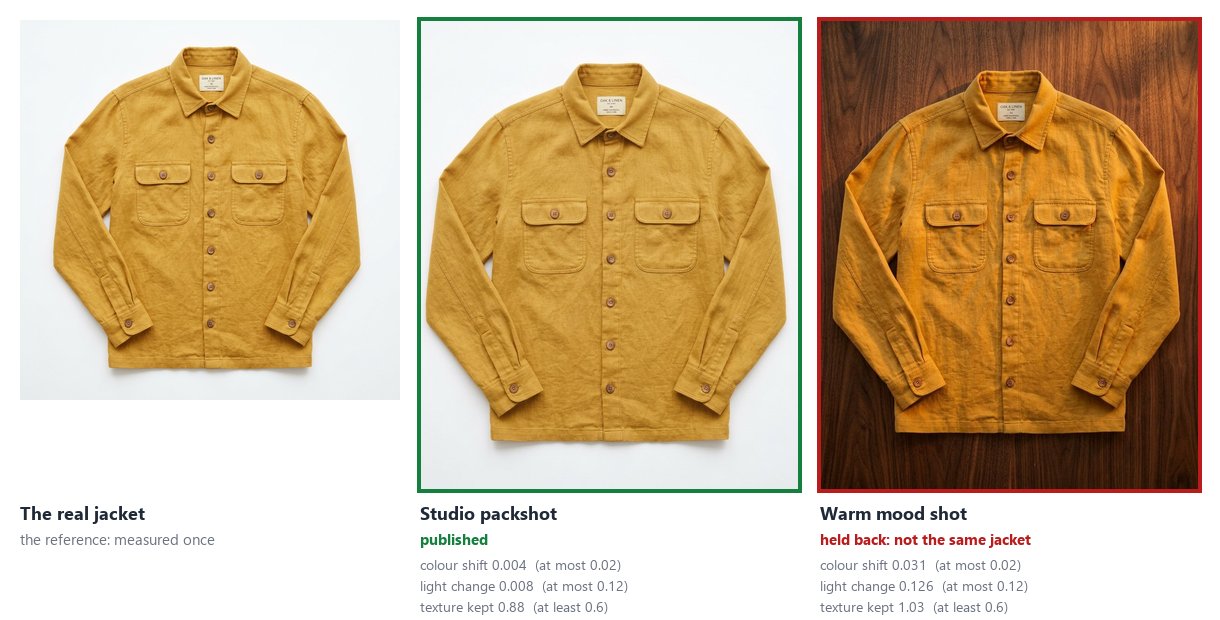
| Look | Colour shift (≤ 0.02) | Light change (≤ 0.12) | Texture kept (≥ 0.6) | Published |
|---|---|---|---|---|
| studio packshot | 0.004 | 0.008 | 0.88 | yes |
| warm mood shot | 0.031 | 0.126 | 1.03 | no |
The report is the report output. 13 credits:
5 for each packshot, 1 for each of the three cut-outs; every measurement is free.
The warm shot is held back for the right reason: its jacket is orange where the real one is ochre — the colour shift is eight times the studio shot’s. Its light change, 0.126, sits just above its limit: on its own that rule would be a close call, and the colour is what decides. Its texture is kept — the golden light even adds grain (1.03).
Every run generates new pictures, so another run gives other numbers; the rules stay the same. A brief that asks for golden light will often warm the product too: the workflow does not stop that, it stops it from being published.
Adapt it
Section titled “Adapt it”- Your product. Any photo of the product, with a background Remove Background separates cleanly. The rules depend on what matters: a bright colour, a precise light (a cosmetic, a car paint) or a texture (a knit, a leather).
- Fixed brand colours. When the product’s colours are known in advance — a logo, a brand red — Color
Palette’s check with
reference_colorsdoes the colour rule in one step. - Retry instead of holding back. Make the packshot and its check the body of a Repeat Until Accepted step: a look that fails is made again with the failed rule as its correction, until it is faithful — as I10 does for brand colours.
- A product in a scene. When the product stands among other things instead of on a backdrop, crop it first with Locate Subject, then cut it out and measure the crop.
- Many products. An iteration over a catalogue’s photos runs the same check on each, with one report for all.
Install it
Section titled “Install it”node madoo-install-example.mjs i09-packshot-check --api <your Madoo API URL> --key <key.json> --run --save packshotsThe installer uploads the jacket’s photo from I04’s folder and installs the workflow. Running it generates two new packshots: about 13 credits — check with the estimate first.
The jacket is the overshirt of I04, a picture made with Madoo’s Text to Image node; the packshots were made by Product Photography’s default model, for this example.