

Dubbing with natural speech
Subtitles let a viewer read another language; dubbing lets them listen to it. The original voices are replaced by voices speaking the target language, while the picture, the music and the ambience stay as they were. A dub is good when nobody notices it: each person keeps a voice of their own, every sentence starts when the speaker opens their mouth and ends before the next one begins, nobody gabbles to catch up, and the room still sounds like the room. This page explains how Madoo gets there, phase by phase, and ends with the ready workflow that does it all from two inputs: a video and a language.
The dub runs as a workflow like any other: every step is a node you can open, every decision is recorded, and the same workflow dubs one video or a hundred. The complete example dubs six minutes of NASA interviews with four people into Italian; the same workflow, run on the three-speaker interview of the translation lab, dubbed it into Spanish, Italian, French, German and Brazilian Portuguese with the same result: every line voiced, every speaker with their own voice, every quality check passed.
The ideas behind it
Section titled “The ideas behind it”Seven ideas explain almost every choice the engine makes. The rest of the page shows them at work.
1. Every line has a window. The transcript cuts the speech into lines (cues): a phrase, with the time it starts, the time it ends and who says it. That time is the line’s window, and the dubbed line must fit in it — because that is when the speaker’s lips move and when the next line begins. A line may borrow up to one second of the pause after it, never the next line’s time. The windows come from the original speech; words, voices and takes are placed on them, and only a line that no rewording could fit is ever allowed to run over — reported, as a last resort.
2. Fit the words, not the speed. Italian, Spanish, French and German usually need more syllables than English for the same idea. The easy fix — speeding the voice up — is what makes a dub sound cheap. Madoo adapts the wording instead: a language model rewrites the translated line for speech, shorter where needed, keeping the meaning, the names and the facts. “In un campo scientifico completamente diverso” becomes “campo scientifico diverso” when the astronaut said “different field of science” in a little over a second.
3. Measure, don’t guess. Nobody can tell how long a sentence will sound from its letters. Each line is voiced, and its audio is measured: its real length without the silence at the edges, and the rate at which it would have to be played to fit its window. The decision is taken on that number, by code, not by a model’s promise.
4. Up to three rounds, only for the lines that need them. A take that fits at natural speed is accepted and frozen. The others go round again — reworded with the measured length of their last take in hand, voiced and measured again — up to three rounds. Only the open lines are paid for again: in the five-language test, three lines in four were accepted at the first round.
5. One voice per speaker. The transcript tells the speakers apart; a video model listens to a few seconds of each and says whether the voice is feminine or masculine; each speaker then gets a voice of that kind, their own for the whole video. See Voices.
6. Keep everything but the original voices. Music, ambience and effects are separated from the voices by an AI model and put back under the new dialogue, lowered while someone speaks. A video without background — a talking head in a quiet room — can skip this at no cost.
7. Deliver first, report everything. A line that still needs a slightly faster voice after three rounds does not throw away a six-minute dub: the best real take is used, and the line is reported with its time and its rate. Only what makes a result impossible — no speech in the video, a file that cannot be built — stops a run. Everything else is measured and written into a manifest and a quality report, so a person, or an agent, knows exactly what to check and where.
The engine at a glance
Section titled “The engine at a glance”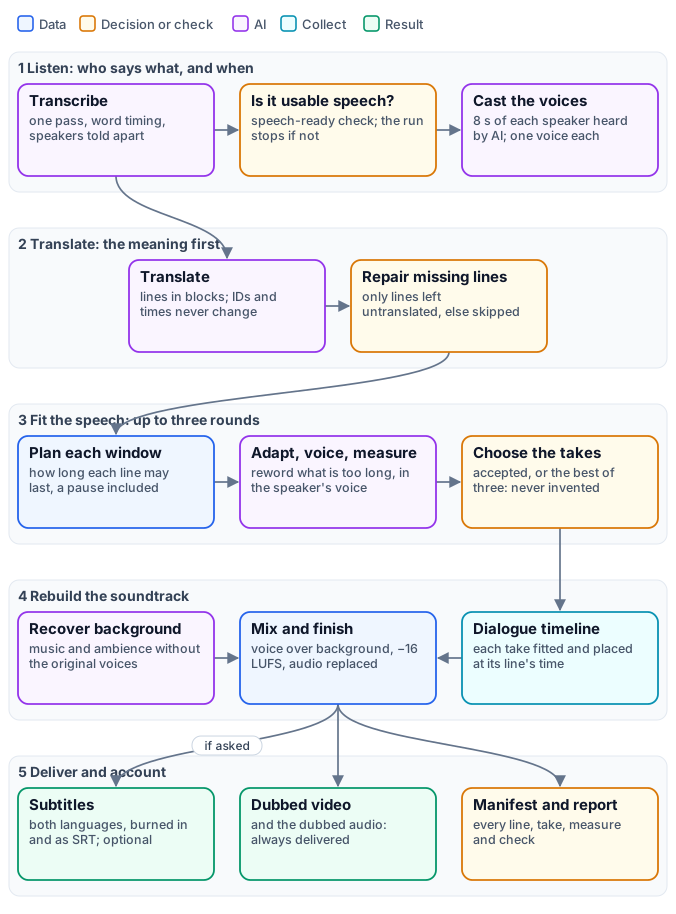
The engine is one workflow of about eighty nodes, and the ready workflow calls it as a
sub-workflow. Its nodes are labelled by phase — A listening,
V voices, B translation, C the rounds, D the dialogue, E the background, F the finishing, G the
checks, H the subtitles — so the canvas reads like the figure. Nodes run as soon as their inputs are ready, not in
the order of the figure: the background is separated while the lines are translated, and the original subtitles are
drawn as soon as the transcript exists.
| Phase | What it produces | Paid steps |
|---|---|---|
| 1. Listen | the source captions, with times and speakers; a voice per speaker | Speech to Text; Video Analysis (a few seconds per speaker) |
| 2. Translate | the target captions, on the same lines and times | Caption Translation |
| 3. Fit the speech | one measured take per line, and the captions aligned to it | Caption Translation (adapting), Text to Speech |
| 4. Rebuild the soundtrack | the dubbed audio and the dubbed video | Stem Separation (only with the background kept) |
| 5. Deliver and account | subtitles, the manifest, the quality report | none |
Phase 1 — Listen: who says what, and when
Section titled “Phase 1 — Listen: who says what, and when”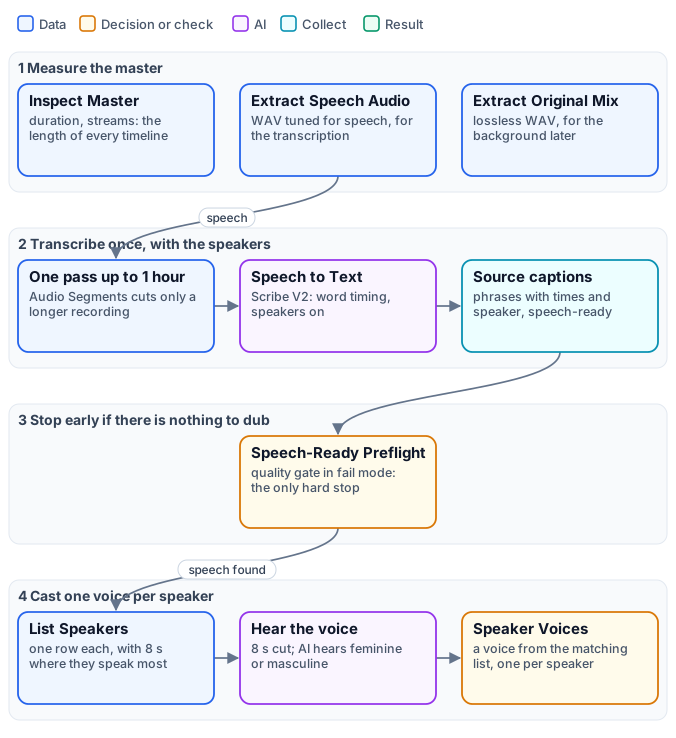
The master is measured first. Media Technical Info reads the video’s exact duration: every timeline the engine builds — the plan, the dialogue, the background, the final audio — is exactly that long, so nothing drifts at the end. The audio is extracted twice, for two jobs: a WAV tuned for speech feeds the transcription, a lossless WAV of the original mix feeds the background recovery.
The speech is transcribed once, with its speakers. Speech to Text with ElevenLabs Scribe V2 writes the words
with their times (word timing) and tells the speakers apart (Speaker Identification, diarization). One pass
matters: a transcription names its speakers speaker_0, speaker_1… consistently from start to end, while two
separately transcribed clips would restart the numbering. The engine therefore keeps a recording of up to an hour in
one pass; only a longer one is cut into segments by Audio Segments, and then the labels are valid within each segment
— the manifest says so (SPEAKER_LABELS_SEGMENT_SCOPED). Aggregate Transcript turns the words into phrases a
voice can say and a viewer can read — a phrase closes at the end of a sentence, at a change of speaker or at a pause
— and, with Speech Ready on, cleans what would confuse a voice: a word repeated in a burst by the recognizer,
fragments under 50 ms, noises transcribed as words, overlapping phrases. The result is the source caption track
(madoo.caption-track/v1): the lines, each with an ID, a start, an end, a text and a speaker.
Transcription and captions explains the track in depth.
Nothing is paid for a video without speech. The cleaning produces a quality check, speech-ready, and a
Quality Gate in fail mode stops the run when there is no usable speech. It is the only gate
of the engine that stops anything, and it stands in front of the expensive steps: the background separation waits
for it.
Each speaker is cast. List Speakers (enumerate/speakers) reads the track and returns one row per speaker, with
their number of lines, how long they speak in all, and a sample of about eight seconds where they speak without
interruption. Trim Video cuts that sample from the video, and Video Analysis — a model that sees and hears the clip
— answers one question, in JSON: is this speaking voice feminine, masculine or unclear? Speaker Voices
(utility/speaker_voices) then gives each speaker a voice of that kind. Voices below
explains the rules.
Phase 2 — Translate: the meaning first
Section titled “Phase 2 — Translate: the meaning first”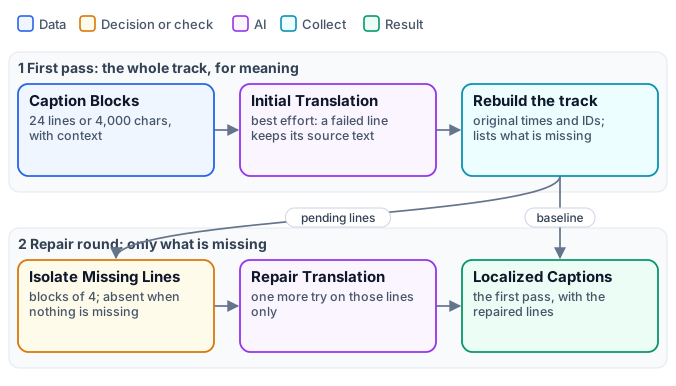
The whole track is translated first, for meaning alone — no attention yet to length. It is the same translation as for subtitles, and Translating captions explains it in full: the lines travel in blocks of up to 24 lines with the line before and after as context; the model must return every line, once, in order, with numbers and links untouched; the result is rebuilt on the original IDs, times and speakers, so a translation cannot move, merge or lose a line.
The translation runs with the deliver-first policy (best_effort): a line the model got wrong keeps its original
text and is listed. A repair round then retranslates only those lines, in blocks of four. When the first pass is
complete — the usual case — the repair round receives nothing and is skipped at no cost. The
output is the target caption track: the same lines and times as the source, in the target language.
The language is an input, a BCP 47 tag — it, es, fr, de, pt-BR, ja — used by the translation, the
adaptation and the voices alike. Nothing in the engine is tied to a language: the source language is detected by the
transcription, and the target is whatever the input says.
Phase 3 — Fit the speech: up to three rounds
Section titled “Phase 3 — Fit the speech: up to three rounds”This is the heart of the engine: turning a correct translation into speech that sounds natural and fits the picture.
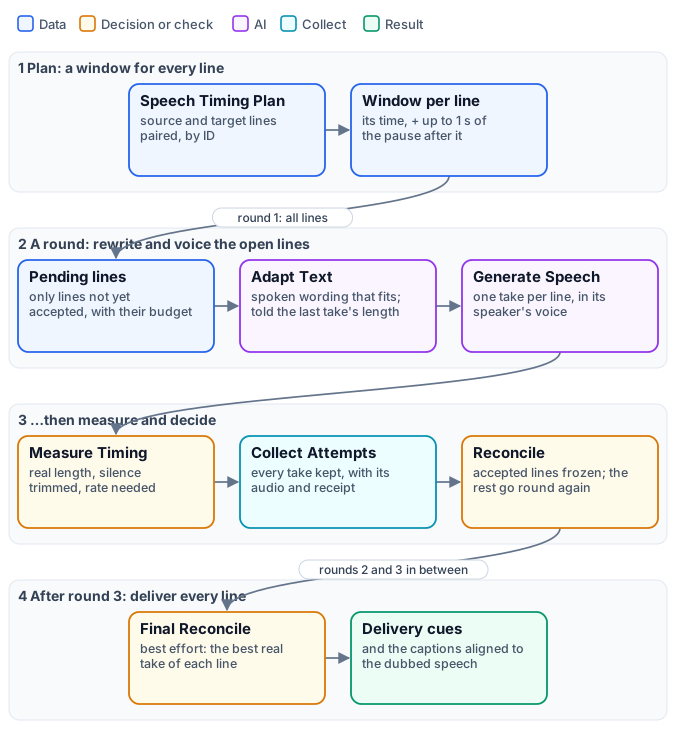
The plan. Speech Timing Plan (utility/speech_timing_plan) pairs every source line with its translation, by
ID, and gives each one its window: the line’s own time, plus up to one second of the silence that follows it
(Maximum End Extension, maximum_end_extension_ms), always stopping 20 ms before the next line. The plan also
fixes the policy — the rates a take may be played at — and becomes the state the three rounds carry forward:
which lines are accepted, which are still open, every take so far.
A round. Each round runs the same eight nodes, only on the lines still open:
- Pending lines — Caption Blocks, in its timing mode, turns each open line into a block with its budget: the window in milliseconds, and from round 2 the text and measured length of its last take, with a maximum number of characters derived from them.
- Adapt Text — Caption Translation, in its timing mode, rewrites the line for dubbing: idiomatic spoken wording, the meaning, names, facts, negations and intent preserved, the translation treated as a draft. A take that was too long calls for more concise wording, never for “speak faster”; a short line is not padded with invented words — silence can fill the time.
- Rebuild and Enumerate — the adapted lines become a track again, and then one iteration per line.
- Generate Speech — Text to Speech voices each line, in the voice of its speaker, at normal speed.
- Measure Timing — Speech Timing Check measures the take: its real length with the silence at the edges trimmed, whether it contains audible speech, and the rate it would need to fit the window.
- Collect and Reconcile — every take is kept with its audio and receipt; Speech Timing Reconcile accepts the takes that fit, freezes them, and sends the others to the next round.
When a take is accepted. The rate a take needs is its measured length divided by the window it may use. In rounds 1 and 2, a take is accepted only if it fits at up to 1.10× — a difference no listener hears. Round 3, the last, accepts up to the engine’s ceiling of 2.0×, because after three rounds a slightly faster line is better than none. A take is never slowed down to fill its window: a short line keeps its natural pace and silence fills the rest.
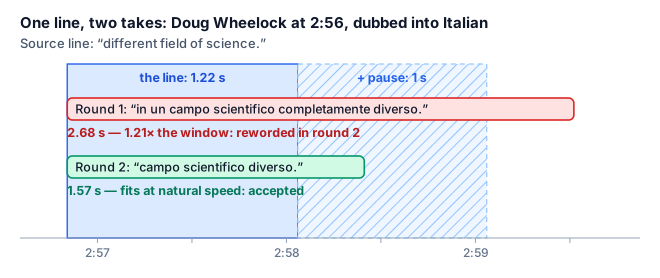
A line from the five-language test. The first Italian take said everything the English said, and more slowly than the astronaut: at 1.21× it would have sounded rushed. The second round received the measured 2.68 seconds and wrote the line again, shorter: 1.57 seconds, inside the window and its pause, at natural speed.
After round 3. The final reconcile (Finalize, with the best_effort delivery policy) closes the state: each
line gets its accepted take — always a take that was generated, stored and measured, never an invented one. A line
still open after three rounds — none of its takes fits its window even at 2.0× — is reflowed with its best take,
the shortest audible one of the three (a later round is not always shorter): it is played at natural pace if it can be, taking the time it needs from the silence after it and, when that is not enough,
starting the following lines a little later — in order, never overlapping, never past the end of the video; only if
the video has no room left is it played faster, up to 2.0×. The report names every reflowed line, how far it runs on and how late the lines after it start. It emits the
delivery cues — for each line its text, its
window, its take and the take’s fingerprint — and the speech-aligned captions: the dubbed text on the times the
dubbed voice actually takes, which the dubbed subtitles use.
Final placement reserves 0.015× below the stricter of the fit ceiling and the combined ceiling divided by the take’s speaking rate. This leaves room for three 0.005× sample-accurate correction steps. A previously accepted take near that ceiling may therefore need a slightly longer final slot; its measured history stays unchanged. The finalizer and manifest recompute the same ordered placement. If that placement exceeds the master, delivery remains unavailable. Rendering always checks the actual decoded samples and applied rate: the reserve is not a guarantee for every filter latency. When a correction step would overshoot, the fitter tries the qualified ceiling itself and fails closed if the complete speech still cannot fit, without trimming speech or raising the ceiling.
If an earlier line delays a later accepted line, final placement first recovers that delay from the later line’s end padding, without increasing its speech rate. It then consumes real inter-line gaps as it walks forward. Lines return to their original timing as soon as those pauses absorb the delay. Only when this preferred placement cannot fit the master does the scheduler try the configured hard envelope (up to 2.0× when explicitly enabled).
| Rate a line needs | What it means | What happens |
|---|---|---|
| up to 1.10× | natural: no listener hears it | accepted in any round |
| 1.10× – 1.20× | slightly quick | reworded in rounds 1–2; accepted in round 3, counted in the report |
| 1.20× – 1.50× | clearly quick | reworded in rounds 1–2; accepted in round 3, counted in the report |
| 1.50× – 2.0× | degraded | accepted only in round 3, reported with its time as SPEECH_TIMING_DEGRADED_RATE |
| above 2.0× | beyond the engine’s ceiling | never played that fast: after round 3 the line is reflowed into the time after it, reported as SPEECH_TIMING_REFLOWED |
On the three-and-a-half-minute interview of the translation lab — 51 lines, three speakers — the rounds went like this:
| Target | Accepted in round 1 | in round 2 | in round 3 | Lines above 1.20× | Fastest line |
|---|---|---|---|---|---|
Spanish (es) |
40 | 10 | 1 | 1 | 1.48× |
Italian (it) |
40 | 8 | 3 | 2 | 1.69× |
French (fr) |
36 | 13 | 2 | 2 | 1.53× |
German (de) |
36 | 9 | 6 | 2 | 1.31× |
Portuguese (pt-BR) |
42 | 7 | 3 | 1 | 1.35× |
Three lines in four fit at the first attempt; almost all the rest at the second. German needs the most rewording, Spanish and Portuguese the least. One or two lines per video end up quick, and the report names them, with their time, for a person to listen to.
Phase 4 — Rebuild the soundtrack
Section titled “Phase 4 — Rebuild the soundtrack”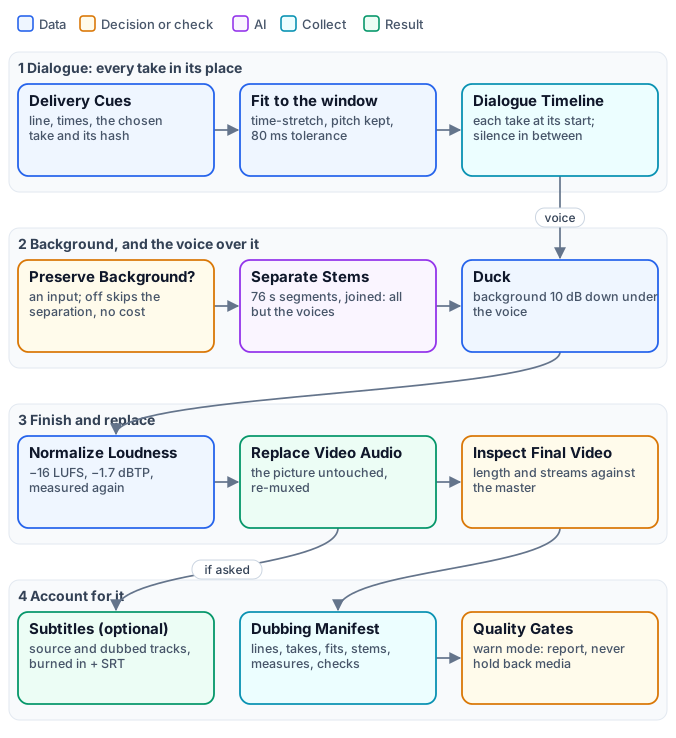
The dialogue. Each delivery cue becomes one iteration. Fit Duration (audio/fit_duration, strategy
natural_speech) trims the take’s edge silence and, only when the take is longer than its window, plays it faster
with pitch and formants preserved — the voice gets quicker, never higher; a shorter take is padded with silence
at its end. The result must match the window within 80 ms. Audio Timeline (aggregate/audio_timeline) then places
each take at its line’s start on a timeline exactly as long as the video, silence in between, and refuses to build
one with a missing line, two lines overlapping or a take running over its window: those would be a broken dub, not a
flawed one.
The background. With Preserve Background on, Stem Separation (ai/stem_separation, Demucs) splits the
original mix into voices, drums, bass and everything else, in segments of 76 seconds; the engine keeps everything
but the voices and joins the segments back into a background as long as the video. The model is good but not
perfect: on a noisy recording a trace of the original voice can remain. With Preserve Background off, a Filter
makes this branch absent: nothing is separated or paid, and the dub is the dialogue alone — right for a talking head
without music, and about a third cheaper.
The finish. Duck (audio/duck, profile voice_over) puts the dialogue over the background, lowering the
background by about 10 dB while someone speaks; Normalize Loudness brings the mix to −16 LUFS with a −1.7 dBTP ceiling
and measures it again; Replace Video Audio puts the new soundtrack on the untouched picture; and the final video is
inspected against the master: same length, with an audio stream. Audio finishing explains
ducking and loudness in depth.
Phase 5 — Deliver and account
Section titled “Phase 5 — Deliver and account”Everything the engine delivers:
| Output | When | What it is |
|---|---|---|
dubbed_video |
always | the video with the dubbed soundtrack |
dubbed_audio |
always | the finished dubbed soundtrack alone (MP3) |
dubbed_video_with_subtitles |
with Generate Subtitles | the dubbed video with the target-language subtitles burned in |
original_video_with_subtitles |
with Generate Subtitles | the original video with its own subtitles burned in |
target_subtitles_srt, source_subtitles_srt |
with Generate Subtitles | the two SRT files |
speaker_voices |
always | who got which voice, and why (madoo.speaker-voices/v1) |
dubbing_manifest |
always | every line, take, measure and check |
quality_report |
always | the checks, and the verdict |
Subtitles follow the dubbed voice. The dubbed subtitles are drawn from the speech-aligned captions of the final reconcile, so each subtitle appears when the dubbed voice says it; the original subtitles use the source track. Generate Subtitles off skips both at no cost.
The manifest (madoo.dubbing-manifest/v2) is the record of the dub: the languages, the source and target tracks,
each line with its source text, its dubbed text, its window, its speaker and voice, its take’s measured and fitted
length and how it was fitted; the voices; the stems; the timeline; the final audio and video with their
measurements; the full history of the rounds; and the provenance of every file. It is what an agent reads to answer
“which lines should a person listen to?”, and what a reviewer reads to trust a dub they have not watched in full.
The quality checks. The manifest evaluates eight checks and the report shows them:
| Check | What it proves |
|---|---|
dubbing-caption-coverage |
every source line has its dubbed line, with the same ID and time |
dubbing-tts-completeness |
every dubbed line has exactly one complete voice take, with its receipt |
dubbing-duration-fit |
every take was fitted to its window within 80 ms |
dubbing-timeline-integrity |
the dialogue timeline has every line at its time, nothing overlapping or missing |
dubbing-natural-speech |
the rounds were followed: which lines were accepted, which were delivered quicker than natural, and at what rate |
dubbing-background-preservation |
the background was separated and mixed back, measured (only when it is kept) |
dubbing-audio-delivery |
the final audio is as long as the video, at the loudness and peak required |
dubbing-video-duration |
the final video is as long as the master and carries the new soundtrack |
Earlier checks feed them — the master preflight, the speech-ready cleaning, each line’s fit, the loudness, the final
audio measurement — and all appear in the manifest.
Gates that report, not hold back. The engine’s final Quality Gates run in warn mode: they
compute the verdict and the report but never withhold a video that was built. A dub with one line at 1.6× is
delivered, with a warning that says where; a dub that cannot be built — a missing take, a broken timeline, a video
that is not the master’s length — fails before it reaches the output. The distinction is the engine’s rule: a
measured imperfection becomes a report; an impossible result stays an error. A workflow that must never publish an
imperfect dub adds its own gate in route mode on the quality report.
Reading the report. A dub with nothing to say has passed: true and no violations. The warnings that matter:
| Code | Meaning | What to do |
|---|---|---|
SPEECH_TIMING_DEGRADED_RATE |
a line needed more than 1.5× after three rounds; the message gives its time and rate | listen to that moment; if it matters, shorten the source line or accept it |
SPEECH_TIMING_REFLOWED, SPEECH_TIMING_DEGRADED_REFLOW |
a line did not fit its window even at 2.0× and took time from what follows (the second code: played above 1.5×) | listen from that line on: the following lines may start slightly late |
SPEAKER_LABELS_SEGMENT_SCOPED |
the recording was transcribed in several segments, so speaker numbers restart in each | expect voice changes at segment borders; dub recordings of up to an hour in one pass |
SPEECH_TIMING_NO_AUDIBLE_SIGNAL (in the rounds’ history) |
a take came back silent | it is re-voiced in the next round; only a line silent in every round is flagged |
One voice per speaker
Section titled “One voice per speaker”The voice casting follows four rules, in this order:
- A voice you choose wins. Speaker Voices takes fixed voices, by speaker (
{"speaker_0": "Rachel"}), on its Voices parameter or input — for a known cast, or a brand voice for the host. - Otherwise, a voice of the speaker’s kind. Speakers are served in order of how long they speak, so the main speaker gets the first voice. A feminine voice comes from the feminine list, a masculine one from the masculine list, each voice used once while the list lasts. The default lists are ElevenLabs voices — feminine Sarah, Charlotte, Alice, Matilda, Jessica, Laura, Lily, Aria, Rachel, masculine Chris, George, Brian, Daniel, Roger, Liam, Eric, Will, Callum, Bill, Charlie — and each list can be replaced.
- When the kind is unclear, distinct voices. A speaker the model could not place, or a workflow without Video Analysis, takes the next unused voice of a mixed list: every speaker still sounds different.
- More speakers than voices: a voice is shared, and the map says so.
The result, madoo.speaker-voices/v1, maps each speaker to a voice and records why (fixed, voice_type,
distinct), with each speaker’s lines and speaking time. Text to Speech reads it on its Speaker Voices input and
the line’s speaker on Speaker, so every take of a speaker, in every round, uses the same voice. A voice model
without a choice of voice keeps its single voice and records that the map was ignored.
The kind of voice is heard, not assumed: pitch alone does not tell it — in the NASA interview, Jeanette Epps speaks lower than her two male colleagues — while a model that watches and listens to eight seconds placed all four speakers of the complete example correctly, for a few hundredths of a credit each. It remains an inference: for a known cast, fix the voices.
The ready workflow
Section titled “The ready workflow”The engine is published as a complete example, installable in any workspace with an API key: W01 — A briefing dubbed into another language. It installs two workflows: the engine, and a short workflow that calls it as a sub-workflow and shows only what a user needs.
| Input | Type | Meaning |
|---|---|---|
source_video |
video | the video to dub: MP4, WebM or MOV, up to 2 GiB on Madoo’s workers (250 MB through the public API upload) |
target_language |
text | the target language, a BCP 47 tag: it, es, fr, de, pt-BR |
preserve_background |
boolean | keep the music and ambience (default true); false dubs the dialogue alone and skips the separation |
generate_subtitles |
boolean | also deliver the two subtitled videos and the two SRT files (default true) |
node madoo-install-example.mjs w01-dubbed-briefing --api <your Madoo API URL> --key <key.json>Then run it with your video and language — from the editor, over the public API
or with MCP execute_workflow. Each input’s value is JSON-encoded: the language is "\"es\"", the switches true
or false, and the video an uploaded asset. Estimate first; part of the cost — how many takes the rounds need, how long each voice speaks — is known
only as the run measures it, and each step reports what it actually consumed.
When the run ends, read the results in this order: watch the dubbed video; read the quality report — passed, and
any warning with its time; listen to the moments it names; open the manifest only to understand one line —
its takes, its rates, its voice. The speaker_voices output says who got which voice.
What it costs
Section titled “What it costs”Four steps are paid: the transcription, the translation and adaptation, the voices, and — with the background kept — the stem separation; the video analysis that casts the voices costs a few hundredths of a credit per speaker. Everything else — measuring, fitting, mixing, loudness, subtitles, the manifest — runs on Madoo’s workers at no credit cost. With the background kept, a dub costs about 6 to 7 credits per minute of video, depending mostly on how much is said and on the language: German needs more rewording and more takes than Spanish. Without the background, about 3.5 to 4.5. Quality, costs and limits breaks it down by step and language. The voices are billed on the characters actually spoken, rounds included, so a video with long pauses costs less than one of non-stop talk.
Limits worth knowing
Section titled “Limits worth knowing”- Speaker identity is kept within one pass, up to about an hour. A longer recording is transcribed in segments
and speaker numbers restart in each; see
SPEAKER_LABELS_SEGMENT_SCOPEDabove. - Lips are not moved. The dub fits each line to the time the speaker speaks, not to the shape of their mouth: on a
close-up, a careful viewer sees that the words differ. Madoo has a Lip Sync node (
ai/lip_sync), which is not part of this engine. - Overlapping speech is simplified. When two people talk at once, the transcript keeps them as separate lines, one after the other; the dub voices them in turn.
- The background is as clean as the separation. On a noisy recording, a trace of the original voice can remain under the dub.
- A voice clone is not used. Each speaker gets a stock voice of their kind, not their own voice.
Building a dub from its blocks shows how to change each of these choices — the voices, the model, the windows, the background — and Quality, costs and limits goes deeper into each.