

I04 — Three garments, one model, one set: a lookbook with shop codes
A small fashion brand has three new pieces, each photographed flat on a table. A lookbook needs them worn, by the same person, in the same place, so the page reads as one collection; and each look must lead to its shop page — a QR code under every picture, for the printed lookbook in the shop and the PDF on the phone.
This example makes the set once, photographs the model there in each garment, styles each look as said, and lays out the lookbook with labels and codes that are exact and checked.
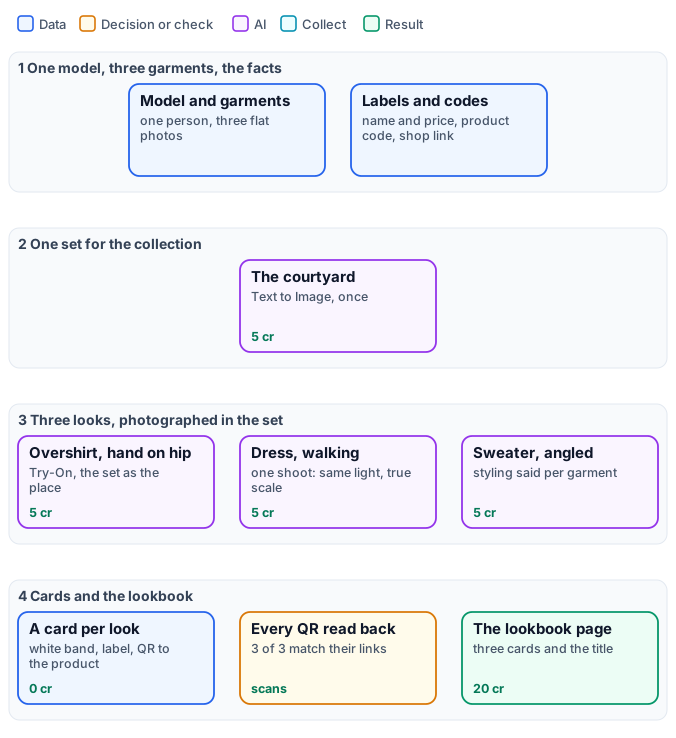
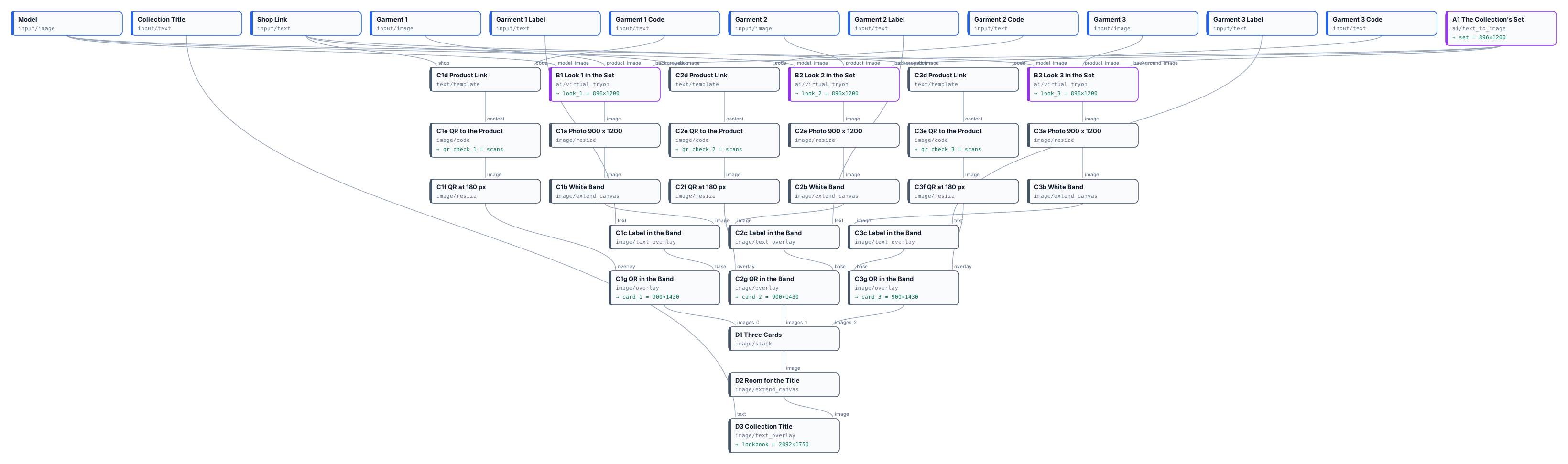
The exact graph is the workflow (as a diagram).
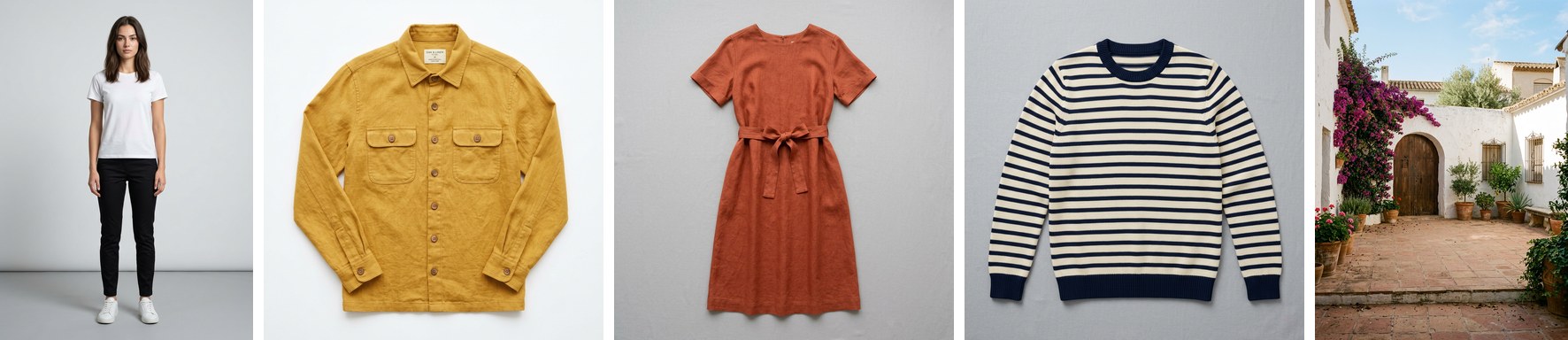
The case
Section titled “The case”| Input | Who provides it | Reference run |
|---|---|---|
| Model | the brand’s model photo | a person in a white T-shirt, black trousers and white sneakers, made with Text to Image |
| Garment 1–3 | the product team, photographed flat | an ochre linen overshirt, a terracotta linen dress, a Breton striped sweater |
| Garment k Label | the merchandiser | Ochre linen overshirt · € 189 … |
| Garment k Code | the shop | ochre-overshirt … |
| Shop Link | the shop | https://example.com/shop/ |
| Collection Title | the brand | Summer in the Courtyard |
What it shows
Section titled “What it shows”- One set, made once, for every look. Text to Image makes an empty courtyard described as a photographer would — a full-length fashion shoot, at eye level, six metres away, a 50 mm lens, a clear area of floor where a model will stand. The same picture goes into every look — the strongest way to make many pictures look like one shoot (Consistency and brand).
- One person throughout. The same model photo in every Virtual Try-On: face, hair and body are kept; only the garment, the pose and what it replaces change.
- Photographed in the set, not pasted on it. Given the set as
background_image, Try-On photographs the model in that courtyard as in one shoot: on its tiles at true scale and in its perspective, in its soft warm light, with the colour of the terracotta reflected on her, shadows where her feet touch the ground, and the same depth of field and grain as the courtyard. The framing moves a little from look to look, as a photographer’s would; the place stays the same. Nothing about the place is said in the looks’custom_prompt— the node does it. - Styling is part of the brief. Each look says what the garment does to the outfit: the overshirt worn open over the T-shirt, keep the trousers and sneakers; the dress replaces the T-shirt and the trousers. Without it the model decides — in a first run it dropped the trousers under the overshirt, in a second it kept them under the dress.
- Words and codes that are exact. The labels are set by Text on Image in a white band added below each photo with Extend Canvas — nothing covers the look. Each QR code is built from the shop link and the product code with a Text Template, and read back by the step: 3 of 3 match (Layouts, batches and codes).
The workflow, step by step
Section titled “The workflow, step by step”| Phase | Steps | What they do here |
|---|---|---|
| A — set | A1 The Collection’s Set |
Text to Image, 3:4, an empty courtyard for a full-length shoot |
| B — looks | B1–B3 Look k in the Set |
Virtual Try-On with the model, the garment and the set; poses hand_on_hip, walking_stride, standing_angled; a styling line per garment in custom_prompt |
| C — cards | per look Cka Photo 900 × 1200, Ckb White Band, Ckc Label in the Band, Ckd Product Link, Cke QR to the Product, Ckf QR at 180 px, Ckg QR in the Band |
the photo cut to size, 230 px of white below it, the label at the left of the band, the QR at the right |
| D — page | D1 Three Cards, D2 Room for the Title, D3 Collection Title |
Stack in a row, a margin with room at the top, the title |
The reference run
Section titled “The reference run”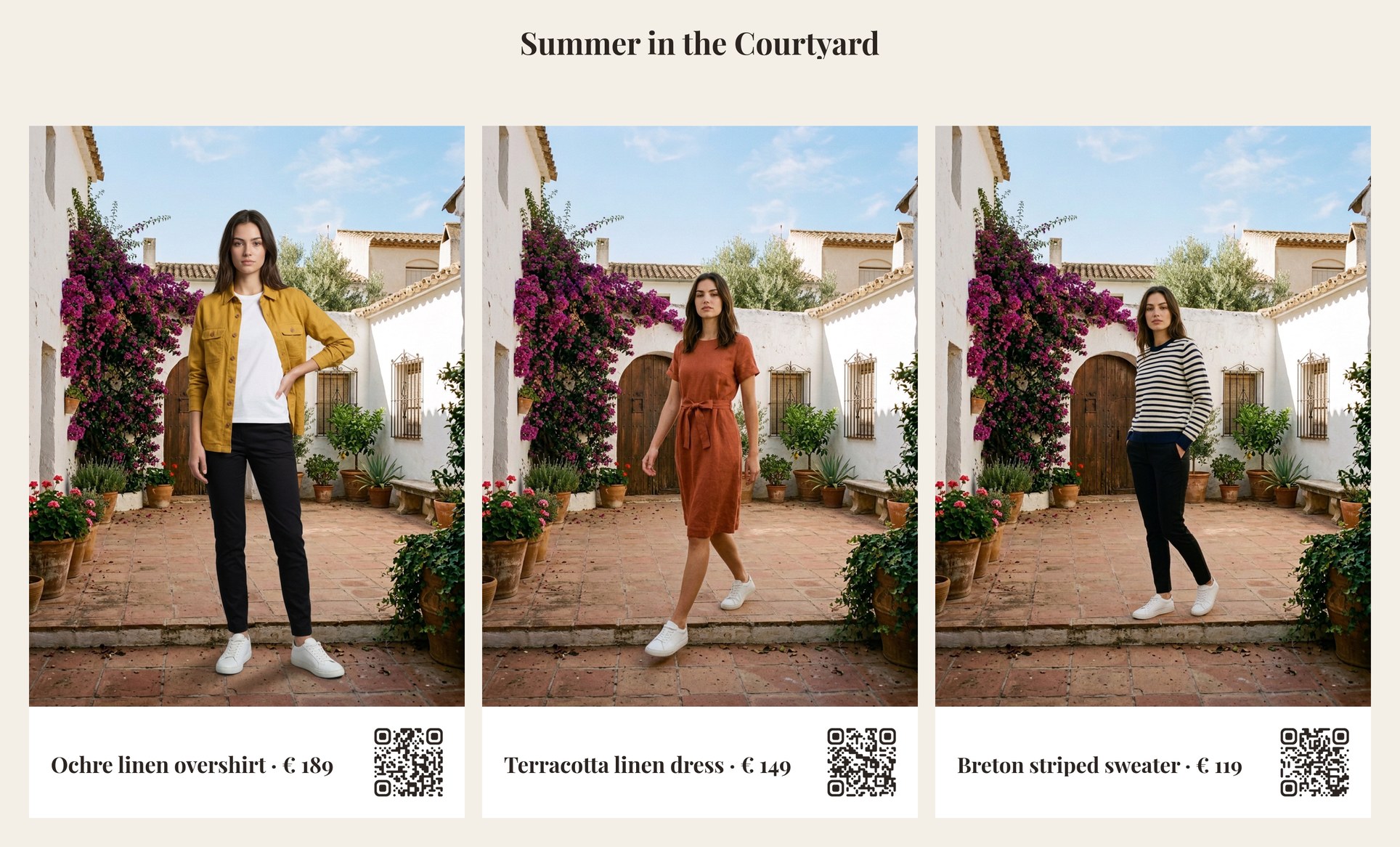
| Output | Result |
|---|---|
set |
the courtyard, 896 × 1200 |
look_1 … look_3 |
896 × 1200, the model in each garment, in the set |
card_1 … card_3 |
900 × 1430, look, label and QR |
qr_check_1 … qr_check_3 |
scanned: true, matches: true — e.g. the dress’s |
lookbook |
2892 × 1750 |
20 credits: 5 for the set, 5 per look; cards, codes and page 0.
Adapt it
Section titled “Adapt it”- More garments. Each garment is a branch: an input, a label, a code, a Try-On and the seven card steps. For a whole collection, run the per-look part over a list with an iteration and collect the cards with a template (Layouts, batches and codes).
- Your set. Replace
A1with a photo of your own location as an input; every look will be photographed there. A photo taken for a full-length shoot — the whole floor where people will stand, at eye level — works best. - Your models. Use photos of your own models, with their release — never a real person without consent.
- Motion. A look is the starting frame of a fashion clip: see Subjects, continuations and fashion clips.
Install it
Section titled “Install it”node madoo-install-example.mjs i04-lookbook --api <your Madoo API URL> --key <key.json> --run --save lookbookThe model, the overshirt, the dress and the sweater are pictures made with Madoo’s Text to Image node; the model is not a real person. The brand, the names, prices and codes are invented. The looks and the set were made by Nano Banana 2, for this example.