

Reading JSON
A JSON document carries many values; a node usually needs one. Extract JSON Value (utility/extract) reads
one value from a document with a path and hands it on with its own type — the customer’s name as text, the VIP
flag as a boolean, the score as a number, the list of lines as JSON — so that the next node receives exactly what
it expects.
Where JSON documents come from
Section titled “Where JSON documents come from”| Source | Node and port |
|---|---|
| A document the caller sends: an order, a record, a plan | JSON Value Input (input/json_value) → json |
| An AI model asked for JSON | Text Generation (ai/text_generation) with Response Format JSON Object → json, and the other AI nodes with a JSON output |
| A collection built from a list | Aggregate JSON (aggregate/json) → result |
| A document checked against a schema | Validate JSON Schema (utility/json_schema_validate) → its validated output |
| A text that holds JSON: a model’s answer, a JSON field of a CSV row, a webhook body | Parse JSON (utility/json_parse) → json |
A document is read the same way whether it travels inline or as a stored file.
A text that contains JSON is not a JSON value: text does not connect to a json port, and the validator says
so. Put Parse JSON (utility/json_parse) between them. It reads the text the way a model writes it — a quoted
string, one ```json fence around the object — and with Find first it takes the JSON inside a longer answer
(“Here is the map you asked for: {…} Let me know…”). A text that is not JSON stops the step with the line and position
where it breaks; in mode route it is sent to a correction branch instead, through valid and errors, and the
steps that read json are skipped. Parse JSON can also check the result against a schema, chosen as in
Validate JSON Schema: a Madoo contract such as madoo.keyframe-map/v1, a schema written in the node,
or one received on its input — one node for “read this text as JSON and make sure it is the right JSON”. When the AI
node has a JSON mode (Response Format JSON Object), its json output is already parsed and needs no Parse JSON.
The hotel offer lab reads a model’s
answer this way and builds a listing from it.
The path
Section titled “The path”A path walks from the top of the document to the value:
| Path | Reads |
|---|---|
customer.name |
the name field of the customer object |
lines[1].sku |
the sku of the second line (indexes start at 0) |
lines |
the whole list, as JSON |
[0].sku |
the sku of the first item, when the document itself is an array |
$.customer.name |
the same as customer.name: a leading $ is accepted |
Fields are separated by ., array items are chosen with [n]. There are no wildcards and no filters: one path,
one value. A field whose name contains a dot or starts with [ cannot be addressed. To work on every item of a
list, iterate over it (enumerate/json, see Iteration); to add up or count the
items, use Calculate, whose paths accept [*] (sum(order.lines[*].qty)).
The expected type
Section titled “The expected type”Expected Type says what the value must be: text, number, boolean, json (an object or an array), or
auto (whatever it is). The value is never converted: when it has another type, the node fails with
EXTRACT_TYPE_MISMATCH and a message that names the path, the type found and the type expected.
Set it whenever you know the type. An AI model that answers "true" instead of true, or "85" instead of 85,
is then caught at the step that reads the value, with a clear message — not three nodes later, where a comparison
fails for no visible reason, or never, where a text is printed in place of a number. With auto the output takes
the type of the value it finds, which is useful only when several types are legitimately possible.
When the field is missing
Section titled “When the field is missing”When Missing decides what happens when the path leads nowhere — the field is not in the document, or the array is shorter than the index:
| When Missing | The node | value |
found |
|---|---|---|---|
fail (default) |
fails with JSON_PATH_NOT_FOUND |
— | — |
absent |
completes | absent: the nodes that need it are skipped | false |
default |
completes | Default Value, which must have the expected type | false |
Choose by what a missing field means for the result:
failwhen the field must be there: an order without a customer is a broken order, and the run should say so.absentwhen the field is optional and the branch that uses it should simply not happen: no coupon code, no coupon line on the invoice.defaultwhen a missing field has an obvious value: no shipping method means"standard".
Found is true when the path led to a value, false when absent or default was used. It is a boolean,
ready for a decision: if the order carries a coupon, then…
A field that is present with the value null is found: found is true and the value is JSON null. Missing and
null are different things in JSON, and Extract keeps them apart.
The lab
Section titled “The lab”The values and JSON lab receives an order, a boolean and a number, and reads six values from the order — one per way of reading:
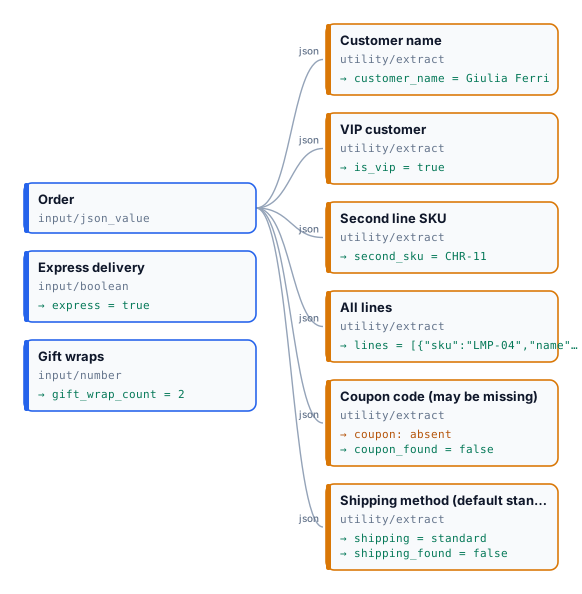
The order it receives (the coupon and the shipping method are deliberately missing):
{ "customer": { "name": "Giulia Ferri", "vip": true }, "lines": [ { "sku": "LMP-04", "name": "Table lamp", "qty": 2, "price": 89.0 }, { "sku": "CHR-11", "name": "Oak chair", "qty": 1, "price": 240.0 } ] }| Extract | Path | Expected | When Missing | Result |
|---|---|---|---|---|
| Customer name | customer.name |
text | fail | "Giulia Ferri" |
| VIP customer | customer.vip |
boolean | fail | true |
| Second line SKU | lines[1].sku |
text | fail | "CHR-11" |
| All lines | lines |
json | fail | the two lines |
| Coupon code | coupon.code |
text | absent | absent, found = false |
| Shipping method | shipping.method |
text | default "standard" |
"standard", found = false |
The run takes about five seconds and costs nothing. Send "vip": "yes" and the VIP step fails with
Value at 'customer.vip' is 'text', not the expected 'boolean'. — the rest of the run completes, and the run ends
as partial success.
Install it into your workspace with an API key (Node 18 or later, no dependencies):
node madoo-install-example.mjs lab-values --api <your Madoo API URL> --key <key.json> --runThe installer is at /downloads/madoo-install-example.mjs;
installing costs nothing, and --run runs the lab once and prints each output.
Errors
Section titled “Errors”| Code | Cause | Fix |
|---|---|---|
EXTRACT_TYPE_MISMATCH |
the value has another type than Expected Type | fix the producer (an AI prompt that asks for true, not "true"), or accept the actual type |
JSON_PATH_NOT_FOUND |
the path leads nowhere and When Missing is fail |
check the path against a real document; use absent or default if the field is optional |
INVALID_JSON_PATH |
the path is malformed: an empty segment, an unclosed [, a negative index |
write it as a.b[0].c |
DEFAULT_TYPE_MISMATCH |
Default Value does not have the expected type | give a default of the expected type ("standard" for text, 0 for a number) |
MISSING_JSON_INPUT |
nothing reached the json port, or a file that is not JSON did |
connect a JSON output |
INVALID_JSON_INPUT |
the document is not valid JSON | fix the producer |