

Reading pictures
A photograph often carries the text a workflow needs: what the object is, what it is made of, its colours, whether it is damaged, which department of a shop it belongs to, what to write under it. Four vision nodes read pictures with a language model and answer in text. They run on GPT-6 Luna by default — Claude and Gemini models can be chosen on the node — and are priced by the tokens they read and write: a few hundredths of a credit per picture.
| Node | Gives | Use it for |
|---|---|---|
Image Analysis (ai/image_analysis) |
an answer to your question, as text or as a JSON object | anything you can ask: alt texts, attributes, a condition report, a comparison of photos |
Image Classifier (ai/image_classifier) |
one of your categories, and a confidence | sending each picture down the right branch |
Product Description (ai/product_description) |
a shop listing: short and long description, key features, SEO description, tags | product pages, marketplace listings, in eleven languages |
Image to Prompt (ai/image_to_prompt) |
the prompt and negative prompt that would make the picture again | “one more like this”, with Text to Image |
The generative side — making and editing pictures — is in Images, where a lab uses the same vision nodes on four museum objects. This page is about the text they write.
Image Analysis
Section titled “Image Analysis”Image Analysis takes 1 to 20 pictures on images (images_0, images_1, …) or in an image set, a prompt and an optional
system_prompt, and answers like Text Generation — the same prompt craft, Max Tokens and
models apply. Its strength is that the question is yours:
- Alt texts. “What the photo shows, for a reader who cannot see it, at most 125 characters” — the length most screen readers handle comfortably.
- Attributes for a catalogue. Object, material as it looks, main colours, style; with closed lists for anything a later step decides on.
- A condition report. Visible damage yes or no, and what it is — useful before a listing goes out, or to send a photo back to a supplier.
- Several pictures at once. “Which of these photos shows the front?”, “Are these two the same product?”, “Describe the set”: refer to the pictures by their order.
- A list of pictures, each with a label. Besides
images, the node reads an image set onimage_set(madoo.image-set/v1): the frames of a video from Extract Scenes, each labelled with its time, or any list built with Generate JSON. Each label is sent just before its picture (Label Images), so the model can tell when or what each one is; wired images come first, and above 20 in all Image Set Limit keeps 20 spread over the set (even, the default), the first 20, or stops (fail). This is how a model that sees images but not video reads a video: see reading a video with a model that sees images.
With Response Format JSON Object the answer comes on the json port as an object, ready for
schema checks and Extract. Ask the model to describe only what is visible and never to
guess a date, a maker, a material it cannot see or a price — a model fills gaps with plausible inventions unless the
prompt forbids it.
Image Classifier
Section titled “Image Classifier”Image Classifier files one picture under one of the categories you list in categories — at least two, separated
by commas — and returns it on category, with a confidence of high, medium or low. An optional prompt gives
context: “An antiques dealer’s stock. Ceramics covers porcelain, faience and earthenware, whatever the shape.”
- Add a category for everything else —
other— and say in the prompt what each category covers. A photo that fits none then lands inotherinstead of being forced into the nearest one. - If the model answers something that is not one of your categories, the step fails with
CATEGORY_NOT_IN_LISTand a message that names what it answered. It does not pick a category for it: a picture routed the wrong way costs more than a step that stops. - Use
confidencewhere a mistake is expensive: sendlowto a person, or to a second, stronger model. - Categories are matched without regard to case;
Ceramicsandceramicsare the same. - For a probability per category instead of a confidence in words, several questions about the same picture, or checks such as focus and watermarks, use Decide with a Model: a choice gives the probability of every option, in about a third of a second.
The category is a text, made to choose a path: Select by Key picks the value or branch for it — a template per department, a background per product type, a model photo per garment — and Image Switch picks one of several pictures.
Product Description
Section titled “Product Description”Product Description writes a complete listing from a product_image and up to five additional_images (back,
label, detail), with an optional product_name and product_description as facts to start from. It answers on five
ports:
| Output | What it holds |
|---|---|
short_description |
one or two sentences, for a card or a preview |
long_description |
the description for the product page |
key_features |
the features, one per line, each starting with - |
seo_meta_description |
the description for search engines |
tags |
keywords, separated by commas |
| Setting | What it does |
|---|---|
language |
en, it, de, fr, es, pt, nl, pl, ja, ko, zh |
tone |
professional, casual, luxury, technical, friendly, playful |
targetPlatform |
generic, shopify, amazon, ebay, etsy, woocommerce: the conventions of that marketplace |
productCategory, targetAudience, seoKeywords, additionalContext, brandGuidelines |
what the writer should know |
maxLengthShort, maxLengthLong |
the lengths asked for (150 and 1000 by default) |
includeCTA, avoidClaims |
a call to action at the end; no claims that cannot be verified (on by default) |
substitutions |
names written as placeholders and then replaced: [BRAND_NAME] → your brand |
It is the quickest way to a listing, and it writes with its own built-in brief, to which your settings are added. That brief is generous: in the lab, told to “describe only what the photo shows”, it still added that the shoe shows restorations and wear consistent with its age — neither of which the photo says. When every word must be backed by the photo — antiques, cosmetics, anything with legal weight — read the facts with Image Analysis first and write the listing with Text Generation and your own system prompt, or have a person approve it. The lengths, too, are asked for, not enforced: check them with a schema when they matter.
Image to Prompt
Section titled “Image to Prompt”Image to Prompt writes a prompt and a negative_prompt that describe a picture for an image model. style
chooses how: detailed (the default), concise, artistic or technical; instructions say what to stress —
“describe it as a studio product photograph: the object, its glaze, the light, the background”. Connect both outputs
to Text to Image to make “one more like this”; the Images lab does it with a
teapot. The prompt is an ordinary text, so it can also be edited by a Replace
or combined with others by a Template before it reaches the image step.
Try it: an antiques dealer’s catalogue
Section titled “Try it: an antiques dealer’s catalogue”An antiques dealer photographs each new object once. The lab reads the photo three ways: the classifier files it in a department, Image Analysis writes the alt text and a catalogue record, Product Description writes the shop listing in Italian for Etsy.
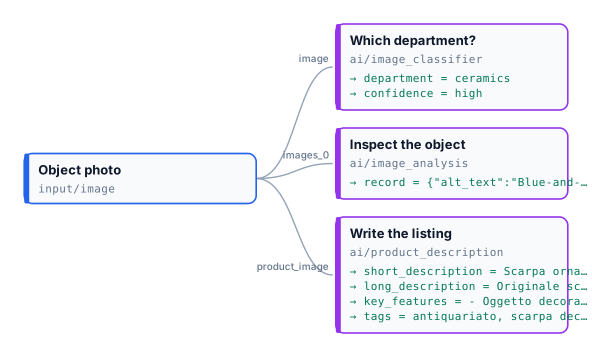
On a Delftware shoe of 1697 from the Metropolitan Museum’s open-access collection, the reference run gave:
| Step | Result | Credits |
|---|---|---|
| Which department? | ceramics, confidence high — the prompt said ceramics covers every shape, so a shoe-shaped object is not filed as footwear |
0.013 |
| Inspect the object | the record below | 0.024 |
| Write the listing | the Italian listing below | 0.047 |
{ "alt_text": "Blue-and-white glazed ceramic high-heeled shoe with floral decoration and a broken ankle section.", "object": "Ceramic high-heeled shoe", "material": "Glazed ceramic", "colours": ["white", "blue", "brown"], "visible_damage": true, "damage_notes": "Large broken section at the ankle opening, with chips and losses along the edges and toe."}Scarpa ornamentale antica in ceramica smaltata bianca e blu, con tacco alto, decori floreali e segni del tempo.
- Oggetto decorativo a forma di scarpa
- Ceramica smaltata nei colori bianco e blu
- Tacco alto e tomaia sagomata
- Decorazioni floreali e motivi lineari
- Craquelé, usura e sbeccature visibili
Tags: antiquariato, scarpa decorativa, ceramica antica, ceramica blu e bianca, decorazione floreale
The record names the break at the ankle; the listing calls the same thing “usura e sbeccature” (wear and chips), and
its long description adds restorations — which is why the facts should come from the record, not from the listing.
On a porcelain vase with two painted hummingbirds, the record came back with "visible_damage": false and no
damage_notes key, as the prompt asked. The run costs about 0.08 credits.
node madoo-install-example.mjs lab-reading-pictures --api <your Madoo API URL> --key <key.json> --runPhotos: “Shoe”, 1697, Delftware; “Vase”, Greenwood Pottery Company, about 1884–93 — The Metropolitan Museum of Art, New York (Open Access, public domain).
When something goes wrong
Section titled “When something goes wrong”| Code or symptom | Node | What happened | What to do |
|---|---|---|---|
CATEGORY_NOT_IN_LIST |
Image Classifier | the model answered a category that is not in your list | add other; say in the prompt what each category covers |
INVALID_STRUCTURED_RESPONSE |
Image Classifier, Image Analysis in JSON mode | the answer was not the JSON object asked for | try again or another model; for Image Analysis, describe the object key by key |
MISSING_CATEGORIES, INSUFFICIENT_CATEGORIES |
Image Classifier | no categories, or only one | list at least two, separated by commas |
AI_RESPONSE_INCOMPLETE |
all | the model reached Max Tokens | raise Max Tokens, or lower the reasoning effort |
| a detail that is not in the photo | all | the model filled a gap | forbid guessing in the prompt; take facts from Image Analysis, not from a listing |
| a text longer than asked | Image Analysis, Product Description | lengths in a prompt are requests | check them with a schema (maxLength) |