

Writing questions
The questions are the real setting of Decide with a Model: there is no temperature, no prompt, no system message — the model reads the content and your questions, and nothing else. Most wrong or uncertain answers come from a question that asks something other than what you meant.
The rules that matter most
Section titled “The rules that matter most”- Ask about what can be seen in the content. “The product is cut off by the edge of the frame” can be judged from a photo; “The customer will be happy” cannot. A question the content cannot answer comes back uncertain — which is the right answer, but not a useful one.
- One concern per question. “The photo is sharp and well lit” is two questions: when one holds and the other does not, the answer is a compromise. Split it, and combine the answers with Combine Conditions.
- For a yes/no, write a statement, not a question. The model judges whether it is true: “The item the customer
received is damaged or broken.” Write it so that
trueis the case you care about. - Give a choice the option for everything else. If the content can fit none of the options, add
otherwith a description. Without it the model must pick the least wrong option — in our measurements, “The shoes are fine but a bit small. What can I do?” went tootherat 0.97 because no option said exchange; in our measurement set, where replacement was described as “the item replaced or exchanged”, the requests for another size went there. - Describe the options. A description says where the boundary is:
shipping — "Delivery, tracking, address or courier". The errors we measured on the kind of a picture were all between options without a clear boundary (space versus other for a photo of the Earth seen from the Moon). - Levels from lowest to highest, each with what it means. The score is a position on them:
low — "No time pressure",medium — "Needs an answer this week",high — "Angry, repeated, or a deadline within a day".
The model reads literally
Section titled “The model reads literally”Every word of the instructions counts. Measured on the same message, “The parcel arrived late.”:
| Instructions | Probability of true |
|---|---|
| “Late.” | 0.99 |
| “The delivery described in the text happened later than the date the customer was promised, according to what the customer writes, without guessing.” | 0.13 |
Both answers are right: the message says the parcel was late, and it never mentions a promised date. Write the condition you would check yourself, no more, no less. The same goes for “asks for a refund” (the words of the customer) versus “is entitled to a refund” (a policy the content does not contain).
What it is good at, and what it is not
Section titled “What it is good at, and what it is not”| Good at | Weak at |
|---|---|
| What a text is about, its tone, its intent; irony (“Fantastic, only three weeks late” → negative) and double negatives (“not free of defects” → has defects) | Counting, numbers, sums, dates: “the number 1 appears in 3, 7, 12 and 31” came back 0.89. Compute with Calculate and compare with Predicate |
| What a picture shows: focus, exposure, framing, background, a watermark, what kind of picture it is | Small text in a picture at low detail; anything that needs reading a label — use high detail or Image Analysis |
| Which of several pictures or texts fits a description | Explaining why: it gives no reasons |
| The same judgement in English, Italian and other languages | Facts outside the content: a policy, a price list, a calendar — put them in the content |
Languages
Section titled “Languages”Write the questions in the language you prefer: in our measurements Italian messages gave the same answers with
English questions and with Italian ones, and as English messages, on every question. Option values are identifiers —
keep them stable (refund, not rimborso in one workflow and refund in another) because the steps downstream
compare them; the description can be in any language.
Order and repetition
Section titled “Order and repetition”The order of the options did not matter in our measurements: 29 messages out of 30 went to the same team with the options reversed, and the best of four pictures was chosen in both orders 22 times out of 22. Still, a list with an obvious first option invites the model to it: put the options in a neutral order. Asking the same thing again gives the same probabilities — repeating a call does not “average” anything.
Putting reference material in the content
Section titled “Putting reference material in the content”The step judges the content, and only the content. To judge a text against something — a brief, the product facts, a style guide — put both in the content with Text Template:
The product facts:[facts]
The description to check:[description]
and ask “Every claim in the description is supported by the product facts.” The same for pictures: send the brief as the content and the pictures as images (see X03).
The lab
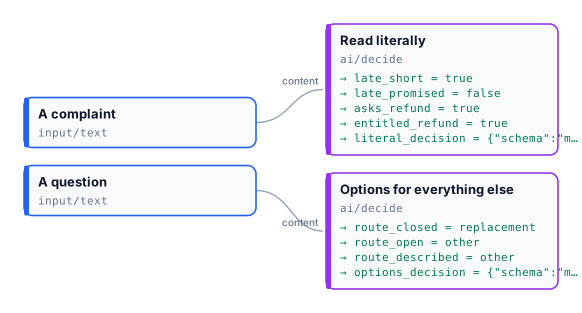
Section titled “The lab”The lab asks pairs of questions that differ only in their wording, in the same call, so the content and the model are the same and only the words change. A complaint — “The parcel arrived late. I want my money back.” — is read literally; a question — “The shoes are fine but a bit small. What can I do?” — is routed with three lists of teams.
| Question | Answer |
|---|---|
| “Late.” | true, 0.99 — accepted |
| “The delivery … happened later than the date the customer was promised, according to what the customer writes, without guessing.” | false, 0.20 — uncertain: no promised date in the message |
| “The customer asks for a refund.” | true, 1.00 — accepted |
| “The customer is entitled to a refund under the shop’s returns policy.” | 0.50 — uncertain: the policy is not in the content |
Teams without other (refund, replacement, shipping) |
replacement, 0.83 — accepted, though the customer asked for no replacement |
The same teams and other |
other, 0.96 |
replacement described “…replaced or exchanged, for example for another size”, and other |
other, 0.86 (replacement 0.13) |
What it shows:
- A precise statement asks for precise evidence. The short “Late.” and the precise one are both right: the first is about the message’s words, the second about a fact the message does not contain.
- What the content says, not what a policy would grant. “Asks for” is in the text; “is entitled to” is not. To judge against a policy, put the policy in the content.
- A closed list forces a guess that looks sure. Without
other, 0.83 passes the threshold of 0.7: the threshold does not protect you from an option that is merely the least wrong. - A description widens an option only to what the content says. The customer asks what to do, not for an
exchange: even with “for another size” in the description,
otherstays the answer — which is right.
0.008 credits a run.
node madoo-install-example.mjs lab-decide-wording --api <your Madoo API URL> --key <key.json> --runQuestions ready to copy
Section titled “Questions ready to copy”| For | Name | Type | Instructions | Options / levels |
|---|---|---|---|---|
| A product photo | in_focus |
yes_no | The photo is in focus: the product is sharp, not blurred. | |
well_exposed |
yes_no | The photo is well exposed: neither too dark nor too bright to see the product. | ||
clean |
yes_no | The image is free of watermarks, logos and overlaid text. | ||
whole_product |
yes_no | The whole product is inside the frame, not cut off by the edges. | ||
background |
choice | What is behind the product? | plain, scene, other | |
| A customer message | route |
choice | Which team should handle this message? | refund, replacement, shipping, product_question, other |
damaged |
yes_no | The item the customer received is damaged or broken. | ||
urgency |
score | How urgent is this message? | low, medium, high | |
| A document | kind |
choice | What kind of document is this? | invoice, quote, contract, price_list, other |
has_amount |
yes_no | The document states an amount of money to pay or to be paid. | ||
| A product description | quality |
score | How good is this product description for an online shop? | weak, good, excellent |
supported |
yes_no | Every claim in the description is supported by the product facts. | ||
| Several pictures and a brief | best |
choice | Which picture fits the brief best: the object, its colour, the background and the view it asks for? | picture_1 … picture_4 |
no_text |
yes_no | None of the pictures shows text, letters, numbers or a logo. | ||
| A review | sentiment |
choice | What is the sentiment of the review? | positive, negative, neutral |
| An uploaded picture | shows_person |
yes_no | The picture shows a person. | |
third_party_brand |
yes_no | The picture shows a brand, logo or trademark that is not ours. | ||
| A video frame (image set) | product_visible |
yes_no | The product is visible in the frame. |
The descriptions of the options used in the labs are in each lab’s workflow.json; the full measured sets are
described in Thresholds and uncertainty.