

Colour, tone and filters
Photos that arrive from different suppliers never match: one is dark, one is cold, one was shot under a yellow lamp. Put side by side on a catalogue page they look like three shops. The adjustment nodes bring them to one standard — the same brightness, the same warmth, the same contrast — and do it the same way every time, for the hundredth photo as for the first. The filter nodes go further and give pictures a style: black and white, a duotone in the brand’s two colours, a soft vignette.
Every node on this page works on the picture’s own pixels, keeps its format, costs no credits, and gives the same result for the same input and settings (Film Grain aside, which is random by nature). None of them invents anything: to change a background, relight a scene or restore a damaged photo, see the AI pages. This page gives, for each node, what it really does — some names promise more elsewhere than they do here — and the lab shows them all on one photo.
Fix first, style second
Section titled “Fix first, style second”A correction is best done in this order, each step on the result of the previous one:
- Exposure and range — make the picture neither too dark nor too flat: Auto Enhance, or Levels and Curves.
- Colour — remove a cast (Temperature & Tint, Colour Balance), then set the saturation (Vibrance).
- Detail — Denoise before, Unsharp Mask last, because sharpening also sharpens noise.
- Style — a LUT, a duotone, grayscale, a vignette: after the corrections, so they start from a clean picture.
For a batch, build the chain once and run it on every photo with an iteration: the same steps give the same look.
| Node | What it does | Settings |
|---|---|---|
Auto Enhance (image/auto_enhance) |
Stretches the picture to use the full range, from black to white, and reduces noise lightly | autoLevels, normalize, enhance (all on). Quick and good on flat photos; it can shift the colour of a picture dominated by one hue |
Brightness & Contrast (image/brightness_contrast) |
The two classic sliders | brightness, contrast: −100 … 100 |
Exposure (image/exposure) |
Like opening or closing the lens | stops (−5 … 5, +1 doubles the light), then gamma |
Levels (image/levels) |
Sets which input tones become black and white, and the midtone | blackPoint, whitePoint (0–255), gamma, outputBlackPoint, outputWhitePoint; channel: rgb, red, green or blue |
Curves (image/curves) |
A tone curve through control points — an S-curve adds contrast | points: at least two {"input": 0–255, "output": 0–255} (either letter case); channel |
Shadows & Highlights (image/shadows_highlights) |
Lifts or deepens the dark tones, brightens or recovers the light ones; black and white stay in place | shadows, highlights: −100 … 100. It is a tone curve applied to the whole picture, not a local correction |
Colour
Section titled “Colour”| Node | What it does | Settings |
|---|---|---|
Hue & Saturation (image/hue_saturation) |
Turns every hue, and raises or lowers saturation and lightness everywhere alike | hue (−180 … 180), saturation, lightness (−100 … 100) |
Vibrance (image/vibrance) |
Saturation that moves muted colours most and vivid ones least; greys stay grey | amount: −100 … 100. It does not recognise skin — it only reads how saturated each colour is |
Temperature & Tint (image/temperature_tint) |
Warmer or cooler, greener or more magenta | temperature, tint: −100 … 100 |
Colour Balance (image/color_balance) |
A colour shift in the shadows, the midtones and the highlights separately | Nine sliders, −100 … 100, named after the pairs CyanRed, MagentaGreen, YellowBlue: positive adds red, green or blue to that range. Blue shadows with warm highlights is the classic “teal and orange” |
Colour LUT (image/color_lut) |
Applies a look stored in a HALD CLUT image | The LUT is an image on the lut input (required); intensity 0–1 mixes it with the original |
Grayscale (image/grayscale) |
Black and white | method: rec709 (as the eye sees), rec601, average |
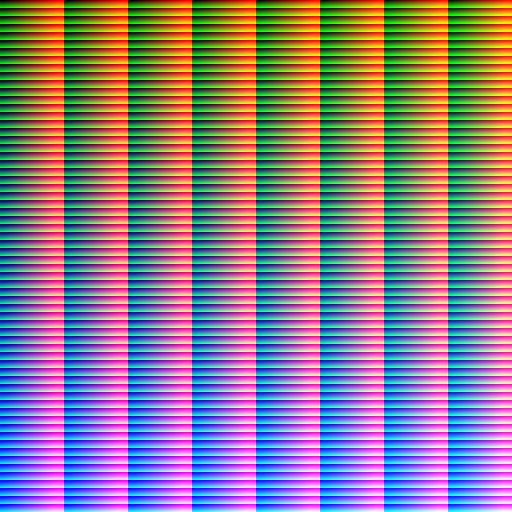
A LUT is how a look travels: a colourist designs it once, exports it as a HALD image (a square of colours, 512 px
for level 8), and every workflow that loads it gets exactly that look. Keep it as a workspace asset and connect it to
the lut input.
Filters
Section titled “Filters”| Node | What it does | Settings |
|---|---|---|
Gaussian Blur (image/gaussian_blur) |
Soft blur | sigma (strength), radius (0 = automatic) |
Motion Blur (image/motion_blur) |
Blur in one direction | sigma, angle (0–360) |
Radial Blur (image/radial_blur) |
Spin around the centre | angle |
Unsharp Mask (image/unsharp_mask) |
Sharpening — last, after every resize | sigma (size of the detail), amount, threshold (ignore flat areas) |
Denoise (image/denoise) |
A light noise reduction | strength 0–1; mild — it cannot rescue a very noisy photo |
Vignette (image/vignette) |
Darkens the edges into backgroundColor along an oval |
sigma (softness of the edge), radius, x and y (inset of the oval) |
Film Grain (image/film_grain) |
Adds grain | amount 0–1, monochrome. Random: two runs differ slightly |
Sepia (image/sepia) |
Old-photograph toning | threshold |
Colorize (image/colorize) |
Tints the picture with one colour | color, opacity (0–100) |
Gradient Map (image/gradient_map) |
Maps darks to one colour and lights to another — a duotone | startColor, endColor, optional midColor |
Posterize (image/posterize) |
Reduces each channel to a few levels | levels 2–32 |
Threshold (image/threshold) |
Pure black and white at a cut-off | value (0–100 %) |
Invert (image/invert) |
Negative | preserveAlpha |
Oil Paint, Emboss (image/oil_paint, image/emboss) |
Painterly brush strokes; relief | radius, sigma |
Edge Detect (image/edge_detect) |
The outlines, white on black | method: canny (clean lines) or laplacian |
The lab
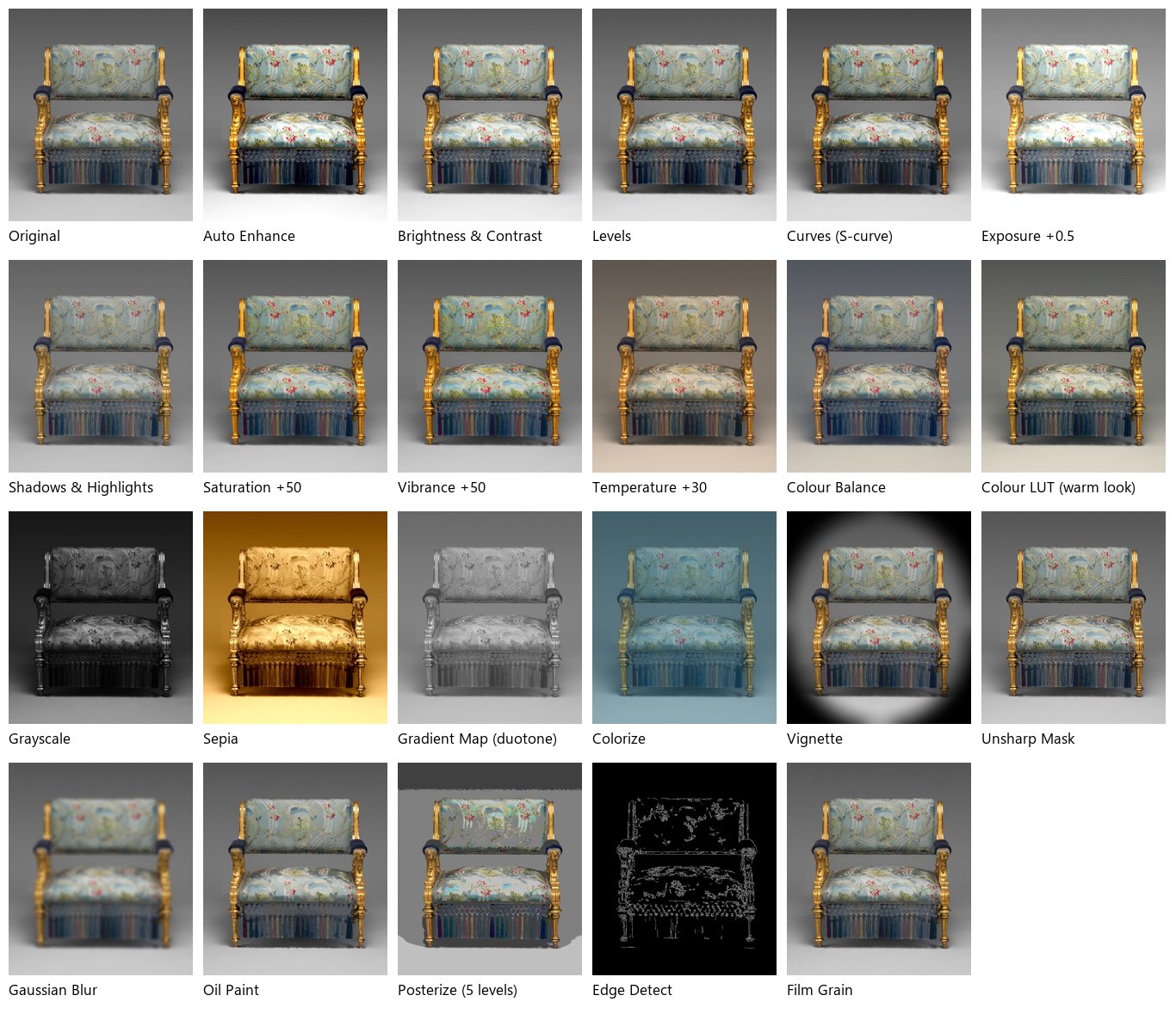
Section titled “The lab”The colour lab runs one photo — an armchair of about
1875, gilded wood upholstered in a blue-green silk with red flowers, on a grey studio background — through twelve
adjustments and ten filters side by side, and a warm look stored as a HALD LUT
(source-warm-look-hald.png) through Colour
LUT.
What to look at:
- Saturation against Vibrance, both at +50, measured: the muted silk goes from a saturation of 0.067 to 0.092 with Saturation and to 0.120 with Vibrance; the gold, already vivid, is pushed further by Saturation (its blue channel from 138 to 111) and barely moved by Vibrance (to 125). Pure greys stay grey with both.
- Colour Balance with blue added to the shadows and yellow to the highlights: measured on the background, a dark grey of 88/88/88 becomes 84/89/95, cooler, and a light grey of 196/196/196 becomes 203/197/185, warmer.
- Shadows & Highlights (+35, −25) opens the chair’s shadows without burning the background.
- The duotone maps the picture from navy
#1B2A49to cream#F2E8CF: a brand’s two colours applied to any photo.
The run costs 0 credits.
node madoo-install-example.mjs lab-image-colour --api <your Madoo API URL> --key <key.json> --run --save looksLimits
Section titled “Limits”- Every adjustment applies to the whole picture: there are no local corrections, no selections, no masks inside an adjustment — combine a correction with Apply Mask when only a part must change.
- Colour Balance, Levels and Curves work on 8 bits per channel (Image files and formats).
- Colour LUT reads HALD images only, not
.cubefiles. - No automatic white balance: a cast is removed with Temperature & Tint or Colour Balance, set by eye or by a measured reference.
Photo: “Armchair”, Herter Brothers, about 1875, gilded wood with modern upholstery, The Metropolitan Museum of Art, New York (Open Access, public domain). The warm look LUT was made for this lab.