The colors of an image
Every picture has a palette: the handful of colors a designer would pick out of it to describe it. A red teapot is
a dusty rose, a deep red and a pale pink; a Van Gogh vase of irises is a grey-blue, a sea green and the warm white of
the canvas. Color Palette (image/color_palette) finds those colors in the pixels. No model is asked and nothing
is guessed: the same picture gives the same palette every time, in a few hundred milliseconds, at no credit cost.
The palette answers questions that come back in every kind of workflow:
| Domain | The question |
|---|---|
| A shop’s catalogue | what color is this product, for its listing, its filters and its variants? |
| Brand and marketing | which colors make up this logo or this moodboard, to reuse in a template or a prompt? |
| Publishing | which background matches this cover, and which text color reads on it? |
| Generated pictures | does this picture keep to the brand colors, or has the model drifted? |
| Travel and hospitality | what does this place look like, in five colors, for a card or a page? |
What it gives
Section titled “What it gives”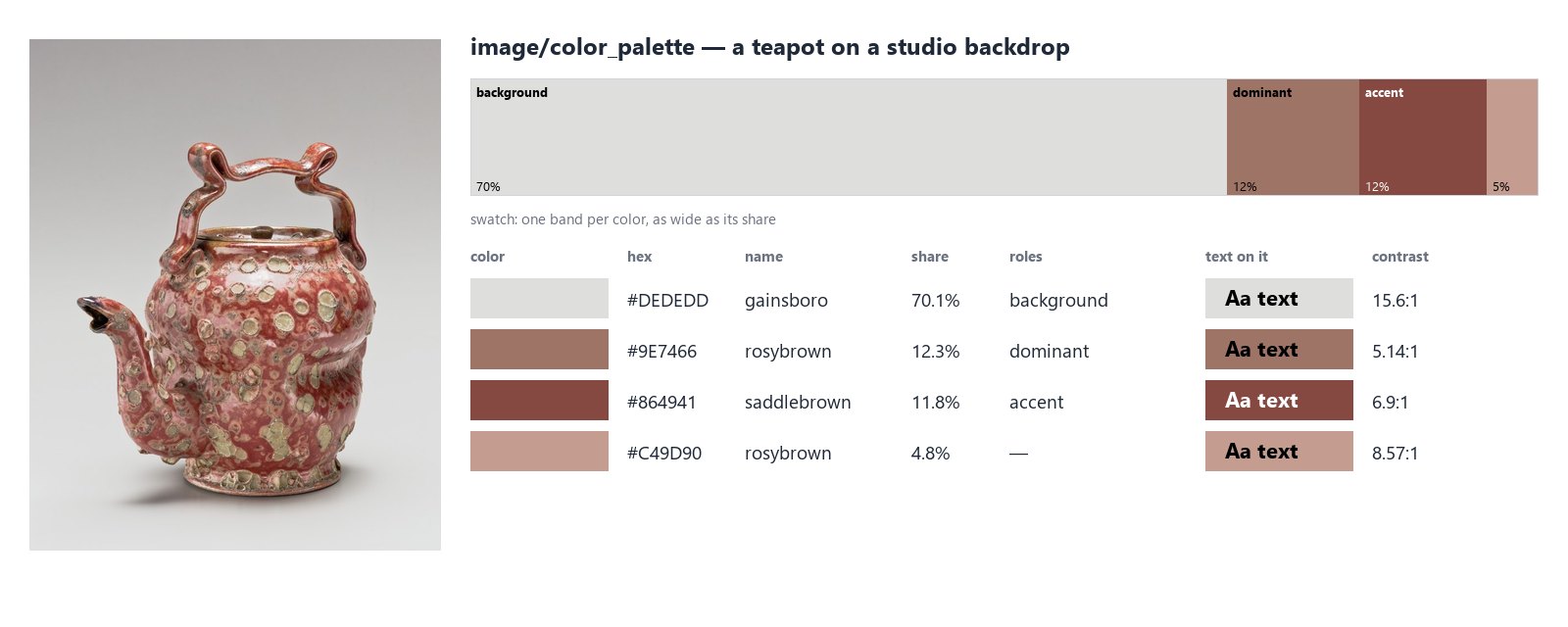
For each color the node returns:
- its hex (
#9E7466) and rgb, in sRGB — the space of every screen and of the color fields of Madoo’s templates; - its OKLCh: lightness from 0 to 1, chroma (0 for a grey, about 0.3 for the most vivid colors a screen shows) and hue in degrees — the numbers to compare colors with;
- its share of the picture;
- the nearest CSS color name (
rosybrown,midnightblue,darkseagreen): plain words for a prompt or a listing; - its roles:
dominant, the largest color that is not the background;accent, the most vivid one;background, the color surrounding the subject; - a text color that reads on it — black or white, whichever contrasts more — and that contrast ratio (WCAG 2: 4.5:1 is the usual minimum for body text, 3:1 for large titles).
Five outputs carry the result:
| Output | What it is |
|---|---|
palette |
the whole result as JSON (madoo.color-palette/v1) |
dominant, accent |
one color each, as #RRGGBB text |
colors |
all the colors as one text, largest first: #9E7466, #864941, #C49D90 |
swatch |
a PNG strip, one band per color, as wide as its share |
quality_check |
the brand check, for a Quality Gate |
How it finds the colors
Section titled “How it finds the colors”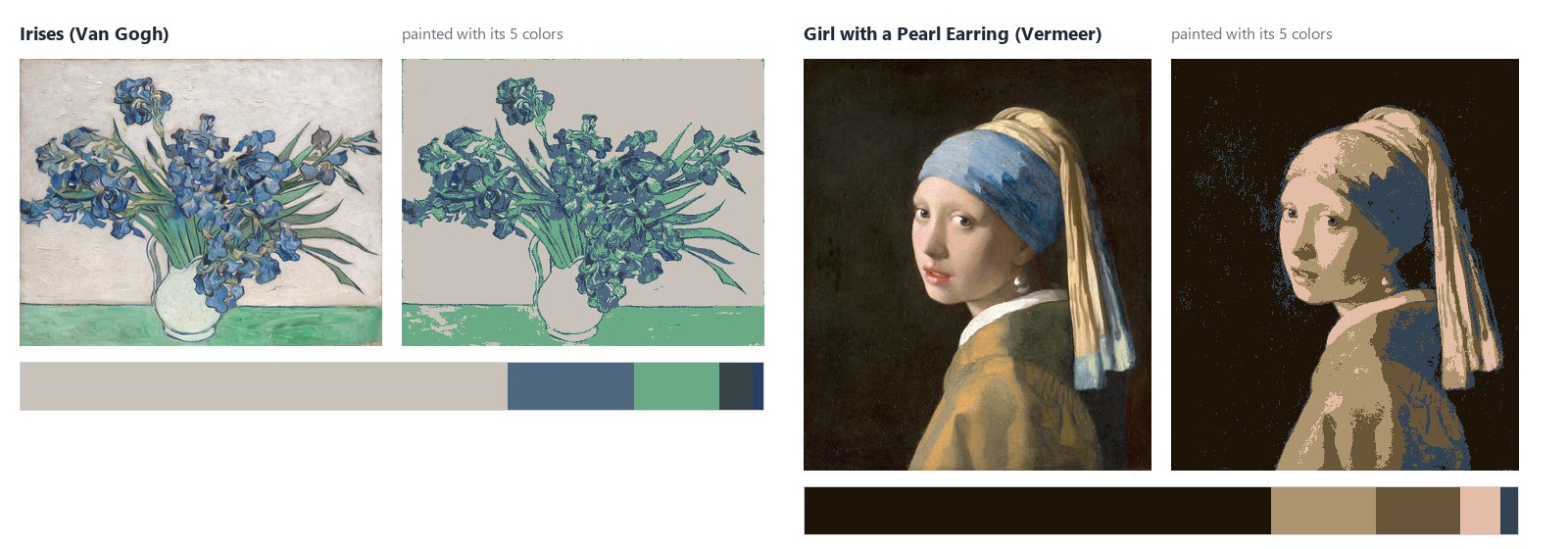
A palette is good when the picture still reads painted with its colors alone. That is how the node works:
- It reads the pixels, converted to sRGB first — a photo in Adobe RGB, a print file in CMYK give the same colors as their sRGB version. A large picture is sampled to about one megapixel, never averaged: averaging blends two colors at every edge into one the picture does not hold. Transparent pixels are left out.
- It groups them: Wu’s quantizer, then a k-means in OKLab, a color space where equal distances look equally different. It is the method of Google’s Material Design, which takes the colors of a phone’s wallpaper the same way. Started from Wu, the k-means always ends in the same place: the same picture, the same palette.
- It keeps distinct colors. From the largest, a color too close to one already kept is counted in it instead of taking a place: six shades of the same grey do not crowd out a blue. A vivid color is never counted in a grey, however close in lightness — the navy of a decoration is not the dark grey behind it.
- It always shows the accent. The most vivid color makes the palette even when it is small — Vermeer’s blue turban, the bougainvillea on a white wall — because it is often the color the picture is remembered by.
A gallery
Section titled “A gallery”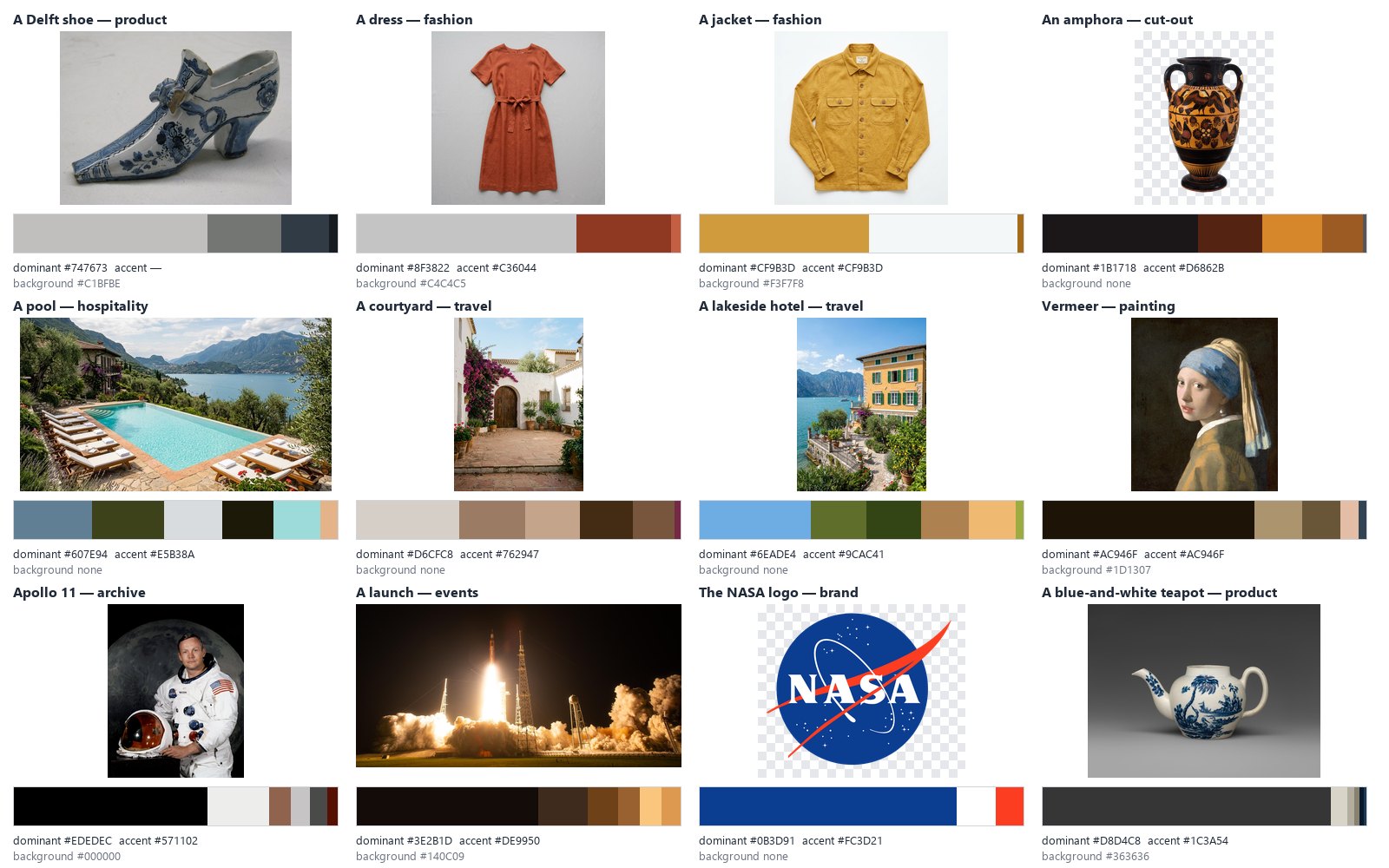
Twelve of the fifty-seven pictures the node was checked on before release — products, garments, cut-outs, hotels, paintings, archive photographs, a logo. A few things to notice:
- On a product photo, the backdrop is recognised and the dominant color is the product’s: the rust of the dress, the white porcelain of the teapot, not the grey behind them.
- On a cut-out (the amphora, after Remove Background) the transparent pixels are left out: the palette is the object’s alone, with no background.
- On a scene (the pool, the courtyard, the hotel) nothing surrounds a subject, so there is no background: the palette is the place.
- On a logo the colors come out exact:
#0B3D91and#FC3D21are the NASA blue and red of the brand manual.
The background
Section titled “The background”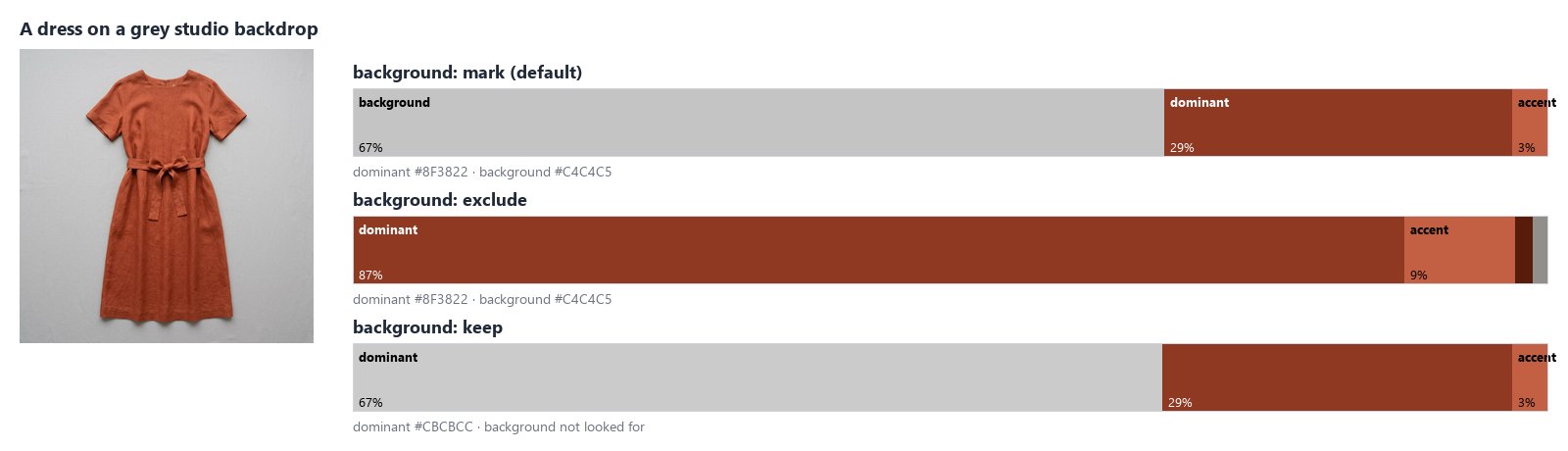
A product is photographed on a backdrop, and the backdrop is usually the largest color in the picture. The node finds it on the border: the color that runs around the picture — at least 60% of the border and a quarter of each of its four sides — is the color that surrounds the subject. A backdrop lit from one side runs from light to dark; its shades count as one background.
Background decides what happens to it:
| Setting | What happens | Use it for |
|---|---|---|
mark (default) |
listed, labelled background, never the dominant color |
most pictures: you see everything and the roles are right |
exclude |
left out, with its shades; the shares describe the rest | the colors of a product on a backdrop |
keep |
not looked for | scenes and pictures where the border is part of the subject |
A cut-out has no background (its border is transparent), and neither has a picture whose colors only touch some sides — a sky above a field, a picture split in two.
Fewer colors or finer shades
Section titled “Fewer colors or finer shades”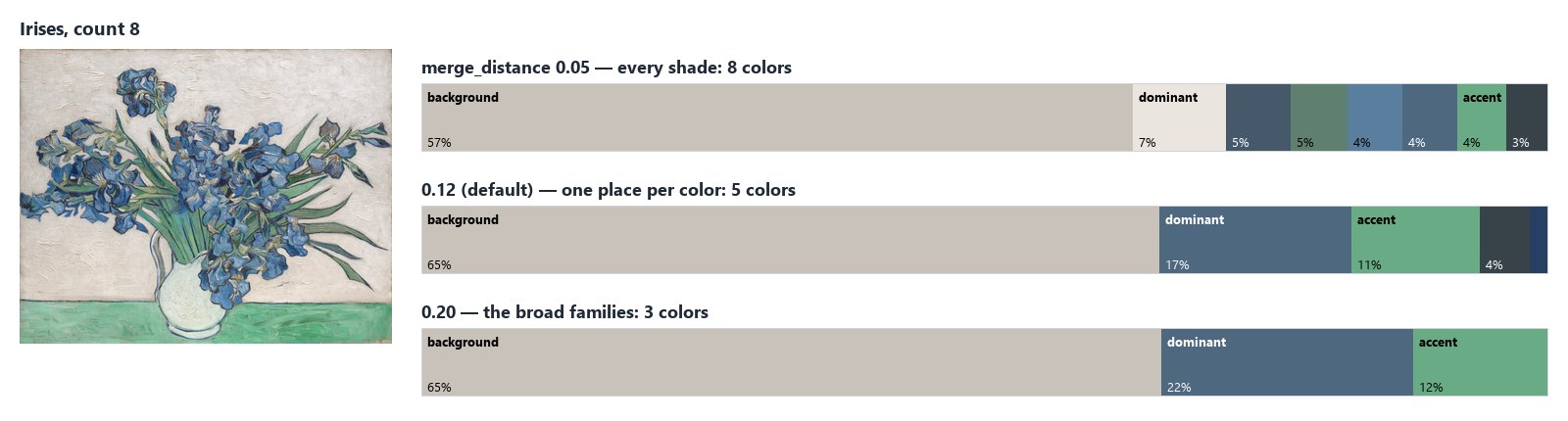
Colors (count, 6 by default, up to 16) is the most the node returns. Merge Distance decides how different two
colors must be to take two places: at 0.12, the default, each color family takes one place; lower it to see the
shades of a painting or a fabric, raise it for the three or four colors a logo or a poster is made of. Minimum
Share leaves out the colors that cover less than 1% of the picture; other_proportion says how much of it the
listed colors leave out.
A text color that reads
Section titled “A text color that reads”Every color comes with text_color — black or white — and the WCAG 2 contrast of that text on it. Put a title on the
dominant color of a cover, a price on a product’s color, a label on a palette swatch: read text_color from the same
color, and check contrast when the text is small (4.5:1 for body text, 3:1 for large titles).
Checking the brand colors
Section titled “Checking the brand colors”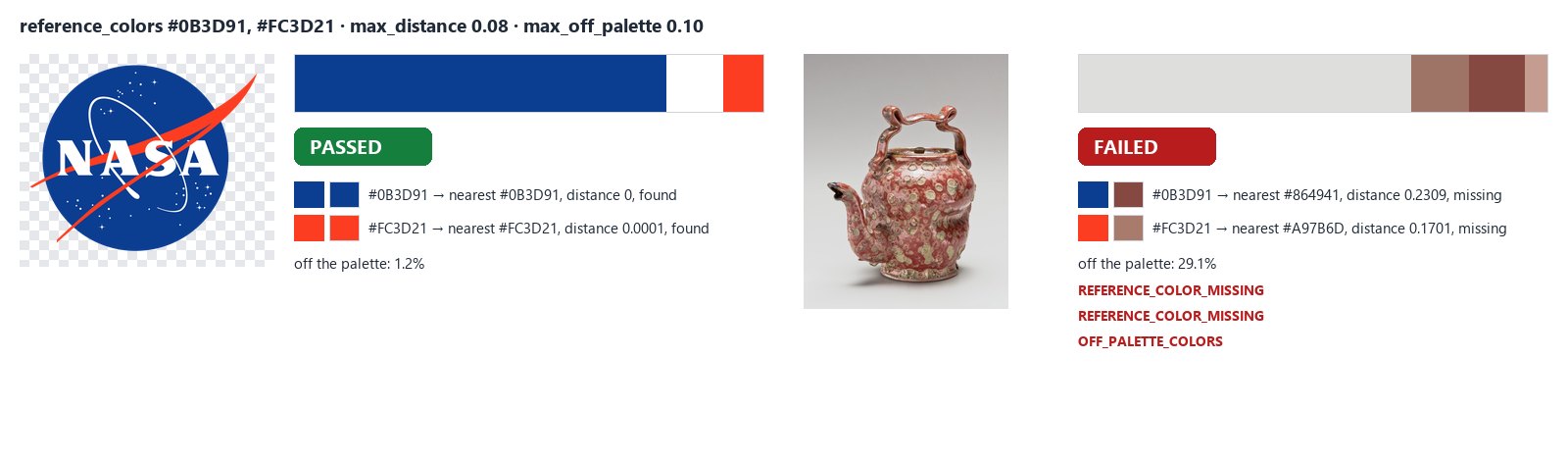
Give the node the brand’s colors in Reference Colors (#0B3D91, #FC3D21) and its quality_check says whether the
picture keeps to them:
- a reference color with no palette color within Max Distance (0.08 by default: the same color to the eye) is missing — an error, or a warning with Require All off;
- with Max Off-Palette Share set, the check fails when more of the picture than that is in colors far from every reference color; whites, greys and blacks are allowed unless Allow Neutrals is off.
Connect quality_check to a Quality Gate and wire the picture to deliver through the gate:
a generated banner that drifted from the brand is held back, the others go on. Each check needs its own Check ID
when several feed the same gate.
Color profiles
Section titled “Color profiles”The node converts every picture to sRGB before reading it. The same painting — Van Gogh’s Irises — saved four ways gives the same palette: the canvas, the blue and the green, each within a just-noticeable step of the sRGB file.
| The file | Canvas | Blue | Green |
|---|---|---|---|
| sRGB JPEG | #C9C2BB |
#4E687F |
#68AB84 |
| Adobe RGB, profile embedded | #D3CCC4 (0.03) |
#5E7D97 (0.07) |
#6CAE88 (0.01) |
| CMYK FOGRA39, profile embedded | #CEC6BF (0.01) |
#5E7280 (0.04) |
#6AA883 (0.01) |
| CMYK without a profile | #C3BBB4 (0.02) |
#31577B (0.07) |
#87B79E (0.06) |
In brackets, the OKLab distance from the sRGB color: 0.02 is about the smallest difference the eye sees, 0.1 is clearly another color. Without the conversion the Adobe RGB file would come out duller and the CMYK ones would not be read at all.
A CMYK file without a profile is read with the usual US press profile; when the file comes from a printer with its own profile, embed it.
Recipes
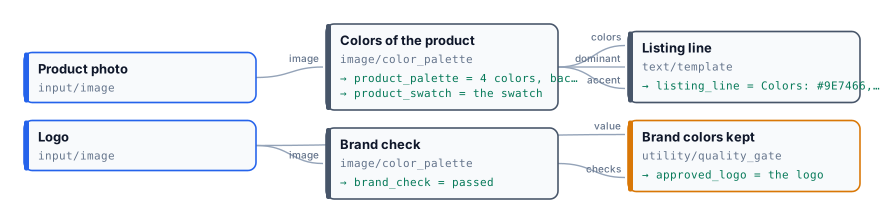
Section titled “Recipes”The colors of a product, for its listing. Product photo → Color Palette (background: exclude) → Text Template
with [colors], [dominant] and [accent] → the listing. For the color’s name, read palette with Extract
(colors[0].name). On a busy background, cut the product out first with Remove Background: the transparent pixels are
left out and the palette is the product’s alone.
A palette into a document template. A template’s color fields take #RRGGBB: connect dominant and accent to
them and one template carries every brand’s colors. Read a third color from palette with Extract
(colors[2].hex), and its readable text color from colors[2].text_color.
A palette into a prompt. colors is a ready list: “Use the palette #1F3A5F, #E8D5B7, #C8102E” in Text Template
before a generation step. The names help a model too: the NASA logo gives midnightblue, white and orangered.
One color per item. palette read with the JSON Enumerator (array path colors) gives one item per color, with its
hex, name, proportion and text_color as outputs — for a swatch card per color, or to filter the colors with a
Predicate.
A brand gate for generated pictures. Generation step → Color Palette with Reference Colors and Max Off-Palette
Share → Quality Gate (all_must_pass, route) → delivery through the gate’s value.
Settings
Section titled “Settings”| Setting | Default | What it does |
|---|---|---|
Colors (count) |
6 | the most colors returned, 1 to 16 |
Background (background) |
mark |
mark, exclude or keep the color around the subject |
Minimum Share (min_proportion) |
0.01 | colors covering less of the picture are left out |
Merge Distance (merge_distance) |
0.12 | a color this close (OKLab) to a larger one is counted in it |
Reference Colors (reference_colors) |
— | the brand colors to check, up to 32 |
Max Distance (max_distance) |
0.08 | how close a color must be to a reference to count as it |
Require All (require_all) |
on | a missing reference color fails the check (otherwise warns) |
Max Off-Palette Share (max_off_palette) |
— | fail above this share of off-palette color |
Allow Neutrals (allow_neutrals) |
on | whites, greys and blacks are never off the palette |
Check ID (check_id) |
color-palette |
the check’s name in a Quality Gate |
Pictures up to 40 megapixels are read; a larger one fails with IMAGE_TOO_LARGE — resize it first. A picture with no
opaque pixel gives an empty palette and a failed check (NO_COLOR); dominant, accent, colors and swatch are
then not provided, so the steps that need them are skipped. A wrong setting is reported when the workflow is saved,
with INVALID_COLOR_PALETTE_PARAMETER.
What it does not do
Section titled “What it does not do”- It reads colors, not meaning. The blue of a sky and the blue of a product are the same blue; to know which part of the picture is the product, cut it out first or ask an AI vision step.
- A backdrop from black to light grey is too wide a range to be one background; cut the product out instead.
- The walls of an empty room touch all four sides and can be marked as background; on scenes, use
background: keep. - Names are approximate. The CSS names are a vocabulary of 139 colors:
darkslategrayfor a deep navy is the nearest word, not a description. For exact work, use the hex and the OKLCh.
The lab
Section titled “The lab”The color palette lab runs two of the recipes, at no credit cost:
- a ceramic teapot on a grey studio backdrop: the backdrop is excluded, and the teapot’s colors are written into a
listing line —
Colors: #9E7466, #864941, #C49D90, #582218. Main color #9E7466, accent #864941.; - the NASA logo checked against its two brand colors: both are found, 1.2% of the logo is off the palette (the anti- aliased edges), the check passes and the Quality Gate releases the logo.