

Choosing
Many workflows deliver one of several versions: the voice-over in the customer’s language, the care note for the
product’s category, the layout for the format a channel asks for. The version is chosen by a key that arrives
with the run — a language code, a category, a format name — and the node that makes the choice is Select by Key
(utility/select_by_key). Like the nodes in Deciding, it is deterministic and costs nothing.
There are two ways to use it, and the difference is what runs:
- Pick — every version is produced, and Select by Key keeps one. Simple, and right when the versions are cheap or all of them are useful.
- Route and rejoin — a Filter per version lets only the chosen branch run, and Select by Key rejoins the branches. Right when each version costs credits: the versions not chosen are never made.
Select by Key
Section titled “Select by Key”Its configuration, Selection (selectionConfig), declares:
| Field | Meaning |
|---|---|
valueType |
the type of the values it chooses between: text, number, boolean, json, image, video, audio, url, document or model3d — one type for every case |
cases |
one to sixteen cases, each a key (what the selector must match), an inputPort (the name of the input that receives that case’s value) and an optional label |
caseSensitive |
whether IT and it are different keys; off by default |
onNoMatch |
what happens when the selector matches no key: use_default, absent or fail |
Each case becomes an input of the node, typed with the value type, and the Selector (selector) input receives
the key. The selector must be a text — a number or a boolean is refused, not converted — and surrounding spaces are
ignored. Read it with Extract when it is a field of the data.
The node answers with the chosen value on Selected Value (selected_value), and three outputs that say how it
chose: selected_key (the key that matched, or default), matched and used_default.
When the selector matches no key:
onNoMatch |
Result |
|---|---|
use_default |
the value connected to Default Value (default_value) is used; matched is false, used_default is true |
absent |
selected_value and selected_key are rejected: what follows is skipped, and the run still completes |
fail |
the node fails with SELECTOR_NO_MATCH — right when an unknown key is a mistake in the data that someone must fix |
Choose the behaviour that says what an unknown key means. A language nobody translated into can fall back to English; a category the catalogue does not know should probably not produce anything; a format code that must exist is an error.
Pick among values
Section titled “Pick among values”In the pick pattern every case is connected to a producer, every producer runs, and Select by Key keeps one value. The choosing lab writes a thank-you message in English, Italian and French with three Templates and picks one by a language code, with the English message also connected to Default Value.
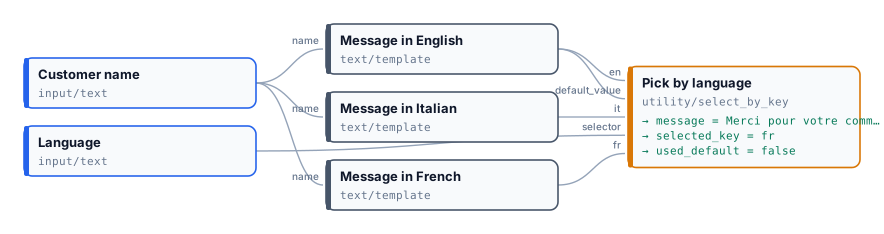
| Language | Message | selected_key |
used_default |
|---|---|---|---|
FR |
Merci pour votre commande, Giulia Ferri ! |
fr |
false |
de |
Thank you for your order, Giulia Ferri! |
default |
true |
FR matches the key fr because the match ignores case. de has no case, so the default applies.
node madoo-install-example.mjs lab-choosing --api <your Madoo API URL> --key <key.json> --runThe second run is in run-inputs-no-match.json.
Picking is right for three Templates; it is wasteful for three AI voice-overs, because every one of them is made and paid for. That is what routing is for.
Route and rejoin
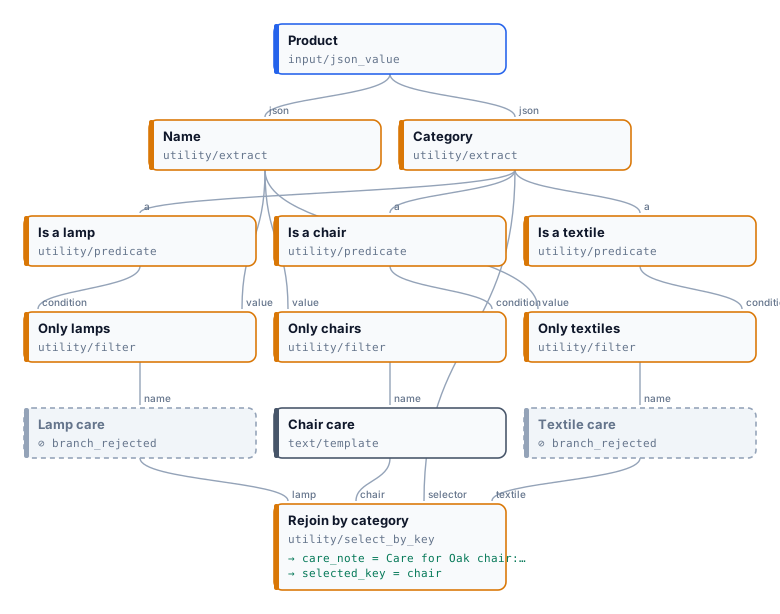
Section titled “Route and rejoin”In the route pattern each version has its own branch, and each branch starts with a Filter whose condition is a
Predicate comparing the key with that branch’s key (equals). Exactly one Filter passes; the others reject, and
their branches are skipped — however many steps they have, and at no cost. Select by Key, fed with the same key,
rejoins the branches: it accepts the rejected cases, so only the
chosen one has to arrive.
The routing lab writes a care note by product category. It
reads the name and the category from the product; three Predicates and three Filters route the name to the lamp,
chair or textile branch; Select by Key rejoins them by the category, with onNoMatch: absent.
| Product | Branches that ran | Care note |
|---|---|---|
Oak chair, chair |
chair only; lamp and textile skipped (branch_rejected) |
Care for Oak chair: wipe with a dry cloth; oil the wood once a year. |
Velvet sofa, sofa |
none | absent — no key matches, and every branch was rejected |
Both runs complete in a few seconds at no cost.
node madoo-install-example.mjs lab-routing --api <your Madoo API URL> --key <key.json> --runKeep the two comparisons in step. A Predicate equals compares texts exactly, case included; Select by Key ignores
case unless caseSensitive is on. The lab turns it on, so that a category written Chair matches neither a Filter
nor a case, and the note is simply absent. Without it, the rejoin would choose the chair case whose branch no
Filter let through — and the note would be absent too, but for a less obvious reason.
Which node for which choice
Section titled “Which node for which choice”| You need | Use |
|---|---|
| one of two branches, by a condition | two Filters, one inverted — see Deciding |
| the key decided from content — the team of a message, the kind of a document, the best of several pictures | a choice of Decide with a Model on the selector |
| one of several values, all cheap to produce | Select by Key alone |
| one of several branches, each with a cost | a Predicate and a Filter per branch, rejoined by Select by Key |
| an optional step, on or off | a Boolean Input and a Filter — see Branches and absence |
The older Image Switch (control/image_switch) chooses among images by a label. It still works in the workflows
that use it; for a new workflow, use Select by Key with valueType: image, which also handles every other type.
Errors
Section titled “Errors”| Code | Cause | Fix |
|---|---|---|
INVALID_SELECTION_CONFIG |
the selection is incomplete: an unsupported type, a duplicate key or input name, no cases or more than sixteen | fix the configuration the message points to |
MISSING_SELECTOR |
nothing reached Selector | connect the key |
INVALID_SELECTOR_TYPE |
the selector is not a text | pass a text; read it with Extract and expected_type: text |
SELECTOR_NO_MATCH |
no key matches and onNoMatch is fail |
add the case, or choose use_default or absent |
MISSING_SELECTED_VALUE |
the matching case has no connection | connect a value to every case |
MISSING_DEFAULT_VALUE |
no key matches, onNoMatch is use_default, and nothing reached Default Value |
connect the default |
SELECTED_VALUE_TYPE_MISMATCH |
the chosen value does not have the configured type | connect values of valueType only |