

Calculating
Calculate (utility/calculate) computes one number from an expression: qty * price,
round(subtotal * (1 + vat_rate), 2), sum(order.lines[*].amount), if(subtotal >= 300, subtotal * 0.05, 0). It
is the node for every amount a workflow shows or decides on — and the reason an AI model should never be asked to
do sums: a language model writes numbers that look right, Calculate computes them.
The expression defines the node
Section titled “The expression defines the node”Every name in the expression that is not a function is a variable, and every variable becomes an input port
of the node with the same name. Write round(subtotal * (1 + vat_rate), 2) and the node grows two inputs,
subtotal and vat_rate; connect a value to each. An unconnected variable is caught when the workflow is
validated (CALC_UNCONNECTED_VARIABLE), and an expression that does not parse is rejected with the position of the
mistake.
A variable takes a number, a boolean (for a condition), or a JSON value read with a path. Text is never
read as a number — the text "12" is refused, as everywhere in Madoo (see Values and types) — so
connect a Number Input, a number-typed field or the result of another Calculate.
The language
Section titled “The language”| Element | Written | Example |
|---|---|---|
| Numbers | 12, 0.22 |
price * 0.22 |
| Operators | + - * /, unary -, parentheses |
(subtotal - discount) * (1 + vat_rate) |
| A field of a JSON value | .field, [n], ["name with spaces"] |
order.lines[0].price, quote["unit price"] |
| Every item of a list | [*] |
order.lines[*].qty |
| Functions | round(x), round(x, digits), floor, ceil, abs, min, max, sum, count, avg |
sum(order.lines[*].amount) |
| A condition | if(condition, then, else), with == != < <= > >= |
if(subtotal >= 300, subtotal * 0.05, 0) |
| Booleans | true, false, a boolean variable |
if(express, 15, 9.9) |
A few rules keep expressions unambiguous:
- Comparisons live inside
if(). The result of Calculate is always a number; to route a workflow on a comparison, use a Predicate (see the decision pages of this section). - One comparison at a time.
a < b < cis refused; nestif()instead. - Only the chosen branch of
if()is computed, soif(guests == 0, 0, total / guests)never divides by zero. - No
%. Write a percentage as a fraction:price * 0.22, orprice * 22 / 100. =is not a comparison. Write==.- A path with
[*]gives a list, which only the list functions accept:sum,count,avg,min,max. Arithmetic between two lists (qty[*] * price[*]) is not supported: compute each line first (see the lab).
Exact arithmetic
Section titled “Exact arithmetic”Calculate works in decimal, not in binary floating point: 0.1 + 0.2 is 0.3, and a total of cents stays a
total of cents. There is no silent value: dividing by zero, a missing JSON field and the average of an empty list
fail the node with a reason instead of producing 0, NaN or an empty result.
Decimals rounds the result; leave it empty to keep it exact. round(x, 2) rounds inside the expression, which
matters when an intermediate amount — a discount, a VAT line — must be rounded before it is added. Rounding
chooses how a value exactly halfway goes: half away from zero (2.345 → 2.35, the usual commercial rule) or half
even (2.345 → 2.34, banker’s rounding).
A number is formatted for the reader — separators, currency symbol, the reader’s language — not by Calculate but where it becomes text: by Format as Text before a prompt, a message or a Text Template (see Turning a value into text), or by the document template that prints it (see Conditions, links and formats).
Amounts per item
Section titled “Amounts per item”Inside an iteration, Calculate runs once per item: connect the item’s fields and it computes each line total. To add the lines up, collect them with Aggregate JSON and sum the collected field:
enumerate/jsonoverorder.lines→qty,priceper line;- Calculate
qty * price→ the line total; aggregate/jsoncollectssku,qty,price,line_total;- Calculate
sum(priced_lines[*].line_total)→ the subtotal.
The collection travels as a stored JSON file; Calculate reads it like any JSON value.
The lab
Section titled “The lab”The calculation lab turns an order into a quote: a total per line, a subtotal, a discount above a threshold, shipping that depends on a switch, VAT, the total and a deposit — plus a count and an average read straight from the order.
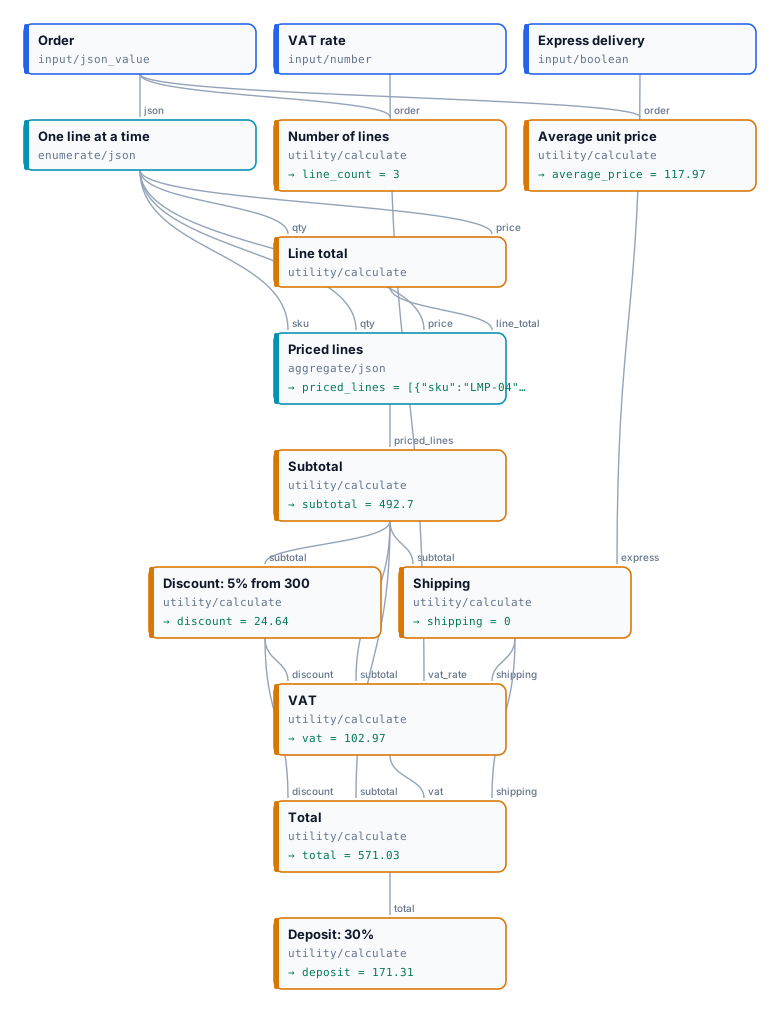
The order has three lines — 2 lamps at 89.00, 1 chair at 240.00, 3 cushions at 24.90 — the VAT rate is 0.22 and express delivery is off:
| Step | Expression | Result |
|---|---|---|
| Line total, once per line | qty * price, Decimals 2 |
178.00 · 240.00 · 74.70 |
| Subtotal | sum(priced_lines[*].line_total) |
492.70 |
| Discount: 5% from 300 | if(subtotal >= 300, round(subtotal * 0.05, 2), 0) |
24.64 |
| Shipping | if(express, 15, if(subtotal >= 200, 0, 9.9)) |
0 |
| VAT | round((subtotal - discount + shipping) * vat_rate, 2) |
102.97 |
| Total | subtotal - discount + shipping + vat, Decimals 2 |
571.03 |
| Deposit: 30% | round(total * 0.3, 2) |
171.31 |
| Number of lines | count(order.lines[*].sku) |
3 |
| Average unit price | avg(order.lines[*].price), Decimals 2 |
117.97 |
The discount is rounded before it enters the VAT, as an invoice does: 5% of 492.70 is 24.635, printed and charged as 24.64. Turn express delivery on and shipping becomes 15, VAT 106.27, the total 589.33 and the deposit 176.80. The run takes about ten seconds and costs nothing.
node madoo-install-example.mjs lab-calculate --api <your Madoo API URL> --key <key.json> --runDate Calculation (utility/date) does for calendar dates what Calculate does for numbers: exactly, instantly, for
0 credits. A contract that starts on 1 November 2026 for four years ends on 31 October 2030; notice six months
before that is due by 30 April 2030 — and a model asked for those dates may get them wrong by a day, a month or a
leap year.
| Operation | What it gives | Example |
|---|---|---|
add, subtract |
a date moved by amount days, weeks, months or years (unit) |
2026-11-01 + 4 years → 2030-11-01 |
difference |
the whole units from date to other_date, negative when other_date comes first |
2026-10-01 → 2026-12-20: 80 days |
end_of_month, start_of_month |
the last or the first day of the month | 2026-10-17 → 2026-10-31 |
day_of_week |
1 (Monday) to 7 (Sunday) | 2026-12-20 → 7 |
- ISO in, ISO out.
dateandother_datetake an ISO date (2026-11-01) or date and time (2026-11-01T14:30:00Z) — from data, from Extract, or written on the node — ortoday, the date in UTC when the step runs. A date written for people (03/10/2026) is refused withDATE_INVALID, never guessed, and so is a date that does not exist (2026-02-30). A date result arrives ondateas ISO text, a number onnumber; the output an operation does not use is absent. - Months as contracts read them. Adding months or years keeps the day of the month when it exists and otherwise
takes the last day: 31 January + 1 month is 28 February (29 in a leap year), and 31 October − 6 months is 30
April. A
differencecounts whole units only: 1 January to 31 March is 2 months. amountcan come from the data: a duration read from a contract, a number of days from an order. It must be a whole number.- Write the result with Format as Text:
2030-04-30becomes30 April 2030, or30 aprile 2030for an Italian reader. - No times, time zones, holidays or working days: Date Calculation counts calendar days.
The dates lab computes a lease’s end and its notice deadline, a warranty’s end, the days to a check-in and its weekday, and the end of the month for an invoice:
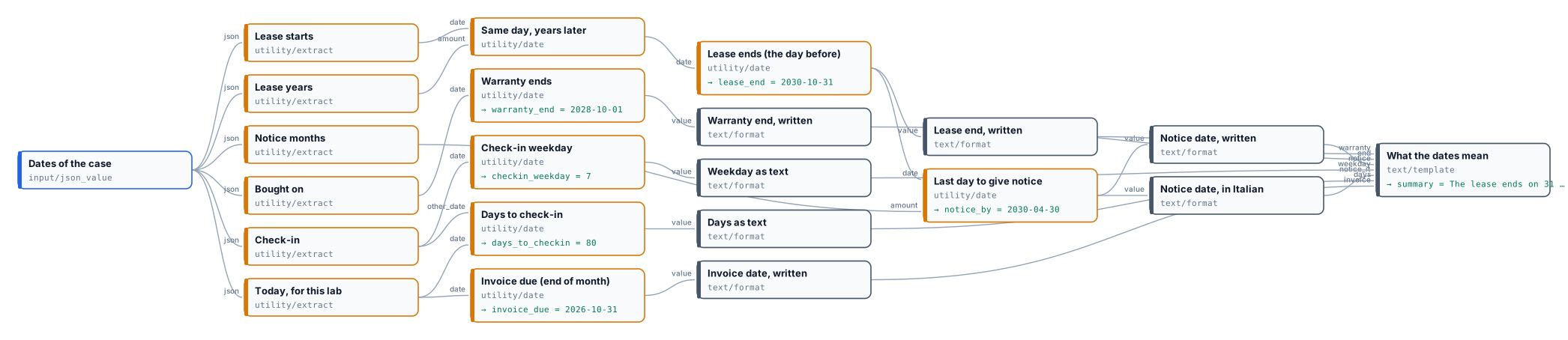
The lease ends on 31 October 2030. To leave, give notice by 30 April 2030 (in Italian: 30 aprile 2030).The warranty ends on 1 October 2028.Check-in is in 80 days, on day 7 of the week (1 is Monday); the invoice is due by 31 October 2026.A four-year lease ends the day before the anniversary: the lab adds four years, then subtracts one day. The lab uses
a fixed date in place of today, so it gives the same result whenever it runs; it costs nothing.
node madoo-install-example.mjs lab-dates --api <your Madoo API URL> --key <key.json> --runErrors
Section titled “Errors”| Code | Cause | Fix |
|---|---|---|
CALC_UNCONNECTED_VARIABLE (validation) |
a variable of the expression has no connection | connect a value to the port with that name, or rename the variable |
CALC_INVALID_EXPRESSION |
the expression does not parse; the message gives the position | fix the character named in the message (%, =, a chained comparison, an unclosed bracket) |
CALC_TYPE_MISMATCH |
a variable is text, a file, or the wrong shape for its use (a list in arithmetic, a boolean as a number) | connect a number or a JSON value; use [*] only inside list functions |
CALC_PATH_NOT_FOUND |
a JSON field or position does not exist | check the path against a real document |
CALC_DIVISION_BY_ZERO |
a divisor is 0 | guard it: if(guests == 0, 0, total / guests) |
CALC_EMPTY_LIST |
avg, min or max of an empty list |
guard it with if(count(list[*].x) == 0, 0, …) |
CALC_OVERFLOW |
a value is too large for exact decimal arithmetic | check the inputs: a real amount never overflows |
CALC_MISSING_INPUT |
no value reached a variable at run time | connect it, or make sure its branch runs |
DATE_INVALID |
Date Calculation received no date, a date not in ISO form (03/10/2026) or one that does not exist (2026-02-30) |
give an ISO date such as 2026-11-01, or today |
DATE_MISSING_OTHER |
a difference with no other_date |
connect or write the second date |
INVALID_DATE_OPERATION |
an unknown operation or unit, or an amount that is not a whole number |
choose from the lists; round the amount |
DATE_OUT_OF_RANGE |
the result falls outside the years 1 to 9999 | check the amount |