

Subjects, continuations and fashion clips
Generative video and sound explains how a generation is priced, run, measured and finished. This page takes three jobs that need more than one clip from one prompt:
- the same subject in several shots, where a single image is not enough and each new shot risks a different face, a different product;
- a clip that goes on, where the new seconds must start exactly where the old ones end;
- a product worn and in motion, from a photo of the product alone.
Each one rests on the same rule: a model sees only the images it actually receives. A node can have ports for a last frame or six reference images, but many models take a single image and ignore the rest. The sections below say, node by node, which models use what — and the step fails, or warns, where it cannot.
Which images reach the model
Section titled “Which images reach the model”| Node | Images it can send | What the models do with them |
|---|---|---|
ai/image_to_video |
a first frame, a last frame, up to 6 reference images | the last frame is used by Seedance Pro (the default), Seedance 2.0 and 2.5, Kling 2.5 Turbo, 2.6, O3 and V3, MiniMax Hailuo-02, H3, H3 Max and H3 Max Turbo, Vidu Q3, Wan 2.2, LTX-2 19B, and FLUX 3 First-Last Frame and PixVerse C1 Transition (which require it); other models ignore it. Reference images are used only by Veo 3.1; the others animate the first frame alone |
ai/fashion_video |
the same as Image to Video | the same models, the same rules |
ai/reference_to_video |
up to 9 images, 3 videos, 3 audios, cited in the prompt | all of them, on the default model — this is the node for a consistent subject |
ai/virtual_tryon |
the person, the garment, and optionally a background, a pose reference and a blank product | all of them on the default model; a model that takes one image is refused before any charge (MODEL_TAKES_ONE_IMAGE) |
ai/video_extend |
the clip to continue | the whole clip |
So: to keep a subject the same across shots, give it to Reference to Video, not to Image to Video’s reference port. To end a clip on a chosen frame, keep the default model or pick one from the list above.
The same subject in several shots
Section titled “The same subject in several shots”ai/reference_to_video makes a clip from a prompt and a set of references. Each reference is cited in the prompt by
its kind and its place: @Image1 is the first connected image, @Image2 the second, @Video1 the first video,
@Audio1 the first audio. The numbering follows the connected slots in order and skips empty ones — connect the
mascot to the first slot and the product to the second, and write “@Image1 pours tea from @Image2”.
What keeps a subject the same:
- The same reference images in every shot. Two shots with the same @Image1 share the face, the colours, the clothes; two shots from two prompts alone do not.
- References made for it. A character on a plain background, whole and in front view; a product isolated, in three-quarter view. What is not in the reference, the model invents.
- Say what must not change. “Keep the fox’s round glasses, mustard apron and claymation look, and the teapot’s speckled teal glaze and bamboo handle, exactly as in the references” — in every shot’s prompt.
- Change the scene, not the subject. Setting, light, framing and action are the prompt’s job.
Limits worth knowing:
- up to 9 images, 3 videos (together 2 to 15 seconds, 480p to 720p, at most 50 MB) and 3 audios (together at most
15 seconds, MP3 or WAV); audios need at least one image or video (
INVALID_REFERENCE_COMBINATION); - no real people. The default model refuses references showing the likeness of a real person, with
CONTENT_POLICY_VIOLATION, before any charge. Use a character, a mascot, an illustration, a product — or a synthetic person; - the duration is the model’s: 5 seconds on the default, 4 to 30 if you set it; a seed is sent and honoured on a best-effort basis.
The default model, Seedance 2.5 reference, costs 29 credits per second at 720p — 145 for five seconds — and about
half that at 480p. Seedance 2.0 (25 per second, 0.6× with a video reference), Seedance 2.0 Fast (16) and Gemini
Omni Flash 1.1 reference (about 6.3 per second at 720p, 2 at 360p, up to 19 at 4K; up to 10 images and 3 videos of
at most 3 seconds each, no audio) MiniMax H3 Max reference (5 per second at 768p, images only; more than
four images add up to 24 credits) Grok Imagine Video 1.5 reference (5 per second at 480p, 8.75 at 720p, 1 to 7
images cited as <IMAGE_0>, <IMAGE_1>, about 0.6 credit each) and PixVerse C1 reference (about 1.9 per second at 360p,
3.1 at 720p, 5.9 at 1080p, a quarter to a third more with audio; 1 to 7 images cited as @Image1, @Image2, the last
one optionally the background with Background Reference) are the alternatives. A step with more images than its model
takes stops before any charge (TOO_MANY_REFERENCE_IMAGES).
Lab: one mascot, one product, two shots
Section titled “Lab: one mascot, one product, two shots”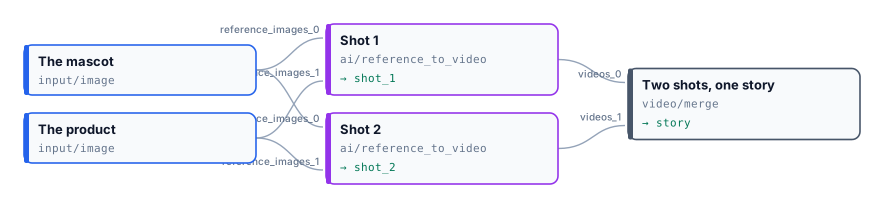
A small ceramics brand has a mascot, Pip the fox potter, and a best-selling teapot. It wants two short scenes for a campaign: Pip pouring tea in the studio, and Pip showing the teapot at a market at dusk. The two references are connected to both shots, and the prompts change only the scene.

Two shots of 5.04 seconds at 1280×720, joined with a one-second fade into 9.1 seconds. The glasses, the apron with its name, the speckled glaze and the bamboo handle are the same in both scenes. 290 credits: 145 per shot.
node madoo-install-example.mjs lab-reference-consistency --api <your Madoo API URL> --key <key.json> --run --save pipThe mascot and the teapot are images made with Madoo’s text-to-image node for this example; they show no real person or product.
A clip that goes on
Section titled “A clip that goes on”ai/video_extend continues a clip past its last frame and returns only the new footage, 5 to 20 seconds of it.
The clip you give it should be an MP4 under 15 seconds and 50 MB. Then:
- Join it after the original with
video/merge, the original invideos_0, the new footage invideos_1. - Join without a transition. Merge Videos fades between clips by default, for one second: on a continuation the
fade eats a second of each side and blurs the very frame where the shot continues. Set
transitiontonone. - Let the merge set the size. The model may answer at a slightly different size — 800×1088 for a 720×960 clip in the lab — and Merge Videos brings every clip to the first one’s.
- Say how the shot goes on, not what the clip is: “the camera slowly pulls back and reveals the frame”.
The only model, FLUX 3 extend, costs 26 credits per second of new footage at 720p — 130 for five seconds — and about 1.3 times that at 1080p. The original’s length is not billed.
Lab: a clip that goes on
Section titled “Lab: a clip that goes on”
The five-second animation of Girl with a Pearl Earring from the first lab goes on for five more seconds: the camera pulls back and reveals the painting’s gilded frame on the museum wall.
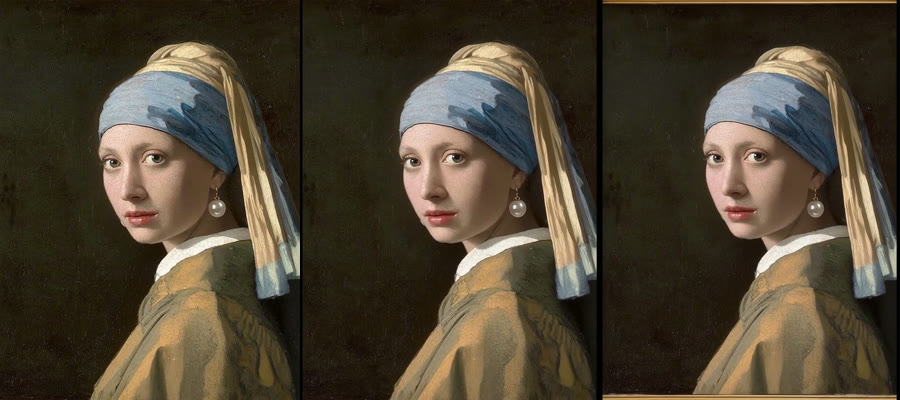

10.04 seconds at 720×960, joined without a transition: the five new seconds arrived at 800×1088 and Merge Videos brought them to the original’s size. The continuation starts on the original’s last frame. 130 credits for the five new seconds; the clip facts are the final measurement.
node madoo-install-example.mjs lab-video-extend --api <your Madoo API URL> --key <key.json> --run --save extendedA product worn, and in motion
Section titled “A product worn, and in motion”Two nodes turn a product photo into a fashion clip:
-
ai/virtual_tryonputs the product on a person. It takes the person’s photo (image 1) and the product’s (image 2), and keeps the person’s face and body as they are. Optional inputs:- a background image, or else one of 41 environments, from a white studio to a Parisian café;
- a pose reference, whose pose only is taken, or else one of 15 poses;
- a blank product with an effect, to change a design’s finish.
It returns one image, or up to four variants. The default model, Nano Banana 2 edit, costs 5 credits per image and takes up to 14 images. A model that takes a single image would dress nobody, so the step stops before any charge (
MODEL_TAKES_ONE_IMAGE). -
ai/fashion_videoanimates it. It is Image to Video with presets written for products worn:
| Product | Presets |
|---|---|
| Clothing | Model Walking, Model Turning, Fabric Close-up, Catwalk Strut, Fabric Flow, Pose Transition |
| Shoes | Shoe Walk, Shoe Close-up, Shoe Lifestyle, Shoe Turntable (no person) |
| Bags and accessories | Bag Showcase, Bag Detail, Accessory Lifestyle |
| Jewellery | Jewelry Sparkle, Necklace Reveal, Bracelet & Watch, Earring Turn, Ring Close-up |
A custom prompt is added after the preset’s; a connected prompt replaces both. Its default model is Seedance Pro, at 8 credits per second: 40 for five seconds.
The try-on image keeps the aspect ratio you give it — square unless you set one — and the fashion clip follows it: set
aspect_ratio on the try-on to 3_4 or 9_16 for a full-length, vertical clip.
Lab: from a product photo to a fashion clip
Section titled “Lab: from a product photo to a fashion clip”
A clothing shop has a flat photo of a linen overshirt and a studio photo of a model in a white t-shirt. The try-on puts the jacket on, worn open; Fashion Video’s Model Turning preset turns the model slowly on the spot.
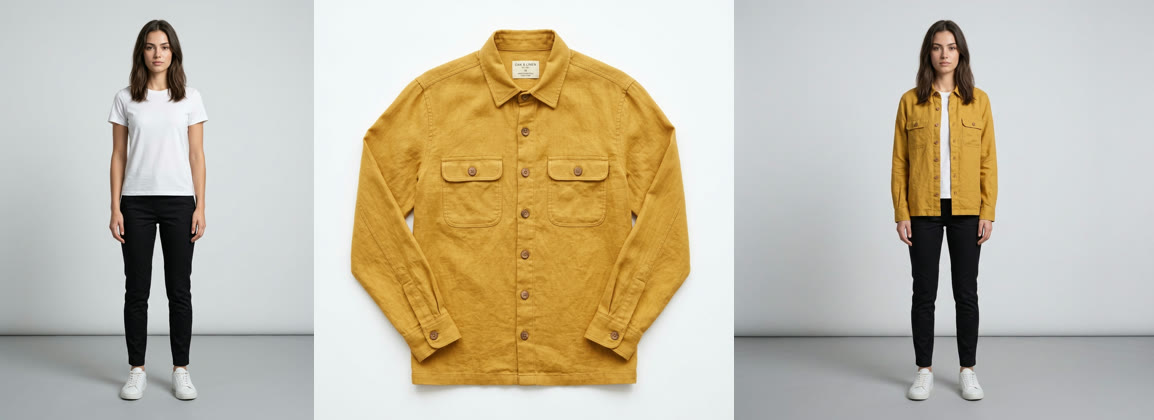
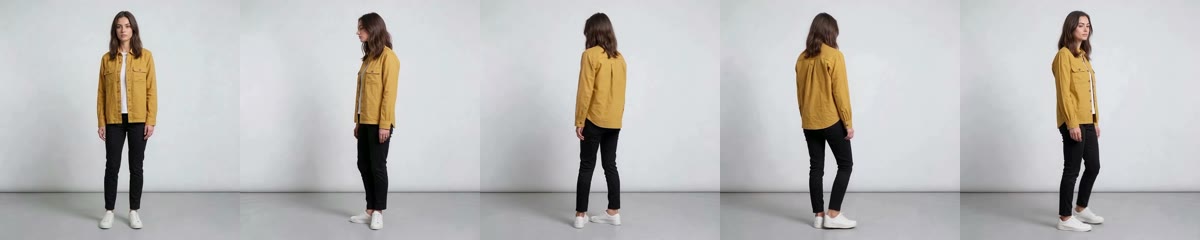
The jacket keeps its colour, its buttons and its pockets through the whole turn, back included. 45 credits: 5 for the try-on, 40 for five seconds of video.
node madoo-install-example.mjs lab-tryon-fashion --api <your Madoo API URL> --key <key.json> --run --save lookThe model and the jacket are images made with Madoo’s text-to-image node for this example; the model is not a real person.
When a step fails
Section titled “When a step fails”| Code | Meaning | Fix |
|---|---|---|
CONTENT_POLICY_VIOLATION |
the model refused a reference or a prompt — on Reference to Video, a real person’s likeness | use a character, a product or a synthetic person |
MODEL_TAKES_ONE_IMAGE |
Try-On or Image Fusion on a model that receives only one image | keep the node’s default model |
INVALID_REFERENCE_COMBINATION |
audio references without an image or a video | connect at least one image or video |
MISSING_PROMPT |
no prompt, preset or custom prompt | write one, or choose a preset |
PAYLOAD_VALIDATION |
the model needs something the step did not give — FLUX 3 First-Last Frame or PixVerse C1 Transition without a last frame | connect it, or choose another model |
RESULT_DOWNLOAD_ERROR |
the provider finished but its file could not be fetched; nothing is charged | run again |