

Checking what a run produced
A run that completes has done what the workflow says, not necessarily what was wanted. A brochure can have a title that overflows its box, a carousel a slide with the wrong photo, a teaser no sound, a video a transition that looks like noise or a pixel format some phones will not play. None of these is an error: the run reports completed and the metadata — sizes, durations, page counts — looks right. They are found only by looking.
A person looks by opening the files. An agent working through the API or MCP cannot open a PDF or play a video, and judging a result from its metadata is how a wrong file gets delivered with confidence. So Madoo shows every output as a picture the agent can see, and as the facts a reviewer would check. It is free, and it works on any completed run.
What you get for each kind of output
Section titled “What you get for each kind of output”| Output | What you see | Labels |
|---|---|---|
| an image | the image | — |
| a list of images (an iterated output, one per row) | every image on one contact sheet | #1, #2… |
| a PDF | every page on one contact sheet, or the pages one by one | p. 1, p. 2… |
| a carousel (the pages manifest of Render Design Template) | every slide | 1/5, 2/5… |
| a video | twelve frames spread from the first to the last, each stamped with its time, and the waveform of its sound | frames, sound |
| an audio | its waveform, with its duration and loudness | sound |
Text and JSON outputs are not pictures: read them from the result.
On MCP the tool is preview_output (execution_id, key): the pictures come back as image blocks a multimodal
agent sees. Through the API it is GET /api/v1/executions/{id}/outputs/{key}/preview, which returns one JPEG
(Executions). key is the output key of the result.
| Parameter | What it does |
|---|---|
mode |
auto (default): one item as an image, several on a contact sheet; sheet: everything on one sheet, a label under each; image: one item; pages (MCP): each item as its own image, up to max_images |
items |
which pages, slides or rows: 3, 1-4,7 |
max_dimension |
the long side, 256–2048 px |
from, to |
video and audio: the stretch to look at, in seconds (from=4.5&to=6) |
A good review goes from the whole to the detail: the sheet first, then the items or the moments that look wrong.
Video and audio: frames, sound and facts
Section titled “Video and audio: frames, sound and facts”A video preview is one sheet: twelve frames, first to last, each with its time, and the waveform of the sound beside them. This is the reel of the editing lab — two sound bites joined by a fade, a badge in the corner:
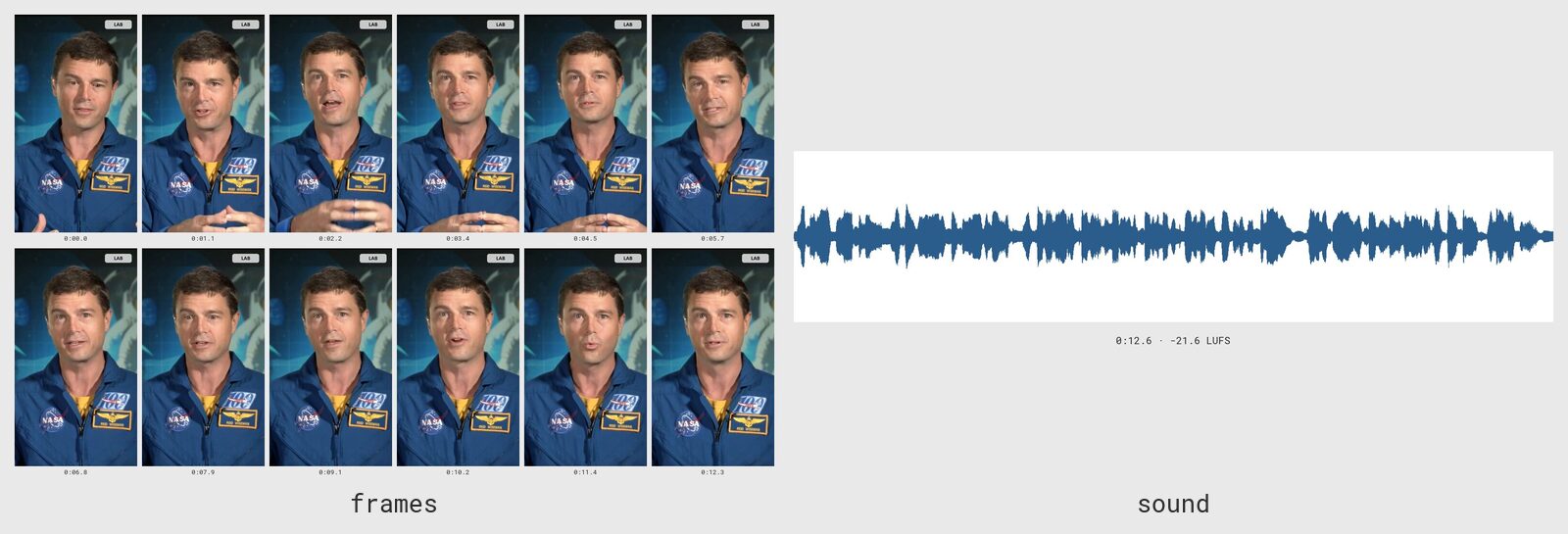
With it come the facts of the file, the things to check before delivering:
| Fact | Why it matters |
|---|---|
| duration, frame rate, size | the length the brief asked for; a 9:16 that is really 9:16 |
| codecs and pixel format | H.264 in yuv420p plays everywhere; yuv444p does not play in Firefox, on iPhones or on social platforms |
| has sound | a teaser with no audio track at all looks fine in every frame |
| integrated loudness (LUFS) and true peak | a voice too quiet next to the music, or clipping |
| silence at the start and at the end, and every silence of half a second or more | a voice that starts late, a gap where two clips were joined |
An audio preview is its waveform with the same sound facts.
Video and audio are prepared on the first request. Frames and waveforms are made by the worker, not by the API;
the first call answers at once that the preview is being prepared — HTTP 202 with Retry-After, or on MCP
status: "preparing" with retry_after_seconds. Call again after that many seconds: it usually takes a few
seconds, a little more for a long video. The pictures are then kept with the run and come back immediately; they
are deleted with it.
Looking closely at a moment
Section titled “Looking closely at a moment”Twelve frames over a whole minute are five seconds apart: enough to see what the video shows, not how a transition
is made. Ask for a stretch with from and to, and the twelve frames are spread over it; the waveform, the
loudness and the silences are then those of the stretch alone. Over the 0.9 seconds of the fade between the two
sound bites of the reel, the frames are 80 ms apart:
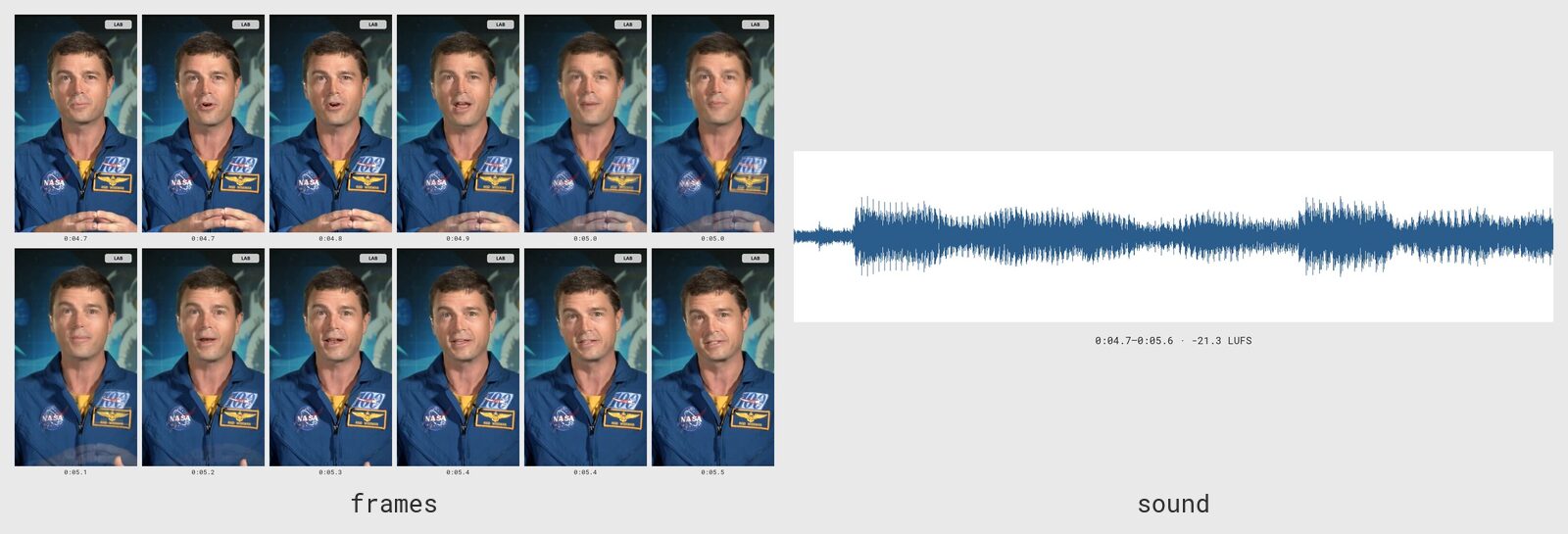
The two shots overlap for 0.4 s, the fade the workflow asked for. A dissolve would show grainy pixels here
instead (Editing video) — the kind of thing a person notices at once and metadata never
shows. Each stretch is prepared once, like the whole file; a stretch that starts after the end of the file is
refused with the file’s duration in the message.
A review, step by step
Section titled “A review, step by step”An agent that built a promotional reel and a brochure for a client checks them like this before showing them:
- The reel, whole:
preview_output(run, "reel"). The frames show the right person, the badge is in every frame, the sound runs from start to end. The facts say H.264 inyuv420p, 1080×1920, 12.6 s. A run of this same lab made before Madoo encoded every video in 4:2:0 saidyuv444p: every frame looked right, and the file would not have played on an iPhone — the facts catch what the frames cannot. - The join: the frames at 4.6 s and 5.7 s are different shots;
preview_output(run, "reel", from: 4.7, to: 5.6)shows a clean fade. - The brochure:
preview_output(run, "brochure", mode: "sheet")— every page on one sheet. Say page 5’s title looks cut. - The suspicious page:
preview_output(run, "brochure", items: "5", max_dimension: 2048)shows it large. If the title is longer than its box, the agent shortens it in the data and runs again — a cheap fix before delivery, not an apology after.
Costs and limits
Section titled “Costs and limits”Previews cost no credits; the pictures of a video or audio count towards workspace storage like image thumbnails. A sheet holds up to 50 items. An image over 60 MB or a PDF over 150 MB is too large to preview: download it.
| Answer | Meaning | What to do |
|---|---|---|
preview_pending (202) / preparing |
a video or audio preview is being made | call again after Retry-After / retry_after_seconds |
not_completed |
the run is still going | wait for it to finish |
output_absent |
the output was skipped (an optional branch) | nothing to look at |
not_previewable |
a text or JSON output | read it from the result |
output_not_found |
no output with that key | the message lists the keys |
invalid_argument |
a wrong mode or items, or a stretch after the end of the file |
the message says which, and the file’s duration |
preview_failed |
the file could not be read as a video or an audio | the message gives the reason |
Downloading outputs from code
Section titled “Downloading outputs from code”When a script downloads an output file from its URL, it should send a User-Agent header that names the
application (User-Agent: my-app/1.0). The CDN in front of the output files may refuse a bare library default —
Python’s urllib, for one — with HTTP 403; browsers, curl and most HTTP clients send an agent of their own.
To pass an output to another run, do not download it at all: use its asset_path
(How workflows are built).