

People and fashion
A garment photographed flat on a table tells a customer little: how does it fall, how long is it, what does it look
like on someone? Photographing every garment on a model, in every setting, is the most expensive shoot a shop has.
Virtual Try-On (ai/virtual_tryon) dresses a person from a photo in a garment from another photo, and places
them in a setting and a pose — one model can wear a whole collection, one garment can be shown on several people, and
the same look can move from a street to a café.
What makes it usable for commerce is what it keeps: the person’s identity — face, hair, body, skin — and the garment’s cut, colour and details. Its prompt opens with an identity rule and tells the model, image by image, what to take from where. This page explains those images, the settings, the model the node needs, and how the look continues into a video.
The pictures, in order
Section titled “The pictures, in order”| Input | Picture | Role |
|---|---|---|
model_image (required) |
1 | The person. Kept: face, hair, body, skin — nothing is “improved” |
product_image (required) |
2 | The garment or accessory. The outfit comes only from this picture |
background_image |
next | A place to photograph the person in, instead of the environment preset |
pose_reference_image |
next | A body pose to copy — only the pose: its clothes, colours and style are ignored |
blank_product_image |
last | The same garment without its print or logo, to isolate a design (Designs on products) |
The node numbers the pictures for the model (“the environment from image 3”, “the pose from image 4”) according to
which ones are connected, so any combination is described correctly. A pose picture wins over the pose preset, a
background picture over the environment preset.
Settings
Section titled “Settings”| Setting | Values |
|---|---|
pose (preset) |
15: standing_front, standing_angled, hand_on_hip, walking_stride, crossed_arms, looking_away, over_shoulder, sitting_casual, sitting_crossed, leaning, contrapposto, power_stance, runway_walk, kneeling, action_dynamic |
environment (preset) |
41 settings: studios (white_studio, gradient_dark…), nature (tropical_beach, autumn_forest…), cities (urban_street, neon_tokyo, cafe_paris…), events (red_carpet, fashion_runway, wedding_venue…), seasons and textures |
aspect_ratio (preset) |
1_1, 4_5, 3_4, 16_9, 9_16 |
effect |
A production finish for a design on the garment — embroidery, screen print, foil… |
variants |
1–4 |
custom_prompt |
Added at the end: “the jacket worn open”, “sleeves rolled up” |
Pose preview images are available with the presets (GET /api/v1/presets?category=pose returns a thumbnail for
each pose).
The model
Section titled “The model”Try-On needs a model that reads several pictures — at least the person and the garment. Its default, Nano Banana 2
Edit (5 credits), reads up to 14; a model that reads one stops the step before any charge (MODEL_TAKES_ONE_IMAGE).
If the chosen model reads fewer pictures than connected, the node drops the pose reference and uses the pose
preset instead, with a prompt rewritten without it — the person and the garment are never dropped.
Good practice
Section titled “Good practice”- The person picture decides the result. A full-length, front-facing photo, even light, plain background: the model then has the body to dress and nothing to guess. For a catalogue, one good model photo is reused for every garment.
- The garment picture flat or on a mannequin, whole, uncropped, without other garments in view.
- No real people without their consent. Use your own models with a release, or a person made with Text to Image — as in the lab. Some video models refuse clips of real, recognisable people.
- Variants are the way to choose: the model decides small things you did not set — how the garment is buttoned, what is worn under it. In the lab, one variant also changed the T-shirt under the jacket.
- Say in
custom_promptwhat must stay: “keep the white T-shirt under the jacket”. - A background is a place to shoot in, not a backdrop to paste on. With
background_image, Try-On photographs the person in that place, as in one shoot: on its ground at true scale and in its perspective, in its light, with the colour of the ground reflected on them, contact shadows, and the photograph’s own sharpness and grain. The framing may move as a photographer’s would, so the place is the same but not pixel for pixel. Describe the place for a full-length shoot — where the person can stand, at what distance — and keepcustom_promptfor the styling (I04; a person and two products in one place in the subjects in a place lab). When the background must stay exactly as it is, use a plain backdrop and put the person on it with Compositing and branding instead. - The same person in every picture. To check that a campaign keeps the model’s face, skin and hair, find her with Locate Subject from her portrait and her role, and rate her face against the portrait — the complete example is I12.
From a still to a clip
Section titled “From a still to a clip”A try-on picture is the starting frame of a fashion clip: Fashion Video (ai/fashion_video) animates it with
presets written for garments worn — a slow turn, a walk, a pose change. The whole chain, with its lab, is in
Subjects, continuations and fashion clips.
The lab
Section titled “The lab”The people and fashion lab dresses one model — a person made with Text to Image, not a real one — in one ochre jacket photographed flat, twice.
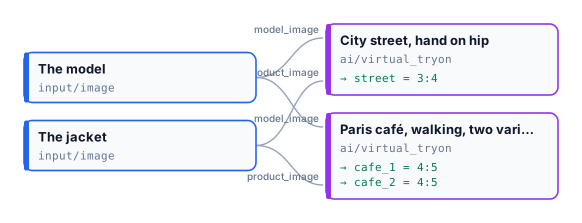
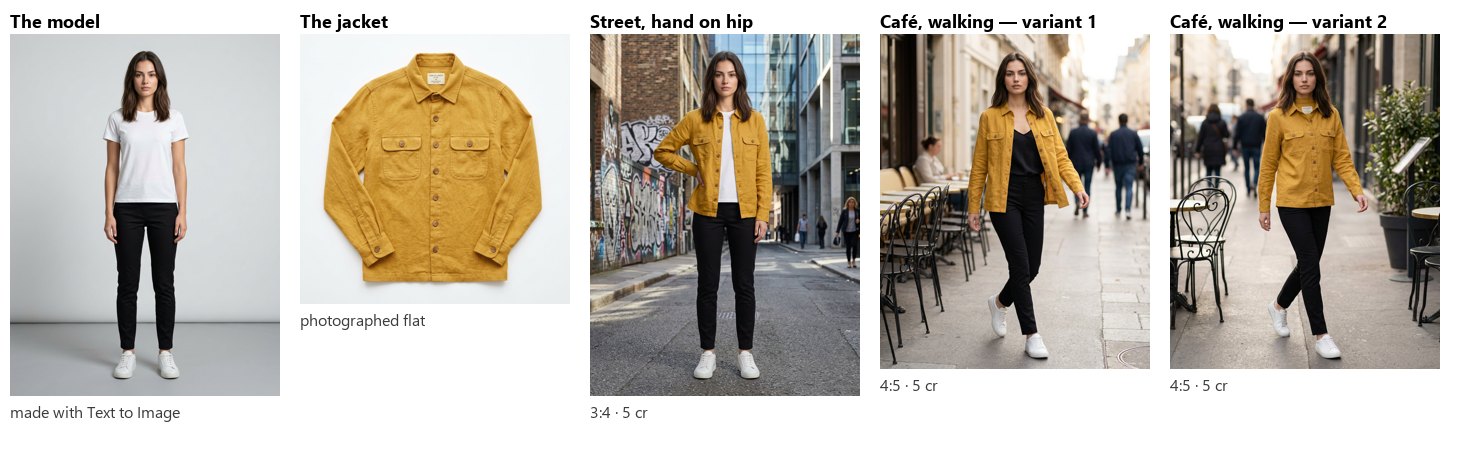
Three pictures, 15 credits. The face, the hair, the body and the jacket — its colour, pockets and buttons — are
the same in all three; the pose and the place changed as asked. The two café variants show what the model decides by
itself: one closed the jacket, the other changed the T-shirt. Pick the one you want, or say it in custom_prompt.
node madoo-install-example.mjs lab-people-fashion --api <your Madoo API URL> --key <key.json> --run --save looksLimits
Section titled “Limits”- One garment per try-on; for a full outfit, run the pieces one after another, each on the previous result.
- Poses and settings are Madoo’s catalogue; for others, connect a pose or background picture.
- Hands, jewellery and small accessories are where the model most often improvises; check them.
The model and the jacket are images made with Madoo’s Text to Image node; the model is not a real person. The try-on pictures were made by Nano Banana 2 Edit, for this lab.