

I05 — Your pet as an old-master portrait: print, post, wallpaper and sticker
Cocoa is a chocolate Labrador photographed in the garden, looking up at someone holding a treat. Her family wants a portrait for the hallway — the kind that hangs in old houses, oil on canvas, a noble in lace — and something to post and keep on the phone. It should be her, not a Labrador: her eyes, her ears, her grin.
This example paints her that way from the photo, borrowing the style of a real seventeenth-century portrait, and delivers everything ready to use: a print file sized and coloured for the printer, a framed post, a wallpaper, a sticker.
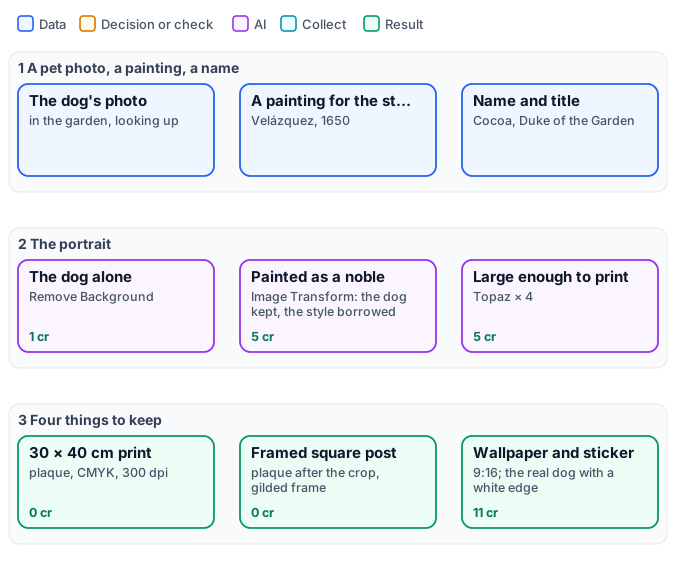
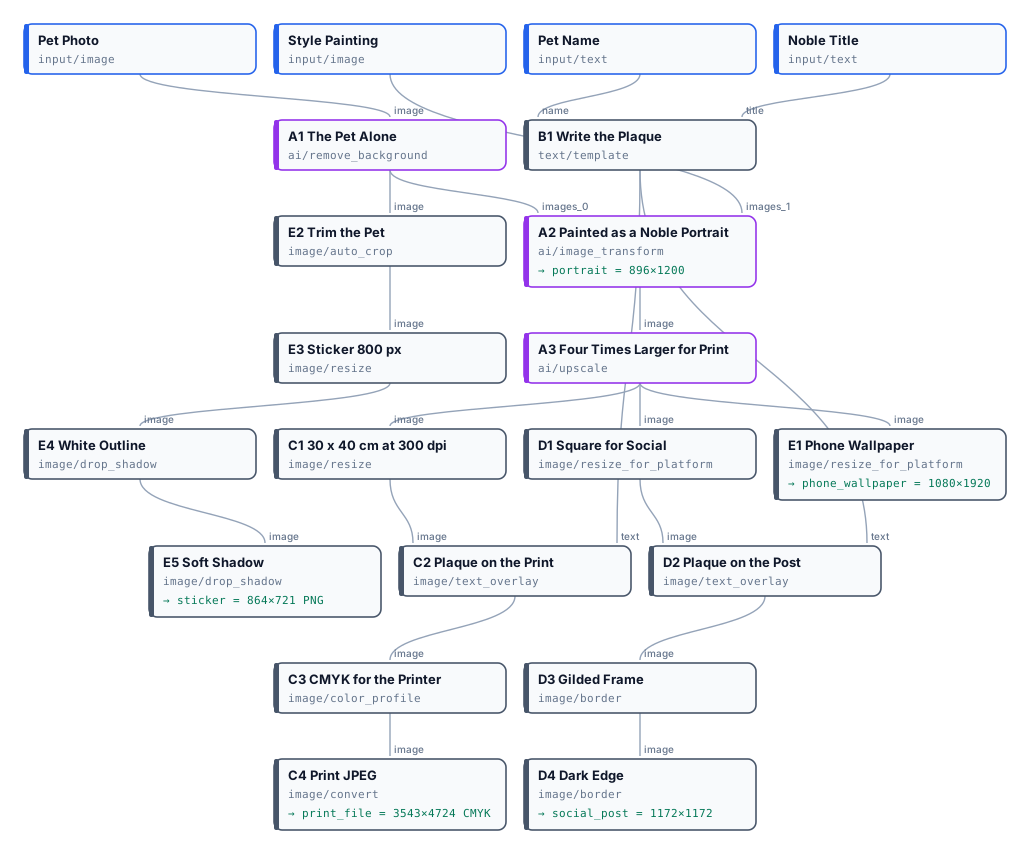
The exact graph is the workflow (as a diagram).
The case
Section titled “The case”| Input | Who provides it | Reference run |
|---|---|---|
| Pet Photo | the family | the Labrador in the garden, looking up, 1920 × 1280 |
| Style Painting | the studio | Velázquez, Juan de Pareja, 1650 |
| Pet Name | the family | Cocoa |
| Noble Title | the family | Duke of the Garden |
What it shows
Section titled “What it shows”- The pet alone, then painted. Remove Background leaves only the dog, so the painting step does not inherit the garden or the people at its edge. Image Transform gets two pictures: the dog, to keep exactly — breed, coat, markings, eyes, ears, expression — and the painting, for its style only: “none of its person”.
- Big enough for a wall. The model paints at about 900 × 1200; Topaz enlarges it four times for one flat price, so the 30 × 40 cm print at 300 dpi needs no further stretching (AI edits).
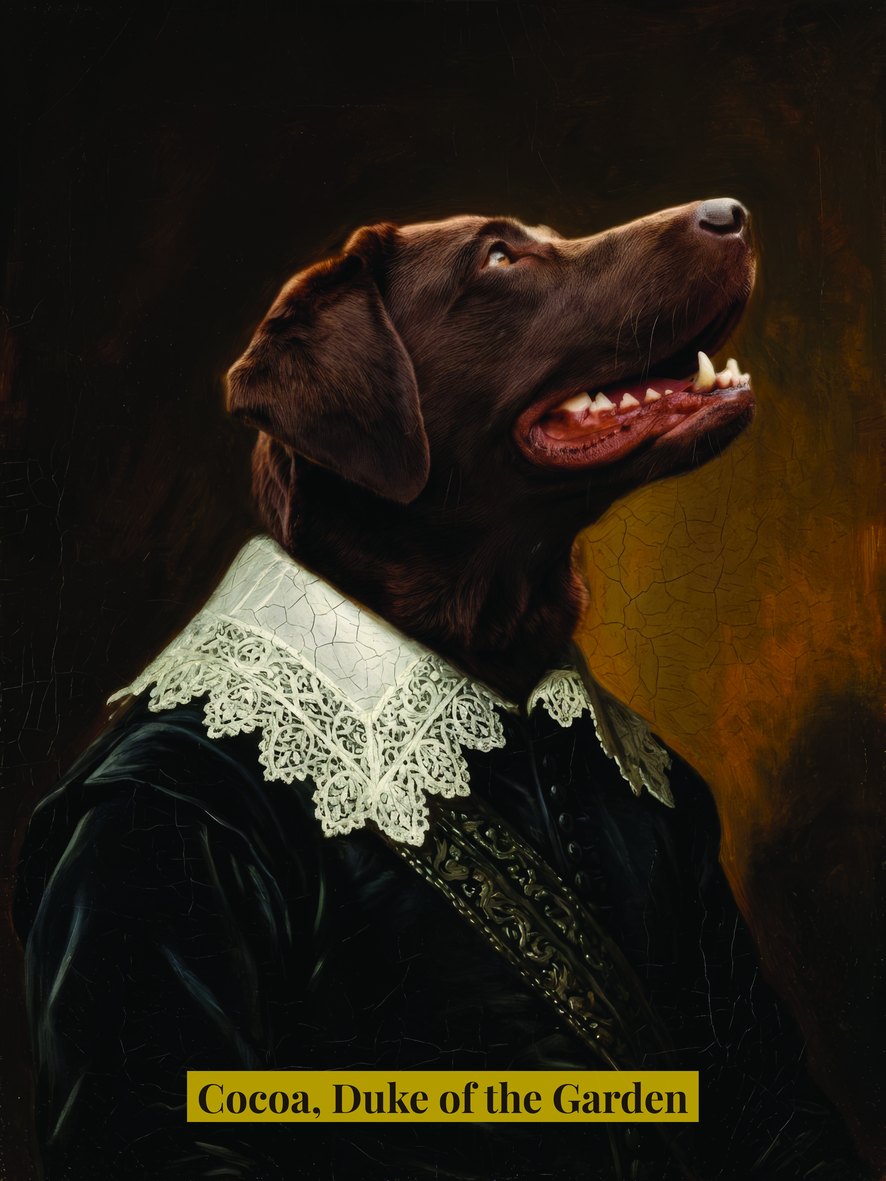
- Ready for the printer. The print is cut to 3543 × 4724 pixels, gets a gold plaque with the name set by Text on Image, is converted to CMYK with Color Profile and saved as a JPEG at quality 95: a file a print shop accepts as it is.
- Each channel its own cut. The square post is cropped first, then the plaque is set and the gilded frame drawn with two Border steps; the wallpaper is a 9:16 crop. Text is always set after the crop, so nothing is ever cut.
- The real dog, too. The cut-out is trimmed, sized to 800 px and given a soft white edge and a shadow with two Drop Shadow steps — a sticker for chats, at no cost.
The workflow, step by step
Section titled “The workflow, step by step”| Phase | Steps | What they do here |
|---|---|---|
| A — portrait | A1 The Pet Alone, A2 Painted as a Noble Portrait, A3 Four Times Larger for Print |
BiRefNet; Image Transform on Nano Banana 2 Edit with the cut-out and the painting, 3:4; Topaz × 4 in illustration mode |
| B — plaque | B1 Write the Plaque |
Text Template: [name], [title] |
| C — print | C1 30 × 40 cm at 300 dpi, C2 Plaque on the Print, C3 CMYK for the Printer, C4 Print JPEG |
Resize fill to 3543 × 4724; the plaque; CMYK, perceptual; JPEG 95 |
| D — post | D1 Square for Social, D2 Plaque on the Post, D3 Gilded Frame, D4 Dark Edge |
Resize for Platform; the plaque; a 36 px gold and a 10 px dark border |
| E — keep | E1 Phone Wallpaper, E2 Trim the Pet, E3 Sticker 800 px, E4 White Outline, E5 Soft Shadow |
9:16; Auto Crop with a margin; Resize fit; a white shadow with no offset, then a soft grey one |
The reference run
Section titled “The reference run”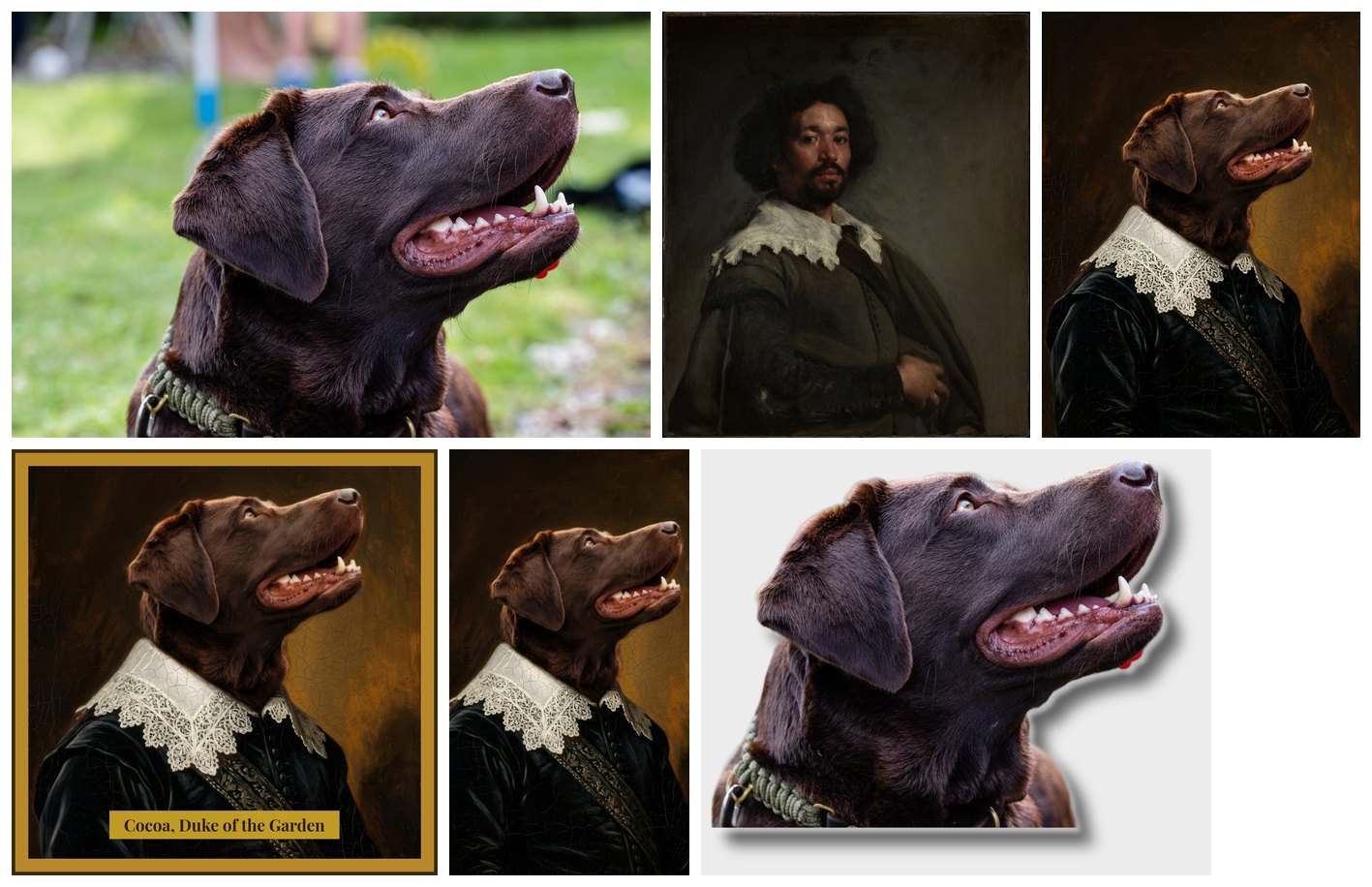
| Output | Result |
|---|---|
portrait |
896 × 1200, the painting as the model made it |
print_file |
3543 × 4724, CMYK JPEG, with the plaque — preview |
social_post |
1172 × 1172: a 1080 square plus the frame |
phone_wallpaper |
1080 × 1920 |
sticker |
864 × 721 PNG with transparency |
11 credits: 1 for the cut-out, 5 for the painting, 5 for Topaz; the print, the post, the wallpaper and the sticker cost nothing.
Adapt it
Section titled “Adapt it”- Any pet, any era. Change the painting: a Dutch still life, a Japanese print, a Renaissance profile — the prompt asks for the style of “the second image”, whatever it is. Use paintings in the public domain, or your own.
- A service. Put the workflow behind an app form — photo, name, title, a choice of three paintings — and a print shop receives files ready for the press (Apps).
- Other sizes. A4, 50 × 70 cm: change the pixels of
C1(centimetres × 300 ÷ 2.54); Topaz × 4 covers up to about 4800 pixels on the long side. - People? Only with their consent: a portrait of a real person changes their likeness, and many platforms and laws protect it.
Install it
Section titled “Install it”node madoo-install-example.mjs i05-pet-portrait --api <your Madoo API URL> --key <key.json> --run --save portraitPhoto: “Portrait of a labrador retriever”, Wikimedia Commons, CC0. Painting: Diego Velázquez, “Juan de Pareja”, 1650 — The Metropolitan Museum of Art, New York (Open Access, public domain). The dog’s name and title are invented; the portrait was made by Nano Banana 2, for this example.