

Finding and framing faces
Pictures of people rarely arrive framed the way a page needs them: a team page wants square head shots, a book jacket a
4:5 author portrait, a story a vertical shot — from photos taken any way at all. Face Detect (image/face_detect)
finds where the faces are, with a model that runs on Madoo’s own workers, and frames the crop for you: a rectangle
around the main face, in the framing and the shape you choose, always inside the picture. Wire it into
Crop and the head shot is made. No provider is called and no credit is spent.
It locates faces and identifies no one: it gives no fingerprint of a face and never compares two faces.
| Domain | The question |
|---|---|
| Teams and profiles | a square head shot of everyone, from whatever photo they sent |
| Publishing | the author’s portrait in 4:5 for the jacket, the same crop for every author |
| Events and social | a 9:16 head-and-shoulders crop of the speaker for a story |
| Marketplaces and listings | does this profile or host photo show a face at all? |
| Any pipeline with people | measure the face apart from the scene: is it lit? |
What it gives
Section titled “What it gives”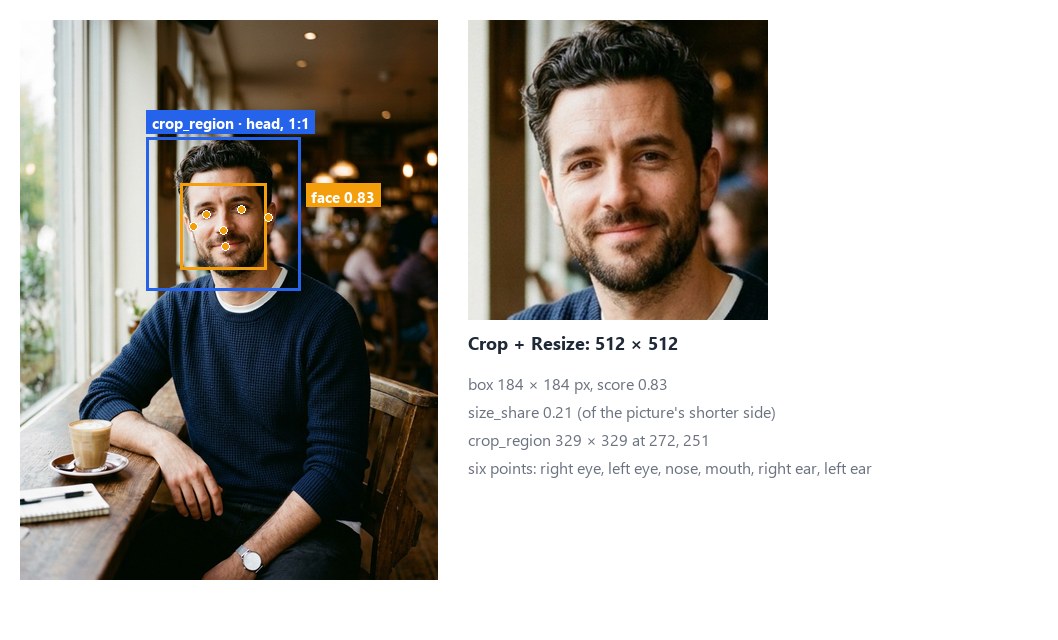
For each face the node returns a score from 0 to 1 — how sure the model is, not a calibrated probability —, its box, six points (the eyes, the tip of the nose, the mouth and the two ears, the person’s right and left) and its size compared with the picture. Faces come best first and are numbered 1, 2, … within the run. Then it frames one of them — the largest, or the best scored — and gives the rectangle to crop.
| Output | What it is |
|---|---|
crop_region |
the rectangle {x, y, width, height} to crop, framed around the selected face: wire it into Crop’s Region; absent when no face is found |
faces |
the whole result as JSON (madoo.image-faces/v1): each face, the crop region, the model that ran |
count |
how many faces were found, a number for a Predicate |
found |
true when at least one was found, a boolean for a Filter |
quality_check |
the check, for a Quality Gate: it fails with NOT_FOUND when no face is found |
Framing and format
Section titled “Framing and format”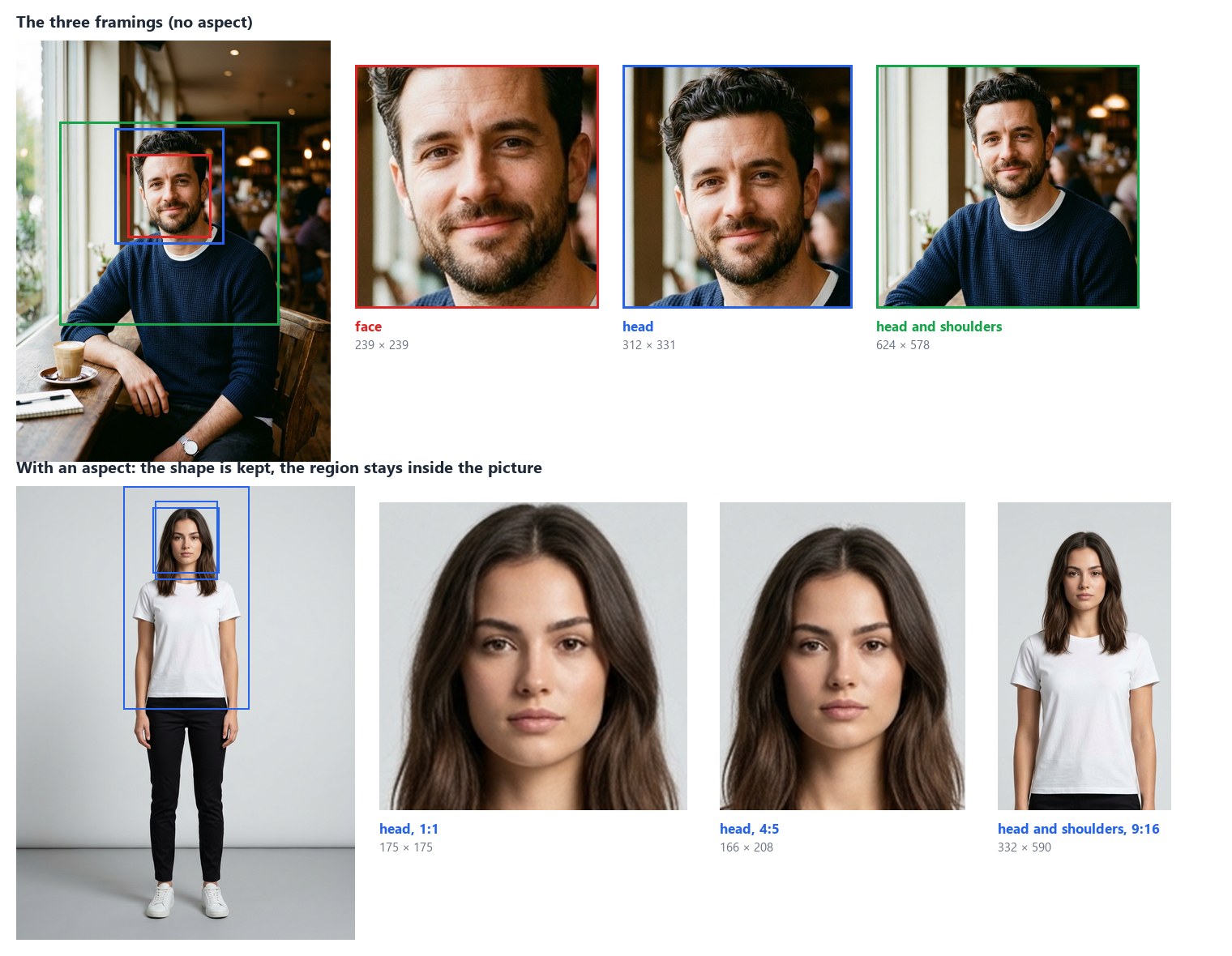
Framing (framing) says what the crop keeps around the face:
face— the face with a small margin, forehead to chin;head(default) — the whole head, hair and chin, a little of the neck;head_and_shoulders— head, neck and shoulders, down to the top of the chest.
Aspect (aspect) gives the crop a shape: none (default) keeps the framing’s own shape; 1:1, 4:5, 3:4,
2:3, 9:16, 5:4, 4:3, 3:2 or 16:9 widen the framing on its shorter side until it has that shape. Either way the
rectangle always lies inside the picture:
- without an aspect, the picture’s edge cuts it — a face near the top loses the room above the hair;
- with an aspect, it keeps its shape: it moves inside the picture and, only when the picture is too small for it, it is reduced around the face.
faces.crop_region.complete is false when the edge cut or reduced the framing: the head shot is there, with less room
than asked. The crop is as sharp as the picture: a face of 99 pixels in a full-length shot gives a 175-pixel head shot,
whatever size it is resized to afterwards.
What it finds
Section titled “What it finds”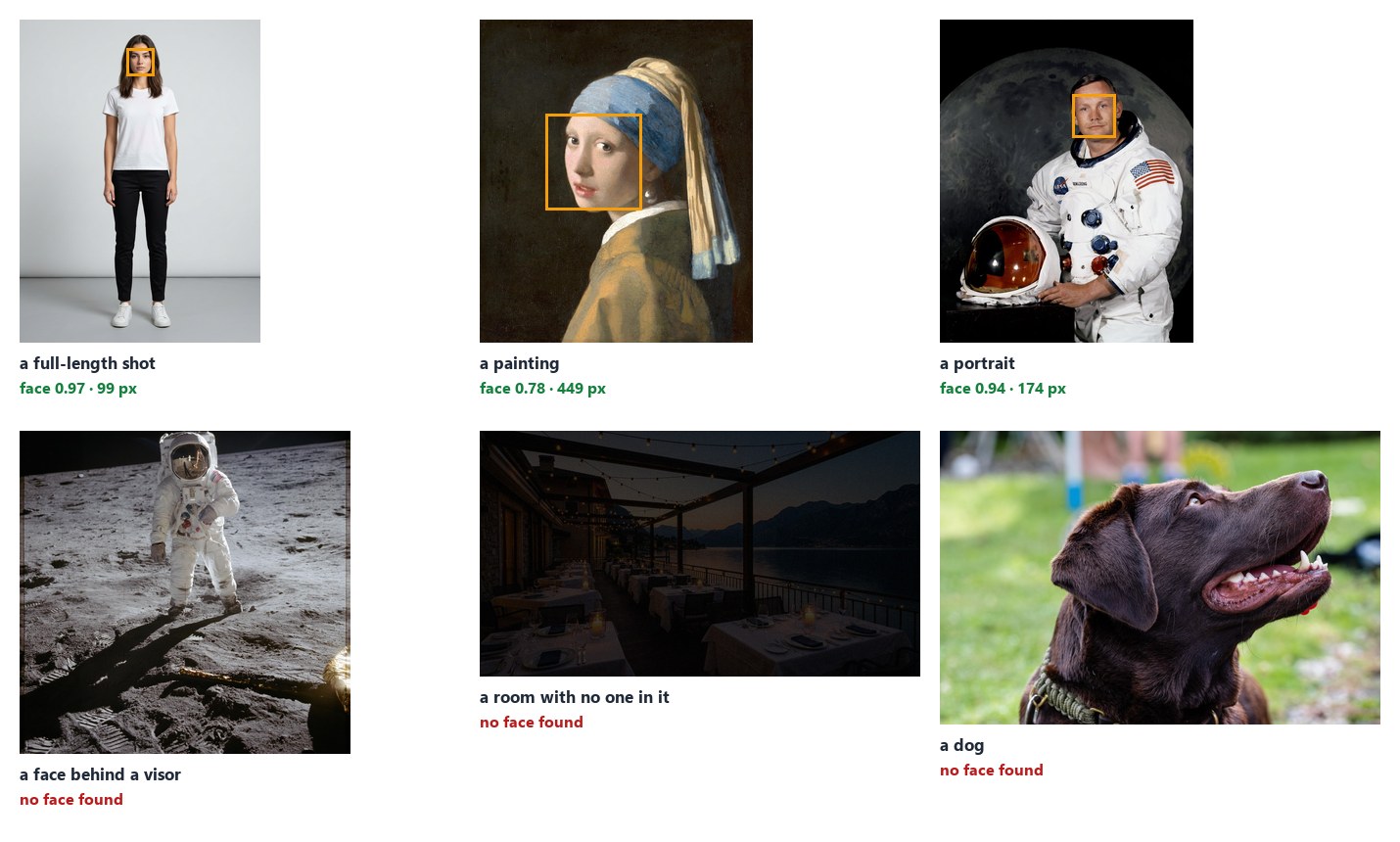
The model finds faces turned towards the camera, from about 5% of the picture’s shorter side up: portraits, profile photos, people in a shot, painted faces too. It misses faces more often when they are:
- small — a face in a crowd or far away;
- turned away or in profile, covered (a visor, a mask, a hand) or cut by the picture’s edge;
- drawn in a simple style, or of a statue.
On the people pictures of this guide it finds every face, and on the dog, the visor and the empty room nothing.
Score Threshold (score_threshold, 0.6) leaves out weaker faces. At 0.5 a dark patch on a restaurant table and
the reflection in a visor came through as faces; at 0.6 they do not, and every real face of these pictures scores above
0.77. Lower it to find more faces — small or half-turned ones —, at the cost of more false ones; raise it when a false
face would be expensive.
To find smaller faces, connect a Region: the node looks only inside that rectangle, so a face that is small in the whole picture is large in the region — a group photo cut in halves, or the box of a person from Instance Segment. Boxes and the crop region stay in pixels of the whole picture.
No face, no crop
Section titled “No face, no crop”
When no face is found, crop_region is absent — there is nothing to frame. Crop with no region falls back to its
own width and height and, with none set, fails. So when a picture may have no face, decide first:
- Quality Gate:
quality_checkinto the gate’s checks, the picture into its Value, moderoute; Crop reads the picture from the gate’s Value output. A picture without a face stops at the gate: Crop and everything after it are skipped, the run completes, and nothing is delivered for that picture. This is the lab, here on a dog. - Filter on
found, when the workflow should do something else with those pictures:foundinto a Filter’s condition and the picture into its value for the pictures with a face, a second Filter with Invert on for the others — keep them aside, send them to a person (an if/else, see Branches).
How it reads a picture
Section titled “How it reads a picture”- Upright, in sRGB, 8 bits. As the other measuring nodes: EXIF orientation applied, colour profiles converted,
HDR (PQ/HLG) refused with
HDR_NOT_SUPPORTED; up to 40 megapixels. - At the model’s resolution. The picture is fitted into 192 × 192 for the model, whatever its size; boxes and points come back in pixels of the picture, to within a pixel or two.
- Locally. The model (BlazeFace full range by Google MediaPipe, Apache-2.0, trained on pictures of people who gave their consent) runs on the worker’s CPU in a few milliseconds per picture; reading the picture takes longer than the model. The first step on a worker also loads the model.
Recipes
Section titled “Recipes”Profile photos for a team page. Photo → Face Detect (head, 1:1) → Quality Gate (route, the photo into Value) →
Crop (image from the gate’s Value, region from crop_region) → Resize 512 × 512. Every photo with a face becomes a
square head shot of the same framing; one without stops at the gate. The lab is this recipe.
An author portrait for a book jacket. Portrait → Face Detect (head_and_shoulders, 4:5) → Crop → Resize to the
jacket’s flap: the same framing for every author of the series.
A story from a full-length photo. Photo → Face Detect (head_and_shoulders, 9:16) → Crop: a vertical crop around
the person, moved down if the head is near the top.
Require a face before an expensive step. Picture → Face Detect (Check ID has-face) → quality_check into a
Quality Gate in route mode, the picture into its Value → the paid step reads the gate’s Value: a picture without a
face never reaches it.
Measure the face, not the scene. Portrait → Face Detect → faces into Image Statistics’
Regions (each face is a region, face-1, face-2, …), the portrait into its Image: the brightness of each face —
a face in shadow against a bright window.
Count the people facing the camera. Group photo → Face Detect → count, or faces into the
JSON Enumerator (array path faces) to go through each face — to crop them all, give each
crop its own Crop with the face’s bbox as Region.
Settings
Section titled “Settings”| Setting | Default | What it does |
|---|---|---|
Framing (framing) |
head |
what the crop keeps: face, head, head_and_shoulders |
Aspect (aspect) |
none |
the crop’s shape: none, 1:1, 4:5, 3:4, 2:3, 9:16, 5:4, 4:3, 3:2, 16:9 |
Crop Around (select) |
largest |
the face to frame when there are several: the largest or the one with the highest_score |
Score Threshold (score_threshold) |
0.6 | faces scoring below are left out, 0.1 to 1 |
Max Faces (max_faces) |
20 | the most faces kept, best first, up to 100 |
Untagged Images (untagged) |
assume_srgb |
read a picture without a profile as sRGB, or fail |
Check ID (check_id) |
face-detect |
the check’s name in a Quality Gate |
A wrong setting — an aspect that is not in the list, a threshold out of range — is reported when the workflow is saved,
with INVALID_FACE_DETECT_PARAMETER. In an App, Framing and Aspect can be offered to the people who use it.
What it does not do
Section titled “What it does not do”- It identifies no one. It says where a face is, never whose; it cannot tell whether two pictures show the same person, and nothing in its result could be used to.
- It does not read expressions, age or anything about the person. A box, six points and a score.
- It does not find a given person. To find this person — the one of a reference portrait — in a scene, use Locate Subject.
- It does not crop by itself. It frames; Crop cuts — so the same region can also feed Image Statistics, or be adjusted before cutting.
- It does not find every face. Small, turned away, covered or drawn faces are often missed: a picture without a face found is “none above the threshold”, not a proof that there is no one.
The lab
Section titled “The lab”The faces lab runs the profile-photo recipe, at no credit cost: on the café portrait it finds one face at 0.83, frames the head in a square, 329 × 329, and makes the 512 × 512 head shot above; on the dog it finds none and the gate stops the picture, as shown in No face, no crop.

In complete examples
Section titled “In complete examples”- I08 — a team page with the same head shot for everyone: six photos taken every way framed into the same square head shot; the one without a face goes on the list of portraits to ask for.