

Generative video and sound
A generative node asks a model to make something that did not exist: a clip from a prompt, a still brought to life, music, the sound of a room. It is the one kind of step in a media workflow that costs real money, takes minutes rather than seconds, and gives a proposal rather than a certain result — the same prompt does not make the same clip twice. Everything around it is the opposite: cutting, fitting, mixing, levelling, putting the sound on the picture and measuring run locally, cost no credits, and give the same result every time.
So a good generative workflow keeps the paid steps few and well aimed, and lets local steps do the rest:
- Know the price before you run. The estimate uses the same model and settings as the run.
- Generate only what a model must make. A 5-second clip, a music bed, the sound of the scene.
- Fit and finish locally. Cut the music to the clip, mix, level for the platform, put it on the picture.
- Measure what came back. Duration, streams, size — and stop delivery when it does not meet the rules.
- Review. A model can ignore part of a prompt; a person, or a check, looks before the clip goes out.
What each generative node makes
Section titled “What each generative node makes”Every node has a default model, used when you name none. The credits below are for that default at the node’s default settings; the other models of the node are listed in the catalog with their own prices.
| Node | What it makes | Default model | Credits (default settings) |
|---|---|---|---|
ai/text_to_video |
a clip from a prompt | Seedance 2.5 | 29 per second at 720p — 145 for 5 s |
ai/image_to_video |
a still brought to life; optional last frame and references | Seedance Pro | 8 per second — 40 for 5 s |
ai/fashion_video |
a product worn and in motion, from presets for clothing, shoes, bags and jewellery | Seedance Pro | 8 per second — 40 for 5 s |
ai/reference_to_video |
a clip that mixes up to 9 images, 3 videos and 3 audios, cited as @Image1, @Video1, @Audio1 | Seedance 2.5 reference | 29 per second |
ai/keyframes_to_video |
a clip that passes through up to 10 images, in order | FLUX 3 keyframes | 11 per second, 5 to 20 s |
ai/video_extend |
the continuation of a clip — only the new footage | FLUX 3 extend | 26 per second, 5 to 20 s |
ai/video_transform |
a clip restyled or edited on its own timeline | Gemini Omni Flash edit | 9 per second, measured; at most 10 s |
ai/video_recast |
the same clip with other people: one photo per new person (1 to 4) replaces the people of a 5 to 30 second source, keeping motion, camera, cuts and sound | MiniMax H3 Max Recast | about 28 per second at 1080p, 18.8 at 768p, measured |
ai/video_upscale |
a clip at 1080p, 2K or 4K | FLUX video upscale | 9 per second at 1080p, measured; more for 2K, 4K and creative detail |
ai/text_to_music |
an instrumental track of 10 to 180 s | CassetteAI Music | 2 per track |
ai/text_to_sound_effects |
a sound effect | MMAudio V2 | 1 per second — 5 for 5 s |
ai/video_to_audio |
the sound of a clip: steps, room, objects | MMAudio V2 | 1 per second — 8 for the default 8 s |
ai/audio_to_video |
visuals driven by an audio track | LTX 2.3 | 7 per second |
ai/lip_sync |
a video’s lips moved to a new voice | LatentSync | 13 per call |
Keyframes to Video takes up to 10 images wired to its slots, or a keyframe map on its keyframe_map input
(madoo.keyframe-map/v1): which image and, optionally, at which frame. When the images come from an iterated branch —
the photos of a place, a variable number of them — Generate JSON builds the map from them with its object shape
(Iteration); when an AI model writes the
map, Parse JSON with the contract madoo.keyframe-map/v1 reads and checks it
(Reading JSON).
ai/virtual_tryon, which puts a product on a person in a still image (Nano Banana 2 edit, 5 credits per image), is the
step before Fashion Video. The images each node really sends to its model — a last frame, reference images — the
consistent-subject technique, continuations and fashion clips, each with a lab, are in
Subjects, continuations and fashion clips.
For a song with lyrics, choose MiniMax Music 2.0 or MiniMax Music 3 on ai/text_to_music: both need the lyrics.
Music 2.0 does not take a duration; Music 3 takes a maximum length, 5 seconds to 5 minutes (60 by default), may stop
earlier, and is charged on the length asked — 1 credit per 8 seconds, 8 for a minute — with a WAV as its output. The default, CassetteAI, makes instrumental music at the length you ask, which is what a music bed needs.
ElevenLabs Music v2.5 composes songs with vocals or instrumentals (force_instrumental) from the description alone,
5 seconds to 10 minutes from a list of lengths, at 38 credits per started minute — 30 s costs as much as 60 s. It
writes and sings its own words: given lyrics, the step stops before any charge with MODEL_TAKES_NO_LYRICS.
Google Lyria 3.5 makes full songs from the description at 7 credits a track, whatever its length; it has no duration
setting — ask for the length and the structure in the description (“a 2-minute track”, “[0:00-0:30] Intro”), which it
treats as a hint (asked for 30 seconds, it returned 63). It also writes its own words and refuses lyrics the same way.
Voices have their own nodes and pages: ai/text_to_speech in Dubbing, ai/voice_conversion and
ai/audio_isolation in Audio finishing.
Choosing a model and its settings
Section titled “Choosing a model and its settings”Leave the model out and the node uses the workspace’s default, or the system’s. To choose one, name it and, if you like, its settings:
{ "id": "animate", "type": "ai/image_to_video", "parameters": { "prompt": "…", "duration": 5, "generate_audio": false }, "model": { "model": "seedance-pro", "params": { "duration": "5", "aspect_ratio": "auto", "camera_fixed": true } } }The model owns its settings. Where the node and the model share a setting — duration, resolution, aspect ratio —
the model decides which values are allowed and which is the default: Seedance Pro takes 2 to 12 seconds and 480p to
1080p, PixVerse V5 only 5 or 8 seconds, Hailuo 02 only 6 or 10. Some settings exist only on some models: a fixed camera
on Seedance Pro, a style on PixVerse, a seed on the models that declare one. The model’s settings and their allowed
values are in its schema, GET /api/v1/models/{model}/params-schema.
When you save a workflow, Madoo checks the model’s settings against that schema:
- a model that cannot do what the node does is refused (
model_not_allowed_for_capability); - a setting the model does not know is dropped (
unknown_model_parameter) — also when a step changes model in the editor: a setting of the previous model is removed and never reaches a run; - settings given without naming a model are dropped (
model_params_schema_unavailable) — the default model may not have them.
A seed is not a promise. Only ai/reference_to_video has a seed on the node; elsewhere it is a model setting, where
the model declares one. The provider tries to repeat a result from the same seed; Madoo does not guarantee it.
The price: known before, held, settled
Section titled “The price: known before, held, settled”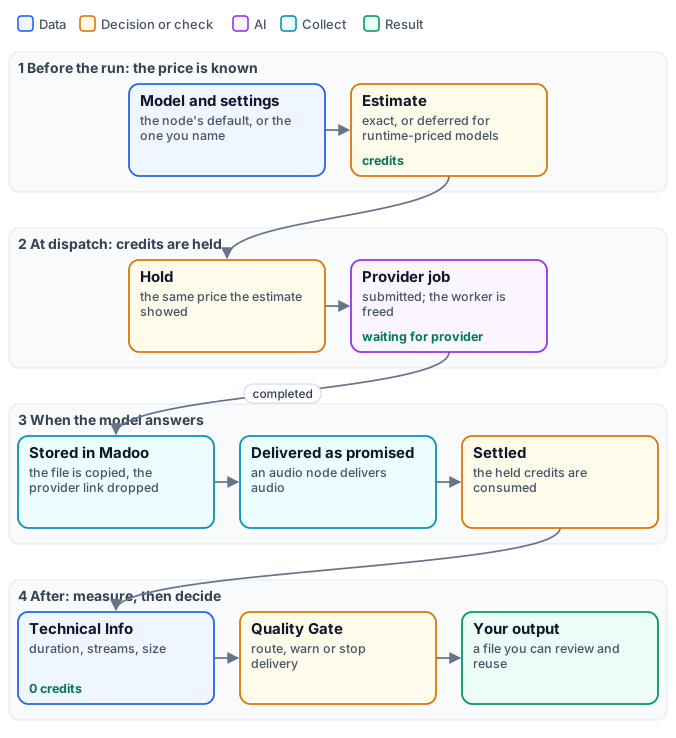
A generative model is priced per second of what it makes, per track or per call. Before a run,
POST /api/v1/workflows/{id}/estimate (or estimate_execution over MCP) prices every step with the same model and
settings the run will use; when the run starts, the same amount is held; when the step completes, it is settled.
- Exact. A per-second price times the duration you set — 5 seconds of Seedance Pro, 40 credits — or a per-track price. The resolution or tier you choose multiplies it: Seedance 2.5 at 1080p costs about two and a half times 720p.
- Deferred.
ai/video_transform,ai/video_recastandai/video_upscaleare priced on the length of the clip you give them, which Madoo measures itself just before sending it. Their estimate saysprojection_status: "deferred"withdeferral_reason: "runtime_unit_price", and the amounts are null — never 0. Transform bills at most 10 seconds on the default model; Gemini Omni Flash 1.1 edit bills the whole clip at the resolution you choose (360p to 4K, about 6.3 credits per second at 720p, 9.4 at 1080p), and its provider refuses clips over about 10 seconds at no cost. Upscale bills at most 20; without a cap, an input over 90 seconds is refused (INPUT_MEDIA_TOO_LONG) before any charge. - Check the estimate for per-second models that read an input.
ai/audio_to_video, and the per-second lip-sync models (Sync Lipsync 2, VEED), are estimated on a default length of 5 seconds rather than the length of your audio. Look at the estimate before a long input.
A runtime-priced node cannot run inside an iteration (RUNTIME_PRICING_ITERATION_UNSUPPORTED when you save): its
price depends on each item’s length, which the hold cannot know in advance.
How a generation runs
Section titled “How a generation runs”A generation takes from tens of seconds to several minutes. Madoo submits it to the provider as a job and frees the worker at once; the step shows waiting for provider, and Madoo asks the provider every few seconds how the job is going. A job the provider reports as queued or in progress is not timed out; a retried step cancels the attempt it replaces, so you are not billed twice for the same clip.
When the model answers, Madoo copies the file into its own storage and drops the provider’s link: the output is a
Madoo file, available as long as the run’s outputs are, and usable by the next steps. It is also delivered as the
node promises: some video-to-audio models answer with the clip carrying its new sound, and Madoo extracts the audio
so that ai/video_to_audio always delivers audio. A completion without a file fails the step (NO_OUTPUT) instead of
passing an empty port on.
Sound for a clip: generate, fit, finish
Section titled “Sound for a clip: generate, fit, finish”A generated clip is usually silent, or better silent: on the models that make sound, generate_audio: false keeps the
choice of sound to you — and costs less where the model prices its audio. Three generative nodes make sound, and local nodes do the rest:
ai/video_to_audiowatches the clip and makes its sound — footsteps, a room, the objects that move. Give it a prompt for what to hear and what not to (“no voices, no music”); set the duration to the clip’s.ai/text_to_musicmakes a music bed from a description: style, instruments, tempo, “instrumental”.ai/text_to_sound_effectsmakes a single effect: a door, a whoosh, applause.
Then, locally and without credits:
- Cut the music to the clip. A 30-second track mixed under a 5-second clip is levelled as 30 seconds and then cut:
the 5 seconds you keep come out louder or quieter than asked. Measure the clip with
media/technical_infoand pass itsdurationto theendofaudio/trim, withstart“0”. - Mix with
audio/mix: the scene’s sound as the primary at 1, the music as the secondary lower — 0.35 in the lab. For music under a voice,audio/ducklowers the music only while the voice speaks. - Level with
audio/loudness_normalize:socialis −14 LUFS,broadcast−23. - Put it on the clip with
video/add_audio, modereplace,shortest.
The details of each finishing step are in Audio finishing and Editing video.
Measure, then decide
Section titled “Measure, then decide”media/technical_info reads what the model gave back: duration, resolution, frame rate, whether there is sound, the
codec, the size. It costs nothing, and its quality_check output goes into utility/quality_gate through a
checks_N input: route sends a clip that fails to another branch, warn delivers it with a warning, fail stops
delivery and the run ends as a partial success with the reason. The rules and checks are in
Media files and preflight.
Measuring says whether the clip is usable — the right length, format and loudness. It does not say whether it is right: whether the model did what the prompt asked. That is a review, by a person or by a video analysis step with a precise question, before anything is published.
What the review finds can be handed to a second generation on its instructions input — every generative node
driven by a prompt has one, sound and music too. The text is added after the step’s own prompt, which stays as it
is; a model that reads no text stops the step before any charge (MODEL_IGNORES_INSTRUCTIONS).
Prompts and limits
Section titled “Prompts and limits”- Describe the motion, the camera and what must not change. “Fixed camera”, “keep the composition and the painted
texture”, “the background stays still”. For
ai/image_to_video, the image already says what is in the scene; the prompt says what moves. - To keep a photo’s world, end on the same photo. Connect the photo to
imageand toend_image: the clip has to arrive back at the picture it left, so the model moves the camera and the light inside the frame instead of inventing what lies outside it. Without an end frame, a slow “push-in” on a village street drifted out and generated a sea, a harbour and parked cars the photo never showed (MiniMax H3 Max); with the photo at both ends, the clips stayed inside the frame.end_imageis read by the models listed on the port (Seedance Pro, the default, among them); others ignore it. On Seedance Pro,camera_fixed: trueholds the camera still as well. - Some models always make sound. Where a model generates audio whatever you ask,
generate_audio: falseis not applied; the step’s sound is then removed, at no cost, with Remove Audio (video/remove_audio). Check it in the preview of the result: “has sound” is one of its facts (Checking what a run produced). - A model can ignore part of a prompt. In the lab, the model turned the girl’s head towards the viewer in two runs out of two — once when asked to, once when asked not to. Motion is a proposal: review it, change the prompt or the model, and run again.
- Say what the sound must not contain. “No voices, no music” for the sound of a scene; “instrumental” for a music bed.
- Extend returns only the new footage. Join it after the original with
video/merge, withtransitionset tonone: the merge fades between clips for one second by default. See Subjects, continuations and fashion clips. - Transform keeps about 10 seconds. Cut a longer clip into parts first.
- Upscale by 1.5× to 3×. A target too close or too far is refused before any charge (
TARGET_TOO_CLOSE,TARGET_TOO_FAR); a 1080p source can only go to 4K. - Put generation outside iterations when you can. A generative step inside an iteration runs once per item, and a runtime-priced one cannot run there at all.
What it costs
Section titled “What it costs”- Generative steps: as in the table — the model’s price times the duration, resolution or tracks you ask for.
- Everything else: measuring, cutting, mixing, levelling, putting the sound on the clip — no credits.
The lab’s clip cost 47 credits: 40 for five seconds of animation, 5 for the room sound, 2 for the music.
Lab: a painting brought to life, with its sound
Section titled “Lab: a painting brought to life, with its sound”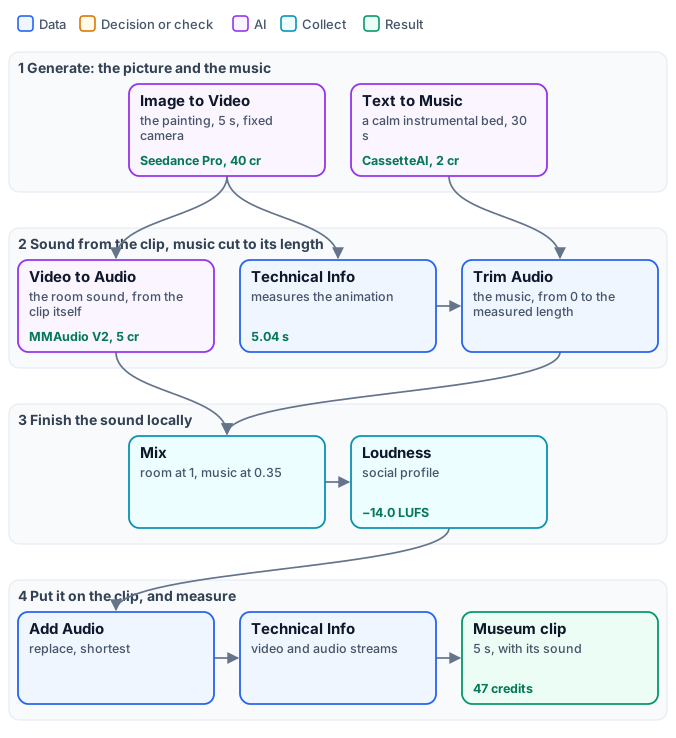
A museum wants a five-second clip of Girl with a Pearl Earring for social media: the painting, alive, with the quiet of a gallery and a little music. The workflow animates the painting with a fixed camera and no sound, asks a second model for the room sound of that very clip, and a third for a calm baroque bed; the music is cut to the clip’s measured length, mixed under the room, levelled to −14 LUFS and put on the clip.
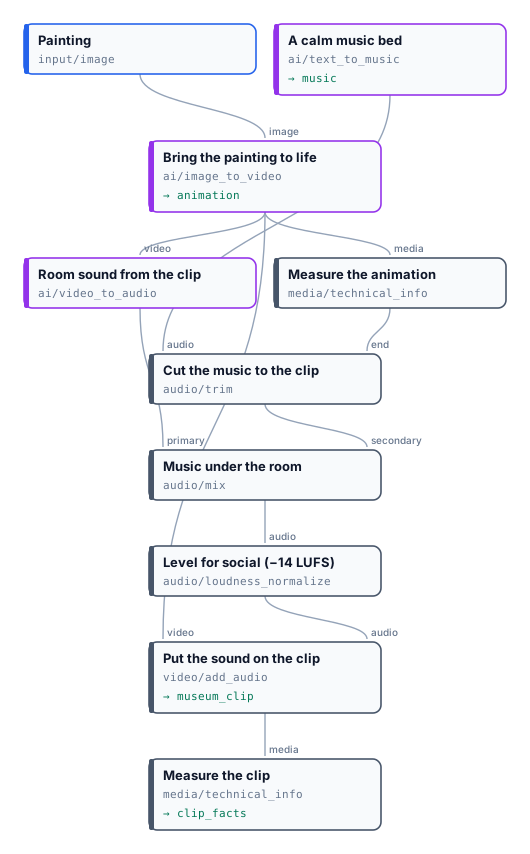
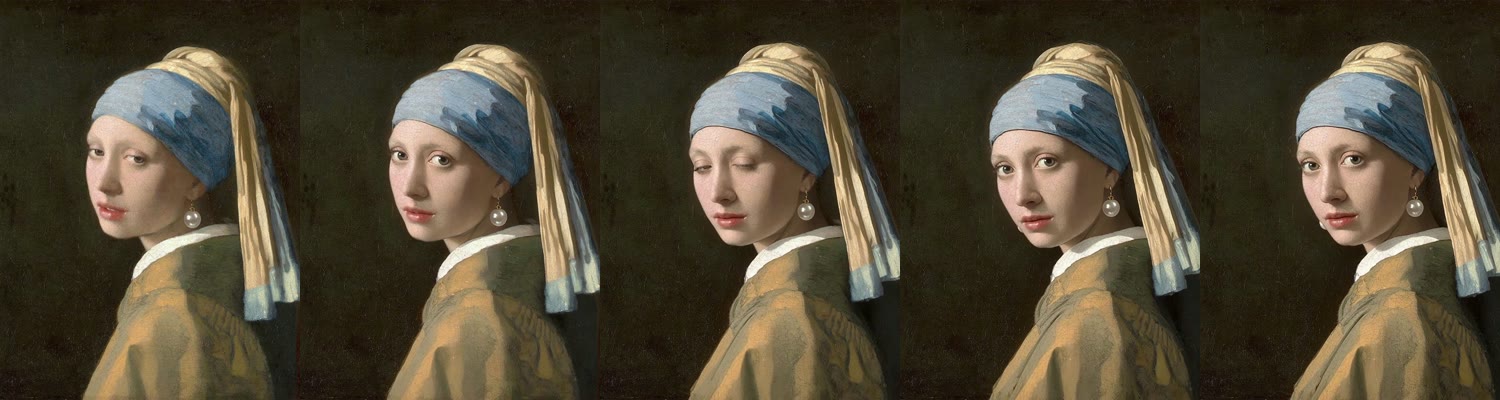
5.04 seconds, 1248×1664 at 24 frames per second with a mono track, −14.0 LUFS integrated, true peak −1.2 dBFS. 47 credits. The model kept the painting’s colours, light and background but turned her head, which the prompt asked it not to do — the reason to review a generated clip before publishing it. The music bed is the whole 30-second track; the clip facts are the final measurement.
node madoo-install-example.mjs lab-generative --api <your Madoo API URL> --key <key.json> --run --save museum-clipTo make it cheaper, choose a lighter animation model on the node — PixVerse C1 (16 credits for 5 seconds at 720p, 10 at 360p), PixVerse V5 (13 for 5 seconds at 720p) or LTX 2 at 3 credits per second — and compare the estimate.
Painting: Johannes Vermeer, “Girl with a Pearl Earring”, about 1665, Mauritshuis, The Hague (public domain).
When a step fails
Section titled “When a step fails”| Code | Meaning | Fix |
|---|---|---|
PAYLOAD_VALIDATION |
the provider refused the request: a missing or out-of-range setting | read the message; check the model’s schema — for example, MiniMax Music needs lyrics |
NO_OUTPUT |
the model finished without a file | run again; if it repeats, change the prompt or the model |
PROVIDER_AUDIO_TRACK_UNAVAILABLE |
the model answered with a video and its sound could not be extracted | run again; report it if it repeats |
INPUT_MEDIA_TOO_LONG |
a measured input is longer than the model accepts | cut the clip first |
TARGET_TOO_CLOSE, TARGET_TOO_FAR |
the upscale target is under 1.5× or over 3× the source | choose another target |
RUNTIME_PRICING_ITERATION_UNSUPPORTED |
a measured-price model inside an iteration | move it out of the iteration |
model_not_allowed_for_capability |
the model named cannot do what the node does | choose a model the node lists |
unknown_model_parameter (warning) |
a setting the model does not know was dropped | check the model’s schema |
CONTENT_POLICY_VIOLATION |
the model refused an image or a prompt — a real person’s likeness in reference-to-video | see Subjects, continuations and fashion clips |
MODEL_IGNORES_INSTRUCTIONS |
instructions connected on a model that reads no text |
choose a model that reads a prompt, or disconnect it |
MODEL_TAKES_ONE_IMAGE |
a try-on or an image fusion on a model that receives one image | keep the node’s default model |