

Checking pictures
A picture that should not go out — blurred, too dark, watermarked, cut off, with the wrong background — costs more once it is on a marketplace or in a campaign than the check that would have stopped it. A picture that should not be paid for — an upload that is not a product, a frame that shows nothing — costs the paid step that follows. Decide with a Model looks at a picture for about 0.006 credits and answers a handful of questions about it in a third of a second.
The checks
Section titled “The checks”Measured on 11 real photos in six versions each (see Thresholds and uncertainty):
| Check | Statement | Right, low detail |
|---|---|---|
| Focus | The photo is in focus: the subject is sharp, not blurred. | 100% |
| Exposure | The photo is well exposed: neither too dark nor too bright to see the subject. | 98% |
| Watermark or overlaid text | The image has a watermark or overlaid text that is not part of the scene. | 100% |
| Framing | The main subject is entirely inside the frame, not cut off by the edges. | 100% |
| What it shows | What does the picture mainly show? — object, artwork, person, animal, space, other | 91% (errors only between space and other) |
Write each check so that true means good when you route on it (“The image is free of watermarks”), or flip the
condition with an inverted Filter. Ask all of them in one step: one call, one price for the picture, and five
answers.
Low or high detail
Section titled “Low or high detail”low (default) |
high |
|
|---|---|---|
| Tokens for a 1200-pixel photo | ≈ 960 with five questions | ≈ 1,650 |
| For a 2400 × 3200 photo | the picture ≈ 200 | the picture ≈ 2,600 |
| Right on focus, 55 photos | 100% | 95% — three sharp photos judged blurred (it saw the grain) |
| Latency, median | 295 ms | 340 ms |
Keep low for anything about the picture as a whole. Use high when the question is about a detail: small text on
a label, a defect a few pixels wide, a seam, a scratch.
Checking before delivering
Section titled “Checking before delivering”The typical shape: one iteration per photo, one Decide with a Model step with the checks, a
Combine Conditions that requires every check and all_accepted, a
Filter, and the delivery behind it; a report collects every answer, delivered or not.
photo ─▶ Decide (in_focus, well_exposed, clean, whole_product, background) ├─▶ Combine Conditions (all) ─▶ Filter ─▶ Resize to the marketplace square ─▶ delivered └─▶ JSON Aggregator: every photo with its answers ─▶ reportX01 is this workflow, on seven product photos: three delivered, four held back with the reason — blurred, watermarked, cut off, too dark.
Checking before paying
Section titled “Checking before paying”Put the check in front of the expensive step. A Decide with a Model step costs a few thousandths of a credit; an image-to-video clip costs tens of credits, an upscale or a relight several. In D02 Image Analysis judges each hotel photo before a video is made of it; a Decide with a Model step does the same screening, with an answer and a probability per check on its own port instead of a JSON verdict to validate and extract. Use Image Analysis when the judge must also write something — a caption, a camera direction — and Decide with a Model when it only decides.
Choosing the best of several
Section titled “Choosing the best of several”Connect the variants to images (or send an image set) and ask a choice with one option per picture — picture_1
to picture_4: with several pictures each is sent after its label, Picture 1, Picture 2… Then
Select by Key delivers the chosen one, with the variants on its cases. Put the brief in the
content, so the model judges against what was asked:
Brief ─▶ Text to Image (4 variants) ─▶ Decide: best (picture_1..4), no_text ─▶ Select by Key ─▶ delivered └─▶ Text Template "The brief the four pictures were made from: …" ─▶ contentIn X03 the model ruled out the cup on a saucer with a printed logo (0.01) and a cup
without a handle (0.01), and chose a plain cup seen from the side at 0.91. When two pictures are equally good the
probability is shared and the answer comes back uncertain: all_accepted is false, and that is the right signal — two
equally good pictures are a choice for a person, or for the art director’s rule.
Screening an upload
Section titled “Screening an upload”Before a user’s picture enters a paid workflow — an App, an embed, an integration — ask what it must be and must not
be: “The picture shows a product on its own”, “The picture shows a person”, “The picture shows a brand, logo or
trademark that is not ours”. With skip_branch on the question that guards the paid step, a picture that is not
clearly acceptable never reaches it. Decide with a Model does not replace the providers’ own moderation and is not a
legal check: see Hidden instructions, refusals and responsibility.
Video frames
Section titled “Video frames”Extract Scenes gives the frames of a video as an image set, each labelled with its time.
Send it to image_set and ask about the frames: “Which frame shows the product best?” is a choice whose options are
not known in advance — ask instead yes/no questions per need (“The product is visible in one of the frames”) and use
Image Analysis when you need to know which frame. Up to 20 frames per step;
Image Set Limit decides which 20.
What the measuring nodes do better
Section titled “What the measuring nodes do better”A decision model judges what a picture looks like. What can be measured is cheaper and exact with the free nodes: the resolution and format with Media Technical Info, where the subject is and how much of the frame it fills with Measure Subject, tone and colour with Image Statistics, fine detail with Image Detail, faces with Face Detect. A good screening often does both: measure first, at no cost, and ask the model only about what cannot be measured.
The lab
Section titled “The lab”The lab checks a product photo — a teapot from the
Metropolitan Museum of Art, public domain — at low and at high detail, and chooses the best of four versions of it:
blurred, too dark, the original, watermarked.
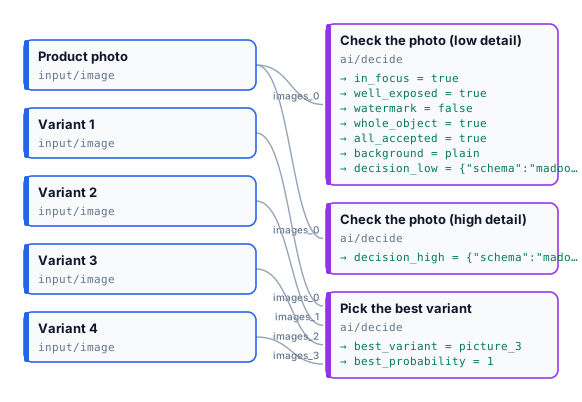
| The original photo | The blurred photo | |
|---|---|---|
| In focus | true, 0.98 |
false, 0.00 |
| Well exposed | true, 0.96 |
true, 0.93 |
| Watermark | false, 0.00 |
false, 0.00 |
| Whole object | true, 1.00 |
true, 1.00 |
| Background | plain, 1.00 |
plain, 0.99 |
| All accepted | true |
true — sure, and the photo is blurred |
| Best of the four variants | picture_3 (the original), 1.00 |
picture_3, 1.00 |
high detail gave the same answers on this photo. 0.022 credits a run: the low check 0.007, the high one 0.009, the
choice between four pictures 0.006. The blurred photo’s inputs are in
run-inputs-blurred.json.
node madoo-install-example.mjs lab-decide-images --api <your Madoo API URL> --key <key.json> --run